Reels are the most-watched format on Instagram, but the app gives you no save button. InDown.io is a free, browser-based downloader that pulls reels, videos, photos, and stories in their original quality. This is an honest, data-first look at how it works, what people think of it, and how to test it yourself.
No login required · Free, no install · HD / original quality · Works on any device
What is InDown.io?
InDown.io is a web-based Instagram downloader. You paste the link to a public reel, post, story, or profile photo, and it returns a clean MP4 or JPG file you can save to your phone or computer. No app, no account, no editing.
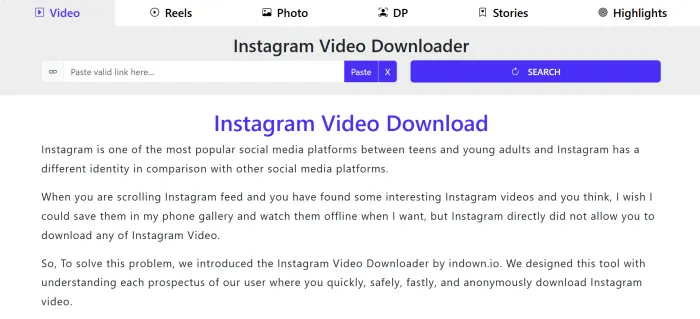
It belongs to a family of paste-a-link media savers, but it is built specifically around Instagram’s formats. That focus shows up in the details: it keeps the original resolution, adds no watermark of its own, and handles the vertical 9:16 reel format without re-encoding it into a blurry mess.
Because everything runs in the browser, the experience is the same whether you are on an iPhone, an Android, a Mac, or a Windows PC. There is nothing to update and nothing sitting on your device. The honest summary: it is a single-purpose utility that does one thing and removes the friction around it.
InDown.io at a glance
| Detail | Summary |
|---|---|
| Type of tool | Web-based downloader |
| Price | Free |
| Account needed | No |
| Install needed | None |
| Output formats | MP4 · JPG |
| Quality | Up to original / HD |
| Watermark added | No |
| Works on | iOS · Android · Desktop |
| Download limit | Unmetered |
Why people bother saving reels at all
A downloader only matters because of how central short video has become. The data explains the demand, and why a no-friction tool gets used so often.
| Metric | Figure | Why it matters for downloading |
|---|---|---|
| Monthly active Instagram users | ~2 billion | The pool of creators producing the reels you may want to keep offline. |
| Share of time spent on video | ~50% | Reels dominate the feed, so most save-worthy content is now video. |
| Reels reshared per day | Hundreds of millions | People already redistribute reels constantly; saving is the natural next step. |
| Engagement vs. static posts | Higher reach | Marketers and creators study top reels, which means re-watching offline. |
| Average reel length people save | 7–30 sec | Short files download in seconds, even on mobile data. |
Figures are widely cited industry estimates for the Instagram and short-video ecosystem; treat them as directional, not exact.
Who actually uses a tool like this?
• Creators and marketers who keep a swipe file of high-performing reels to study hooks, pacing, and trends, then build their own version.
• Everyday viewers who want a recipe, workout, tutorial, or funny clip available offline, on a flight, or to send to someone who is not on Instagram.
• Small teams archiving their own posts and stories (content that disappears after 24 hours) so they have a backup outside the app.
Key features, compared
Below is what the tool offers and what each feature means in practice, including the limits, because a useful review names them.
| Feature | InDown.io | What it means for you |
|---|---|---|
| Reel downloads | Yes | Pulls the full video file in its native vertical quality. |
| Photo & carousel downloads | Yes | Saves single images; carousels can be grabbed slide by slide. |
| Story downloads | Yes | Capture public stories before they vanish at 24 hours. |
| Profile photo (DP) saver | Yes | Grab a full-size profile picture, not a thumbnail. |
| Account required | No | Nothing to sign up for; you never hand over a password. |
| Added watermark | No | The file is clean, with no logo stamped over the video. |
| Private accounts | No | Only public content works; a privacy guardrail, not a bug. |
| Bulk / batch download | Limited | Built for one link at a time, not scraping whole profiles. |
What content types are supported
If it is public and on Instagram, there is a good chance InDown handles it. Here is the breakdown.
| Content type | Output | Typical use | Supported |
|---|---|---|---|
| Reels | MP4 | Trends, tutorials, entertainment | ✓ |
| Feed videos | MP4 | Longer in-feed clips | ✓ |
| Photos | JPG | Single-image posts | ✓ |
| Carousels | JPG / MP4 | Multi-slide posts | ✓ |
| Stories | MP4 / JPG | 24-hour disappearing posts | ✓ |
| Profile photo | JPG | Full-resolution avatar | ✓ |
| Private content | N/A | Followers-only posts | ✗ |
How to download an Instagram reel
The whole flow takes about ten seconds and four steps. No technical knowledge needed.
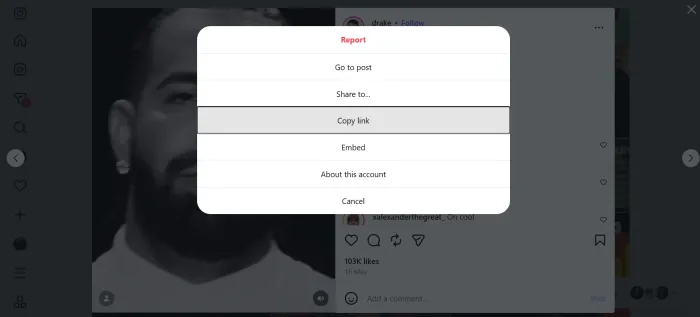
1. Copy the reel link. In the Instagram app, tap the Share (paper-plane) icon under the reel, then Copy link.
2. Open InDown.io. Head to the site in any browser, or follow the steps in the next section.
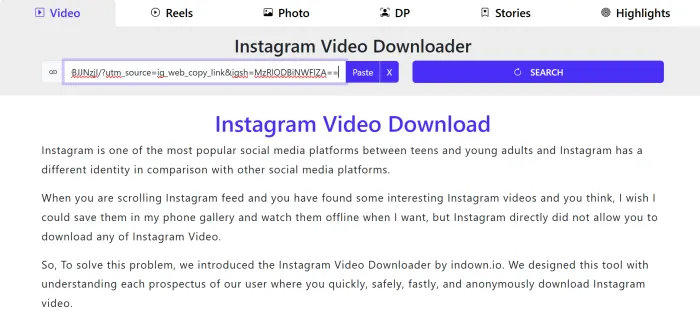
3. Paste and submit. Drop the link into the box and select the download button. The file is fetched in seconds.
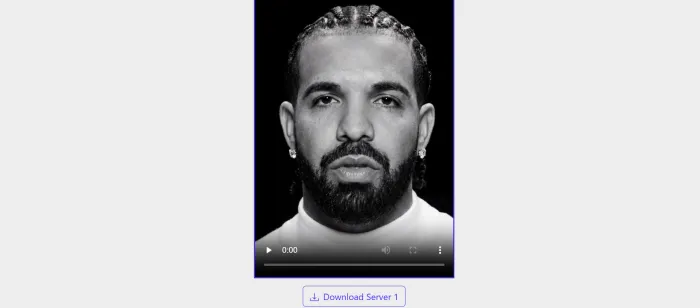
4. Save the file. Save the MP4 to your camera roll or downloads folder. Done. It is yours offline.
Good to know before you start
• Only public links work. If an account is private, the tool cannot reach it, which is the privacy line working as intended.
• Speed depends on the file. A short reel is near-instant; a long carousel of HD photos takes a touch longer.
• Quality matches the source. InDown will not upscale a low-res upload; it returns what the creator posted.
TEST IT YOURSELF
Try the downloader
Want to see it work? Grab a link to any public reel and run it through the live tool. The four steps below take under a minute.
Open the live tool: https://indown.io
1. Copy a public link. In Instagram, open a reel, post, or story, tap Share, then Copy link.
2. Open the downloader. Go to InDown.io in any browser on your phone or computer.
3. Paste the link. Drop it into the box on the homepage and select the download button.
4. Save your file. Tap to save the returned MP4 or JPG to your device. That is the whole loop.
Tip: a reel link looks like https://www.instagram.com/reel/… . Only public links work; private accounts return nothing, which is the privacy guardrail doing its job. Always download responsibly and credit creators when you repost.
Why users choose InDown.io
Plenty of downloaders exist. These are the three reasons people land on this one and stay.
• Zero friction. No account, no app, no upsell wall before you get your file. Paste, click, save. That speed is the whole point of a utility, and it is where InDown is strongest.
• Clean, original-quality files. No watermark is added and the resolution matches the source. For creators studying reels or anyone reposting with permission, a clean file is non-negotiable.
• Truly cross-device. Because it lives in the browser, the same flow works on a phone in line at the store and on a desktop at your editing station, with nothing to install or keep updated.
Pros and cons
| Strengths | Limitations |
|---|---|
| Free with no subscription or hidden fee | Public content only; private accounts will not work |
| No sign-up or password handover | No true bulk or batch profile download |
| Keeps original resolution, adds no watermark | Carousels often need slide-by-slide saving |
| Works in any browser, on any operating system | Ad-supported, like most free downloaders |
| Handles reels, stories, photos, and profile pics | Relies on Instagram’s public structure, which can change |
What users say about downloaders like this
The first table groups the themes that come up repeatedly in feedback on free Instagram downloaders, with the kind of venue each tends to appear in. One important caveat: these reflect the category in general and are not pulled from InDown’s verified review pages. A single-purpose tool like this is not even listed in every directory (G2 and Capterra, for instance, catalogue business software). Use the second table to check current, first-hand reviews yourself.
What users say, and where it tends to come up
| Sentiment | What users say | Where this kind of comment usually appears |
|---|---|---|
| Praise | No login or password required | Trustpilot, Reddit safety threads |
| Praise | Free, with no paywall before the download | Product Hunt, app store reviews |
| Praise | Clean files at original quality, no watermark added | Product Hunt, YouTube tutorial comments |
| Praise | Works the same on phone and desktop | Trustpilot, Reddit |
| Criticism | Ads and pop-ups, occasionally intrusive | Trustpilot, Reddit |
| Criticism | No batch mode for whole profiles or campaigns | Reddit, Product Hunt |
| Criticism | Public content only (also a deliberate privacy limit) | Forums, support pages |
| Criticism | Reliability dips when Instagram changes its setup | Reddit, app store reviews |
Venues indicate where this kind of comment usually surfaces for downloaders in this category, not verified InDown-specific citations.
Where to read real, current reviews
Ratings and even availability change over time, so verify on the live pages rather than taking any summary (this one included) at face value. The links below run a search; if a platform has no listing, you will simply see no results.
| Source | What you’ll find there |
|---|---|
| Product Hunt | Launch-day reactions, maker replies, and upvote counts |
| Reddit & forums | Candid threads, comparisons, and “is it safe?” discussions |
| App store reviews | Day-to-day usability feedback and ratings, if a mobile app exists |
| YouTube comments | Real-world “did it work for me” reports under tutorials |
InDown.io vs. other ways to save a reel
There is more than one route to an offline reel. Here is where a dedicated web downloader wins and where it does not.
| Method | No login | Keeps quality | No watermark | Cross-device | Best for |
|---|---|---|---|---|---|
| InDown.io (web) | ✓ | ✓ | ✓ | ✓ | Quick one-off saves |
| Screen recording | ✓ | ✗ | ✓ | ✗ | When nothing else works |
| Instagram in-app save | ✗ | ✓ | ✓ | ✗ | Bookmarking inside the app |
| Browser extensions | ✓ | ✓ | Varies | ✗ | Desktop power users |
| Paid downloader apps | Varies | ✓ | Varies | ✗ | Heavy bulk workflows |
Is InDown.io safe and legal to use?
On safety: because there is no sign-up, you never expose your Instagram credentials, which removes the single biggest risk with sketchier downloaders that ask you to log in. Like most free tools it is ad-supported, so a reputable ad blocker and basic caution around pop-ups are sensible.
On legality: downloading a public reel for personal, offline viewing sits in a widely tolerated gray area. The line you should not cross is what you do next. Respecting creators is not just polite; it keeps you on the right side of copyright. Treat downloaded content the way you would want yours treated.
Use it responsibly
• Personal use is safest. Saving a tutorial or clip for yourself is very different from republishing it.
• Get permission to repost. Reuploading someone’s reel as your own can breach copyright and platform rules.
• Always credit the creator. Tag and link the original whenever you share; it is expected and protects you.
Final verdict
4.5 / 5 · Recommended for quick saves InDown.io nails the one job it sets out to do: turn a public Instagram link into a clean, full-quality file with no account, no install, and no friction. For creators building a swipe file, viewers keeping content offline, or anyone backing up their own stories, it is a fast, reliable, genuinely free option. Its limits are honest ones (no private content and no heavy batch mode) and they are the same trade-offs you will find across reputable downloaders. Use it for what it is great at, respect creators when you repost, and it earns its bookmark. |