For two years I edited product photos for a friend’s tiny ceramics shop the slow way, cloning out shadows one stubborn pixel at a time. Last month I rebuilt one of those same listings in under four minutes. My skill had not changed. The software had finally caught up.
That is the quiet story of 2026: AI image tools stopped being party tricks and started doing real work. The problem is no longer capability, it is choice, and the pricing is slippery enough that half the “best tools” lists online read like a bot wrote them. So I opened the apps that actually earn their place. Two quick notes before we start: treat every price as a mid-2026 snapshot and confirm at checkout, and I have skipped the screenshots in favor of clean data, because you came here to decide, not to scroll.
The numbers behind the noise
A quick gut check before the tool list, because context changes how you read the rest. This is no longer a hobby niche. The AI photo-editing market sat near $2.1 billion in 2024 and is on track for roughly $8.9 billion by 2034, a 15.7 percent compound annual clip. In that single year, AI image editing was the fastest growing software category on the planet, with listings and traffic up 441 percent.
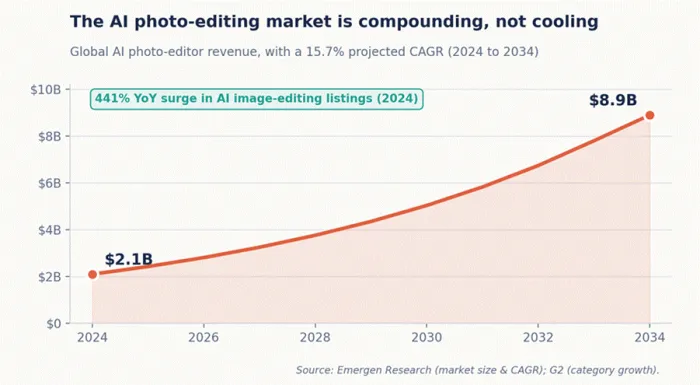
Figure 1. The category is compounding, not cresting.
The adoption numbers are just as telling. Around 58 percent of image-editing users in the United States now lean on AI features, and roughly 72 percent of e-commerce companies depend on image editing for product visuals. Automated editing trims manual effort by close to 40 percent, which is the polite way of saying it hands you back an evening. Adobe’s Firefly engine alone has generated more than 12 billion images since launch. Whatever you pick here, you are joining a stampede, not placing an early bet.
How I sorted the contenders
I did not boil this down to one master score, because the honest answer to “which is best” is “best at what.” A wedding photographer and a Shopify seller want opposite things from the same word. So I judged each tool on four practical axes: how clean the edits look on real, imperfect photos; how steep the learning curve is for a first-timer; the true cost once credit limits and add-on passes are counted; and the specific job it was built to win. Where a tool is clearly the right call for a certain person, I say so plainly. Where it quietly nickels and dimes you, I say that too.
A note on credits and “lifetime” deals Most AI tools here meter usage with credits, and “unlimited” rarely means unlimited. Two habits save money: set up your brand assets before generating so first drafts land on target, and check whether a “lifetime” license actually includes future generative features. Luminar’s, for example, expire after a year. And always confirm the live price at checkout, because promotions in this category are constant. |
Here is the lay of the land at a glance, before we go tool by tool.
| Tool | Best for | Standout AI move | Paid from | Free tier | Rating |
|---|---|---|---|---|---|
| Photoshop (Firefly) | Pro retouching & compositing | Generative Fill & Expand | $9.99/mo | Trial | ★★★★½ |
| Canva Magic Studio | Fast, on-brand design | One-prompt full layouts | $14.99/mo | Yes | ★★★★½ |
| Luminar Neo | Photographers | Sky & Relight AI | ~$119/yr | Trial | ★★★★☆ |
| Photoroom | E-commerce sellers | Background + AI staging | ~$7.99/mo | Yes | ★★★★☆ |
| Hotpot AI | Budget all-rounders | All-in-one credit pool | $12/1k credits | Yes | ★★★½☆ |
| Stylar / Dzine | Style-driven creators | Layer-based AI canvas | $8/mo | Yes | ★★★★☆ |
Adobe Photoshop (with Firefly)
★★★★½ · The professional ceiling

If image editing were a city, Photoshop would be the old downtown that everything else is still zoned around. It is the most capable editor here by a wide margin, and the gap is widest exactly where AI now does the heavy lifting. Generative Fill paints in or removes objects from a typed sentence. Generative Expand stretches a photo past its original edges and invents the missing scenery. Newer Firefly passes handle reference-guided generation and distraction cleanup that used to eat an afternoon.
The trade is the obvious one. Photoshop rewards patience and punishes tourists. The interface is dense, the muscle memory takes weeks, and Adobe’s billing has earned its reputation, including a $150 million FTC settlement in March 2026 over how early-termination fees were buried at signup. Read the cancellation terms before you commit. For anyone doing layered composites, precise masking, or client work that must be flawless, none of that is a dealbreaker. This is still the ceiling.
Signature AI features
| Feature | What it actually does | Cost / note |
|---|---|---|
| Generative Fill | Adds, replaces, or removes objects from a text prompt | Uses Firefly credits |
| Generative Expand | Extends the canvas, fills new area to match the scene | Firefly credits per run |
| Remove tool | One-brush cleanup of wires, blemishes, photobombers | Mostly local, fast |
| Reference generation | Steers new content toward a sample image’s style | Firefly credits |
| Neural Filters | Smart portrait, colorize, depth, and skin edits | Included |
Pricing
| Plan | Monthly (annual) | What you get |
|---|---|---|
| Photography (20GB) | $9.99 | Photoshop + Lightroom, 20GB cloud |
| Photography (1TB) | $19.99 | Photoshop + Lightroom, 1TB cloud |
| Photoshop single app | $22.99 | Photoshop + Fresco, 100GB cloud |
| Creative Cloud Pro | $69.99 | 20+ apps, full Firefly credits (4,000/mo) |
Firefly credit allotments differ sharply by plan. The cheaper Standard all-apps tier ($54.99/mo) caps generative credits at just 25 a month.
Scorecard
| Dimension | Rating |
|---|---|
| Edit quality & control | ★★★★★ |
| Beginner-friendliness | ★★★☆☆ |
| Value for money | ★★★½☆ |
| Best in class for | Pro retouching & compositing |
Where it wins
•Unmatched precision, masking, and layer control
•The deepest AI toolset on this list, tightly integrated
•Works offline for most edits, with a vast plugin and tutorial ecosystem
Where it frustrates
•Steep learning curve that is genuine overkill for quick social edits
•Subscription only, with sticky cancellation terms
•Heavy generative days can drain your credit allotment
Canva (Magic Studio)
★★★★½ · Design for everyone, AI included

Canva is what happens when design tools stop assuming you went to art school. Magic Studio bundles a dozen AI features into an interface your least technical coworker can drive on day one. Magic Eraser wipes objects, Magic Grab lifts a subject off its background to reposition it, Magic Expand extends a frame, and Dream Lab spins images from text. In April 2026 the company went further with Canva AI 2.0, built on its own design-specific model, which turns a single sentence into a finished, on-brand layout.
It will not replace Photoshop for surgical retouching, and Canva says as much. What it replaces is the friction. For social posts, ads, decks, and quick product touch-ups, you go from idea to export before Photoshop has finished launching. The catch lives in the credits: Pro hands you 500 AI credits a month shared across every Magic tool, and a busy week of Dream Lab plus copy generation can drain them by mid-month. A live tracker, added in March 2026, at least keeps the burn visible.
The Magic Studio toolkit
| Tool | What it does | Best for |
|---|---|---|
| Magic Eraser | Removes objects, fills the gap automatically | Quick photo cleanup |
| Magic Grab | Lifts a subject out to move or resize it | Recomposing layouts |
| Magic Expand | Extends an image past its borders | Aspect-ratio fixes |
| Dream Lab | Text-to-image generation, many styles | Concept and social visuals |
| Magic Switch | Resizes and translates a design across formats | Multi-platform output |
Pricing
| Plan | Price | Notes |
|---|---|---|
| Free | $0 | Core tools, limited AI (about 50 Magic Media uses/mo) |
| Pro | $14.99/mo or ~$120/yr | 500 AI credits/mo, Brand Kit, background remover |
| Teams | from $10/user/mo (annual) | Shared brand assets and collaboration |
| Enterprise | Custom | Admin controls, security, scale |
Canva vs Photoshop, head to head
| Task | Canva | Photoshop |
|---|---|---|
| Quick object removal | Fast, good enough | Cleaner on tricky edges |
| Layered compositing | Limited | Best in class |
| On-brand templates | Best in class | Manual |
| Learning curve | Minutes | Weeks |
| Price to start | Free | $9.99+/mo |
Scorecard
| Dimension | Rating |
|---|---|
| Ease of use | ★★★★★ |
| Edit quality | ★★★½☆ |
| Value for money | ★★★★½ |
| Best in class for | Fast, on-brand everyday design |
Where it wins
•Near-zero learning curve with a huge template and asset library
•AI baked into a real design workflow, not bolted on
•A genuinely useful free tier
Where it frustrates
•Shared 500-credit pool drains quickly under heavy use
•Not the tool for fine retouching, and some premium stock costs extra
•A few new features (like Magic Layers) are still region-limited
Luminar Neo (Skylum)
★★★★☆ · Built for photographers, not subscriptions

Luminar Neo is the photographer’s pick on this list, and the one that does not want a slice of your salary every month. It is built for people who shoot, not people who composite. Sky Replacement swaps a dull horizon in a click, Relight AI re-lights a scene as if you moved the lamp, Face and Skin AI retouch portraits without the plastic look, and the generative trio (GenErase, GenSwap, GenExpand) handles object removal and canvas extension.
There is a pricing wrinkle worth understanding. You can subscribe to Pro at about $119 a year, which keeps every extension and update flowing, or buy a perpetual license one time, often $99 to $159 during Skylum’s frequent sales. The asterisk on “lifetime”: the generative AI tools are included for one year from purchase, after which they need an Upgrade Pass to stay current. One more honest limit. Luminar edits photos only. If you need video, look elsewhere.
Signature AI tools
| Tool | What it does |
|---|---|
| Sky AI | Replaces and relights skies realistically |
| Relight AI | Adjusts lighting by depth, foreground versus background |
| Face & Skin AI | Natural portrait retouching, eye and skin enhancement |
| GenErase / GenSwap / GenExpand | Generative removal, replacement, and canvas extension |
| Noiseless & Supersharp | AI denoise and sharpening, sold as extensions |
Pricing & licensing
| Option | Cost | The fine print |
|---|---|---|
| Pro subscription | ~$119/year | All extensions and updates, generative AI included |
| Perpetual (Desktop) | ~$99 one-time (sale) | Owns the version; generative tools 1 year, then Upgrade Pass |
| Perpetual (Cross-device) | ~$139 one-time (sale) | Adds mobile editing on iOS and Android |
| Perpetual (Max) | ~$159 one-time (sale) | Adds mobile plus Spaces gallery hosting |
Sale pricing fluctuates often, so list prices can read higher. Confirm the current bundle on Skylum’s site.
Scorecard
| Dimension | Rating |
|---|---|
| Photo realism | ★★★★½ |
| Ease of use | ★★★★☆ |
| Value (one-time option) | ★★★★☆ |
| Best in class for | Landscape & portrait photographers |
Where it wins
•A genuine one-time-purchase option in a subscription world
•Excellent sky replacement and depth-aware relighting
•Gentle, intuitive sliders and strong portrait retouching
Where it frustrates
• “Lifetime” generative tools expire after a year
•Photo only, with no video editing
•Promotional pricing makes the true cost hard to read at a glance
Photoroom
★★★★☆ · The e-commerce specialist

Photoroom is laser-focused on one job and very good at it: turning a phone snapshot into a clean, sellable product photo. Upload, and it removes the background, drops in a tasteful shadow, and stages the item on an AI-generated surface in seconds. Its Virtual Model feature even puts apparel on AI-generated people, which spares small sellers a photoshoot. For e-commerce, where a shopper forms an impression in a fraction of a second, that is the whole ballgame.
It scales for volume, too. Batch processing runs hundreds of images at once, and the API, from about two cents an image for background removal, plugs into store pipelines. The Free plan gives you 250 watermarked exports a month, which is plenty to test. Just know the tiers climb with your catalog, and the API is billed separately from any app subscription. If you sell things online, Photoroom often pays for itself the first week. If you want a general editor, it will feel narrow.
Plans & limits
| Plan | Price | Exports & standout |
|---|---|---|
| Free | $0 | 250 exports/mo, watermark, limited AI |
| Pro | from ~$7.99/mo (annual) | 500 batch exports, full AI tools, no watermark |
| Max | ~$26.99/mo | 1,500 batch exports, better models, Shopify, product video |
| Ultra | from ~$99/mo | Highest volume and top-resolution outputs |
Which plan fits you
| You are… | Pick | Why |
|---|---|---|
| Testing the waters | Free | Watermarked previews, zero commitment |
| A solo seller (10–50 SKUs) | Pro | Clean, watermark-free HD listings |
| A growing store | Max | Batch plus Shopify plus product video |
| A developer or platform | API / Ultra | Programmatic editing at scale |
Scorecard
| Dimension | Rating |
|---|---|
| Background removal | ★★★★★ |
| Ease of use | ★★★★½ |
| General editing breadth | ★★★☆☆ |
| Best in class for | E-commerce product photos |
Where it wins
•Best-in-class automatic background removal
•AI staging, shadows, and on-model apparel shots
•Batch processing and an API built for real scale
Where it frustrates
•Narrow once you step outside product photography
•API is billed on top of app subscriptions
•Mobile and web purchases do not transfer between platforms
Hotpot AI
★★★½☆ · The budget all-rounder

Hotpot AI is the Swiss Army knife for people who refuse to pay for six subscriptions. Under one credit balance you get background removal, photo restoration, colorization, an upscaler that pushes images up to 10x, an object remover, AI headshots, and a Stable Diffusion image generator. A freelancer can generate concept art, fix a client’s faded family photo, and clean up a product shot in a single sitting without juggling logins.
It trades top-tier polish for breadth and price. Outputs are solid rather than spectacular, with one tester clocking about a 73 percent hit rate on detailed prompts, and text rendering is still a weak spot. But the math is friendly: the free tier allows up to 75 watermarked images a day, and paid credits start at $12 for 1,000, with most edits costing one to three credits each. Students, nonprofits, and open-source projects can qualify for near-free access. One caveat from users: failed generations have eaten credits without a refund, so start small.
Tools & credit cost
| Tool | What it does | Credit cost |
|---|---|---|
| AI Art Generator | Text-to-image on Stable Diffusion | 1–3 credits |
| Background Remover | Isolates a subject or product | 1–2 credits |
| Object Remover | Erases unwanted elements, fills in | 1–2 credits |
| Photo Restorer | Repairs scratches, revives old photos | Varies |
| Upscaler | Increases resolution up to 10x | Varies |
| AI Headshots | Pro headshots from selfies | ~$15 / 80 shots |
Pricing
| Plan | Cost | Notes |
|---|---|---|
| Free | $0 | Up to 75 images/day, watermarked |
| Pay-as-you-go credits | $12 / 1,000 | No subscription, credits are reusable |
| Karma Tier | Near-free | Students, nonprofits, open-source projects |
| API | Usage-based | For developers running Stable Diffusion |
Scorecard
| Dimension | Rating |
|---|---|
| Value for money | ★★★★½ |
| Output quality | ★★★☆☆ |
| Breadth of tools | ★★★★☆ |
| Best in class for | Budget all-in-one editing |
Where it wins
•Many tools under one cheap, reusable credit pool
•No forced subscription, with a usable free tier
•Reliable restoration and background removal
Where it frustrates
•Mid-tier generation quality and weak text rendering
•Failed jobs can quietly burn credits
•Commercial rights require a paid plan
Stylar AI (Dzine)
★★★★☆ · Control freaks, welcome

Stylar, now also branded Dzine, is for the person who wants AI help without surrendering control. Its calling card is a layer-based canvas that feels like a design app rather than a prompt box. You stack elements, position them, sketch rough shapes to guide the model, and dial style intensity with a slider. Predefined styles skip the prompt-engineering ritual, and the Stylar Assistant will even write the prompt for you.
That control makes it a favorite for designers, marketers, and anyone assembling collages, mockups, or stylized concepts. Exports go up to a crisp 6144 by 6144 pixels, and the platform has since grown video and audio modules. Pricing is approachable: a free plan gives 200 credits a week, Standard runs $8 a month on annual billing with 2,000 monthly credits, commercial rights, and watermark removal, while Professional at $25 unlocks 6,000 credits and no prompt filtering. The honest caveat is that it still carries some beta rough edges, and very complex compositions can outgrow it.
Feature highlights
| Feature | Why it matters |
|---|---|
| Layer-based canvas | Precise, design-app-style composition |
| Predefined styles | Consistent looks without prompt wrangling |
| Sketch-to-guide | Rough shapes steer the generated result |
| Stylar Assistant | Conversational AI writes your prompts |
| Hi-res export | Up to 6144 x 6144 px for print and web |
Pricing
| Plan | Price (annual) | Credits & extras |
|---|---|---|
| Free | $0 | 200 credits/week, standard resolution |
| Standard | $8/mo | 2,000 credits/mo, commercial rights, no watermark |
| Professional | $25/mo | 6,000 credits/mo, no prompt filtering, fast queue |
| Business | $50/mo | 12,000 credits/mo, early access to new features |
Scorecard
| Dimension | Rating |
|---|---|
| Creative control | ★★★★½ |
| Ease of use | ★★★★☆ |
| Output polish | ★★★½☆ |
| Best in class for | Style-driven, layered creation |
Where it wins
•Real layer-based control with strong style consistency
•Commercial rights on the inexpensive tier
•High-resolution exports for print and web
Where it frustrates
•Beta rough edges still surface
•Not built for heavy retouching, and credits gate output
•The Stylar and Dzine dual branding can confuse
Reading the map
Stack them up and a pattern appears. Plot beginner-friendliness against professional depth, and the field splits into clear camps.
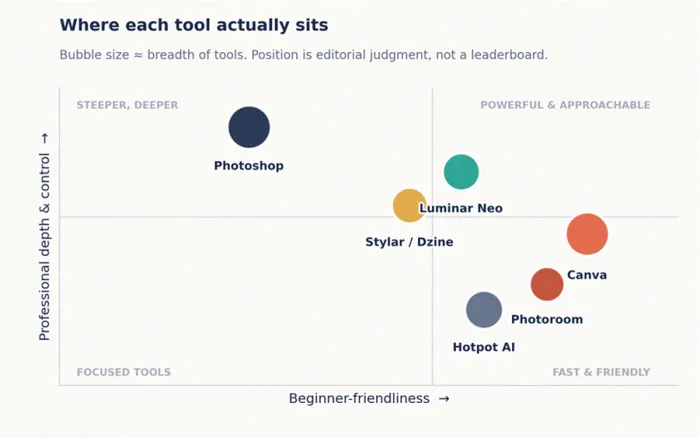
Figure 2. Positioning is editorial judgment, not a leaderboard.
Photoshop sits alone in the deep end, powerful and demanding. Canva and Photoroom own the friendly corner, trading some ceiling for speed. Luminar and Stylar land in the interesting middle, approachable but with real control, which is exactly where most people actually live. The size of each bubble hints at breadth: the all-rounders cover more ground, the specialists go deeper on one task. There is no winner on this chart, only a closest fit.
Which one should you pick
If you want the 30-second version, here it is.
| Your situation | Best pick | Why |
|---|---|---|
| You retouch or composite professionally | Photoshop | Nothing matches its precision and AI depth |
| You want fast, on-brand visuals fast | Canva | Magic Studio and templates, free to start |
| You shoot landscapes or portraits | Luminar Neo | Great relighting and a one-time license |
| You sell products online | Photoroom | Background removal and staging for stores |
| You want many tools on a budget | Hotpot AI | One cheap credit pool, no subscription |
| You want control over style | Stylar / Dzine | Layer-based canvas and style control |
The final verdict
Editor’s pick: Photoshop for power, Canva for almost everyone else If you held me to a single name it is Photoshop, because nothing here matches its precision and the AI has finally made the slow parts fast. But the right pick is the one that fits your work, and for most people that is Canva: free to start, impossible to get lost in, and good enough that you may never need more. |
Here is what I actually run. Photoshop stays installed for the jobs that have to be flawless, Canva stays open for the things due in twenty minutes, and a small Hotpot credit balance covers the odd one-off so I am not paying a monthly fee to wipe one background. If I shot landscapes for a living, Luminar’s one-time license would sit right beside them. The lesson from years of doing this the hard way is the same one I keep coming back to: do not buy the most powerful tool, buy the one that matches the work in front of you.
Most people need one of these, not all six. Pick the closest fit, learn it properly, and let the software hand back the evenings you used to lose to a clone stamp. Then go take more photos worth editing.