

Everyone selling an “AI academic writing tool” promises to turn a rough draft into publishable prose. So instead of trusting the homepage, I made an account, clicked through the whole thing, and fed Paperpal the least academic text I could think of: a 100-word superhero story. The goal was simple. I wanted to see whether Make Academic is a real feature or just a marketing word. This review is what I found, along with verified pricing, ratings from across the web, and where the tool genuinely helps (and where it does not).
Paperpal at a glance
| WHAT IT IS | An AI writing assistant built only for academic text: grammar, academic tone, paraphrasing, citations, plagiarism and AI detection, and 30+ journal submission checks. Made by Cactus Communications (Editage). |
| BEST FOR | PhD students, researchers, and non-native English authors who write for journals regularly and want their English to read like a paper, not a blog post. |
| NOT FOR | People who want a bot to write the whole paper (Paperpal deliberately will not), or a general assistant for email and marketing copy. Grammarly fits that better. |
| PRICE | The free plan is usable for testing. Paperpal Prime currently costs $25/month or $144/year ($12/month when billed annually). Paperpal Pro sits above it at $59/month or $348/year ($29/month when billed annually). |
| MY VERDICT | 4.1 out of 5. Excellent inside its niche, not a generalist. The free tier is worth trying before you pay. |
4M+ Academics (Paperpal's figure) | 250M+ Reference articles searchable | 10,000+ Citation styles supported |
50+ Languages for translation | 30+ Submission-readiness checks | 23+ yrs Of STM editing behind it |
What Paperpal actually is (and isn't)
The short version: Paperpal is what you get when an academic editing company builds an AI on top of two decades of experience. Editage has edited research manuscripts for years, and its suggestions are trained on millions of published papers and real editor corrections across more than 1,300 subject areas.
That focus is the whole pitch. You do not prompt it to “act like a journal editor” the way you would with a generic chatbot, because that behaviour is baked in. The trade-off is the opposite of ChatGPT: Paperpal is narrow on purpose, and it puts guardrails around full-text generation so you stay the author.
• Where it lives. Web app, plus add-ins for MS Word, Google Docs, Overleaf, and a Chrome extension. You work where you already write.
• What it's built on. Millions of scholarly articles and editor corrections, so tone and terminology suggestions fit academic conventions rather than general prose.
• On your data. Paperpal states it never trains its models on your writing. Sensitive, embargoed, or sponsor-owned work is still worth checking against your institution's policy.
Paperpal's ratings across the web
One score is never the whole story, so here is how Paperpal lands on the platforms that matter: user reviews, an expert editorial score, and the extension store, with an honest note on the spread.
| Platform | Rating | Sample size | What the score actually tells you |
|---|---|---|---|
| Trustpilot | 4.6 / 5 | 387 reviews* | The largest public user-review sample I found. Paperpal also invites customers to leave reviews, which is useful context when reading the distribution. |
| Research.com | 4.2 / 5 | Editorial review | An expert/editorial assessment rather than a normal user-rating average. |
| Chrome Web Store | 4.3 / 5 | 26 ratings* | A useful signal specifically for Paperpal's browser extension rather than the complete product. |
| G2 | 5.0 / 5 | 2 reviews* | Positive, but far too small a sample to treat 5.0 as representative of the whole user base. |
| Capterra | 4.3 / 5 | 3 reviews* | Again positive, but the sample is too small for strong conclusions. |
*Counts checked in August 2026 and may change.
The sample sizes matter almost as much as the scores. Trustpilot has substantially more Paperpal reviews than G2 or Capterra, so I would put more weight on repeated themes across reviews than on a perfect-looking score based on two users. Trustpilot also identifies Paperpal as a business that asks customers for reviews, and many reviews are marked as invited. That does not make those reviews invalid, but it is useful context.
My takeaway from the review data is therefore narrower than “everyone loves Paperpal”: users are generally positive about the academic editing experience, but several of the eye-catching ratings come from very small samples.
Getting started, step by step
No card is needed for the free plan. Here is the full path from the homepage to a ready-to-use editor, one screen at a time.
Step 1 · The homepage
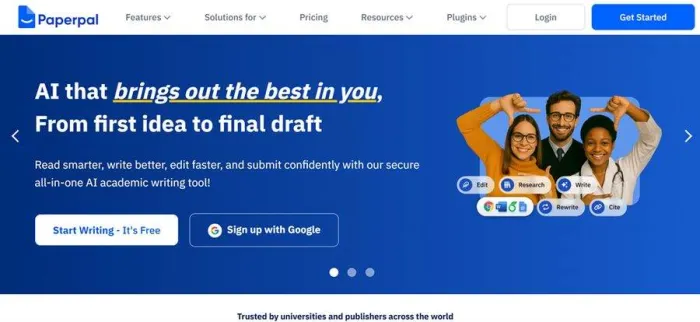
This is where you land at paperpal.com. The headline, “AI that brings out the best in you, from first idea to final draft,” frames Paperpal as an assistant for the whole writing process, not a one-click essay generator. Two buttons get you in: “Start Writing, It's Free” or “Sign up with Google.”
Step 2 · Logging in
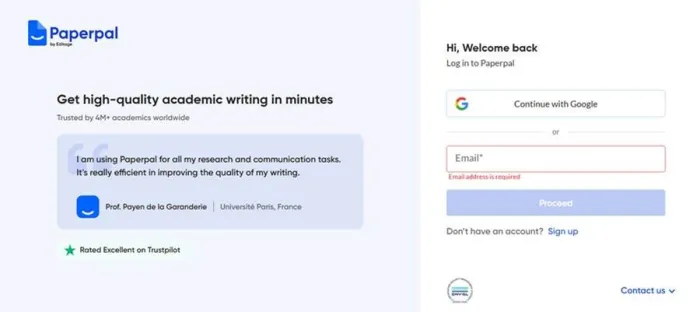
If you already have an account, this is the login screen. You can continue with Google or type in your email. The left side carries social proof: a testimonial from a professor at Universite Paris and a “Rated Excellent on Trustpilot” badge.
Step 3 · Creating your account
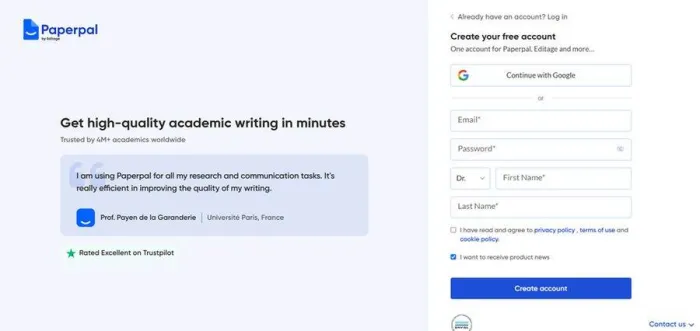
New users fill in this short form: continue with Google, or set an email and password, pick a title (I used Dr.), and add a first and last name. You agree to the privacy policy and terms, and the same account also unlocks Editage and R Discovery.
Step 4 · Onboarding, question 1 of 3
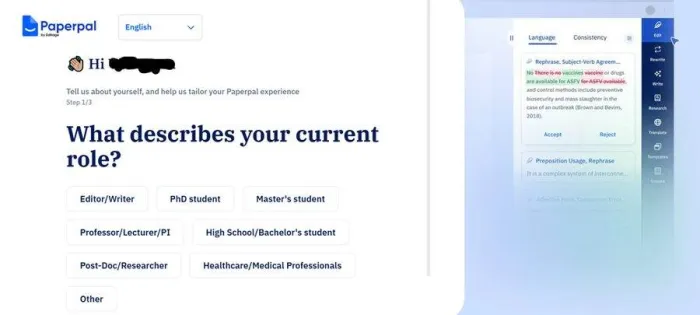
Paperpal now asks three quick questions so it can tailor its suggestions. First: “What describes your current role?” with options like PhD student, Master's student, Professor or Lecturer, Post-Doc or Researcher, and Healthcare or Medical Professional. On the right you can already see the editing panel previewing tracked-changes suggestions.
Step 5 · Onboarding, question 2 of 3
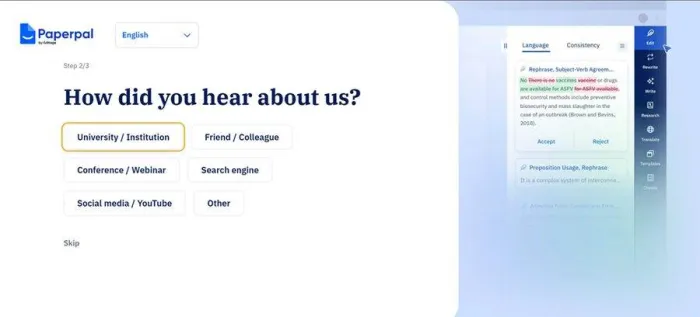
Next it asks how you heard about it: University or Institution, Friend or Colleague, Conference or Webinar, Search engine, Social media or YouTube, or Other. This step is skippable if you would rather move straight on.
Step 6 · Onboarding, question 3 of 3
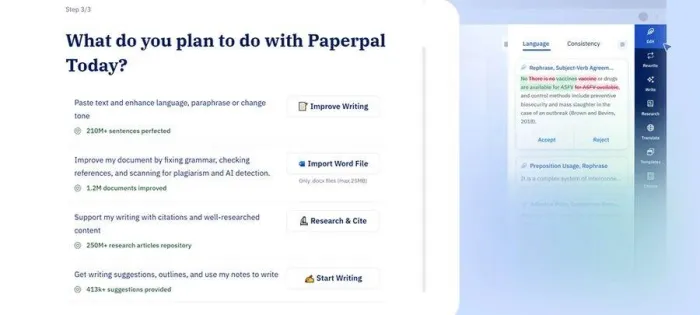
The last question is the useful one. “What do you plan to do with Paperpal today?” routes you to the right starting point: Improve Writing (210M+ sentences perfected), Import Word File (1.2M documents improved, .docx up to 25MB), Research and Cite (250M+ article repository), or Start Writing (413k+ suggestions provided). I chose to improve writing, which drops you straight into the editor.
The experiment: Make Academic vs a superhero story
A methods paragraph is already halfway academic, which makes for a soft test. So I gave the tool the opposite. I asked ChatGPT for a 100-word Iron Man story, full of casual verbs and action-movie phrasing, then walked it through Paperpal one step at a time.
How I ran the test
This is a hands-on demonstration, not a controlled benchmark. I wanted to make the change in writing register unusually easy to see, so I deliberately used text that was nothing like an academic manuscript.
| Test variable | What I used |
| Input | A roughly 100-word superhero story generated with ChatGPT |
| Paperpal feature | Rewrite → Make Academic |
| Paperpal platform | Web editor |
| Input shown by Paperpal | 99 words |
| Evaluation | Meaning preservation, tone, wording, added information, and length |
| Output selection | The generated Make Academic result shown in the screenshots |
One limitation is important: a superhero story can show whether Paperpal changes writing style, but it cannot prove that the tool handles scientific terminology, statistical results, citations, or methodological claims accurately. I therefore treat this as a demonstration of its editing behaviour, not proof of its scientific accuracy.
Step 1 · The test material
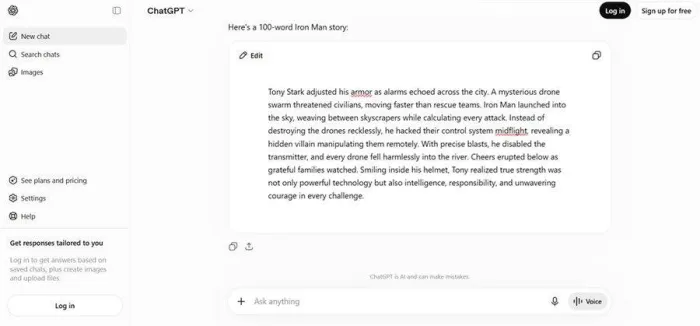
Here is the raw input, generated in ChatGPT: a 100-word story about Iron Man stopping a drone attack. It is deliberately un-academic, full of words like “adjusted,” “echoed,” “hacked,” and “weaving.” If Make Academic can lift this into a scholarly register, it can handle a real draft.
Step 2 · Pasting it into Paperpal
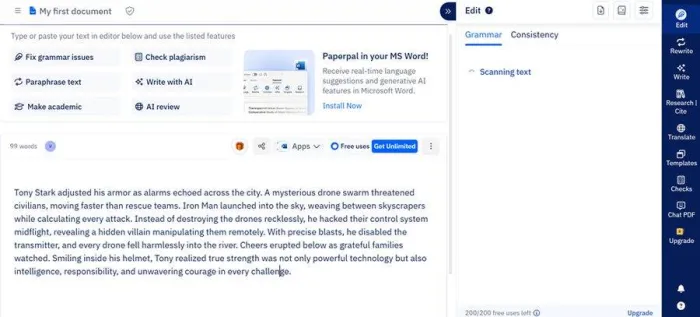
I pasted the story into a new document, and Paperpal counts 99 words. The left toolbar lists the core actions: fix grammar, check plagiarism, paraphrase, write with AI, make academic, and AI review. On the right, Paperpal immediately begins scanning for grammar and consistency, and the counter still shows all 200 free uses available.
Step 3 · Choosing Make Academic
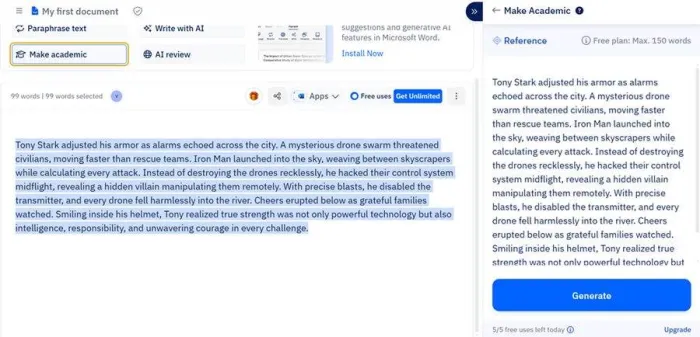
I selected the full passage and clicked “Make academic.” The right panel loads the text as a reference and shows a Generate button. Two limits are visible here: the free plan caps a single rewrite at 150 words, and I have five free generative uses for the day.
Step 4 · The academic rewrite
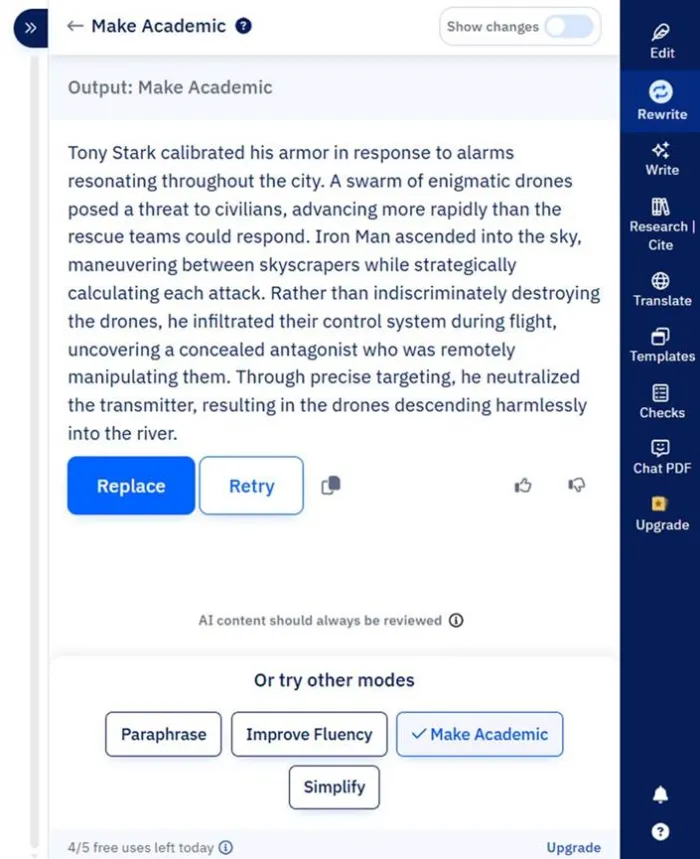
After I hit Generate, Paperpal returns the rewritten paragraph. The casual story is now written in a formal, measured register, and I can Replace the original, Retry, or switch modes to Paraphrase, Improve Fluency, or Simplify. The meaning is intact; only the tone and phrasing have changed.
Step 5 · Seeing the tracked changes
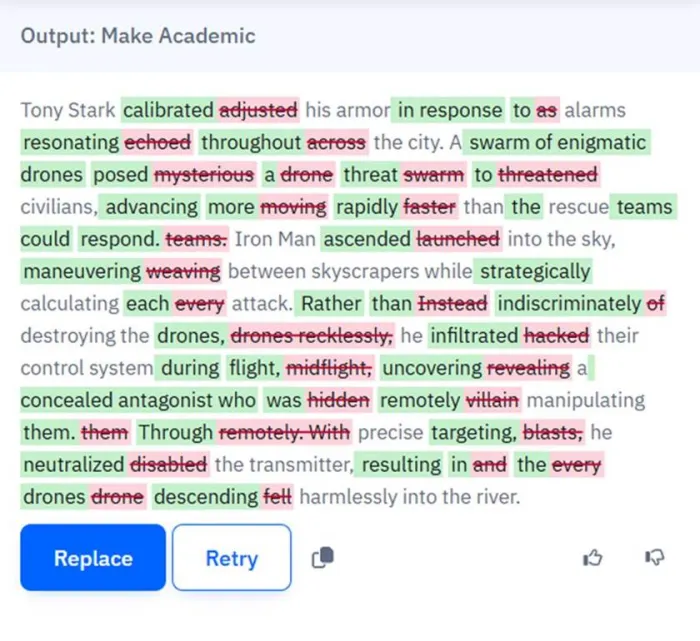
Toggling “Show changes” reveals exactly what the tool did, marked up like a copy-editor. Removed words are struck through in red and the academic replacements are highlighted in green, so you can accept the edit with your eyes open: “adjusted” becomes “calibrated,” “mysterious drone swarm” becomes “swarm of enigmatic drones,” and so on across the whole passage.
The before and after
| ORIGINAL (ChatGPT) | AFTER (Make Academic) |
| Tony Stark adjusted his armor as alarms echoed across the city. A mysterious drone swarm threatened civilians, moving faster than rescue teams. Iron Man launched into the sky, weaving between skyscrapers while calculating every attack. Instead of destroying the drones recklessly, he hacked their control system midflight, revealing a hidden villain manipulating them remotely. | Tony Stark calibrated his armor in response to alarms resonating throughout the city. A swarm of enigmatic drones posed a threat to civilians, advancing more rapidly than the rescue teams could respond. Iron Man ascended into the sky, maneuvering between skyscrapers while strategically calculating each attack. Rather than indiscriminately destroying the drones, he infiltrated their control system during flight, uncovering a concealed antagonist who was remotely manipulating them. |
Every swap, side by side
| Casual (input) | Academic (output) |
| adjusted | calibrated |
| echoed across | resonating throughout |
| mysterious drone swarm | swarm of enigmatic drones |
| moving faster than rescue teams | advancing more rapidly than the rescue teams could respond |
| launched into the sky | ascended into the sky |
| weaving | maneuvering |
| recklessly | indiscriminately |
| hacked | infiltrated |
| revealing a hidden villain | uncovering a concealed antagonist |
| disabled the transmitter | neutralized the transmitter |
| every drone fell | the drones descending |
What I actually noticed
• The tone shift is real, not cosmetic. It did not just add longer words. It restructured phrasing (“moving faster than rescue teams” became “advancing more rapidly than the rescue teams could respond”). That is the register of a paper, not a synonym swap.
• It kept the meaning. Nothing was invented or contradicted. The drones, the villain, and the river ending all survive. On real research text, that faithfulness is the point: you want elevated English, not new claims.
• The free tier caps length. Make Academic runs on up to 150 words at a time, and my returned rewrite covered the action through “into the river,” so the two closing sentences were left out. On longer passages you rewrite in chunks and should check that nothing gets dropped.
• Academic often means denser. The output is wordier, which suits journals but works against tight word limits. You would then reach for Paperpal's trim or word-reduction mode to pull it back.
• A superhero story is a toy test. It proves the mechanics of tone transformation, not subject-matter accuracy. On genuine research writing the value is register, grammar, and consistency, and by design Paperpal will not ghost-write the paper for you.
| Margin note. If your goal is a full first draft from a prompt, this is not that tool, and it tells you so with reminders to review AI output. Where it earns its place is the pass after you have written something: making serviceable English sound like a publication. |
Everything else it does
Make Academic is one mode inside a much bigger toolkit. The pieces you will actually use:
| Feature | What it does |
| Edit (language and consistency) | Real-time grammar, spelling, punctuation, and academic-tone fixes, plus consistency checks for terminology, abbreviations, numbers, and table and figure labels across long manuscripts. |
| Rewrite | Four modes: Paraphrase, Improve Fluency, Make Academic, and Simplify, plus word reduction to hit journal limits without losing meaning. |
| Research and Cite | Find references from 250M+ articles, generate citations in 10,000+ styles, and save sources to a library while you write. |
| Chat with PDF | Upload sources, ask questions, and compare across documents with citations. Useful for speeding up a literature review. |
| Checks and AI Review | Plagiarism and AI-content detection, reference accuracy, and 30+ submission-readiness checks, plus a virtual research coach that flags clarity and structure. |
| Translate and Templates | Academic translation across 50+ languages that preserves technical terms, plus outline and section templates to beat the blank page. |
Pricing, and whether it is worth it
Verified against Paperpal's own pricing page and help centre. The free plan is a real trial, not a teaser.
| Plan | Price | What you get |
Free test drive | $0 | 200 language suggestions per month, 5 AI uses per day, unlimited citations, 7,000-word monthly plagiarism check (standard report), templates and translation. Great for evaluating; limits hit fast on a full manuscript. |
Prime Monthly flexible | $25 per month | Everything unlimited: language editing, generative AI, consistency checks. 10,000-word monthly plagiarism check (detailed report), unlimited AI detection, detailed submission report. |
Prime Quarterly save 27% | $55 about $18.33/month | All Prime features. A sensible pick if you are pushing one paper through over a term. |
Prime Annual best value | $139 about $11.58/month | All Prime features for a year. This is the one to buy if you publish regularly. |
| The real math: annual works out to about $11.58 per month, which is roughly 54% cheaper than paying monthly (Paperpal advertises “up to 77% off,” measured against its own reference rate). Either way, $139 a year is less than the cost of a single professional manuscript edit, which is the honest benchmark. If Prime saves you even one desk rejection or one paid edit, it has paid for itself. Team plans start around $107 for 2 to 5 seats, and institutional licences are quote-based. Annual has a 30-day refund window; monthly has 7 days. | ||
What users are saying
Pulled from Trustpilot, G2, and Capterra, this is the praise and the gripes, because both are real.
One PhD student said Paperpal became a second pair of eyes, finally letting them edit independently instead of emailing a supervisor for every check. (G2, paraphrased)
★★★★★
A Capterra reviewer called the accuracy “superb,” saying manuscripts edited with Paperpal ranked above the 85th percentile in a separate editing service's system.
★★★★★
Non-native English authors repeatedly say it makes their writing sound academic without changing the meaning, the single most common piece of praise. (Trustpilot)
★★★★☆
The loudest complaint is money-shaped: annual plans that auto-renew catch people out, though several noted that support issued refunds quickly when asked.
★★★☆☆
A harsh minority report exists too: occasional file-upload bugs and a view that it cannot be the sole tool for a serious paper. Worth testing on the free tier first.
★★☆☆☆
Pros and cons
| STRENGTHS | WEAKNESSES |
|
|
Who it is for, and who should skip it
Buy Prime if you are:
• A researcher or PhD student submitting to journals more than twice a year
• A non-native English speaker who wants publication-grade phrasing
• Someone who would otherwise pay for professional language editing
• Tired of juggling a grammar checker, a paraphraser, a citation tool, and a plagiarism scanner in separate tabs
Stick with the free plan or skip it if you are:
• Writing one short paper a year; the free plan likely covers you
• Looking for a general assistant for email, blogs, or marketing (choose Grammarly)
• Hoping an AI will write the whole manuscript from a prompt
• Handling embargoed or sponsor-owned text without clearing tool use with your institution
The verdict
Here is where I land. Paperpal is not a “write my paper” button, and, refreshingly, it does not pretend to be. It deliberately will not generate whole manuscripts, which is exactly why it is the wrong last-minute purchase if what you actually need is reassurance about your science. It will not tell you whether your method holds up.
What it is quietly excellent at is the unglamorous middle of academic writing: turning serviceable English into journal English, catching grammar and consistency issues across a long document, tidying references, and flagging plagiarism and AI risk before a reviewer does. My Iron Man test was a toy, but it made the mechanics visible. The tone transformation is real, and it kept the meaning intact. Scale that from a superhero to a discussion section and you can see the value.
So if you write for journals regularly, especially in English as a second language, the $139-a-year Prime plan is an easy yes. It costs less than one professional edit and saves hours. If you write one paper a year, the free tier is a legitimate trial. And if you want a general-purpose writing assistant, this is not it. Try the free plan on your next draft before you pay a cent. That is the most honest recommendation I can give.
Final rating: 4.1 out of 5. Best-in-class for its niche, not a generalist.





