

I've lost count of how many “all-in-one AI” tools I've opened, poked at for an afternoon, and either kept or quietly cancelled. Easy-Peasy.AI is one of the ones people ask me about most, and for good reason. It bundles writing templates, image generation, text-to-speech, transcription and a ChatGPT-style assistant into one tidy dashboard, and it does it at a price that won't scare off a solo creator.
But “all-in-one” always comes with a catch. Spread a tool across a dozen jobs and it rarely becomes the best at any single one of them. If you've bumped into Easy-Peasy's inconsistent image output, its flat text-to-speech, or you simply want more depth in the one area you care about, you're not being fussy. You're being normal.
So I put this together the way I'd explain it to a colleague over coffee: five alternatives, each genuinely good at something, with the honest catch for each. No fake benchmarks, no “this changes everything.” Just what each tool is for, who should use it, and where it'll annoy you.
A quick refresher: what Easy-Peasy AI is (and isn't)
Easy-Peasy.AI is a broad generative-AI suite aimed at creators, marketers and small businesses. Under one login you get 170+ content templates, an image generator, text-to-speech in 40+ languages, audio and YouTube transcription, a ChatGPT-style chat (MARKY) with real-time data and PDF chat, plus no-code custom bots you can embed on a site. It runs on mainstream models (GPT, Claude, Gemini) and starts with a free tier, with paid plans that stay budget-friendly.
The honest summary Strengths
Watch-outs (from users and reviewers)
|
If any one of those catches is your dealbreaker, here's where I'd look instead.
| A word on prices. Everything below reflects roughly early-to-mid 2026, and AI pricing changes constantly. Treat the numbers as ballpark and confirm on each vendor's page before you pay. |
The five alternatives at a glance
If you only read one section, make it this one. Here's the shortlist, what each is best at, and the catch, all in a single view.
| Tool | Best for | Standout strength | Starts at* | The catch |
|---|---|---|---|---|
| Monica AI | Same all-in-one feel, upgraded | Many top models + a browser agent in one place | Free; ~$9/mo | Credit limits; busy interface |
| Blaze AI | Solo marketers & small teams | Brand-voice writing + repurposing + scheduling | Trial; ~$25/mo | Pricier; long-form needs edits |
| Gamma | Turning ideas into slides, docs & pages | Prompt-to-polished visual content, fast | Free; ~$8-10/mo | PowerPoint exports need cleanup |
| Toolbaz AI | Free drafts & brainstorming | 85+ writing tools, often no login | Mostly free | Quality varies; ads & caps |
| Wordtune | Polishing what you wrote | Best-in-class sentence rewriting & tone | Free; ~$7/mo | An editor, not a generator |
*Approximate entry pricing as of mid-2026; verify current plans on each site.
If you're more of a visual thinker, here's roughly how these tools sit relative to each other and to Easy-Peasy:
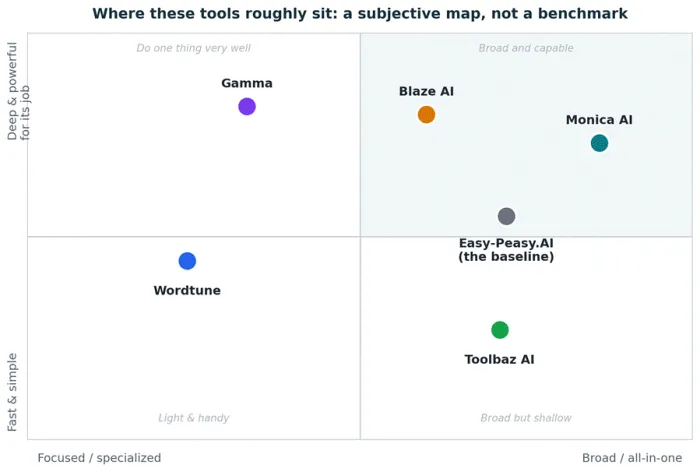
A rough, subjective map, not a scored benchmark. The specialists cluster toward “focused but deep”; the all-in-one tools sit to the right.
How real users rate them across the web
Star ratings only tell part of the story, but they're a useful gut-check before you commit. Here's how each tool scores on the major review sites. Notice how the same product can look strong on one platform and rough on another.
| Tool | G2 | Capterra | Trustpilot | Other signals |
|---|---|---|---|---|
| Easy-Peasy.AI | Few reviews | 4.9★ (small) | Mixed (~76) | The baseline; thin review volume overall |
| Monica AI | n/a | n/a | Mixed (low vol.) | Chrome Store 4.9★ (30M+ installs) |
| Blaze AI | 4.6★ | 4.8★ | 4.6★ (1,300+) | Consistently high across every site |
| Gamma | 4.3★ | 3.7★ | 2.0★ (117) | 70M+ users; scores split sharply by site |
| Toolbaz AI | Not listed | Not listed | ~2.5★ (small) | Free tool; reviews lean critical |
| Wordtune | 4.6★ | 4.4★ | ~4.0★ (575) | Strong on writer-focused platforms |
Ratings are approximate and captured in mid-2026 from G2, Capterra and Trustpilot; they shift over time, and some tools have very few reviews. Always check the live listings for current numbers.
Why the scores jump around Don't read this as a simple leaderboard. G2 and Capterra mostly collect reviews from business buyers who deliberately chose the tool, so their scores skew high. Trustpilot attracts self-serve and consumer users and tends to gather billing, cancellation and refund complaints, which drags averages down (that's most of the story behind Gamma's low Trustpilot score, despite a solid 4.3 on G2). And where a tool has only a handful of reviews, like Easy-Peasy or Toolbaz, a few strong opinions swing the average a long way. The practical move: read the most recent reviews on each site, not just the star number. |
The five alternatives, in depth
Monica AI: the closest thing to a straight upgrade
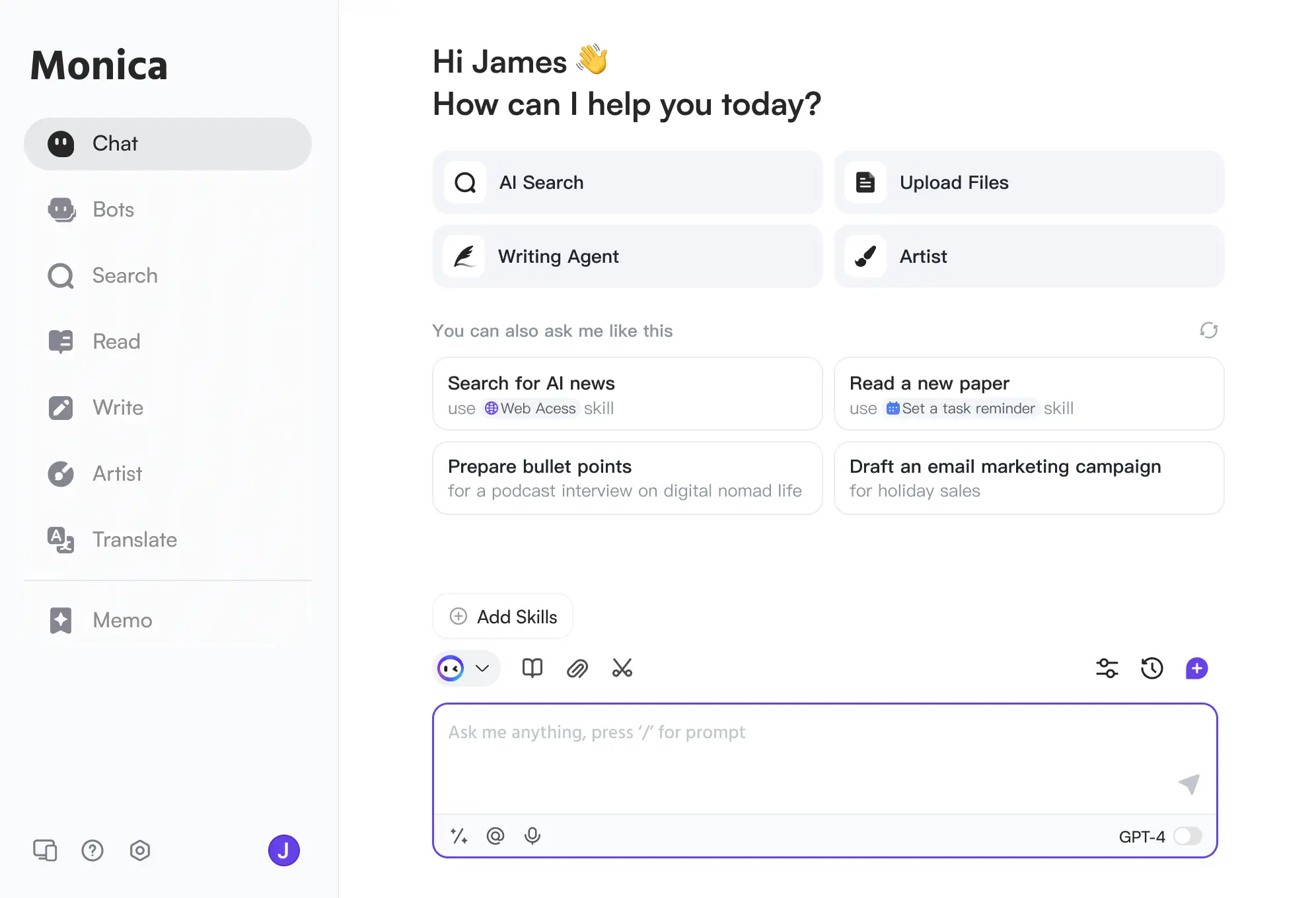
Monica is an all-in-one AI assistant that lives in your browser (Chrome and Edge), with desktop and mobile apps too. Instead of one model, it hands you a shelf of the best ones (GPT, Claude, Gemini and more) for chat, writing, translation, summarising, and image and video generation, all from a sidebar that works on any page.
| Best for: Anyone who liked Easy-Peasy's “everything in one place” but wants stronger underlying AI and a slicker in-browser workflow. |
What you can do with it
| Feature | What you get |
|---|---|
| Multi-model chat | Switch between GPT, Claude, Gemini and others; compare answers side by side |
| Writing help | Draft, rewrite and expand copy anywhere you type, with 80+ templates |
| Read & summarise | One-click summaries of long web pages, PDFs, and YouTube videos |
| Create | AI image generation, short video clips, and a slide generator |
| Agent & research | “Monica Agent” and Deep Research automate multi-step tasks and reports |
| Works everywhere | Highlight text on any site for instant explain, translate, or rewrite |
What's great
| Where it falls short • Runs on a credits system, where heavier models burn credits faster and caps can bite even on paid plans • The sheer number of micro-features can feel cluttered • Depends on a browser extension, which isn't for everyone • Quality varies across its many smaller tools |
Pricing (approximate)
| Plan | Price* | What you get |
|---|---|---|
| Free | $0 | Limited daily queries on lighter models, enough to test the workflow |
| Pro | ~$9-10/mo | Higher limits and access to premium models via credits |
| Pro+ / Unlimited | ~$17-20/mo | Bigger allowances for heavy daily use |
Real-world scenario. You're researching a blog post. In one sidebar you summarise three source articles, ask Claude to outline the piece, have GPT draft a section, generate a header image, and translate a quote, all without leaving the tab.
My honest take If your main frustration with Easy-Peasy is “I wish the underlying AI were better,” Monica is the most natural switch. Just go in knowing the credit maths matters: map your heaviest weekly task to a plan's limits before you commit, or you'll hit a wall mid-project. |
Blaze AI: for marketers who want brand voice and publishing, not just text

Blaze is a content-marketing platform built for “teams of one.” It learns your brand voice from your website or writing samples, generates on-brand blogs, emails, ads and social posts, then repurposes one piece into dozens of formats and schedules them across channels.
| Best for: Solopreneurs and small teams who publish constantly and want consistency plus a built-in calendar, not just a blank text box. |
What you can do with it
| Feature | What you get |
|---|---|
| Brand voice | Builds a brand kit (tone, vocabulary, a “never say” list) from your site or samples |
| Multi-format writing | Blogs, emails, ads, captions and product descriptions from a single brief |
| Content multiplication | Turn one article into 50+ assets: tweets, a newsletter, captions and more |
| Scheduling | Publish to Instagram, Facebook, LinkedIn, X, TikTok, Mailchimp and WordPress |
| Built-in SEO | Keyword hints, readability, headline and meta suggestions in the editor |
| Team workflow | Real-time collaboration and share-for-review approvals |
What's great
| Where it falls short
|
Pricing (approximate)
| Plan | Price* | What you get |
|---|---|---|
| Free trial | 7 days | Test the core writer, repurposer and brand voice |
| Creator | ~$25/mo* | Individual marketers with moderate volume (billed annually) |
| Team | ~$59/mo* | ~3 seats, more brand voices, collaboration |
| Autopilot / Enterprise | Higher / custom | Hands-off automation, SSO, dedicated support |
Real-world scenario. You write one solid case study. Blaze spins it into a LinkedIn post, five tweets, a newsletter and an Instagram caption in your voice, then drops them onto the calendar to publish at peak times.
My honest take Blaze isn't trying to be a cheap Easy-Peasy replacement. It's a step up in ambition and price. If content is a real growth channel for you and consistency is the problem, it earns its keep. If you just need the odd draft, it's overkill. |
Gamma: the fastest way from an idea to something that looks designed
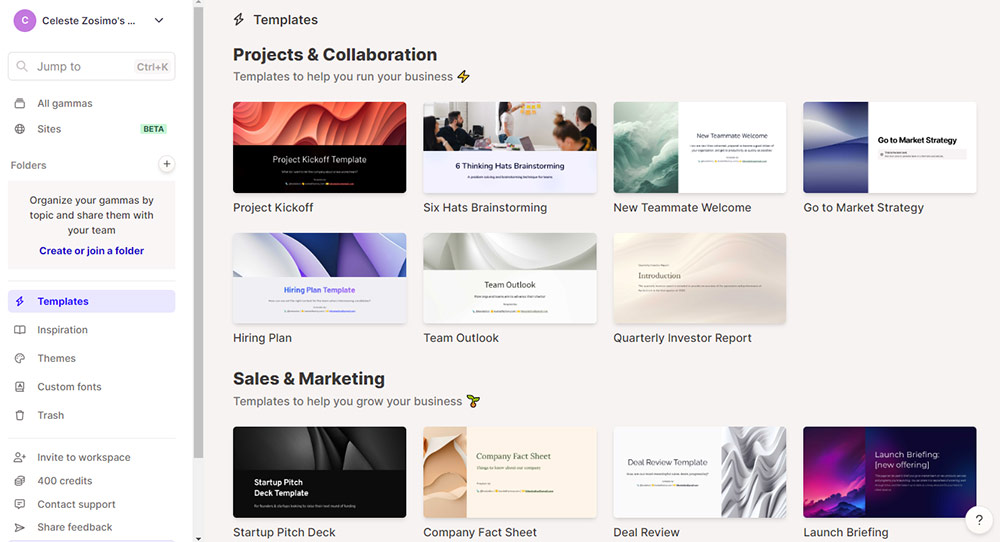
Gamma turns a prompt, pasted text, or an uploaded file into a polished presentation, document, webpage, or social graphic. It uses a modern card-based format and applies clean design automatically, so non-designers get professional-looking output in minutes.
| Best for: Founders, marketers and educators who need good-looking decks, one-pagers or landing pages without opening PowerPoint or hiring a designer. |
What you can do with it
| Feature | What you get |
|---|---|
| Prompt-to-deck | Describe a topic and get a structured, styled slide deck in under a minute |
| Four content types | Presentations, documents, full websites (one-click publish), and social posts |
| Gamma Agent | Chat-based AI that researches, rewrites and restyles the whole document for you |
| Design on autopilot | 40+ themes; one click re-themes the entire deck, images included |
| Embeds & charts | Drop in video, forms, and auto-generated charts that stay interactive online |
| Export & analytics | Send to PDF, PNG or PowerPoint; track views with built-in analytics |
What's great
| Where it falls short
|
Pricing (approximate)
| Plan | Price* | What you get |
|---|---|---|
| Free | $0 | 400 one-time credits, enough for several presentations to test it |
| Plus | ~$8-10/mo | Unlimited AI creation, more control and exports |
| Pro | ~$15-20/mo | Advanced features, branding, larger workspaces |
Real-world scenario. A client asks for a pitch deck by tomorrow. You paste your rough notes, Gamma builds ten well-structured cards with a coherent theme and AI images, you spend 20 minutes fixing details, and you send a link that looks like a designer touched it.
My honest take Gamma isn't a like-for-like Easy-Peasy swap. It's the piece Easy-Peasy is weakest at. If your real need is “make my content look presentable, fast,” Gamma is the clearest win on this list. Just treat exports to traditional slides as “90% done,” not “done.” |
Toolbaz AI: the free toolbox for quick drafts and ideas

Toolbaz is a sprawling suite of 85+ free AI writing tools you can use straight from the browser, often without even logging in. It taps multiple models (GPT, Claude, Gemini, Meta and more) for articles, essays, stories, emails, scripts and social copy, plus image generation and text-to-speech.
| Best for: Students, bloggers and casual creators who want fast, no-commitment drafts and brainstorming without paying for anything. |
What you can do with it
| Feature | What you get |
|---|---|
| 85+ tools | Article, blog, essay, story, poem, email, script, LinkedIn and more, each purpose-built |
| Model choice | Pick from several AI models to see which output you prefer |
| No-login access | Core text tools work instantly on the free site, no account needed |
| Beyond text | AI image generator, text-to-speech voiceovers, and basic code help |
| Rewriting | Paraphraser, summariser, and rephrase / “humanise” utilities |
| Customisation | Adjust tone, length and language per tool |
What's great
| Where it falls short
|
Pricing (approximate)
| Plan | Price* | What you get |
|---|---|---|
| Free | $0 | Most tools, no login; ads and usage limits apply |
| Standard | ~$6-10/mo | Higher word limits, better models, fewer restrictions |
| Pro / Ultra | ~$20-40/mo | Large word/token allowances for heavier use |
Real-world scenario. It's 11pm and you need three blog-title options, a rough intro and a quick product blurb. Toolbaz gets you usable drafts in a couple of minutes for free, which you then tighten by hand.
My honest take Think of Toolbaz as the closest free cousin to Easy-Peasy's template library: broad and beginner-friendly, but you're trading polish and reliability for price. It's a great scratchpad and a poor final-draft tool. Use it to get unstuck, not to hit publish. |
Wordtune: the one for making your writing actually good
Wordtune specialises in refining what you've already written. It rewrites and paraphrases sentences, adjusts tone, shortens or expands, fixes grammar, and summarises long content, mostly at the sentence level, through a browser extension and web editor.
| Best for: Writers, non-native English speakers, and professionals who can produce a draft but want it to read clearer, sharper and more natural. |
What you can do with it
| Feature | What you get |
|---|---|
| Rewrite & paraphrase | Multiple context-aware alternatives for any sentence, keeping your meaning |
| Tone control | Switch between formal and casual with a click |
| Shorten / expand | Trim bloat or add supporting detail without starting over |
| Grammar & spelling | Real-time proofreading as you write |
| Summarise | Condense articles, PDFs and YouTube videos into key points |
| Works where you write | Chrome/Edge extension across Google Docs, Gmail and more |
What's great
| Where it falls short
|
Pricing (approximate)
| Plan | Price* | What you get |
|---|---|---|
| Basic (Free) | $0 | ~10 rewrites/day, a few summaries/month, unlimited grammar |
| Advanced | ~$6.99/mo* | ~30 rewrites/day and more summaries (billed annually) |
| Unlimited | ~$9.99/mo* | Unlimited rewrites and summaries, priority support |
Real-world scenario. You've drafted a client email that's technically fine but reads stiff. You highlight each clunky sentence, skim Wordtune's alternatives, pick the ones that sound like you, and in two minutes it reads warm and confident.
My honest take Wordtune is the odd one out here because it isn't an all-in-one, and that's the point. If Easy-Peasy's writing gets you 80% of the way but the prose feels flat, pair a generator with Wordtune as your finishing layer. On its own it won't replace Easy-Peasy; alongside one, it fixes the exact thing generators are worst at. |
So which one should you actually pick?
The right answer depends entirely on what's driving you away from Easy-Peasy. Here's the quick logic I'd use.
| If your main need i | Reach for | Why |
|---|---|---|
| “Same all-in-one, but better AI” | Monica AI | Multiple top models plus everything-in-a-sidebar |
| “On-brand marketing content at scale” | Blaze AI | Brand voice, repurposing and auto-scheduling |
| “Make my content look designed, fast” | Gamma | Prompt-to-deck / doc / site with automatic polish |
| “Free drafts and brainstorming” | Toolbaz AI | 85+ tools, no login, zero cost |
| “Fix flat, awkward writing” | Wordtune | The best sentence-level editor around |
A combo that punches above its weight Draft in Toolbaz or Monica (cheap and broad), polish in Wordtune (clarity and tone), then package the final piece in Gamma (visuals). Three modest tools working together can out-perform one that tries to do it all, often for less money. |
The final verdict
If you made me choose one to hand a friend leaving Easy-Peasy, it'd be Monica AI. It keeps the all-in-one convenience you're used to while quietly fixing the biggest weakness, which is the quality of the AI doing the work. It's the lowest-friction switch on this list.
But “best” really is personal here, and after sitting with all five, the pattern is hard to miss: the specialists beat the generalist at their own game. Gamma will make your work look better than Easy-Peasy ever could. Wordtune will make it read better. Blaze will keep a real publishing schedule alive. Toolbaz will do it all for free, if “good enough” is good enough. Easy-Peasy's superpower was never being the best at any of these. It was putting them under one affordable roof.
So here's my honest advice: stop hunting for a single tool that's “better than Easy-Peasy at everything,” because it doesn't exist. Instead, name your one real bottleneck (quality, design, consistency, budget, or polish) and pick the tool above that owns it. Start on a free tier, run your actual next project through it, and let your own work tell you whether it's a keeper. That beats any listicle, including this one.





