

ChatGPT gets plenty right, but long-form was never its home turf. I kept hitting the same walls: drafts that lost the plot around section three, the same transition phrases recycled every 400 words, and responses that quietly stopped short of the length I asked for. So over the past eight weeks I put six tools that were designed for long-form work through the same three briefs: a 2,400 word affiliate roundup, a 3,000 word evergreen guide, and a chapter from a novel manuscript I keep around for testing exactly this.
Every tool got identical briefs, first on default settings, then with its paid features switched on. I logged how long each draft took, how much editing it needed before I would put my name on it, and what the subscription costs. The prices below are what the vendors published in August 2026. Several of these companies repriced during the year, so treat every figure as a snapshot and confirm on the live page before paying.
The six at a glance
| Tool | Built for | Entry price | Free way in | The feature that matters |
|---|---|---|---|---|
| Koala AI | SEO blogs and affiliate sites | $9/mo | 5,000 word trial, no card | Live SERP and Amazon data inside drafts |
| Sudowrite | Fiction, novels, serials | $10/mo annual | ~10,000 credit trial, no card | Story Bible keeps a whole book consistent |
| Jasper | Brand and marketing content | $59/mo annual | 7 day trial | Brand Voice across every asset |
| Writesonic | Content plus AI search tracking | $99/mo | Limited free plan | Article writer tied to SEO and GEO data |
| Surfer | Articles engineered to rank | $79/mo annual | 7 day money-back | Drafts scored live against the SERP |
| Scalenut | Keyword-to-draft SEO workflow | $39/mo | 7 day trial | Cruise Mode, keyword to draft in minutes |
Head-to-head: three ways to compare them
Numbers first, features second, and then what actually happened when the drafts came back.
Pricing compared
| Tool | Entry plan | Monthly | Annual | Free way in |
|---|---|---|---|---|
| Koala AI | Essentials | $9 | ~20% off | 5,000 word trial, no card |
| Sudowrite | Hobby & Student | $19 | $10/mo | ~10,000 credit trial, no card |
| Jasper | Pro | $69 | $59/mo | 7 day trial |
| Writesonic | Starter | $99 | ~20% off | Limited free plan |
| Surfer | Essential | $99 | $79/mo | 7 day money-back |
| Scalenut | Essential | $39 | Discounted | 7 day free trial |
Feature checklist
| Tool | SERP-driven drafts | Voice training | Fiction tools | 1-click WordPress |
|---|---|---|---|---|
| Koala AI | ✓ | ✗ | ✗ | ✓ |
| Sudowrite | ✗ | ✗ | ✓ | ✗ |
| Jasper | ✗ | ✓ | ✗ | ✗ |
| Writesonic | ✓ | ✓ | ✗ | ✓ |
| Surfer | ✓ | ✗ | ✗ | ✓ |
| Scalenut | ✓ | ✗ | ✗ | ✓ |
WordPress publishing on Scalenut requires the Growth tier.
What my testing showed
| Tool | The draft came back as | Edit time | Weak spot |
|---|---|---|---|
| Koala AI | Publish-ready structure for commercial keywords | ~30 min | Flat voice on opinion pieces |
| Sudowrite | Scene prose with continuity intact | ~30 min | Nothing for nonfiction or SEO |
| Jasper | On-brand guide, lightest tone edit of the six | ~30 min | Hard to justify for solo use |
| Writesonic | Sourced draft matched to SERP intent | ~45 min | Wordy filler to trim |
| Surfer | Scored page with a clear edit checklist | ~40 min | Tempts you to chase the score |
| Scalenut | Sound structure, flat prose | ~60 min | Repetitive phrasing throughout |
The Tools Explained
Koala AI: closest to publishable for SEO and affiliate content

Built for SEO + affiliate sites | Starts at $9 per month | Free way in 5,000 word trial |
Koala was my lowest expectation going in and the tool I used most by the end. You hand KoalaWriter a keyword, set the tone, length and target country, and it researches the live search results before writing a complete article. My affiliate roundup brief came back with real product specs and review data pulled straight from Amazon's live listings, which no other tool here even attempts. On the Professional tier it also added internal links to existing posts and pushed the finished draft to WordPress in one click. The prose needed a personality pass, but the structure, facts and formatting were ready.
Where it earned its spot
▪ SERP analysis runs before a word is written, so outlines match what already ranks for the keyword.
▪ Live Amazon product data and reviews flow into affiliate roundups automatically.
▪ Deep research mode, automatic internal linking and one-click WordPress publishing arrive at the $49 tier.
| Pricing: Essentials is $9 a month for 15,000 words and 250 chat messages. Starter is $25 for 45,000 words, Professional is $49 for 100,000 words plus the research and linking features, and Boost is $99 for 250,000 words. The trial gives 5,000 words with no card required. |
Pros
| Cons
|
Sudowrite: the only one that understands a manuscript

Built for Fiction + novels | Starts at $10/mo annual | Free way in ~10,000 credits |
Sudowrite is the only tool in this lineup that treats a book like a book. The Story Bible holds your synopsis, characters, world rules and outline, and every chapter draft reads from it. In my fiction test, a side character's limp introduced in scene two was still there in scene nine, which is precisely the kind of continuity ChatGPT loses. Muse, the in-house model trained on fiction, writes actual scene prose with dialogue and interiority rather than plot summary dressed up as a chapter. And the Describe and Rewrite tools fix a weak paragraph in place instead of forcing a full regeneration.
Where it earned its spot
▪ Story Bible keeps characters, plot threads and world rules consistent across an entire manuscript.
▪ Muse, a fiction-trained model, produces scene-level prose instead of summaries.
▪ Describe, Rewrite and Brainstorm edit surgically without touching the rest of the page.
| Pricing: Hobby and Student is $19 a month, or $10 on annual billing, with 225,000 credits. Professional is $29 ($22 annual) with 1,000,000 credits, and Max is $59 ($44 annual) with 2,000,000 credits that roll over for 12 months. The free trial includes roughly 10,000 credits, no card required. |
Pros
| Cons
|
Jasper: voice control that survives 3,000 words
Built for Brand + team content | Starts at $59/mo annual | Free way in 7 day trial |

Jasper has grown out of being a writing toy and into marketing software, and the price reflects it. What justified the bill in my testing was Brand Voice: I trained it on three published samples, and my 3,000 word guide came back needing the lightest tone edit of any draft in this entire test. Knowledge assets let it pull from your actual product details rather than improvising, and the long-form editor sits beside campaign tools, so the same guide became emails and social posts without re-explaining anything to the model.
Where it earned its spot
▪ Brand Voice learns from your samples and holds the register across thousands of words.
▪ Knowledge assets ground drafts in your real product facts instead of guesses.
▪ Campaign features turn one long-form piece into a matching set of shorter assets.
| Pricing: Pro runs $69 per seat monthly, or $59 on annual billing, and includes Brand Voices and Knowledge assets. Business is custom priced for larger teams. There is a 7 day trial and no free plan. |
Pros
| Cons
|
Writesonic: drafting and AI search visibility in one login
Built for Content + AI search | Starts at $99 per month | Free way in Free plan |
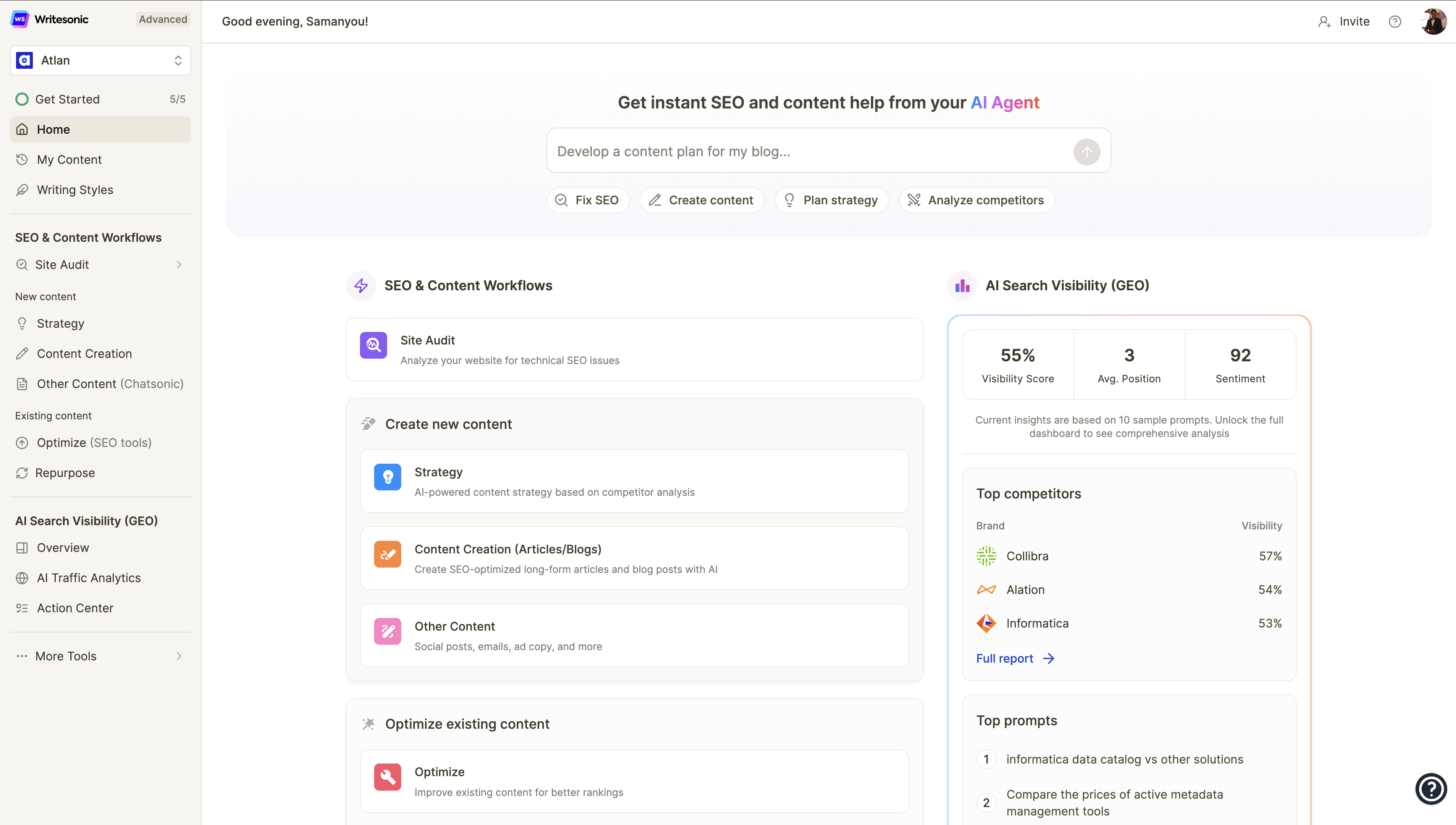
Writesonic has turned into a search visibility platform with an article writer inside it, and that framing explains both its strengths and its bill. The AI Article Writer researched live sources for my evergreen guide, cited them, and matched section headings to what the search results show intent for. The same dashboard then audits your site and tracks whether your brand actually appears in AI answers, a loop none of the other five closes. The catch: the company repriced more than once while I was testing, so read the checkout page, not old reviews.
Where it earned its spot
▪ The article writer researches and cites live sources, then structures drafts around real SERP intent.
▪ Site audits and AI search visibility tracking share a dashboard with drafting.
▪ A limited free plan lets you judge output quality before spending anything.
| Pricing: When I checked in August 2026, the Starter tier listed at $99 a month with 15 AI articles plus site audits, and annual billing saves roughly 20 percent. Earlier, cheaper tiers still float around the web, which tells you how often the pricing moves. |
Pros
| Cons
|
Surfer: when the ranking is the whole point
Built for Articles built to rank | Starts at $79/mo annual | Free way in 7 day refund |

Surfer starts from the opposite direction: the page score comes first and the writing serves it. Surfer AI drafted my guide against the live SERP and dropped it straight into the Content Editor, where it opened at a score of 72 with a sidebar showing exactly which terms, headings and questions were missing. That sidebar is the real product. It turned my editing hour into a checklist instead of a staring contest with a draft. Built-in plagiarism and AI-detection checks run before anything ships, which matters when clients ask.
Where it earned its spot
▪ Every draft lands inside the Content Editor with a live score and term coverage map.
▪ Surfer AI structures articles from SERP data rather than model instinct.
▪ Plagiarism and AI-detection checks are part of the workflow, not an add-on tab.
| Pricing: Essential listed at $99 a month, or $79 on annual billing, with 30 Content Editor credits and a small monthly pool of AI articles; extra Surfer AI articles cost $29 each. Plan names were reshuffled during 2026, and there is no free tier, only a 7 day money-back guarantee. |
Pros
| Cons
|
Scalenut: the budget keyword-to-publish workflow
Built for Keyword to publish | Starts at $39 per month | Free way in 7 day trial |
![Rytr vs. Scalenut: In-depth Comparison [2026]](https://driebipxfld1t.cloudfront.net/ai-tools-screenshots/scalenut-ui.jpg)
Scalenut is the budget pick, and Cruise Mode is why it makes this list. The flow takes a keyword through context, title, outline and draft in a guided sequence that genuinely finished in about five minutes for my evergreen brief. NLP key terms and SERP research sit beside the editor while you clean up, and the Growth tier publishes straight to WordPress. The draft itself was the flattest prose of the six, with phrasing that repeats if you don't intervene, but the bones were sound and the price makes the extra editing time easy to forgive.
Where it earned its spot
▪ Cruise Mode runs keyword to complete draft in a guided five step flow.
▪ NLP terms and SERP research stay on screen during cleanup.
▪ One-click WordPress publishing arrives on the Growth tier.
| Pricing: Essential is $39 a month with 100,000 AI words and 5 SEO articles. Growth is $79 with unlimited AI words, 30 SEO reports and WordPress publishing, and Pro is $149. Annual billing discounts each tier further, and there is a 7 day free trial. |
Pros
| Cons
|
Match the tool to the job
| You run a niche or affiliate site | Koala AI. Cheapest entry, live Amazon data, and drafts closest to publishable for commercial keywords. |
| You write fiction | Sudowrite. Nothing else on this list understands a manuscript, let alone book two of a series. |
| You manage a brand or team | Jasper. Voice and knowledge controls are what justify the per-seat price. |
| You want drafting and AI search tracking together | Writesonic. One dashboard covers writing, audits and visibility in AI answers. |
| Rankings are the entire KPI | Surfer. The scored Content Editor is the sharpest optimization loop of the six. |
| Budget rules everything | Scalenut. A complete keyword-to-publish workflow from $39 a month. |
Final verdictEight weeks in, my card statement tells the honest story: I cancelled three of these and kept three. Koala stayed because $9 to $49 a month for near-publishable SEO drafts is hard to argue with, and the Amazon integration paid for itself on the first roundup. Sudowrite stayed because nothing else here even attempts what it does; my test chapter needed a style pass, not a rewrite, and Story Bible caught continuity slips I would have missed on my own. Surfer stayed for the Content Editor more than the AI writer, because that scored sidebar turns editing from guesswork into a checklist. Jasper is the one I would keep if I ran a content team instead of my own sites. The voice control is real, but so is the per-seat bill. Writesonic does the most things and changed its pricing twice while I was testing it, which made committing feel risky. Scalenut is the budget answer, and it writes like one. None of them removes the editing. Every draft in this test got 30 to 60 minutes of human work before it was fit to publish. The difference is starting at seventy percent instead of a blank page, and for long-form, that difference is the entire game. |





