
How These Tools Were Tested
Every tool here was run through the same real workload rather than a feature checklist. The test set included a 40 minute recorded interview, a two minute product explainer, a batch of six vertical clips for social, and one short piece of generated b-roll. The goal was to see how each tool behaves on the kind of work creators and small teams actually ship, not how it performs in a polished demo.
The Frame-to-Finish method scores each tool across five lenses:
•Output quality. Visual fidelity, motion realism, caption accuracy, and how much cleanup the result needs before it is publishable.
•Editing control and workflow fit. How much the editor can steer the result, the size of the learning curve, and whether the tool fits an existing pipeline or replaces it.
•Speed and turnaround. Render times, queue behaviour under load, and how much manual work the automation actually removes.
•Cost clarity and value. Whether pricing is predictable, how aggressively credit systems meter usage, and the real cost per finished minute.
•Export, rights, and publishing. Resolution caps, watermarks, commercial usage terms, and how easily finished work reaches each platform.
| Two caveats behind every pick. Pricing in this category changes often, and several tools meter usage through credit systems that make the true monthly cost depend heavily on how hard they are pushed, so every figure here is approximate and current as of June 2026. Editorial scores reflect hands-on judgement against the workload above, not a laboratory benchmark, and the right tool depends far more on the job than on any single number. |
The Shortlist at a Glance
Seven tools made the cut, spread across four distinct jobs. The table below is the fast version. The sections that follow explain the trade-offs each one hides.
| Tool | Best for | Entry price | Standout strength | Main watch-out |
|---|---|---|---|---|
| Runway | Generative footage and VFX shots | From about $15 | Best in class text and image to video | Premium credits drain fast on iteration |
| Descript | Podcasts, talking head, screen recordings | From about $16 | Editing video by editing the transcript | Media minute and AI credit limits |
| CapCut | Short form and social video | Free, then about $10 | A huge free toolkit on every device | More features moved behind the paywall |
| HeyGen | Avatar explainers and dubbing | From about $24 | Lifelike avatars and lip synced translation | About 20 credits per minute of premium avatar |
| Opus Clip | Repurposing long video into clips | From about $15 | Finds the clips actually worth posting | One narrow job, metered by minutes |
| Pippit | E-commerce and marketing video | From about $24 | Store URL to ad ready video in minutes | Single paid tier, e-commerce focused |
| Adobe Premiere Pro | Professional timeline editing | From about $23 | Industry standard control plus Firefly AI | Steeper learning curve than the rest |
Mapped against the two questions that matter most, how much manual control the editor keeps and whether the work is short form or long form, the field separates cleanly:
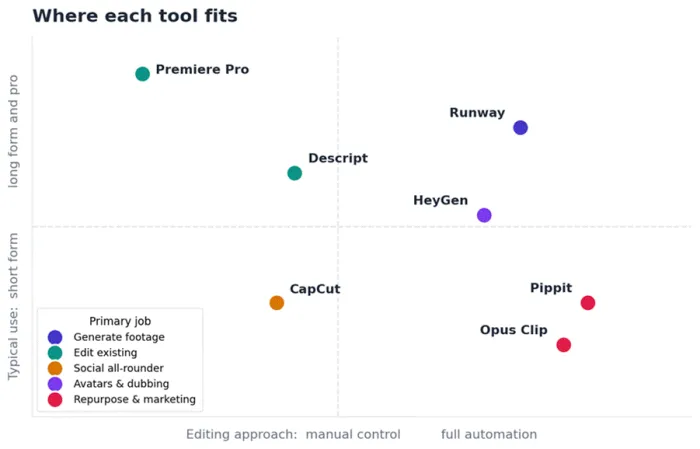
Editorial positioning based on hands-on testing. Placement reflects typical use, not a strict ranking.
The Seven Tools
Runway
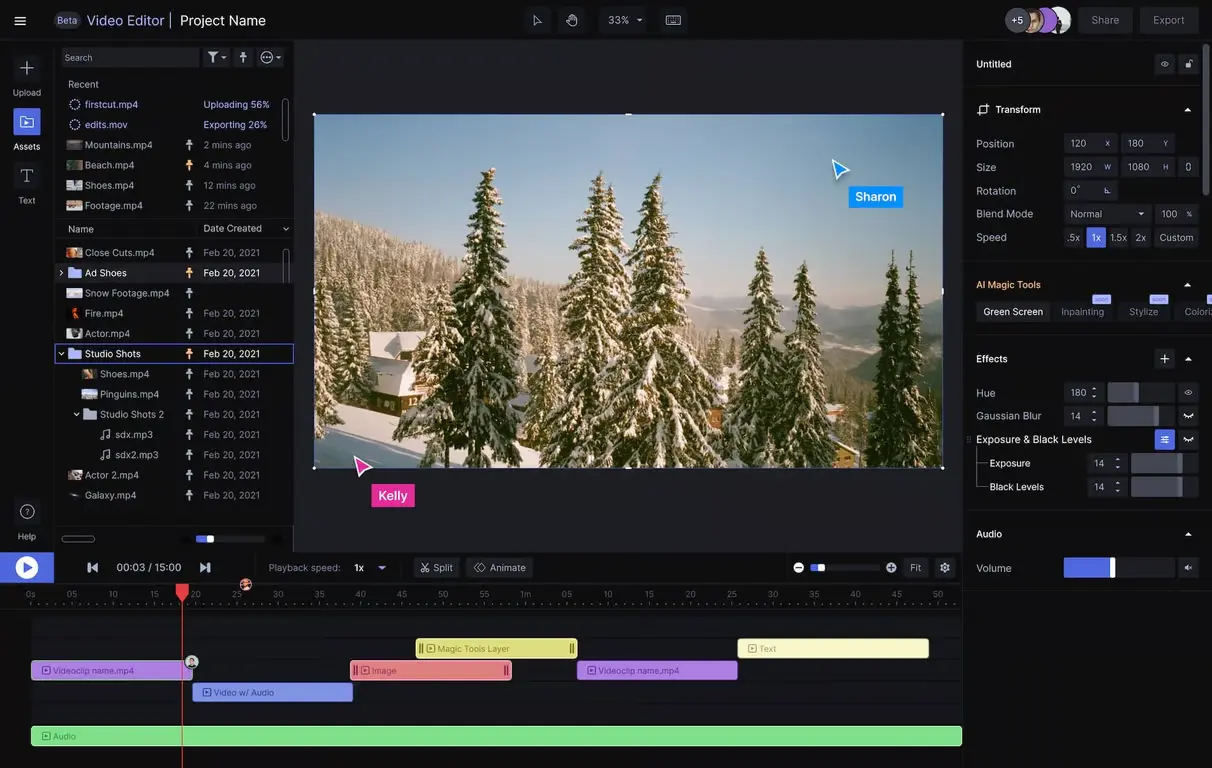
The generative powerhouse
Runway, formerly Runway ML, is the tool most people picture when they imagine AI video. Type a description or feed in a single still image, and the model returns footage that did not exist before. The 2025 and 2026 releases pushed it well past that party trick into a multi model platform, where the Gen-4 family sits alongside partner models and a genuine editor for assembling and finishing shots in one place.
The output is the headline, and it earns it. For surreal b-roll, concept films, product hero shots, and effects that would be expensive to film, very little matches it. The honest counterweight is the meter. Runway runs on credits, and credits are spent on every generation whether the result is usable or not. A single polished sequence often takes several attempts, so the effective cost per finished second climbs quickly, and reviewers consistently report queue waits when demand is high. The standard professional workaround is simple: draft on cheaper, faster models and spend premium credits only on the final pass.
| At a glance | |
| Best for | Generative b-roll, concept films, and VFX shots |
| Standout | Gen-4 family text and image to video quality |
| Pricing (approx.) | Free trial credits, then paid from about $15 per month |
| Platforms | Web |
| Watch-out | Credits are spent on every generation, used or not |
| Editorial score | 4.5 out of 5 |
| Strengths | Where it struggles |
Output quality. Few tools generate footage this convincing from a prompt or a single frame. Creative range. Motion controls and a growing set of partner models cover most generative needs. All in one. Generation and a real finishing editor live in the same workspace. | Credit burn. Every attempt costs credits, and strong shots often take several tries. Queue waits. Reviewers report slowdowns when demand is high. Wrong fit for edits. It does not replace a timeline editor for assembling existing footage. |
Best for: generative footage, b-roll, and effects where nothing pre filmed exists. Skip if: the real job is trimming and assembling footage that already exists, where a timeline editor costs less and frustrates less. |
Descript
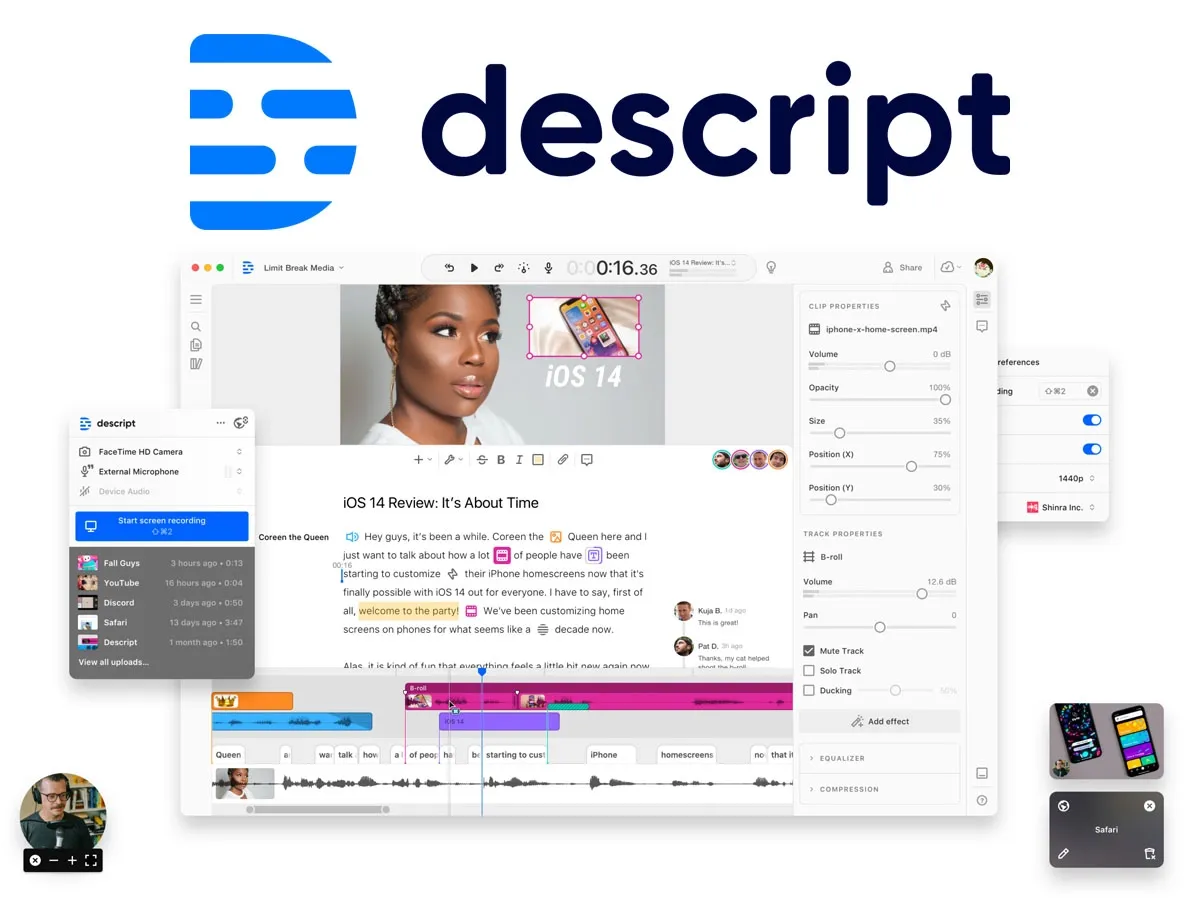
The transcript is the timeline
Descript reframes editing around words. Import a recording and it produces a transcript, deleting a sentence from the transcript deletes it from the video, and copying text moves the matching footage. For anything driven by speech, such as podcasts, interviews, tutorials, and talking head explainers, that single idea removes most of the tedious work.
The AI layer around it does the cleanup that usually eats an afternoon. The Underlord assistant drafts and trims, Studio Sound rescues noisy audio convincingly, filler word removal clears out the ums in one click, and eye contact correction fixes a wandering gaze. It is not built for fast cutting set to music or heavy visual effects, and a timeline purist may find the text first approach limiting on highly visual edits. The 2026 pricing also moved to a system of media minutes and AI credits, so uploading several camera angles or leaning on the heavier AI tools can hit limits mid month on lower tiers. For its core audience, the time saved still makes it one of the highest return tools in the category.
| At a glance | |
| Best for | Podcasts, interviews, tutorials, and talking head video |
| Standout | Edit by deleting and moving text in the transcript |
| Pricing (approx.) | Free tier, then paid from about $16 per month |
| Platforms | Mac, Windows, web |
| Watch-out | Media minutes and AI credits can cap heavier months |
| Editorial score | 4.5 out of 5 |
| Strengths | Where it struggles |
Text first speed. Cutting filler and mistakes is as fast as editing a document. Clean audio. Studio Sound rescues noisy recordings with very few artifacts. Helpful AI layer. Underlord, eye contact correction, and filler removal handle routine cleanup. | Not for heavy VFX. Music driven, highly visual edits are not its strength. Usage limits. Media minutes and AI credits can run out mid month on lower tiers. A new mental model. The text first idea takes adjustment for timeline veterans. |
Best for: speech led video such as podcasts, interviews, tutorials, and screen recordings. Skip if: the work is fast, music driven cutting with heavy visual effects. |
CapCut

The free default
CapCut, owned by ByteDance, is where a large share of the world's short videos are now edited, and the free tier is the reason. By early 2026 it had reportedly crossed roughly 800 million monthly active users. The free plan includes a real multi track timeline, auto captions, background removal, speed ramping, and a deep library of templates and effects across mobile, desktop, and web. For everyday social content, many creators never need to pay.
The catch arrived with the 2025 restructure, which split the paid offering into Standard and Pro and moved a chunk of previously free content behind the paywall, with AI tools metered by credits on top of the subscription. Pricing also varies noticeably by region and by whether the app is bought through an app store or directly. None of that undercuts the core value, but the free plan is narrower than it once was, and the heaviest generative AI use can still trigger top ups.
| At a glance | |
| Best for | Short form, social, and everyday video on any device |
| Standout | A deep free editing toolkit with AI extras |
| Pricing (approx.) | Free, Standard from about $10, Pro higher, varies by region |
| Platforms | Mobile, desktop, web |
| Watch-out | Some once free features now sit behind the paywall |
| Editorial score | 4.5 out of 5 |
| Strengths | Where it struggles |
Generous free tier. Multi track editing, captions, and effects at no cost. Available everywhere. Mobile, desktop, and web share one ecosystem. Fast for social. Templates and auto tools suit short form perfectly. | Shrinking free scope. The 2025 restructure paywalled more content. Credit metering. Heavier AI use can still need top ups. Pricing varies. Cost differs by region and by app store. |
Best for: everyday short form and social video, especially on a tight budget. Skip if: predictable enterprise pricing and deep professional control are the priority. |
HeyGen

Avatars and translation
HeyGen turns a script into a video of a realistic digital presenter, and it does it well enough that the avatars hold up for corporate explainers, training modules, and localized marketing. Its standout is translation. It can take a finished video and re voice it into a long list of languages while matching the speaker's lip movements, which is genuinely difficult to do anywhere else.
The economics need attention. HeyGen competes with platforms like Synthesia runs on credits, and premium avatar generation consumes roughly twenty credits per minute, so an entry plan's allowance covers only a handful of minutes of high end avatar video each month. Custom avatars, faster processing, and extra avatar slots are paid add ons that lift the real monthly cost above the headline price. There is also an ethical dimension worth naming, since realistic avatars and voice cloning carry consent and deepfake considerations that responsible teams should plan around.
| At a glance | |
| Best for | Avatar explainers, training, and multilingual marketing |
| Standout | Realistic avatars plus lip synced video translation |
| Pricing (approx.) | Free tier, then Creator from about $24 per month |
| Platforms | Web, mobile |
| Watch-out | Premium avatar minutes burn credits quickly |
| Editorial score | 4 out of 5 |
| Strengths | Where it struggles |
Avatar realism. Presenters hold up well for corporate and training use. Translation. Lip synced re voicing into many languages is a rare strength. No filming needed. Scripts become finished video without a camera or crew. | Credit ceilings. Premium avatar minutes are limited on entry plans. Add on costs. Faster processing and extra avatars lift the real price. Consent questions. Realistic avatars raise deepfake and consent considerations. |
Best for: spokesperson explainers, training, and localized versions of one core video. Skip if: the plan is high volume faceless short form, where credits run out fast. |
Opus Clip
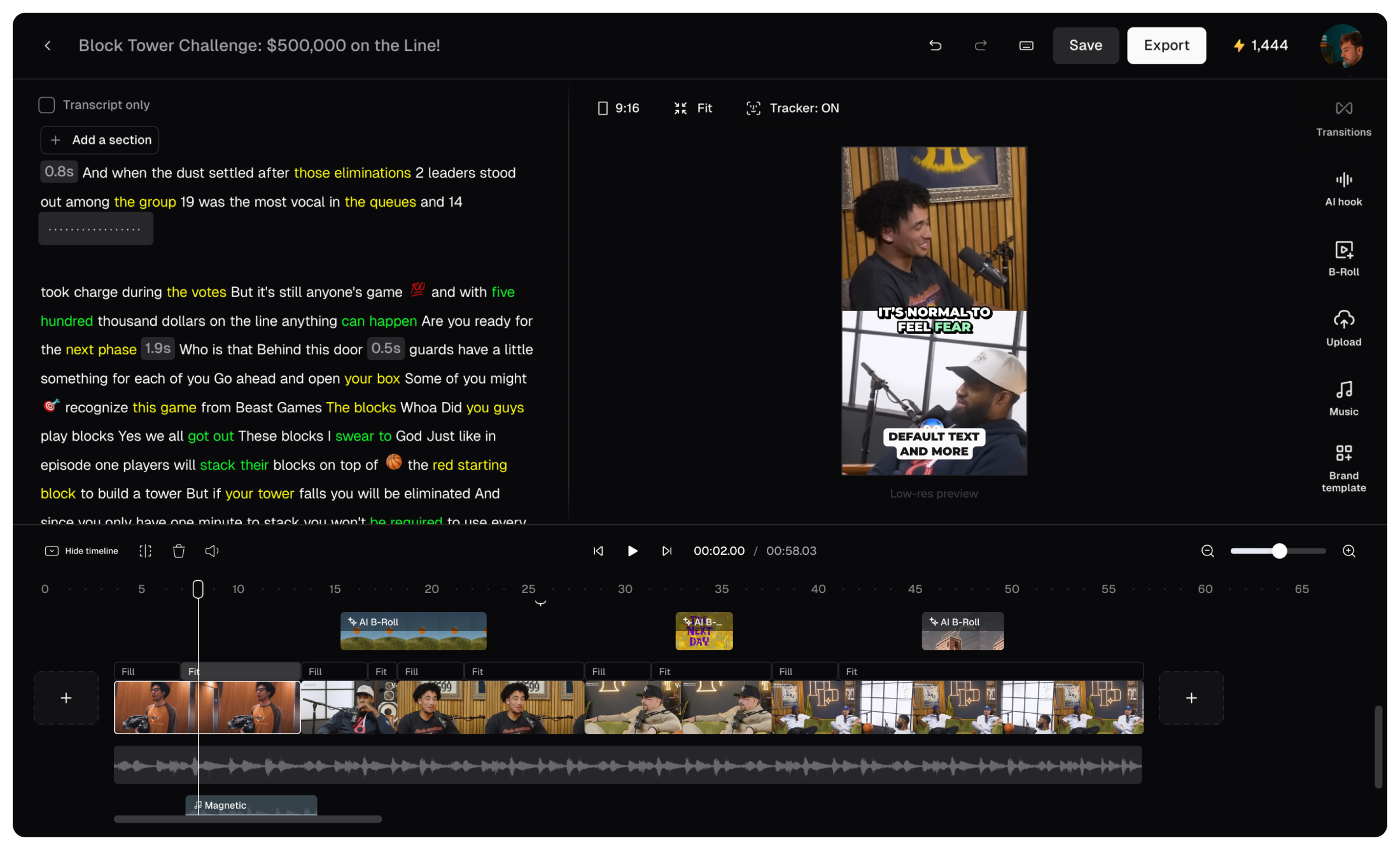
Long video in, short clips out
Opus Clip does one thing with unusual focus. It takes a long recording, such as a podcast, webinar, stream, or YouTube upload, and automatically pulls out the moments most likely to perform as short vertical clips, complete with reframing, captions, and a virality score that flags the strongest cuts. For creators sitting on hours of long form footage, it turns a tedious review job into minutes.
The narrowness is the trade-off. It cannot create original footage and is not a general editor, so it lives alongside other tools rather than replacing them. Pricing is metered by processing minutes, the free tier watermarks exports, and full resolution output plus automatic posting sit on the paid plans. Used for the job it was built for, it earns its place. Asked to do more, it quickly hits its edges.
| At a glance | |
| Best for | Turning long recordings into short vertical clips |
| Standout | Virality scoring that flags the strongest cuts |
| Pricing (approx.) | Free tier, then Starter from about $15 per month |
| Platforms | Web |
| Watch-out | Cannot create footage, metered by processing minutes |
| Editorial score | 4 out of 5 |
| Strengths | Where it struggles |
Saves review time. It surfaces the best moments automatically. Smart formatting. Reframing and captions come built in. Publishing built in. Higher tiers post clips straight to social platforms. | One job only. It repurposes, it does not create or fully edit. Minute metering. Heavy use climbs the pricing tiers quickly. Free limits. The free tier watermarks output and caps resolution. |
Best for: creators sitting on hours of long form footage that needs clipping for social. Skip if: a general editor or original footage is what is actually needed. |
Pippit
Product page to finished ad
Pippit, built by the CapCut team at ByteDance, is aimed squarely at sellers and marketers. Feed it a product URL or a few images and it assembles a marketing video with captions, transitions, music, and even an AI presenter, optimized for TikTok, Reels, and Shorts. For Shopify, Amazon, and TikTok Shop sellers who need volume, the batch tools and store integration are the real appeal.
It is purpose built rather than general, so creators outside e-commerce will find much of it irrelevant, and the paid offering is essentially a single annual tier with a weekly refreshing credit allowance, which leaves little room for light or occasional use. As with every ByteDance product, data and ownership considerations are worth weighing for brand assets. For its target user, though, the speed from product link to publishable ad is hard to beat.
| At a glance | |
| Best for | E-commerce sellers and marketers shipping volume |
| Standout | A product URL becomes a finished marketing video |
| Pricing (approx.) | Free weekly credits, then paid from about $24 per month |
| Platforms | Web |
| Watch-out | Effectively one annual paid tier, e-commerce focused |
| Editorial score | 4 out of 5 |
| Strengths | Where it struggles |
Speed to ad. A product link becomes a polished video in minutes. Built for commerce. Marketplace ready outputs and batch processing. Avatars included. Spokesperson style content without hiring talent. | Narrow audience. Little use outside e-commerce and marketing. Rigid plan. Essentially one annual paid tier with weekly credits. Data questions. ByteDance ownership warrants the usual review. |
Best for: Shopify, Amazon, and TikTok Shop sellers producing marketing video at scale. Skip if: the content is not product or sales focused, or usage is only occasional. |
Adobe Premiere Pro
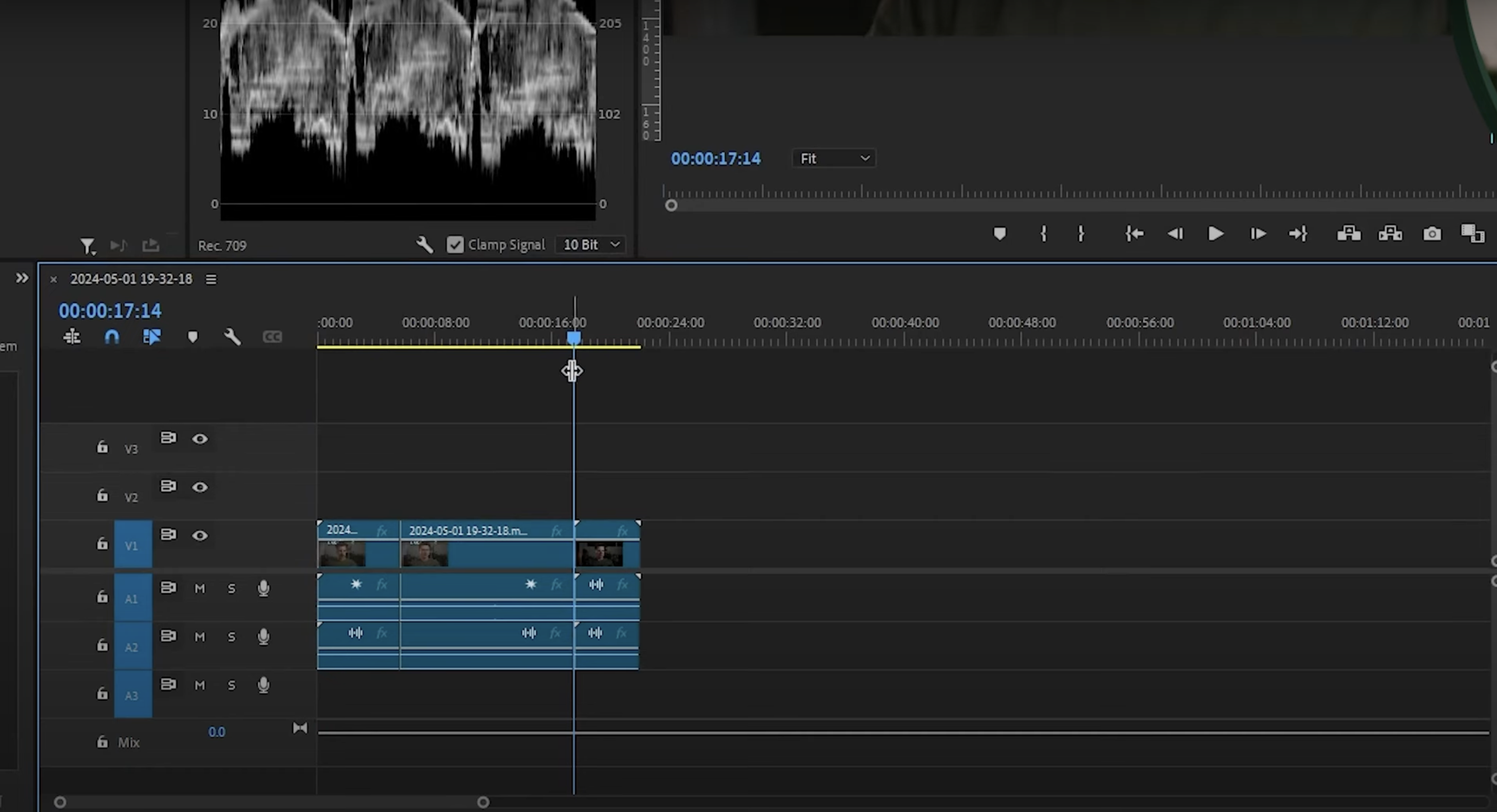
The professional standard, now with AI
Premiere Pro is the opposite of automation first. It is the timeline editor used across film, television, and serious online production, and its AI features are layered onto that control rather than replacing it. The Firefly powered tools are practical rather than flashy. Generative Extend adds a few invented frames to hold a shot or smooth a transition, Enhance Speech cleans dialogue, Media Intelligence searches hours of footage for the right clip in seconds, and caption translation speeds up localization.
Because Firefly is trained on licensed and stock content, Adobe positions its generative output as commercially safer than several rivals. The cost is the learning curve more than the price. Premiere rewards editors who already think in timelines and frustrates anyone hoping to type a prompt and walk away. Premium generative features also draw on Adobe's credit system on top of the subscription. For a professional pipeline, none of that is a dealbreaker. For a creator who only needs quick social clips, it is far more tool than the task requires.
| At a glance | |
| Best for | Professional, frame accurate timeline editing |
| Standout | Firefly AI tools layered on full manual control |
| Pricing (approx.) | Single app from about $23 per month |
| Platforms | Mac, Windows |
| Watch-out | Real learning curve, premium AI draws on credits |
| Editorial score | 4.5 out of 5 |
| Strengths | Where it struggles |
Total control. The frame accurate standard for serious editing. Practical AI. Generative Extend, Enhance Speech, and Media Intelligence speed real work. Safer generation. Firefly trains on licensed content for commercial use. | Learning curve. It rewards editors who already think in timelines. More than many need. Overkill for quick social clips. Credit add ons. Premium generative features draw on Adobe credits. |
Best for: professional, frame accurate editing where AI accelerates rather than leads. Skip if: the need is quick clips and a prompt and walk away workflow. |
How to Choose the Right One
The fastest way to pick is to start from the job, not the brand. A few common situations map cleanly to a tool:
•For podcasters, interviewers, and course creators: Descript handles the whole edit, and Opus Clip turns the long recordings into short clips for distribution.
•For social and short form creators on a budget: CapCut covers most needs for free, with Pippit a strong option when the content is product or sales focused.
•For marketing and e-commerce teams shipping volume: Pippit for product videos and HeyGen for spokesperson style explainers and multilingual versions.
•For generative footage, b-roll, and effects: Runway leads, with the standard advice to draft on cheaper models and finish on the premium one.
•For professional, frame accurate editing: Premiere Pro, with its AI features as accelerators rather than the main event.
One pattern cuts across all of them. The headline price is rarely the real price. Five of the seven meter usage through credits, which means the monthly bill scales with how hard the tool is pushed, and quiet months on non rolling credits are simply wasted budget. Estimating a realistic monthly volume before subscribing matters more here than in most software categories.
Approximate Pricing Compared
On a like for like view of the lowest regular paid entry point, the spread is narrower than the feature differences suggest:
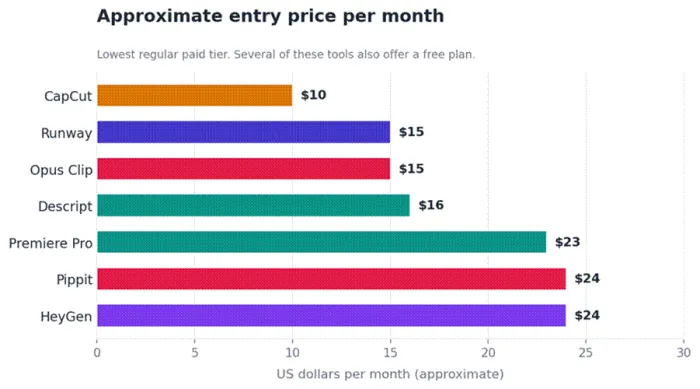
Approximate lowest regular paid monthly price in USD, as of June 2026. Annual billing where offered. Credit add ons, promotions, and regional pricing are not included, and several tools also offer a free tier.
The Verdict
There is no single best AI video editor, because the tools are not really competing for the same job. The useful question is which job needs doing. For editing what already exists, Descript and Premiere Pro anchor the two ends, fast and text driven on one side, precise and professional on the other. For creating something new, Runway sets the bar on quality and Pippit on speed to a finished ad. CapCut remains the sensible free starting point for almost anyone, HeyGen owns the narrow but valuable lane of avatars and translation, and Opus Clip quietly solves the repurposing problem better than tools ten times its scope.
The smartest approach in 2026 is rarely one tool. Most working creators end up pairing a precise editor with a fast generative or repurposing tool, and the budget decision usually comes down to credit math rather than sticker price. Whichever combination fits the work, the figures and limits here are worth re checking before committing, because in this category they move fast.