AI content tools are no longer limited to text generation. A growing category of platforms now promise to automate entire creative workflows including images, voiceovers, sound effects, video generation, and editing.
AutoDraft AI is one of the newer platforms attempting to do exactly that. Instead of focusing on one task, the platform bundles several AI powered tools into a single interface designed mainly for content creators.
At first glance, the idea sounds appealing. A single dashboard where a user can generate scripts, visuals, voiceovers, thumbnails, and even full videos. In theory this could reduce the number of separate tools a creator needs.
The real question is whether AutoDraft AI actually delivers a useful workflow or if it simply bundles a collection of AI features that still require heavy manual work.
This article takes a closer look at how AutoDraft AI works, what features it offers, how its pricing is structured, and what kind of users it is realistically built for.
What AutoDraft AI Actually Is
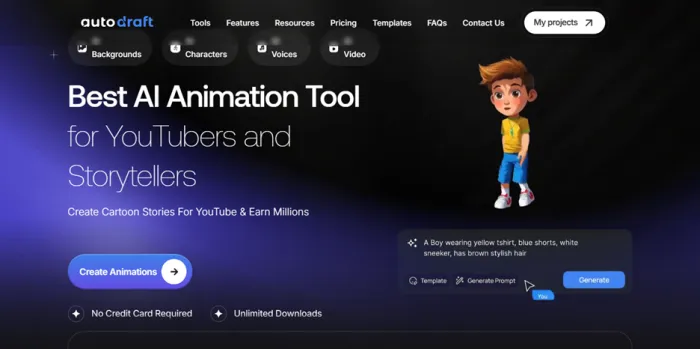
AutoDraft AI is a browser based platform that combines multiple AI generation tools into a single workspace.
Rather than focusing on a single task like writing or video editing, the platform aims to support an entire content creation pipeline.
In practical terms this means a user can generate different assets required for online content such as:
- AI generated characters
- Voiceovers and cloned voices
- Video scenes
- Background music and sound effects
- AI generated images
- Thumbnails for YouTube videos
- Editing and production tools
The idea behind this approach is simple. Many creators currently move between multiple platforms to produce a single video or piece of content. One tool might generate scripts, another might produce images, and a third might handle voice narration.
AutoDraft AI attempts to bring these functions together into one platform.
The Core Tools Inside AutoDraft AI
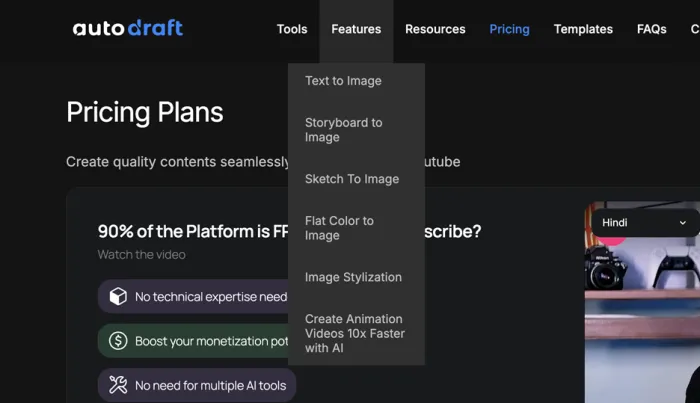
The platform currently focuses on a handful of main features that form the foundation of its workflow.
AI Character Generator
One of the more visible tools in the platform is the AI character generator.
This allows users to create digital characters that can be used in videos, stories, or visual content. These characters can be generated using prompts and customized depending on style or theme.
For content creators producing animated style videos or visual storytelling content, this tool acts as a way to generate recurring characters quickly.
However, like many AI character generators, the quality can vary depending on prompts and design requirements.
AI Voiceover and Voice Cloning
AutoDraft AI also includes voice related tools.
These allow users to:
- Generate voice narration from text
- Clone voices for repeated use
- Create spoken dialogue for videos
Voice tools have become common in AI content platforms, especially for creators producing narrated videos or explainer content.
The main advantage here is speed. A script can be turned into narration without recording audio manually.
Voice cloning also opens the possibility of maintaining a consistent voice across multiple pieces of content.
AI Sound Effects and Background Music
The platform includes a library of copyright free background music along with AI generated sound effects.
These features are designed to help users add audio elements to videos without searching external music libraries.
For YouTube creators or social media editors this can save time during production.
However, most AI music and sound generators still require careful selection to avoid repetitive or generic sounding tracks.
AI Image Generator
AutoDraft AI includes an image generation tool that creates visuals from prompts.
This is useful for:
- Illustrations
- Scene backgrounds
- Concept images
- Video thumbnails
Image generators have become a standard feature across many AI platforms, so this inclusion is expected.
The main advantage here is convenience. Instead of leaving the platform to create images elsewhere, the visuals can be generated directly within the same workflow.
AI Thumbnail Maker
For YouTube creators, thumbnails are often one of the most important elements of a video.
AutoDraft AI includes a thumbnail generator that aims to create visually engaging thumbnail designs automatically.
These thumbnails can combine generated images, text elements, and design templates.
While this feature can save time, creators who rely heavily on distinctive branding may still prefer manual design tools.
AI Video Generator and Editing Tools
Perhaps the most ambitious feature of the platform is the AI video generation system.
Users can combine generated assets such as:
- Characters
- Voice narration
- Images
- Music
- Sound effects
to produce short videos.
The platform also includes editing tools that allow users to adjust scenes, timing, and visuals within the interface.
This positions AutoDraft AI somewhere between a creative tool and a lightweight video production system.
Pricing Structure
AutoDraft AI currently offers two primary subscription plans.
Base Plan
Price: $10 per month
The base tier includes:
- 1000 credits per month
- Feedback on uploaded YouTube videos
- Unlimited 4K cloud downloads
- AI character generator
- Premium assets
- AI voiceover
- AI sound effects
- AI voice cloning
- Copyright free BGM library
- AI video generator
- AI editing tools
- AI image generator
The only feature not included in this tier is the thumbnail generator.
Pro Plan
Price: $39 per month
The Pro plan increases the monthly credit limit and adds additional capabilities.
Features include:
- 4000 credits per month
- Feedback on uploaded YouTube videos
- Unlimited 4K cloud downloads
- AI character generator
- Premium assets
- AI voiceover
- AI sound effects
- AI voice cloning
- Copyright free BGM library
- AI thumbnail maker
- AI video generator
- AI editing tools
- AI image generator
The primary differences between the plans are the credit allowance and access to the thumbnail generator.
What the Credit System Means
Credits are used to power different AI actions inside the platform.
Each time a user generates an image, voice clip, or video asset, a certain number of credits are consumed.
The exact cost varies depending on the type of generation.
This model is fairly common among AI platforms because generating media such as images or voice requires significant computing resources.
For users producing content regularly, the number of credits available per month will determine how often the tool can realistically be used.
Who AutoDraft AI Appears to Be Built For
Based on its feature set, AutoDraft AI is clearly targeting creators who produce online content regularly.
This includes:
- YouTubers
- Social media creators
- digital storytellers
- short form video creators
- marketing teams creating video content
The platform attempts to simplify the process of generating multiple assets needed for online videos.
For example, a creator could theoretically:
- Generate characters
- Write or import a script
- create voice narration
- generate background visuals
- assemble the video
- add music and sound effects
All within a single interface.
Whether this actually replaces specialized tools depends heavily on how advanced the creator's workflow is.
Potential Strengths of AutoDraft AI
Several aspects of the platform may appeal to certain users.
First, the combination of multiple AI tools in one place reduces the need to jump between different websites.
Second, the inclusion of voice, image, and video generation creates a fairly complete toolkit for content production.
Third, the entry level price is relatively low compared to many AI video platforms.
For casual creators or those experimenting with AI content creation, this lower barrier to entry could be appealing.
Possible Limitations
Like many AI content platforms, AutoDraft AI also faces some potential limitations.
AI generated content often requires significant editing to feel polished or unique.
Creators who rely heavily on custom branding or advanced editing may still need traditional tools such as video editing software.
Another limitation comes from the credit system. Heavy content producers may quickly consume monthly credits, which could require upgrading plans or waiting for the next billing cycle.
Finally, the success of an all in one platform often depends on how strong each individual feature is. If one part of the workflow feels underpowered, users may still need external tools.
Final Verdict
AutoDraft AI represents a growing trend in AI software.
Instead of focusing on one specialized function, platforms are beginning to bundle multiple AI tools into a single content creation environment.
For creators who want an experimental AI toolkit that can generate characters, visuals, voiceovers, and videos in one place, AutoDraft AI could be an interesting option.
However, like most all in one AI tools, its usefulness will likely depend on how polished each individual feature becomes over time.
For now, AutoDraft AI seems best suited for creators exploring AI assisted content production rather than professionals looking to replace advanced editing software.
Overall rating: 7.3 / 10
Good concept with a wide range of features, but the real value depends on how well the individual tools perform in real world creative workflows.