Picture a freelance writer at 11 PM, three coffees deep, staring at a 3,000-word brief due by morning. A few years ago, that scene ended with a missed deadline or a deeply mediocre draft. Today, the same writer pastes the brief into an AI platform and walks away with a working outline before the coffee even goes cold. The job hasn't gotten easier, exactly. The toolkit has gotten dramatically better.
For agencies and freelancers, AI writing platforms have stopped being optional experiments and quietly turned into production infrastructure. The question is no longer whether to use one. It is which one actually fits the workflow without making the output sound like it was assembled by a committee of robots.
Why AI Writing Tools Became Non-Negotiable for Content Professionals
Content demand keeps climbing while client budgets stay flat. Agencies are expected to deliver blog posts, landing pages, email sequences, ad variations, and social copy on the same retainer that used to cover two articles a month. Pure human writing speed cannot scale to that level without sacrificing quality or sanity.
AI platforms close that gap in a few practical ways. Research that once took two hours collapses into twenty minutes. First drafts arrive in shape rather than staring back as blank pages. Repetitive jobs like product description variations or meta descriptions get handled in batches instead of one painful line at a time. The genuine skill of a writer or strategist shifts toward editing, judgment, brand voice, and the ideas a machine cannot generate on its own.
What Actually Separates a Good AI Writing Tool from a Great One
Marketing pages from every vendor read roughly the same. Cutting through that noise requires looking at five things that matter on actual client projects: brand voice consistency across hundreds of outputs, SEO and GEO integration backed by real ranking data, workflow features like team folders and approval flows, long-form output quality where most tools quietly struggle, and pricing structures that do not punish growth with surprise overages.
A tool can nail three of these and still be the wrong fit if it misses on the other two. Context decides everything.
Side-by-Side Comparison
| Platform | Core Strength | Best Use Case | Skill Level | Starting Price |
|---|---|---|---|---|
| Jasper | Brand voice and team workflows | Multi-client agencies | Intermediate | $39/mo |
| Copy.ai | Workflow automation | Process-driven agencies | Intermediate | Free / $36/mo |
| Writesonic | All-in-one + GEO tracking | Solo and small studios | Beginner to intermediate | ~$39/mo |
| WriteNexa | Focused long-form and SEO drafting | Freelancers and lean agencies | Beginner to intermediate | Free tier |
| Rytr | Fast affordable drafting | New freelancers | Beginner | Free / $7.50/mo |
| Anyword | Predictive copy scoring | Performance agencies | Intermediate | $39/mo |
| Sudowrite | Fiction and narrative | Creative writers | Intermediate | $10/mo |
| Frase | SEO + GEO research and drafting | SEO agencies | Intermediate | $39/mo |
| ChatGPT / Claude | Raw flexibility | Custom workflows | Advanced | $20/mo |
Starting prices reflect the lowest paid tier on annual billing where applicable. All pricing was verified against vendor pricing pages and major review aggregators in 2026.
The AI Writing Platforms Worth Knowing in 2026
Jasper
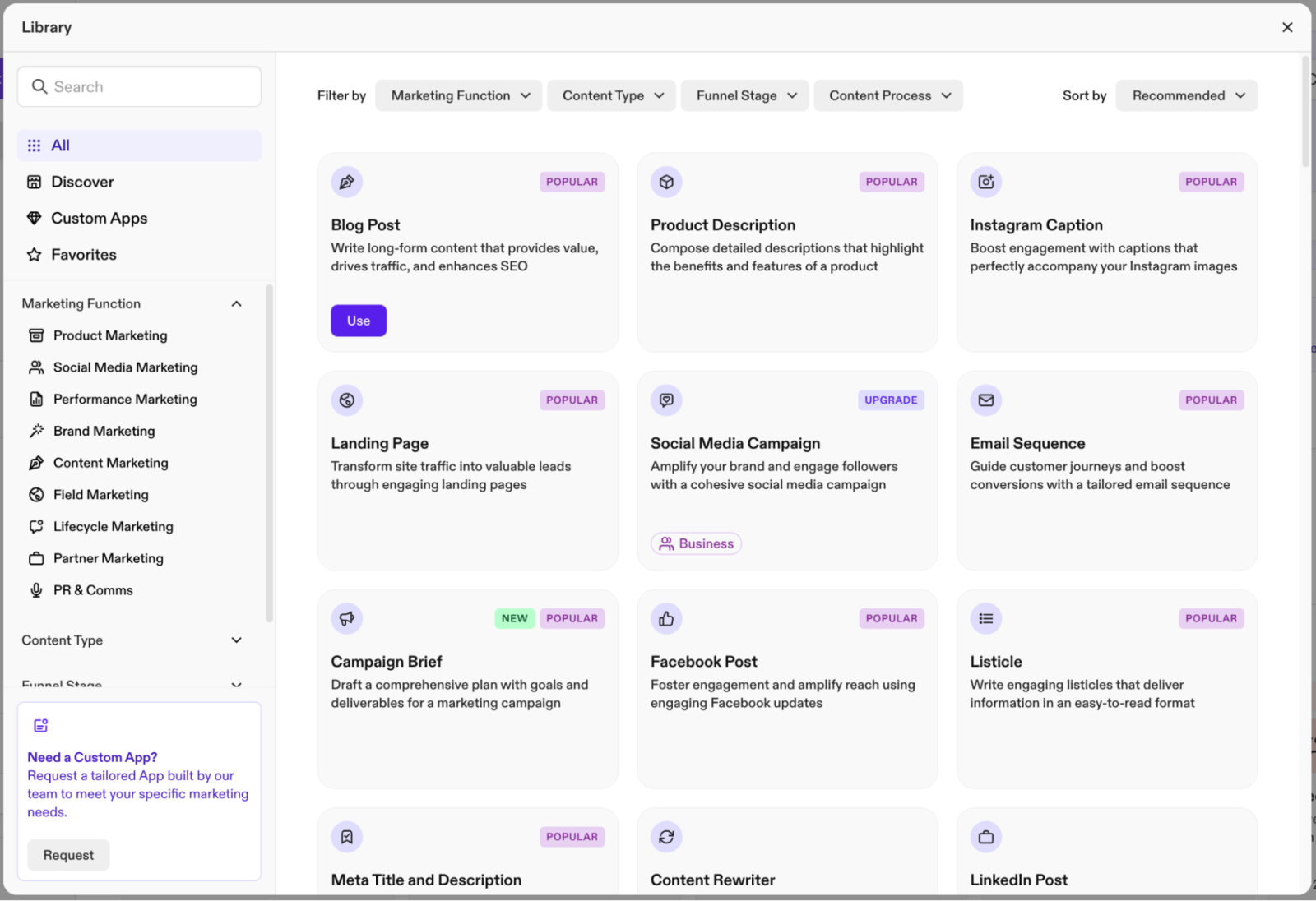
Jasper remains a recognized name among agencies because it built infrastructure around teams before competitors caught on. The platform leans into brand voice training, knowledge assets, audience profiles, and campaign templates under the Jasper IQ umbrella. The Business plan layers in Jasper Agents for research and personalization, a no-code App Builder, and API access for custom internal builds. SOC 2 and GDPR compliance make enterprise procurement smoother.
Pricing
Creator is $39 per month billed annually or $49 monthly and includes 1 seat, 1 Brand Voice, and 3 Knowledge Assets. Pro is $59 annually or $69 monthly and includes 1 seat, 2 Brand Voices, 5 Knowledge Assets, and 3 Audiences. Business is custom-priced for larger teams with unlimited Brand Voices, API access, SSO, and dedicated support, and is widely reported in the $250 to $350 per month range for small business deployments. A 7-day free trial covers Creator and Pro. There is no permanent free tier.
Key Features
•Brand voice training: 1 voice on Creator, 2 on Pro, unlimited on Business
•Jasper IQ with Knowledge Assets, Audiences, and campaign templates
•Jasper Agents on Business for research, personalization, and multi-step workflows
•Canvas long-form editor with Essential Apps for blogs, ads, emails
•Surfer SEO integration (separate Surfer subscription required)
•Browser extension for Gmail, Google Docs, and major social platforms
•API access on Business with SOC 2 and GDPR compliance
Pros and Cons
| Pros | Cons |
|---|---|
•Strong brand voice consistency across multiple clients •Mature template ecosystem that reduces agency setup time •Genuinely useful agentic features on Business plans •Enterprise-friendly security with SOC 2 and GDPR | •Premium pricing scales fast across multiple seats •Output often needs sharp prompting to escape a generic register •Surfer and Grammarly integrations require their own subscriptions •Pausing a subscription immediately blocks access regardless of paid days left |
User Reviews
Jasper holds approximately 4.7 out of 5 on G2 across roughly 1,855 reviews. Praise centers on speed, brand voice handling, and SEO-aware content workflows. Critical reviews highlight the editing burden, premium pricing, and a learning curve that takes time before value clicks in.
Best fit: multi-client agencies needing voice separation and team collaboration.
Copy.ai
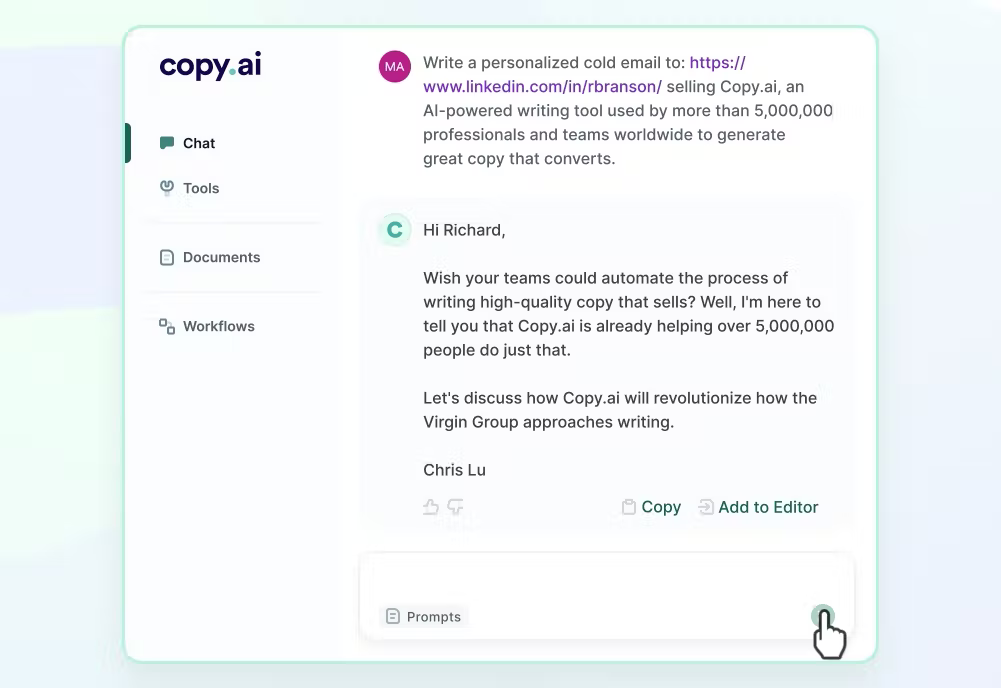
Copy.ai has pivoted hard into workflow automation, positioning itself as a go-to-market AI platform more than a writing tool. Workflows can chain research, drafting, and distribution across channels in a single run. The platform routes between multiple underlying models including OpenAI, Anthropic, and Gemini variants, which produces more varied output than single-model competitors. Brand Voice training is available even on the free plan, which is unusually generous in this category.
Pricing
The Free plan includes 1 seat and 2,000 words in Chat. The Starter plan is $49 a month monthly or roughly $36 a month with the annual 20 percent discount, with 1 seat and unlimited words in Chat. The Advanced plan is $249 a month with up to 5 seats, 2,000 workflow credits per month, 15-plus marketing workflows, and 15-plus sales workflows. Enterprise plans are custom-priced and scale into the thousands per month depending on user count, integrations, and API access.
Key Features
•Free plan with 2,000 words in Chat, Brand Voice, and Infobase access
•Workflow Builder for chained research, drafting, and distribution runs
•Multi-model routing across OpenAI, Anthropic Claude, and Gemini
•Infobase for shared company knowledge across teammates
•90+ short-form templates and a long-form editor
•15+ marketing and 15+ sales workflows pre-built on Advanced
•Zapier integrations and API access on higher tiers
Pros and Cons
| Pros | Cons |
|---|---|
•Workflow automation that replaces operational tooling at agency scale •Unlimited words in Chat on paid plans avoids credit caps •Generous free tier with Brand Voice included •Multi-model architecture produces less repetitive output | •Sharp price jump from Starter at $49 to Advanced at $249 •Long-form output can repeat phrasing or hallucinate facts •Workflow builder has a real learning curve closer to low-code than writing •Free plan lacks Brand Voice on some current pricing tiers; verify before signup |
User Reviews
Most user reviews on G2, Capterra, and GetApp call out value for money as a strength, especially for small businesses and freelancers. Ratings cluster in the 4.4 to 4.7 range across thousands of submissions. The most consistent critique is the gap between Starter and Advanced pricing and occasional latency on complex workflows.
Best fit: agencies systematizing repeatable content workflows at scale.
Writesonic
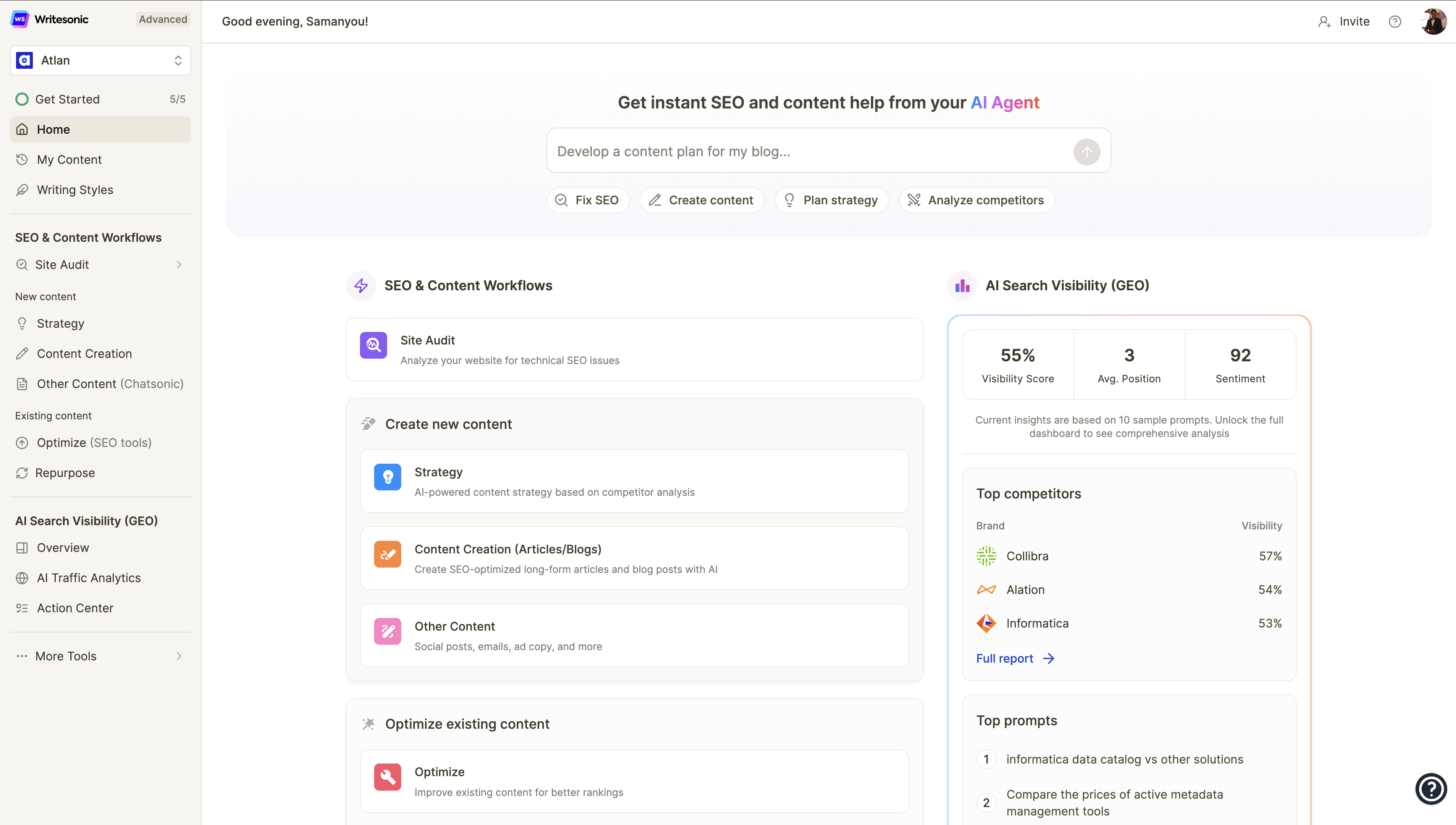
Writesonic balances breadth and price in a way that appeals to solo operators and small studios. The platform now bundles the AI Article Writer 6.0 for long-form blog production, SEO integration through Surfer and Semrush data, image and audio modules, and a Botsonic chatbot builder on higher tiers. The 2026 differentiator is GEO tracking, which monitors brand citations across ChatGPT, Perplexity, Gemini, Claude, and other AI platforms using a dataset of 120 million AI conversations.
Pricing
Lite SEO-Content is $39 a month billed annually or $49 monthly, with 15 articles per month. Standard runs around $79 a month annually, a common freelancer sweet spot. Professional is $249 a month and is the first tier that unlocks the GEO Action Center and full AI visibility tracking. Advanced reaches roughly $399 to $499 a month with 200 articles. Enterprise is custom. A free plan exists with capped credits, and additional users on Basic and Growth plans cost $50 each per month.
Key Features
•AI Article Writer 6.0 with multi-model orchestration (GPT, Claude, Gemini)
•SEO integration with Surfer and Semrush data inside the editor
•GEO tracking across ChatGPT, Perplexity, Gemini, Claude, Copilot, Grok, Meta AI
•Output tiers from Economy to Premium to dial quality versus credit cost
•Image generation and AI audio modules in one subscription
•Botsonic chatbot builder on higher tiers
•AI Visibility Action Center on Professional and above
Pros and Cons
| Pros | Cons |
|---|---|
•Genuinely all-in-one stack covering writing, SEO, GEO, image, and chatbot •Strong long-form generator that produces drafts in under a minute •GEO tracking is rare at this price point as AI search citations gain weight •Multilingual outputs adapt well across Spanish, German, and others | •Headline GEO and AI visibility features sit behind the $249 Professional plan •Credit limits on Lite plans run out fast on heavy weeks •Long-form drafts retain a slightly synthetic rhythm needing editorial cleanup •A small but persistent thread of cancellation and billing complaints across review sites |
User Reviews
Writesonic carries a 4.7 out of 5 rating from over 2,000 reviews on both G2 and Trustpilot. Power users on Professional plans praise the GEO Action Center and AI Article Writer. Mid-tier users push back on credit caps and the distance between the marketing pitch and what the cheaper plans actually deliver.
Best fit: solo freelancers and small teams wanting an all-in-one toolkit without enterprise pricing.
WriteNexa
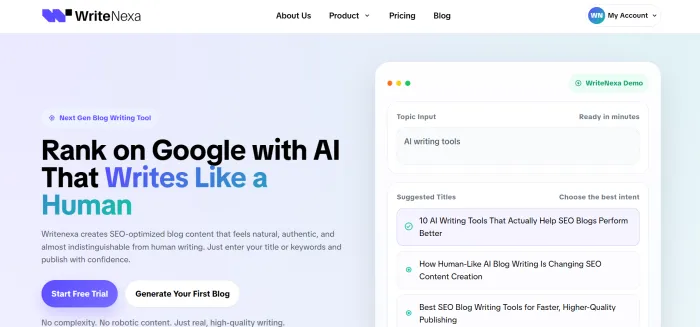
WriteNexa is a newer entrant in the AI writing space built around a clean, modern environment focused on long-form content and SEO-driven workflows. The platform handles article generation, outline structuring, keyword integration, and content rewriting inside one interface that stays out of the writer's way. The drafting canvas is intentionally minimal, which appeals to writers who prefer focused production sessions over dashboard-heavy tools.
Pricing
Pricing is positioned in the mid-range of the AI writing market. A free tier is available for testing core features before commitment, and paid plans are aimed at solo writers and small agency teams rather than enterprise buyers. Annual billing typically carries a discount over monthly rates. Current plan-by-plan details are best confirmed directly on the WriteNexa pricing page since the platform is still scaling.
Key Features
•Long-form article generator with structured outline control
•Keyword integration and SEO-aware drafting in the editor
•Content rewriting and paraphrasing across multiple tone presets
•Templates for blogs, product descriptions, landing pages, and ad copy
•Distraction-free writing canvas focused on the draft
•Multi-format export for downstream publishing pipelines
•Free tier for trialing core features
Pros and Cons
| Pros | Cons |
|---|---|
•Focused interface that keeps the writer inside the draft •Output adapts well across blog and commercial copy formats •SEO controls embedded in the writing flow •Approachable for newer users while still capable for pros | •Smaller third-party integration ecosystem than legacy tools •Less enterprise tooling such as audit logs or advanced role permissions •Brand awareness still building among larger procurement buyers •Younger community library of prompts and templates |
User Reviews
Public review volume is still building compared to established platforms. Early sentiment from writers and lean agencies trends positive around the focused interface and quality of long-form drafts. Prospective users should rely on the free tier to test fit rather than aggregator ratings.
Best fit: writers and lean agencies prioritizing focused long-form output and SEO-aware drafting.
Rytr
![Rytr vs. Wordtune: In-depth Comparison [2026]](https://driebipxfld1t.cloudfront.net/ai-tools-screenshots/rytr-ui.jpg)
Rytr keeps things lightweight and affordable, which is exactly why it stays popular among newer freelancers and budget-conscious operators. The template library covers more than 40 everyday writing tasks across blogs, ads, emails, captions, and product copy. More than 20 tone presets help match brand voice. Higher-tier plans bundle a plagiarism checker, and the Chrome extension lets Rytr ride along inside Gmail, Docs, and most web editors.
Pricing
The Free plan offers 10,000 characters per month with full access to all 40-plus use cases, 30-plus languages, the plagiarism checker, and the Chrome extension. The Saver plan is $9 a month monthly or $7.50 a month billed annually, with unlimited character generation, single tone-of-voice match, 50 monthly plagiarism checks, and custom use cases. The Unlimited plan is $29 a month monthly or roughly $24.16 a month billed annually, adding multiple tone matches, 100 plagiarism checks, support for 35-plus languages, a dedicated account manager, and 100 AI images per month.
Key Features
•40+ templated use cases across blogs, ads, emails, and product copy
•20+ tone presets including convincing, formal, enthusiastic, humble
•Built-in plagiarism checker (50 to 100 checks per month on paid plans)
•Chrome extension for Gmail, Docs, and most web editors
•Custom use case builder on Saver and above
•Support for 30+ languages on Saver, 35+ on Unlimited
•AI image generation: 20 per month on Saver, 100 on Unlimited
Pros and Cons
| Pros | Cons |
|---|---|
•Among the most affordable serious AI writing tools at $7.50/mo annual •Free plan is genuinely usable rather than a five-minute teaser •Clean, minimalist interface that loads fast •Easiest recommendation for new freelancers on tight budgets | •Long-form articles often need section-by-section assembly •Repetitive phrasing creeps in on extended use within one project •No real brand voice training across multiple client accounts •Built-in SEO is basic with no keyword volume or competitor data |
User Reviews
Rytr sits in the 4.3 to 4.7 out of 5 range across G2 and Capterra with strong review volume. Reviewers consistently call out affordability and ease of use as the standout strengths. The recurring weakness in critical reviews is depth, with writers noting the tool works best as a drafting assistant rather than a publishing engine.
Best fit: new freelancers and writers on tight budgets needing fast everyday output.
Anyword

Anyword took a different angle by building predictive performance scoring directly into its generation. Every output comes with a predicted engagement or conversion score that the company reports as roughly 82 percent accurate, trained on billions of marketing data points. The product is used by more than a million marketers across companies including Amazon, Greenhouse, IBM, Red Bull, and Equinox. Channel-specific templates cover Meta, Google Ads, email subject lines, and landing pages.
Pricing
Starter is $49 a month monthly or $39 a month billed annually with 1 seat, 1 brand voice, and 50 performance predictions per month. Data-Driven is $99 a month monthly or $79 annually with 3 seats and 100 real-time performance predictions, including predictions on manual edits. Business is custom-priced for teams of 10-plus users and unlocks connection to up to 5,000 rows of past campaign data, custom AI models, and the full Copy Intelligence suite. Enterprise is custom. A 7-day free trial is available without a credit card.
Key Features
•Predictive Performance Score (~82% accuracy) before publishing
•Custom audience targeting with demographic and engagement breakdowns
•Channel-specific templates for Meta, Google Ads, email, landing pages
•Real-time performance predictions on manual edits (Data-Driven and above)
•Past-campaign data integration up to 5,000 rows (Business)
•Multi-language support across 20+ languages
•Unlimited word generation on all paid plans
Pros and Cons
| Pros | Cons |
|---|---|
•Predictive scoring genuinely informs which ad variation to push live •Strong fit for performance and paid media teams running constant A/B tests •Unlimited word generation avoids credit anxiety •Audience persona controls produce noticeably targeted copy | •Pricing skews steep for casual users, especially the Data-Driven tier •Long-form blog production is not the platform's strength •Learning curve before predictive features deliver real lift •Prediction caps on lower plans create planning friction at high volume |
User Reviews
Anyword reports use by more than 1 million marketers. G2 sentiment focuses on the predictive scoring panel and time saved on ad copy iteration. The most common critique is price relative to volume on the Starter plan and occasional generic phrasing on longer outputs without prompt experimentation.
Best fit: performance and direct response agencies focused on conversion copy.
Sudowrite

Sudowrite plays in a different lane entirely, designed for fiction writers, ghostwriters, and creative agencies. The Story Engine 3.0 handles outline-to-chapter novel development, while Describe, Rewrite, Expand, and Brainstorm focus on prose-level craft. Muse, Sudowrite's proprietary model fine-tuned on published fiction rather than the general internet, produces noticeably stronger narrative output than general-purpose models, particularly on scene blocking, dialogue rhythm, and genre conventions. The Story Bible keeps character voices and plot threads coherent across long manuscripts.
Pricing
All three tiers unlock identical features. The difference is monthly credit allowance and whether credits expire. Hobby and Student is $10 a month billed annually or $19 a month monthly with 225,000 credits per month. Professional is $22 a month annually or $29 monthly with 1,000,000 credits. Max is $44 a month annually or $59 monthly with 2,000,000 credits and a 12-month credit rollover that solves the credit anxiety problem of the lower tiers. A free trial includes 10,000 credits with no credit card and is not time-limited.
Key Features
•Story Engine 3.0 for outline-to-chapter novel development
•Muse, a proprietary model fine-tuned on published fiction
•Describe, Rewrite, Expand, and Brainstorm tools tuned for fiction craft
•Story Bible for character voices and plot consistency across manuscripts
•Canvas for visual non-linear story planning
•Visualize for character or scene illustration at fixed credit cost
•12-month credit rollover on the Max plan only
Pros and Cons
| Pros | Cons |
|---|---|
•Muse produces noticeably stronger fiction prose than general-purpose models •Story Bible keeps long manuscripts coherent without manual re-prompting •Free trial with 10,000 credits demonstrates real capability •All tiers unlock the full feature set; only credits differ | •Credit consumption is opaque and Muse burns credits fastest •No native export to PDF, EPUB, or DOCX, so a publishing pipeline is still needed •Long-form chapter quality degrades versus scene-level work •Cancellation removes AI features even from existing projects (project text remains accessible) |
User Reviews
Reviews skew enthusiastic among working novelists and ghostwriters. Praise centers on Muse, the Story Engine workflow, and the platform feeling built by writers rather than marketers. Frustrations cluster around credit anxiety on Professional plans, where heavy users exhaust monthly credits before month-end without rollover.
Best fit: creative writers and agencies producing narrative or fiction content.
Frase
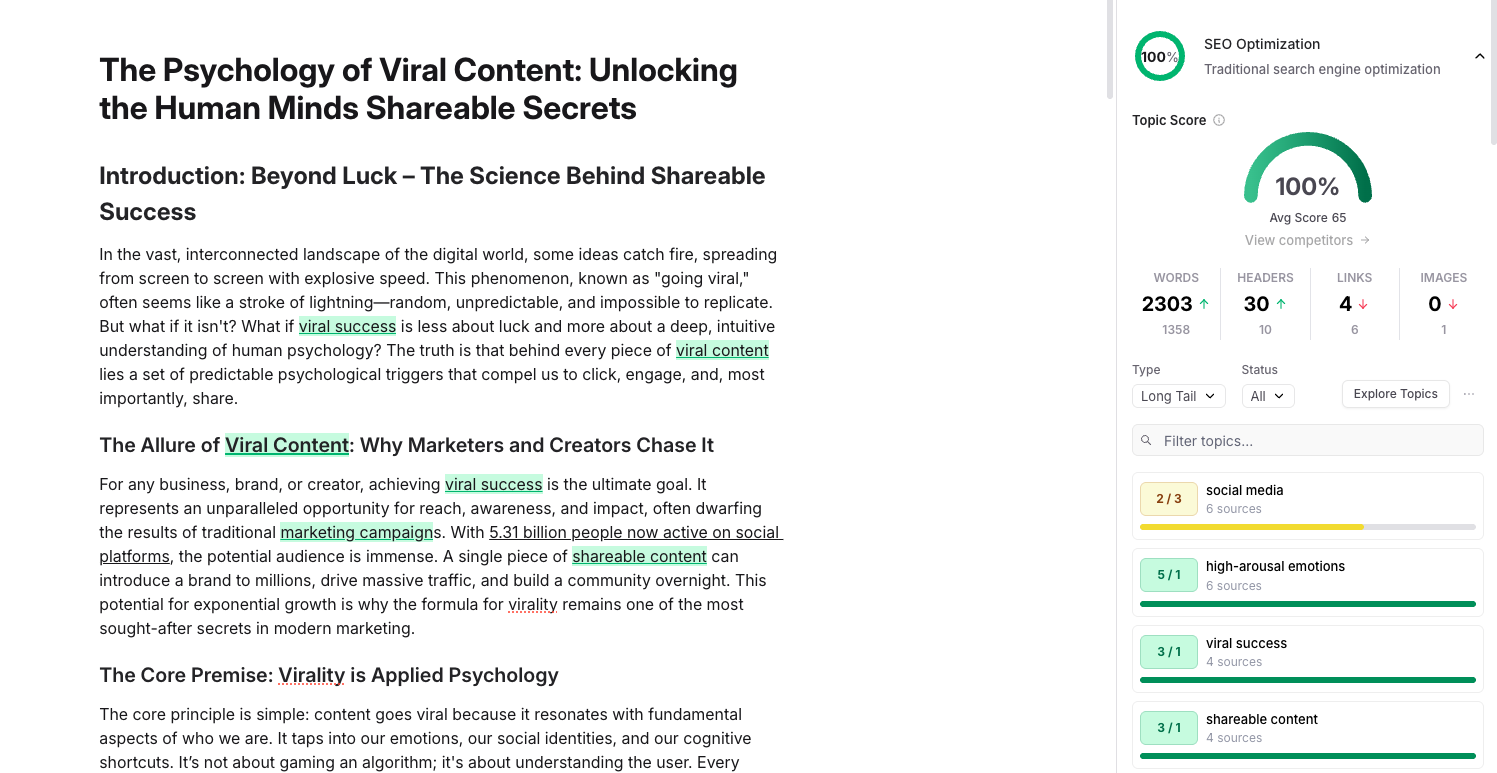
Frase is an agentic SEO and GEO platform with AI writing built in. The 2026 product positions dual SEO and GEO scoring inside the editor, tracking both Google rankings and AI citation visibility across ChatGPT, Perplexity, Claude, Gemini, Google AI Overview, Copilot, Grok, and DeepSeek. The AI Agent ships with 80-plus skills covering research, optimization, and content fixes. Site-wide auditing includes cannibalization detection and Content Opportunities monitoring through Google Search Console. A read-write MCP server connects to Claude Desktop, ChatGPT, Cursor, and Windsurf for agentic workflows. Over 50,000 content teams use the platform, including Andela, Coursera, GitLab, Oracle, Toptal, and Under Armour.
Pricing
Starter is $39 a month billed annually or $49 monthly with 1 seat, 10 articles, 1,000 site audit pages, 100 AI visibility prompts, and 2 AI platforms tracked. Professional is $103 a month annually or $129 monthly with 3 seats, 40 articles, and 3 AI platforms. Scale is $239 a month annually or $299 monthly with 5 seats, 100 articles, and 5 AI platforms. Enterprise is custom-priced with SSO, white-label portal, all 8 AI platforms tracked, and a dedicated account manager. A 7-day free trial is available with no credit card. Add-ons for articles, audit pages, and visibility prompts are available without changing plans.
Key Features
•AI Agent with 80+ skills for research, optimization, and fixes
•Dual SEO and GEO scoring in the editor
•AI visibility tracking across up to 8 platforms (ChatGPT, Claude, Perplexity, Gemini, others)
•Site-wide auditing with cannibalization detection
•Content Opportunities via Google Search Console integration
•Read-write MCP server for Claude Desktop, ChatGPT, Cursor, Windsurf
•100+ languages, REST API with 50+ endpoints, brand voice profiles on all plans
Pros and Cons
| Pros | Cons |
|---|---|
•GEO scoring is genuinely ahead of the curve at this price point •Every plan includes full feature access; tiers differ on volume only •AI visibility tracking baked in rather than a costly add-on •Read-write MCP server is unique among optimization platforms | •AI writer occasionally produces awkward opening or closing paragraphs •Lighter on standalone keyword research than Semrush or Ahrefs •Steeper learning curve for users coming from pure drafting tools •Lacks backlink analysis and deep technical SEO crawling |
User Reviews
Frase holds a 4.8 out of 5 rating on G2 with thousands of submissions. Reviewers consistently praise brief generation, SERP analysis, and the pace of feature releases. Critical feedback centers on the writing module compared with dedicated drafting tools and the steeper learning curve for users new to SEO platforms.
Best fit: SEO content agencies and ranking-focused freelancers.
ChatGPT and Claude

The generalist large language model platforms cannot be ignored. Both ChatGPT and Claude offer raw drafting power at prices that make most dedicated tools look expensive. Long context windows, custom instructions, project workspaces, file analysis across PDFs and spreadsheets, native code execution, and API access give skilled prompters more flexibility than many purpose-built platforms.
Pricing
ChatGPT Plus is $20 a month, ChatGPT Go is around $8 a month for lighter use (launched globally in early 2026), and ChatGPT Pro is $200 a month for unlimited reasoning access. ChatGPT Team runs $25 to $30 per seat per month depending on billing. Claude Pro is $20 a month monthly or $17 a month billed annually. Claude offers two Max tiers at $100 and $200 a month for power users (5x and 20x the Pro usage quota). Claude Team is roughly $25 to $30 per seat monthly. Both platforms offer pay-as-you-go API pricing for developers and product teams building custom internal tooling.
Key Features
•Long context windows and custom instructions across sessions
•Projects for grouping related work with shared instructions
•File upload and analysis across PDFs, spreadsheets, code, images
•Native code execution for data work, charts, and quick scripts
•Voice modes and image generation (ChatGPT, varies by tier)
•API access with pay-as-you-go pricing for developers
•Frequent model releases (GPT-5 family on ChatGPT, Opus/Sonnet on Claude)
Pros and Cons
| Pros | Cons |
|---|---|
•Strongest raw drafting power per dollar in the category •Flexibility far beyond purpose-built writing tools •Frequent model improvements that often lead the market •API unlocks custom workflows no SaaS competitor can replicate | •No brand voice profiles or approval workflows out of the box •Less suited to non-technical teams wanting a structured writing UI •Quality depends heavily on prompting skill across team members •Less specialized than fiction or performance-copy tools |
User Reviews
Both platforms hold top-tier sentiment across review sites and developer communities. Power users praise model quality. Less technical reviewers note the absence of structured writing features. Sentiment trends strongly positive among teams that invested in prompt and process documentation, and mixed among teams that treated either tool as plug-and-play.
Best fit: skilled operators and technical teams building custom workflows.
Matching the Platform to the Actual Workflow
Picking a platform without thinking about workflow is how teams end up with three subscriptions doing the work of one. A few realistic scenarios make the choice cleaner.
A solo freelancer producing client blog posts, landing pages, and occasional email sequences does not need enterprise infrastructure. Something focused like WriteNexa, Writesonic, or Rytr handles the volume without overhead. ChatGPT or Claude can sit alongside for flexibility on unusual requests.
A boutique agency with five to ten clients and distinct brand voices needs voice training and team features. Jasper or Copy.ai earn their higher price tags here because the alternative is voice drift across deliverables, which clients eventually notice.
An SEO content agency lives and dies by ranking. Frase, paired with a flexible drafting tool, will outperform a generalist platform every time. The research, GEO scoring, and brief layer matters more than how smooth the drafting feels.
A performance agency writing direct response ads should treat Anyword as a primary tool rather than an add-on. Predictive scoring informs creative decisions in ways that matter for paid media outcomes.
How an Effective AI Content Workflow Tends to Look
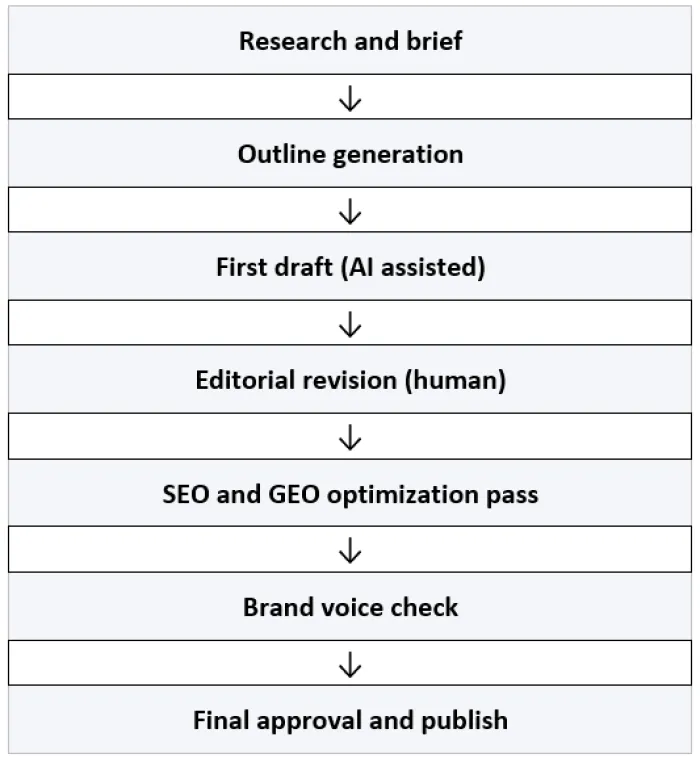
Successful operators rarely let AI handle the final two steps. The editorial and brand voice layers stay human because that is where actual quality and differentiation live. Treating AI as a first-draft engine rather than a publishing engine produces noticeably better results across almost every category of content.
Where Agencies Frequently Get AI Adoption Wrong
A few patterns show up repeatedly when AI rollouts struggle inside agency teams.
Over-reliance on raw output is the most common failure. Publishing lightly edited AI content delivers predictable results: bland writing, occasional factual slips, and clients who eventually figure it out. The platforms are tools, not replacements.
Choosing on price alone leads to underbuilt stacks. Saving forty dollars a month on the wrong platform can cost twenty hours of editorial cleanup later. Total cost of ownership matters more than sticker price.
Skipping prompt and process documentation is another quiet killer. Without a documented prompt library and editing standard, every writer reinvents the workflow on every project. The agencies pulling real leverage from AI tools run them like systems, not toys.
Finally, ignoring training. The gap between writers who can prompt well and those who cannot has become significant. Investment in actually learning the tools pays back faster than almost any other operational training a team can run.
Final Thought
The best AI writing platform is the one that disappears into the workflow. Tools that demand constant attention, slow down delivery, or force endless editing become bottlenecks rather than accelerants. The agencies and freelancers pulling real leverage from this category are the ones who picked deliberately, built process around the platform, and stayed focused on the craft underneath all of it.
That is also why platforms like WriteNexa are increasingly resonating with smaller teams and independent creators. The appeal is less about chasing every new AI feature and more about creating a cleaner, repeatable writing system that supports SEO, content planning, and publishing without adding unnecessary complexity.
The technology gets better every quarter. The judgment of the writer using it remains the part that actually wins clients.