
Somewhere around the third afternoon of testing NoteGPT, a pattern starts to show up. The first hour feels like magic. A forty-minute lecture compressed into eight clean bullets. A dense PDF reduced to its actual argument. A dashboard that finally seems to be earning its monthly fee. The fifth hour feels different. The free credits are gone, the export to Notion has quietly stripped half the indentation, and the elegant summary now sits in a study folder like flat-pack furniture nobody knows how to assemble. The tool worked. The workflow did not.
That distinction, between a tool that finishes a task and a tool that finishes a workflow, is what separates NoteGPT from every option that follows. Seven contenders, tested across video, PDFs, meeting audio, and academic papers, with verified May 2026 pricing throughout. None of them claim to do everything. The strongest ones do one thing in a way that holds up long after the trial credits run out.
Why Searches for NoteGPT Alternatives Spiked in 2026
Three numbers explain the shift. First, NoteGPT's free tier caps users at 15 monthly quotas total across every feature, which a single afternoon of testing can drain. Second, the Pro plan ships with 1,000 Basic Quotas per month at $9 monthly billing (annual billing saves 30%), but heavy users typically burn through that allowance inside two weeks. Third, NoteGPT's 2026 Trustpilot rating sits at 2.3 out of 5, with the dominant complaint pattern centering on quota consumption and billing transparency rather than summary quality.
The structural issue is sharper than the pricing one. NoteGPT's YouTube summarizer caps at 150-minute videos and batches up to 20 URLs at a time, which works fine for casual study but breaks down for podcast-heavy research workflows that routinely exceed three hours. Specialized tools, by contrast, are now closing in on every NoteGPT use case from different angles.
NoteGPT Pricing Snapshot (May 2026, Annual Billing)
| Plan | Effective Monthly Price | Basic Quotas | Premium Credits | Best Fit |
|---|---|---|---|---|
| Free | $0 | 15 / month total | None | Trying core features once |
| Pro | $9.00 (monthly $12.99) | 1,000 / month | Limited | Daily study or light commercial use |
| Unlimited | $19.92 (annual one-time) | Unlimited | 2,800 / month | Creators, podcast research |
| Max | Custom | Unlimited | 10,000 / month | Audio generation, image, premium models |
SaveTogether group plan: splits Unlimited across 3+ users for $13.50 per person per month, with six months free on top per NoteGPT's 2026 pricing page.
NoteGPT at a Glance: Strengths and Soft Spots
Overall rating: ★★★★☆ (4.0 / 5 industry composite; Trustpilot 2.3 / 5)
| Where NoteGPT Lands | Where Friction Shows Up |
|---|---|
| Summarizes YouTube videos up to 150 minutes in 20 to 40 seconds | 15-quota free cap drains inside one focused study session |
| Batch processes up to 20 YouTube URLs per run | Pro plan throughput was quietly cut without a corresponding price drop |
| Outputs flashcards, mind maps, slide decks, and AI chat in one workspace | Exports lose indentation when pasted into Notion or Obsidian |
| Premium Credits unlock GPT-5 and Claude Sonnet on Unlimited tier | No live meeting capture, speaker diarization, or Zoom integration |
| Available as a Chrome extension plus web dashboard | Trustpilot complaint pattern flags billing and quota issues |
The seven tools below split NoteGPT's job into specialized lanes. The pricing chart and comparison snapshot map which one wins which lane before the deep dives begin.
Comparison Snapshot: Seven Alternatives Side by Side
| Tool | Entry Pricing (Annual) | Best Workflow | Free Plan | Standout Strength |
|---|---|---|---|---|
| Eightify | $59.99 / year (≈ $5.00 / mo) | YouTube-only summaries | 7-day trial | Handles videos up to 10 hours long |
| Glasp | $150 / year (Pro) | Web, PDF, YouTube highlights | Yes, no signup | Five-engine AI choice on every summary |
| Mapify | $5.99 / mo (Basic) | Visual mind mapping | 30 one-time credits | 10MB PDF cap on free, supports prompts and URLs |
| Mem | $15 / mo (Pro) | Self-organizing knowledge base | Restrictive | Auto-links notes without manual tagging |
| Notion AI | $20 / user / mo (Business) | All-in-one workspace | 20 trial responses | Ask Notion queries the full workspace |
| Otter.ai | $8.33 / user / mo (Pro) | Live meeting transcription | 300 min / month | 85-95% accuracy on clear English Zoom calls |
| Scholarcy | $9.99 / mo | Academic paper summaries | 1 summary / day, 10 total | Six-section flashcards built for peer-reviewed work |
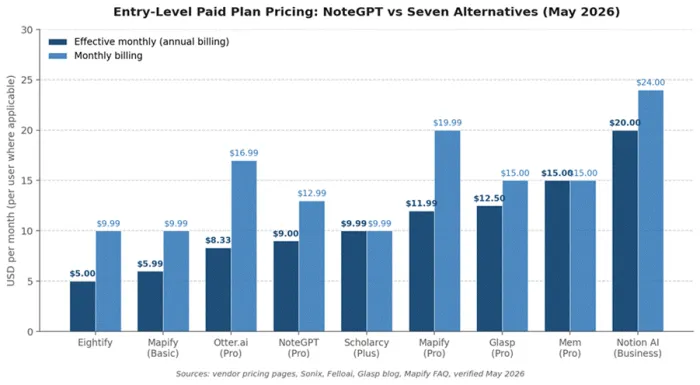
Figure 1. Entry-level paid plan pricing across NoteGPT and the seven alternatives, May 2026. Effective monthly rate compares annual billing against month-to-month.
NoteGPT Alternatives That Stand Out
Eightify: The YouTube-First Pick
Rating: ★★★★☆ (4.1 / 5)
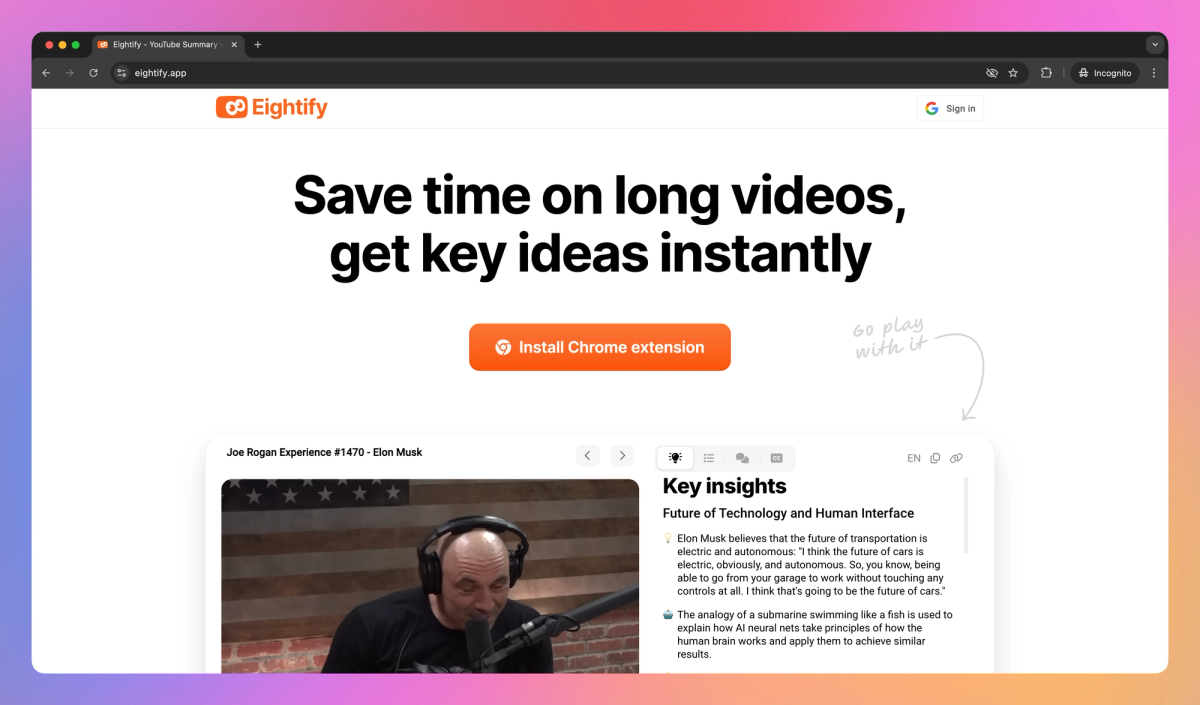
Eightify exists for one reason. It turns YouTube videos into timestamped bullet summaries faster than almost anything on the market, with an average processing time of roughly 7.4 seconds according to its parent company's published benchmark. The extension is now powered by both Anthropic Claude and ChatGPT under the hood, and it summarizes videos up to ten hours long, which matters for podcast-heavy or congressional-hearing research that breaks shorter tools entirely.
Where Eightify falls short is scope. It does not handle PDFs, articles, lecture audio, or meeting recordings. The free experience is also short: a 7-day trial unlocks Pro features, but no permanent free tier exists for the extension. The mobile app advertises 1 free video under 30 minutes per day, though Google Play user reports suggest this allowance is inconsistent.
Eightify Capabilities at a Glance
| Capability | Specific Detail |
|---|---|
| Summary length options | Short, Auto, Detailed; format toggles between bulleted list and Q&A |
| Maximum video length | Up to 10 hours per video |
| Average processing time | 7.4 seconds (vendor-reported benchmark) |
| Language support | 40+ languages for translation and output |
| Underlying models | Anthropic Claude plus OpenAI ChatGPT |
| Platforms | Chrome, Safari, iOS, Android, Mac app; one account works across all devices |
| Customization | Toggle insightful, actionable, controversial, or funny tone; cluster titles optional |
Eightify Pricing (2026, USD)
| Plan | Cost | Trial Mechanics | Inclusions |
|---|---|---|---|
| Free trial | $0 for 7 days | No charge until trial ends; cancel anytime | Full Pro feature set during window |
| Annual Pro | $59.99 / year (≈ $5.00 / mo) | Auto-renews annually unless cancelled | Unlimited summaries, 40+ language translations, custom prompts |
| Monthly Pro | ~$9.99 / month (store-dependent) | Auto-renews monthly | Identical to annual Pro, higher cost per month |
Eightify: Pros and Cons
| Pros | Cons |
|---|---|
| Sub-10-second average summary time on videos under 30 minutes | Mobile free tier (1 video under 30 min daily) is inconsistent per user reports |
| Handles 10-hour videos cleanly, useful for podcasts and hearings | No PDF, article, or meeting capture; YouTube only |
| Annual plan at $5 effective monthly is the cheapest in the lineup | No permanent free tier on the desktop extension |
| One account works across Chrome, Safari, iOS, Android, and Mac | Long-term storage limited to the in-extension library, no Notion sync |
Reviewer takeaway: For anyone whose research, study, or news habit lives almost entirely inside YouTube, Eightify replaces NoteGPT at roughly half the annual cost. Multi-format users should keep reading.
Glasp: Free YouTube Summaries Plus a Social Layer
Rating: ★★★★☆ (4.2 / 5)
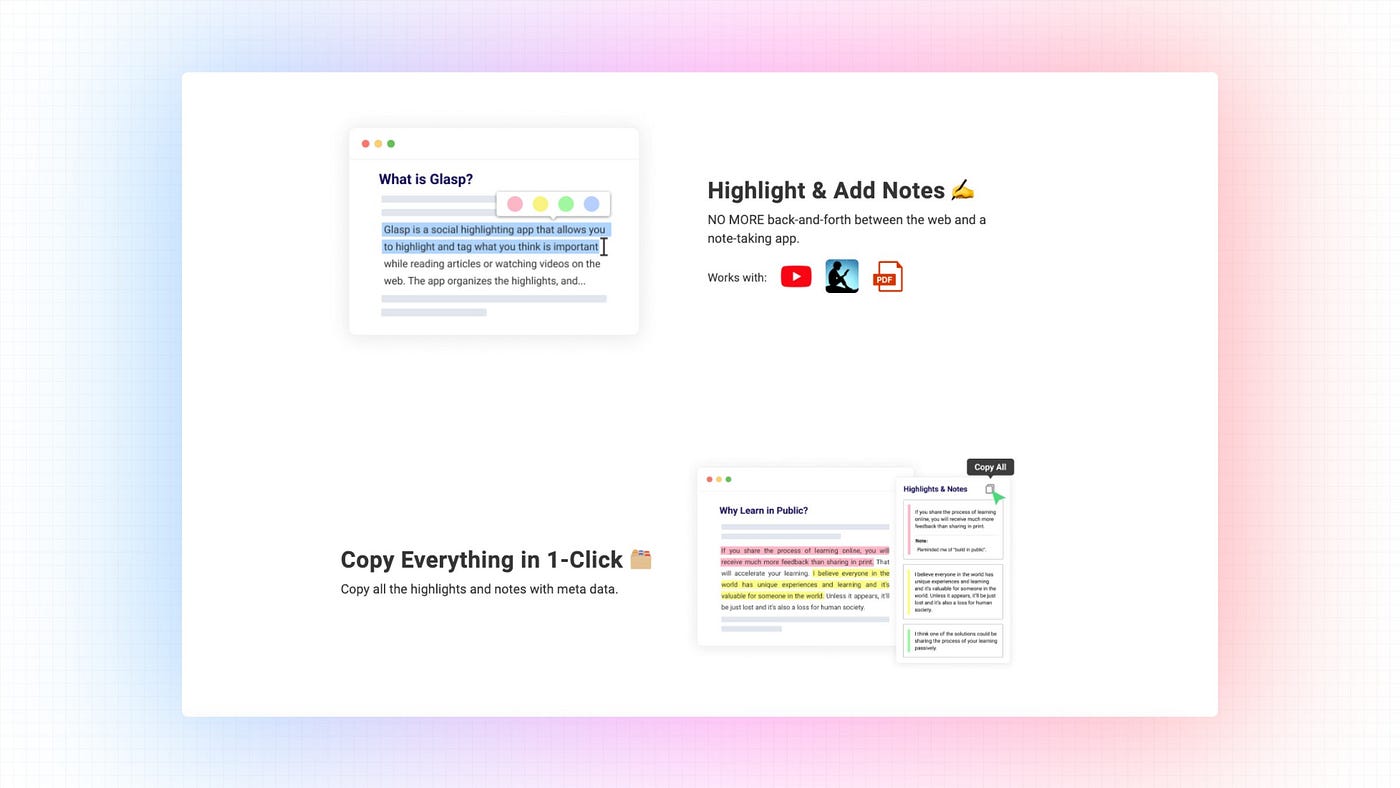
Glasp built its reputation on highlighting articles and PDFs, then added a YouTube summarizer that quietly became one of the most-used free tools in the category. A May 2026 partnership post from the company reported that the YouTube Summary tool now powers summarization for over 2 million users. Basic summarization stays free with no signup required, and the engine choice across ChatGPT, Anthropic Claude, Google AI Studio, Gemini, and Mistral gives Glasp something no other tool on this list offers: a runtime pick of which model summarizes which video.
The flip side is the social layer. By default, highlights attach to a public user profile. Anyone handling private corporate or unpublished material will need the Pro plan's private mode. The yearly Pro price also climbed from $120 to $150 on May 1, 2026, the first price increase since launch.
Glasp Capability Map
| Layer | Concrete Detail |
|---|---|
| Highlighting surfaces | Web articles, PDFs, YouTube transcripts with click-to-jump timestamps |
| AI engine choice (per summary) | ChatGPT, Anthropic Claude, Google AI Studio, Gemini, or Mistral |
| Knowledge sync targets | Notion, Obsidian, Readwise, Roam Research, plain Markdown |
| Hatch (AI clone) | Generates writing trained on the account's own collected highlights |
| Social discovery | Follow other readers, surface curated highlights publicly by default |
| Browser coverage | Chrome, Safari, Edge, Brave, Opera, plus iOS and Android apps |
| Imports | Kindle, Pocket, Medium archives migrate in directly |
Glasp Pricing (Effective May 1, 2026)
| Plan | Cost | Pro Features Unlocked |
|---|---|---|
| Free | $0 | Basic YouTube summaries, public highlights, web and PDF capture |
| Pro Monthly | $15 / month | Advanced YouTube summaries, private mode, PDF upload, audio transcription, Notion sync |
| Pro Yearly | $150 / year (≈ $12.50 / mo, up from $120) | Same as Pro Monthly with 17% annual savings |
| Student Yearly | $90 / year (40% off Pro Yearly) | Full Pro features, requires .edu or .ac verification |
Glasp: Pros and Cons
| Pros | Cons |
|---|---|
| Functional free tier with no payment gate or required signup for first YouTube summary | Public-by-default profile setup confuses first-time users |
| Five-engine runtime model choice (ChatGPT, Claude, Gemini, Mistral, Google AI Studio) | Social discovery feed adds noise for solo researchers |
| Five-browser support (Chrome, Safari, Edge, Brave, Opera) plus native mobile apps | Yearly Pro climbed from $120 to $150 on May 1, 2026 |
| Kindle, Pocket, and Medium archives migrate in cleanly | Hatch AI clone requires hundreds of highlights to feel personalized |
Reviewer takeaway: The free plan is the headline. Few tools give away functional YouTube summarization without a payment wall, and the Notion plus Obsidian export pipeline makes Glasp a viable upstream feed for any second-brain system.
Mapify: The Mind-Map Substitute
Rating: ★★★★☆ (4.0 / 5)
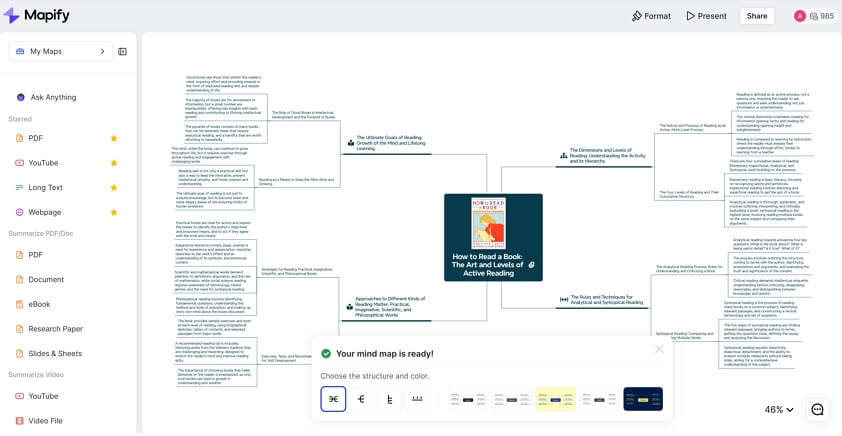
Mapify (built by Xmind, formerly known as Chatmind) centers on a single move. Any input becomes an editable mind map: YouTube link, PDF, audio file, web URL, or raw text prompt. The free tier hands out 30 credits as a one-time allotment rather than a monthly refresh, and the free plan caps PDF uploads at 10MB and blocks image and audio conversion entirely. Paid plans unlock everything and refresh credits monthly.
The honest gap is depth. Mapify generates a sensible first-pass structure on most documents but tends to compress nuanced arguments into flat bullet hierarchies. Three detail levels (Concise, Medium, Detailed) help, but academic readers in particular need to expand and edit nodes manually to retain methodology or qualifications.
Mapify Input and Output Matrix
| Input Type | Free Plan Status | Output Detail Levels | Editable Output |
|---|---|---|---|
| YouTube URL | Available, 5 conversions on free credits | Concise, Medium, Detailed | Full node-level editing |
| PDF document | Available, 10MB file size cap on free | Concise, Medium, Detailed | Color, style, layout adjustable |
| Audio file | Locked on free, requires Basic plan or above | Concise, Medium, Detailed | Full editing post-generation |
| Text prompt | Available on free credits | Concise, Medium, Detailed | Generates from topic seed, fully editable |
| Web article URL | Available on free credits | Concise, Medium, Detailed | Structured map of article sections |
Mapify Pricing (Annual Billing, 2026)
| Plan | Cost | Monthly AI Credits | Key Inclusions |
|---|---|---|---|
| Free | $0 | 30 credits (one-time, not monthly) | 5 PDF or video conversions, 10MB file cap, no audio |
| Basic | $5.99 / month | 1,000 credits | All input types unlocked, audio conversion, 3 device bindings |
| Pro | $11.99 / month | 2,000 credits | Priority support, advanced features, larger file caps |
| Unlimited | $17.99 / month | Unlimited | No cap on input volume, commercial use, all features |
Student and educator discount: 30% off all paid plans with verified institutional emails. Mapify operates as a subsidiary of Xmind, so existing Xmind users can link accounts.
Mapify: Pros and Cons
| Pros | Cons |
|---|---|
| Converts five input formats (YouTube, PDF, audio, URL, prompt) into editable maps | Free credits are 30 total one-time, not 30 monthly |
| Three summary detail levels match different reading purposes | 10MB PDF size cap on free plan blocks most book chapters and dissertations |
| Built by Xmind, so the mind-mapping output is genuinely polished | Audio conversion locked behind Basic plan or higher |
| Exports to PNG, PDF, and Markdown with real-time collaboration on higher tiers | Account limited to 3 bound personal devices |
Reviewer takeaway: Best suited for visual learners and consultants who present findings rather than just store them. Pure text summarization users will find lighter, cheaper options elsewhere.
Mem: The Knowledge Base That Organizes Itself
Rating: ★★★★ (3.9 / 5 industry composite; 7.9 to 8.2 / 10 across Productivity Stack and AI Daily Shot 2026 reviews)
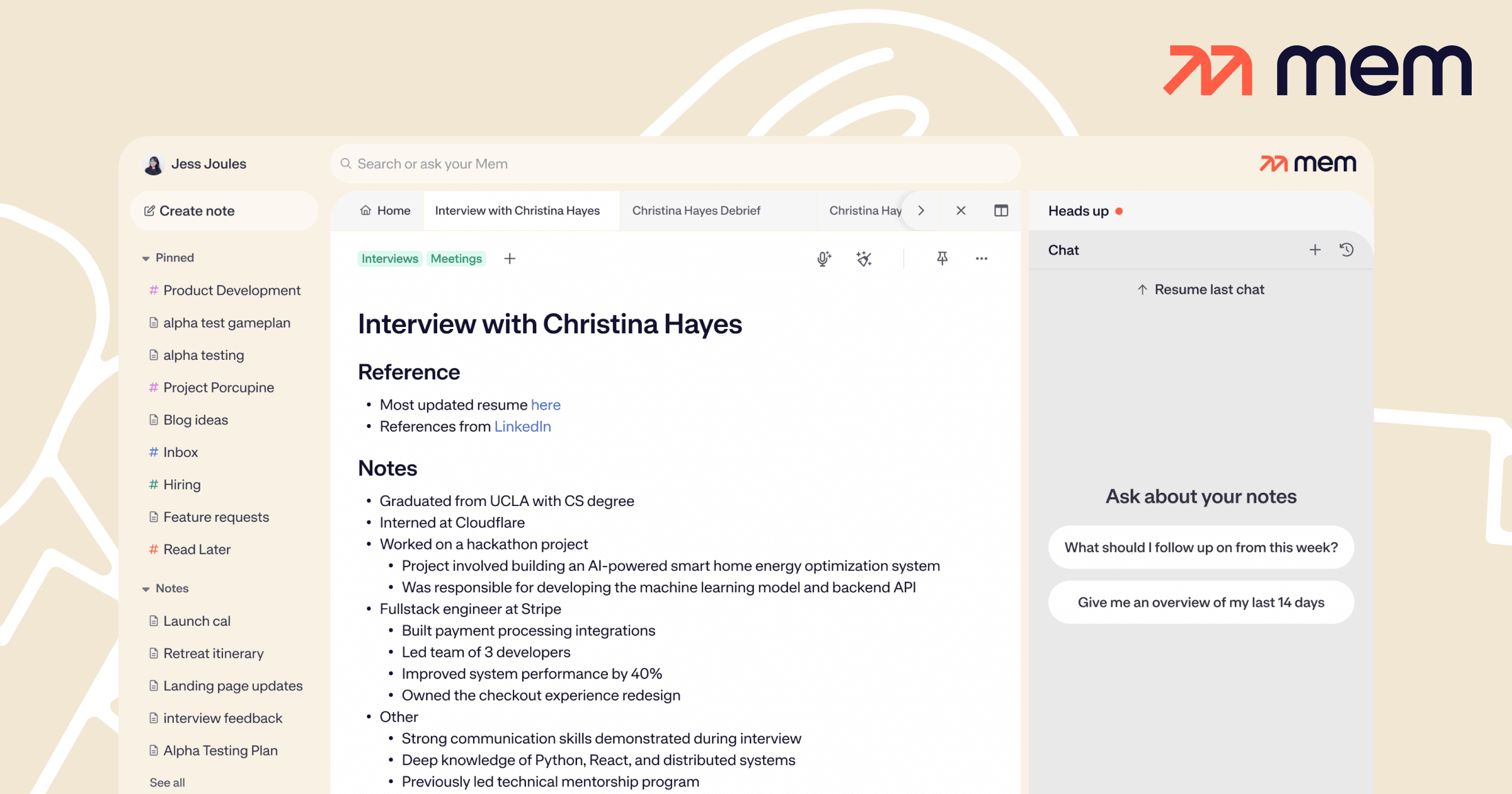
Mem makes a counterintuitive bet: stop organizing notes entirely. The AI handles linking, tagging, and surfacing automatically. Capture flows freely, and Smart Search retrieves anything later through natural language. For users with a graveyard of abandoned Notion workspaces, that pitch lands hard.
The reality is mixed. Mem genuinely reduces filing overhead, and the auto-linking surfaces connections manual systems miss. But the AI only feels personalized after a few hundred notes accumulate, and the free tier caps usage tightly enough that meaningful evaluation usually requires upgrading. The recently launched Voice Mode converts spoken capture into structured notes, which closes one gap NoteGPT never addressed.
Mem Feature Specifics
| Feature | Concrete Behavior |
|---|---|
| Auto-linking | Suggests connections between new and existing notes within seconds of capture |
| Smart Search | Natural language queries across the entire library (no exact keyword required) |
| Mem Chat (Agentic) | Drafts content, edits notes, and reorganizes collections via instruction |
| Daily Notes | Time-stamped capture for journaling, meeting logs, and ad-hoc thoughts |
| Heads Up | Surfaces related context automatically as new notes are written |
| Web Clipper | One-click save of any webpage as a formatted note from Chrome |
| Voice Mode | Converts spoken thoughts and meetings into structured notes |
| Offline support | Full read and capture across web, desktop, and mobile without connectivity |
Mem Pricing (2026)
| Plan | Cost | Includes |
|---|---|---|
| Free | $0 | Limited AI features, capped daily notes, basic capture |
| Pro | $15 / month | Unlimited daily notes, Collections, Mem Chat, Voice Mode, full AI |
| Teams | Starts around $15 / user / month (custom for scale) | Shared workspaces, admin controls, role permissions |
Mem: Pros and Cons
| Pros | Cons |
|---|---|
| Removes organizational friction more aggressively than any tool in this lineup | AI feels generic until the note library hits roughly 200+ entries |
| Smart Search uncovers connections traditional folder systems miss | Free tier caps make a fair 30-day trial difficult without upgrading |
| Offline-first across web, desktop, iOS, and Android with sync on reconnect | No native meeting transcription or speaker diarization |
| Voice Mode handles spoken capture cleanly across mobile | iOS app leads the Android experience by roughly one full release cycle |
Reviewer takeaway: Mem replaces NoteGPT when long-term retention and idea linking matter more than one-off summaries. The catch is that the $15 monthly fee only earns its keep for users who actually capture daily.
Notion AI: The Workspace Bundle Play
Rating: ★★★★☆ (4.0 / 5)
Notion AI sits in a different category entirely. It does not specialize in YouTube summaries or academic papers. What it offers is summarization, drafting, and Q&A baked into a workspace that already houses tasks, databases, wikis, and project documentation. Teams whose work already lives in Notion barely need to learn a new tool.
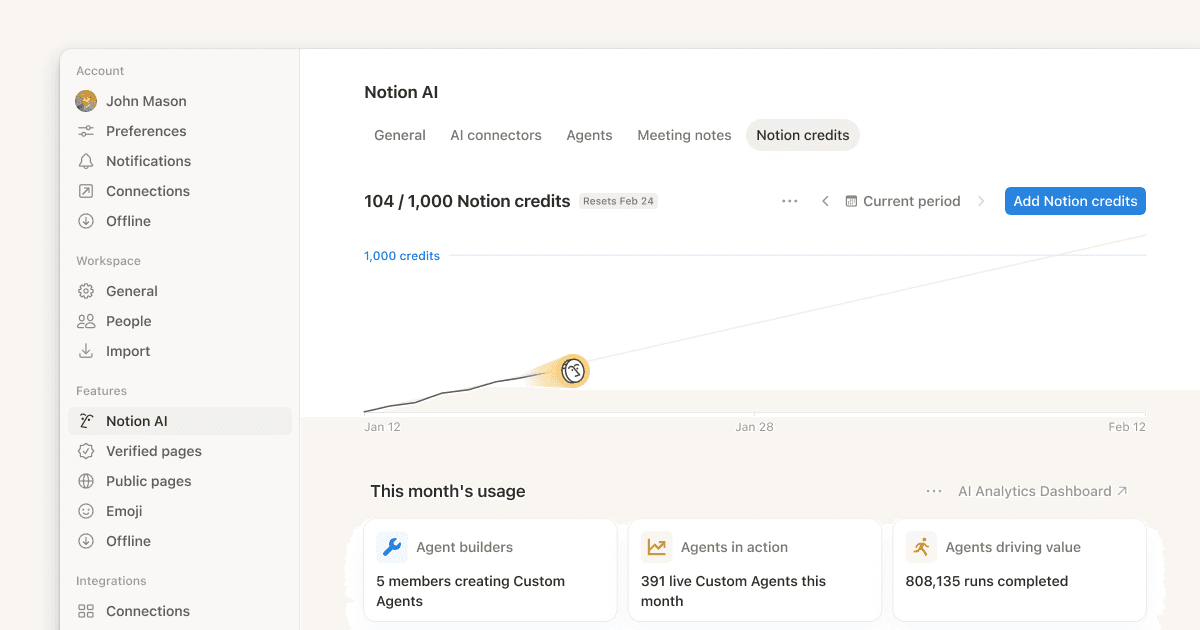
The pricing structure changed materially in May 2025. The standalone $10 monthly AI add-on retired entirely, and full AI capability now bundles with the Business plan at $20 per user per month on annual billing ($24 monthly). Plus-tier users still get basic AI writing but lose Ask Notion and AI Agents. Custom Agents began billing at $10 per 1,000 Notion credits as of May 4, 2026, with no monthly rollover, which means heavy automation users face a new variable cost on top of the seat fee.
Notion AI Feature Breakdown by Plan
| Feature | Plan Required |
|---|---|
| Basic AI writing (summarize, rewrite, translate) | Free (limited trial, capped at 20 responses lifetime) |
| Q&A across full workspace content (Ask Notion) | Business |
| AI Agents and Custom Agents (with credit billing) | Business |
| Database AI fills and auto-tagging | Business |
| Connected search across integrated apps | Business |
| Enterprise-grade SSO, audit log, and zero data retention | Enterprise |
| Free Plus plan for verified students and educators | Education tier (.edu email) |
Notion AI Pricing (May 2026)
| Plan | Annual Billing | Monthly Billing | AI Access |
|---|---|---|---|
| Free | $0 | $0 | 20 trial responses lifetime, then locked |
| Plus | $10 / user / mo | $12 / user / mo | Basic AI writing only, no Ask Notion |
| Business | $20 / user / mo | $24 / user / mo | Full Notion AI, Ask Notion, AI Agents |
| Enterprise | Custom | Custom | Full AI plus SSO and advanced controls |
| Custom Agent usage | $10 per 1,000 credits | Same | Add-on, billed monthly, no rollover from May 4, 2026 |
Notion AI: Pros and Cons
| Pros | Cons |
|---|---|
| Combines summarization with task, database, and wiki tools natively | Pure summarization users overpay vs. dedicated tools by roughly 2x |
| Ask Notion turns a clean workspace into a queryable knowledge base | Add-on retirement forced solo users from $18 to $20 per seat in 2025 |
| Custom Agents handle multi-step workflows like inbox triage and database fills | Custom Agent credits run out fast on heavy automation (no rollover) |
| Exports across Markdown, PDF, HTML, and CSV at every plan tier | Q&A quality depends entirely on workspace cleanliness and tagging discipline |
Reviewer takeaway: Notion AI replaces NoteGPT for teams whose work already lives in Notion. Standalone summarizers still beat it on price and speed for single tasks.
Otter.ai: The Meeting Capture Specialist

Rating: ★★★★ (4.4 / 5 on G2 across 462 reviews; 4.5 / 5 on Capterra)
Otter.ai answers the question NoteGPT does not even try to answer: what about live meetings? OtterPilot joins scheduled Zoom, Google Meet, and Microsoft Teams calls automatically through Google Calendar or Outlook integration. Live transcripts appear in real time with speaker diarization, and the AI Chat feature now queries the entire meeting history in natural language as of the 2026 Meeting Intelligence Platform expansion. The platform reports 17 million total users and adoption across 60% of Fortune 500 companies.
The honest caveat is accuracy. Independent testing in 2026 (Sonix, Notta, Itsconvo, Bankerology) puts Otter's clean-audio accuracy at 85% to 95% in optimal Zoom conditions, dropping to roughly 70% with background noise or overlapping speakers. The Pro tier's transcription cap was also cut from 6,000 minutes to 1,200 in late 2024 without a corresponding price drop. File-based workflows hit harder limits even faster, since Pro caps imports at 10 files per month.
Otter.ai Plan Limits Side by Side
| Plan | Monthly Live Minutes | File Imports | Per-Conversation Cap | Other Caps |
|---|---|---|---|---|
| Basic (Free) | 300 | 3 lifetime | 30 minutes | No advanced search or custom vocab |
| Pro | 1,200 | 10 / month | 90 minutes | Advanced search, custom vocabulary |
| Business | Unlimited live + 6,000 imported | Unlimited | 4 hours | CRM sync, admin controls |
| Enterprise | Unlimited | Unlimited | Unlimited | SSO, SCIM, HIPAA option, OtterPilot for Sales |
Otter.ai Pricing (May 2026)
| Plan | Annual Billing | Monthly Billing | Effective Per-Minute Cost |
|---|---|---|---|
| Basic | $0 | $0 | $0 (300 min / month) |
| Pro | $8.33 / user / mo | $16.99 / user / mo | $0.0076 / min (annual, 1,200-min cap) |
| Business | $19.99 / user / mo | $30 / user / mo | Effectively unlimited above 6,000 min |
| Enterprise | Custom (Claap 2026 estimate: $15,000 to $35,000 / yr) | Custom | Negotiated, includes OtterPilot for Sales |
Student discount: 20% off Pro with .edu verification, bringing the effective rate to roughly $6.67 / month on annual billing.
Otter.ai Accuracy Benchmarks (2026 Independent Testing)
| Audio Condition | Reported Accuracy Range |
|---|---|
| Clean single-speaker Zoom call, English, no background noise | 93% to 98% |
| Multi-speaker meeting, clear audio, moderate cross-talk | 85% to 92% |
| Background noise, accents, or overlapping speakers | Roughly 70% |
| Heavy industry jargon (after custom vocabulary training) | +15% accuracy gain reported |
| Non-English (French, Spanish only) | 85% to 90% reported, no other languages supported |
Otter.ai: Pros and Cons
| Pros | Cons |
|---|---|
| OtterPilot auto-joins Zoom, Meet, and Teams calls without manual action | Only six supported languages: English, Spanish, French, German, Japanese, Chinese |
| CRM sync with Salesforce, HubSpot, and Pipedrive on Business and above | Pro minute cap was halved (6,000 to 1,200) without a price adjustment |
| Speaker diarization holds 85-95% accuracy in optimal audio | HIPAA compliance only on Enterprise tier |
| AI Chat queries the entire meeting archive in natural language | Free tier file-import limit is 3 lifetime, not 3 per month |
Reviewer takeaway: Otter is the strongest NoteGPT alternative for any workflow where the source material is live conversation rather than published content.
Scholarcy: Built for Academic Reading
Rating: ★★★★ (4.0 / 5)
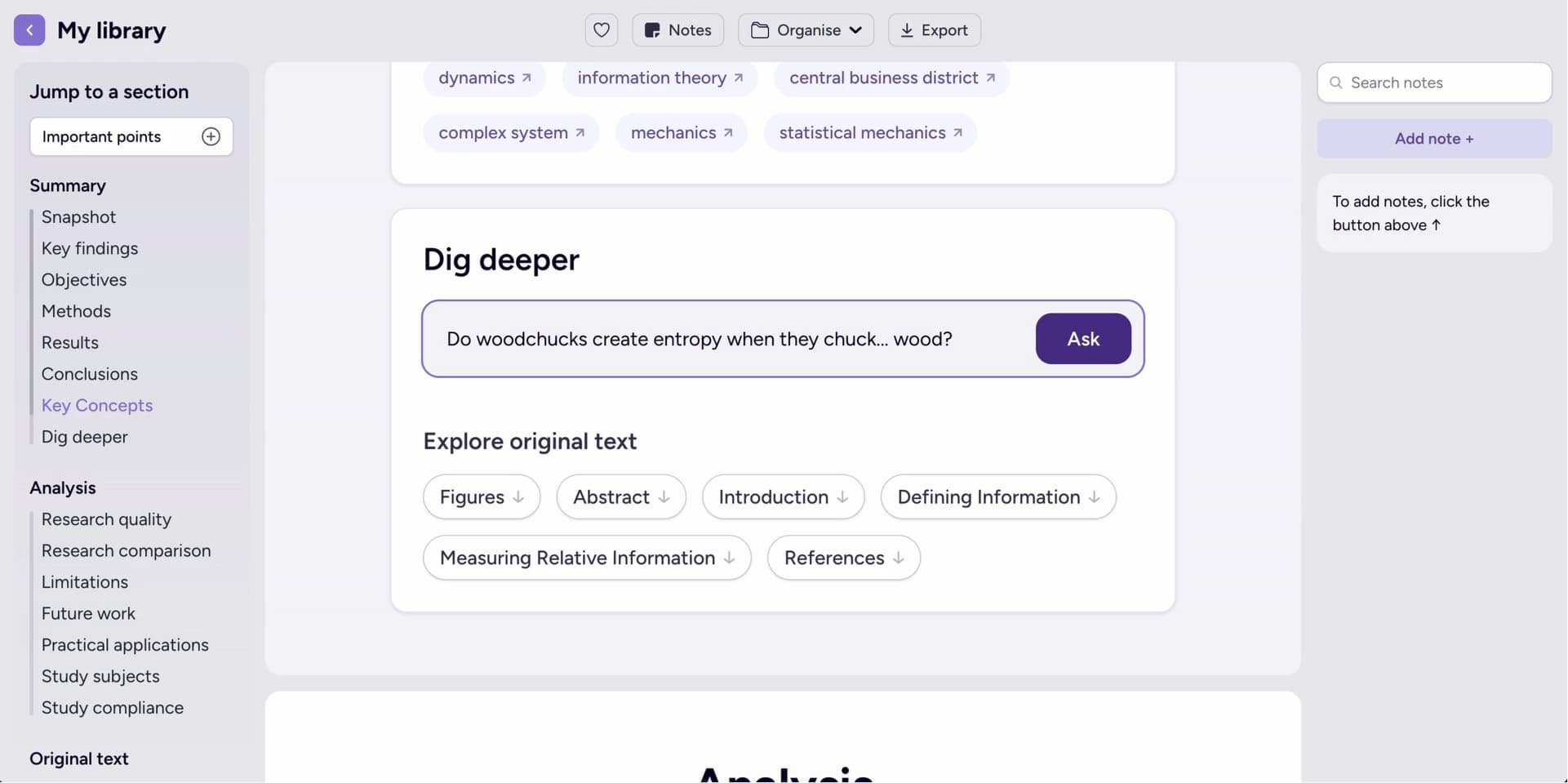
Scholarcy specializes in something most general AI summarizers handle poorly: academic papers. Instead of a generic bullet list, Scholarcy generates structured Summary Flashcards with sections for background, methods, key findings, contributions, limitations, and references. Tables and figures get extracted automatically and exported separately to Excel. Cited references link to open-access versions where available, which helps researchers chase sources without hitting paywalls.
The weakness shows up outside academia. For general articles, podcasts, or YouTube content, Scholarcy is overkill. The free plan also caps at a single summary per day (10 lifetime total), which is enough to test the tool but not to run a literature review on. The Plus plan removes that cap and adds 100-flashcard bulk export, which is the actual workflow unlock for researchers.
Scholarcy Flashcard Output Structure
| Flashcard Section | What It Captures |
|---|---|
| Background | Context, problem statement, prior literature cited in the paper |
| Methods | Study design, sample size, methodology, statistical approach |
| Key Findings | Results, effect sizes, statistical highlights, observed outcomes |
| Contributions | Author claims, novelty statements, theoretical advances |
| Limitations | Constraints and caveats the paper acknowledges |
| Tables and Figures | Auto-extracted, exportable to a single Excel workbook |
| References | Linked, with open-access versions surfaced where available |
Scholarcy Pricing (2026)
| Plan | Cost | Summary Limit | Export Mechanics |
|---|---|---|---|
| Free | $0 | 1 summary per day, 10 total lifetime | Single-flashcard export, one at a time |
| Plus Monthly | $9.99 / month | Unlimited summarization | Up to 100 flashcards exported per batch |
| Plus Yearly | $7.49 / month (25% off annual) | Unlimited summarization | Same as Plus Monthly with annual discount |
| Institutional | From $8,000 / year | Unlimited per seat | Department-wide library, collaboration features |
Imports and exports: 7-day Plus trial with no upfront payment. Imports from PDF, Word, Zotero, Google Drive, plain text, and YouTube. Exports to Word, RIS, BibTeX, EndNote, Zotero, and Excel.
Scholarcy: Pros and Cons
| Pros | Cons |
|---|---|
| Six-section flashcard structure matches how researchers actually read papers | Free plan capped at 1 summary per day, 10 lifetime |
| Tables and figures auto-extract into a single Excel workbook | Less useful for non-academic content (podcasts, news, YouTube) |
| Bulk export to RIS, BibTeX, EndNote, Zotero, Word, and Excel | Flashcard format strips nuance from complex methodology debates |
| Open-access cited reference linking saves hours chasing paywalled sources | Interface feels dated next to newer competitors like SciSpace and Paperguide |
Reviewer takeaway: Scholarcy replaces NoteGPT for graduate students, researchers, and policy analysts whose primary input is peer-reviewed work.
Decision Matrix: Picking the Right Replacement
The right alternative depends entirely on the dominant input format and the downstream workflow. The capability matrix below maps which tools earn a recommendation in which category, followed by a concrete picks table.
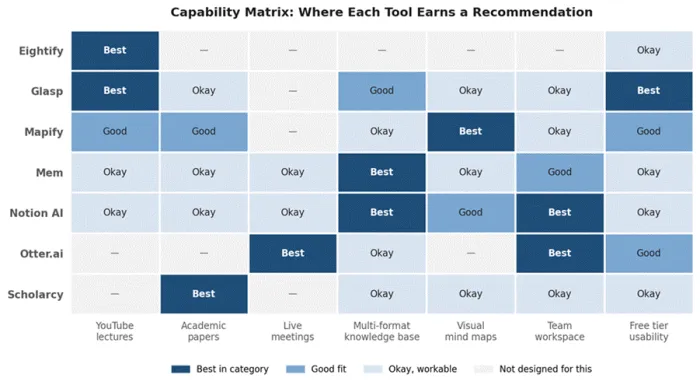
Figure 2. Capability matrix across seven NoteGPT alternatives. Best in category, good fit, okay, and not designed for this use case, by primary workflow.
Strongest Picks by Use Case
| Primary Use Case | Strongest Pick | Backup Pick | Why the Match Works |
|---|---|---|---|
| YouTube lectures and tutorials | Eightify | Glasp | Eightify is fastest annually; Glasp wins on free tier and engine choice |
| Academic paper reading | Scholarcy | Mapify | Scholarcy structures by section; Mapify visualizes citation flow |
| Live meetings and sales calls | Otter.ai | Mem (post-capture) | Otter captures at 85-95% accuracy; Mem organizes the output |
| Multi-format knowledge base | Mem | Notion AI | Mem auto-organizes without tags; Notion centralizes alongside tasks |
| Visual learning and presentations | Mapify | Glasp with Markdown export | Mapify generates editable mind maps directly from five input types |
| Team workspace with AI | Notion AI | Mem (for solo) | Notion bundles AI with task, wiki, and database tools |
| Free tier with no payment gate | Glasp | Mapify 30 credits | Glasp's free plan is genuinely usable long-term, no signup required |
A practical sequence for users replacing NoteGPT entirely: start with Glasp or Eightify for video, layer Otter for meetings, add Scholarcy for academic work, and pipe outputs into Mem or Notion for long-term retention. The combined stack runs under $42 per month and covers every format NoteGPT touched plus several it never did.
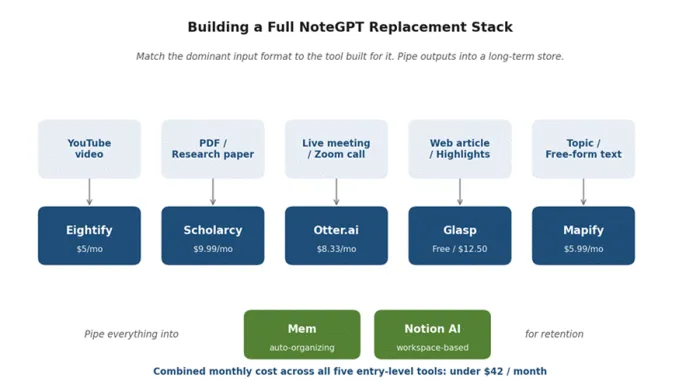
Figure 3. A full NoteGPT replacement stack mapped by input format. Combined entry-level cost across all five specialized tools stays under $42 / month before long-term storage.
Final Verdict
Here is the unromantic truth after weeks inside each of these tools. NoteGPT is not bad. It is narrow. The reason it keeps losing ground in 2026 is not a feature gap, it is a structural one. Specialized tools have matched its speed and pulled ahead on workflow depth. Five of the seven alternatives above list entry-level paid plans under $12 a month, so cost is no longer the barrier. Fit is.
The students drowning in lecture footage land on Eightify or Glasp. The researchers buried under PDF stacks default to Scholarcy. The consultants who live inside Zoom quietly migrate to Otter and never look back. The pattern in every case is the same. Pick the tool that matches the format that already dominates the day, and the upgrade tends to pay for itself inside the first billing cycle. Loyalty to a tool that solved last year's problem is the only move that consistently costs more than it saves.