

Monica is a good product. That is worth saying up front, because most "alternatives" articles start by inventing a problem so they have something to sell you.
It does what it promises: it drops a multi-model assistant into your browser sidebar so you can summarise a page, rewrite an email, translate a paragraph, or ask questions about a PDF without breaking your flow. For a lot of people that is the whole job, and they never need anything else.
But people do leave, and when they do it is usually for one of three concrete reasons:
• The credit maths stopped working. Monica meters premium models through an Advanced Credits pool that sits separately from basic queries. On the entry Pro tier that pool is finite. If your work skews toward long documents, deep research, or image generation, you will meet the ceiling well before the month ends.
• Breadth is not depth. Monica covers a lot of ground at moderate depth. If 70 to 80 percent of your AI time goes into one activity (writing code, interrogating spreadsheets, producing cited research), a specialist will beat it on that activity, consistently.
• You want the assistant to do things, not just say things. Monica reads the page you are on. It does not click through it, fill the form, or check the price again next Tuesday.
If none of those describe your week, the honest recommendation is to stay where you are. If one or more of them made you nod, keep reading.
First: what you would actually be giving up
You cannot judge a replacement without being clear on the incumbent. Here is a fair read on Monica as it stands in 2026, strengths and strain points side by side.
| Area | What genuinely works | Where it strains |
|---|---|---|
| Model access | GPT, Claude, Gemini and others behind one subscription, switchable mid-conversation. Cheaper than three separate seats. | You get the models, not each provider's native power features. Deep platform-specific tooling stays on the platform. |
| Page context | Reads whatever is on screen (article, PDF, YouTube video) with no copy-paste. This is the feature people actually miss when they leave. | It reads, it does not act. No clicking, form-filling, or scheduled monitoring. |
| Everyday writing | Solid drafting, rewriting, tone shifts and translation. Reliable for email and short-form work. | Long-form structure and revision passes chew through advanced credits quickly. |
| Breadth | Chat, search, summarising, images, ChatPDF and custom bots under one login. Genuinely convenient. | Every module is good-enough rather than best-in-class. Specialists win on their home turf. |
| Pricing | Free tier is usable for evaluation. Pro is competitive against a single frontier-model subscription. | Credit metering makes your real monthly cost hard to predict until you have tracked a full cycle. |
Table 1. An honest read on Monica AI's strengths and limits, 2026.
How this ranking was built
You should be able to check my reasoning, so here it is in plain terms.
• Ranking criterion: how much of Monica's actual job the tool takes over, weighted by how well it does that part. This is not a raw quality ranking. The tool at number four may well be the best tool on this page for you.
• Pricing: compiled in August 2026 from vendor pricing pages cross-checked against independent trackers. Where sources disagreed, and for several of these tools they did, I show a range rather than quietly picking the flattering number.
• No invented benchmarks. Where I say a tool is stronger at something, that is an editorial judgement drawn from vendor documentation and independent reviews, not a score invented to look rigorous.
• No affiliate relationship influenced the order. Free tiers were used for evaluation where available.
Worth knowing: almost every tool here has moved to credit or token metering rather than flat unlimited access. The headline monthly price is no longer the number that decides your cost. The size of the credit pool is. Budget by workload, not by sticker.
The five, at a glance
| # | Tool | Best for | Entry paid | Main trade-off |
|---|---|---|---|---|
| 1 | Sider AI | A near drop-in sidebar swap with more model choice and stronger research agents | ≈ $4–$10/mo | Feature sprawl; unlimited tiers still capped by credits |
| 2 | HARPA AI | People who want the browser to act: automation, monitoring, data extraction | ≈ $12–$15/mo | Steeper learning curve; token accounting takes getting used to |
| 3 | Blackbox AI | Developers who mostly use AI inside an IDE, not a browser tab | ≈ $10/mo | Not a general assistant; data-retention controls are enterprise-only |
| 4 | Julius AI | Anyone whose real work is spreadsheets, CSVs and reporting | ≈ $20/mo | Narrow by design; free tier too small to evaluate properly |
| 5 | iAsk AI | Fast, source-backed research answers on a tight budget | ≈ $9–$12/mo | Answers questions well; does very little else |
Table 2. Quick comparison of all five alternatives. Prices are approximate, August 2026.
Sider AI: the closest thing to a drop-in swap
If you like Monica's shape and just want more of it, Sider is the obvious move. It is the same idea executed with a wider model roster: a persistent sidebar on any page, with access to a large set of frontier models, plus research agents that go further than a summary.
Where it pulls ahead of Monica
• Multi-model side-by-side. Ask one question, get answers from several models in parallel, compare. Sounds like a gimmick until you use it on a judgement call, say a legal-adjacent question or a strategy framing, and watch two models disagree in a way that tells you something.
• Research agents that produce cited output. Its Deep Research and Scholar Research modes crawl a wide set of sources and return a structured, referenced report. Monica has research features; Sider's go further before you have to take over.
• A genuinely cheap entry rung. The lowest paid tier starts well below Monica Pro. If your usage is real but modest, you can pay less for a comparable experience.
• Wider surface coverage. Chrome and Edge extensions plus desktop and mobile apps, so the same assistant follows you off the browser.
Where it disappoints
• Feature sprawl is real. The interface tries to do everything and feels busy for the first week until you settle on the three things you actually use.
• The "unlimited" tiers are not unlimited. There is still a monthly credit cap on advanced models, and unused credits do not roll over.
• Conversation management is thin: no folders, no serious search across your history, limited export. If you treat chats as a knowledge base you will feel this.
• Published pricing is confusing. Independent trackers report entry figures anywhere from roughly $4 to $20 depending on tier, billing period and region. Read the checkout page carefully.
Real scenario: you are comparing four vendor contracts. In Monica you would summarise each one in turn. In Sider you can run the same extraction prompt against two models on the same document and flag anywhere they disagree. The disagreements are usually where the ambiguous clause is.
Verdict: the default recommendation. Same habit, more headroom, cheapest honest entry point. Start on free for a week before choosing a tier.
HARPA AI: when you want the browser to do the work
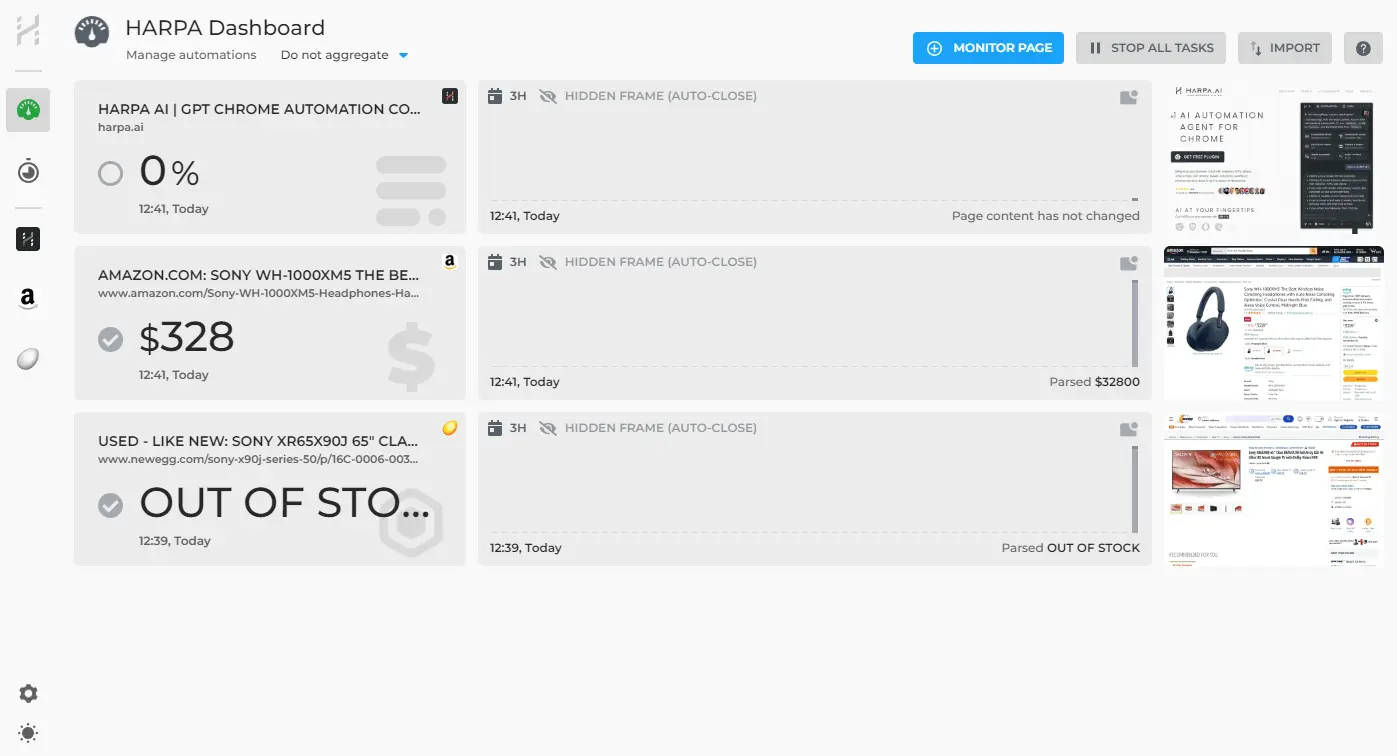
This is the one that addresses reason three from the introduction. Monica and Sider read your screen. HARPA operates it, navigating, clicking, extracting structured data, watching pages for changes and telling you when something moved.
It sits somewhere between an AI sidebar and a lightweight automation platform, which is both the appeal and the catch.
Where it pulls ahead of Monica
• Browser automation, not just chat. It can walk through pages, pull data into a structure, and fill forms. Repetitive weekly browser work becomes a saved command.
• Monitoring and alerts. Track a competitor's pricing page or a product listing and get told when it changes. Nothing in Monica's feature set covers this.
• Bring your own API keys. Instead of paying a credit markup you can plug in your own OpenAI or Anthropic keys and pay providers directly, which is usually cheaper at volume and more predictable.
• Local chat storage and a one-time licence option. Chats stay on your machine rather than the vendor's servers, and a lifetime plan exists for people who dislike subscriptions.
Where it disappoints
• The learning curve is the steepest here. Commands and workflows reward setup time; the first hour feels like more work than the task you were avoiding.
• Megatoken accounting is another mental model to hold. Output tokens cost multiples of input tokens, and premium models burn through the pool much faster than efficient ones.
• Automations are brittle in the way all browser automation is brittle. Sites change layouts; your workflow breaks; you fix it.
• As a plain conversational assistant it is fine, not better than Monica. You are paying for the automation layer.
Practical tip: do not start by rebuilding your whole workflow. Pick one task you genuinely repeat every week, such as pulling ten competitor prices or checking a set of job boards, and automate only that. If it holds up for a fortnight, build the second one.
Verdict: the right answer if your bottleneck is repetitive browser work rather than writing. The wrong answer if you just want faster summaries.
Blackbox AI: for developers who live in the editor

A different bet entirely. If you are a developer, an uncomfortable amount of your Monica usage is probably code-shaped: explaining a stack trace, drafting a function, translating between languages. That work does not belong in a browser sidebar. It belongs where your code is.
Blackbox has grown from a VS Code autocomplete plugin into a multi-agent platform spanning IDE extensions, a CLI, and autonomous agents that handle multi-step repository tasks.
Where it pulls ahead of Monica
• It runs where you work. VS Code, JetBrains, a CLI, and mobile apps. No copy-pasting code into a browser panel and losing all project context in the process.
• Very large model roster under one subscription, with an orchestration layer that can run several coding agents against the same repository in parallel.
• An unusually generous free tier. Chat and basic autocomplete cost nothing, which makes it low-risk to evaluate against your own codebase.
• Image-to-code. Turning a screenshot or design file into a working component is genuinely useful in front-end work and has no Monica equivalent.
Where it disappoints
• Suggestion quality on complex tasks is inconsistent, and several reviewers note it lags the leading dedicated editors on deep codebase awareness.
• Data retention controls and the ability to opt out of training are reserved for enterprise plans. If you work on client or proprietary code, read those terms before you connect a repo. This is the single most important line in this section.
• Pricing has been restructured more than once, and older tiers referenced across the web no longer exist.
• Support responsiveness draws recurring complaints in user reviews.
Honest limitation: this does not replace Monica. It replaces the slice of Monica you were using for code. Most developers who make this switch end up keeping a general assistant alongside it, which is a real cost, not a saving.
Verdict: excellent value for the coding slice, at a price that makes trying it nearly free. Not a general-purpose assistant, and not for sensitive code on a non-enterprise plan.
Julius AI: for people whose real work is data
Ask Monica to analyse a 40,000-row CSV and you will get something plausible and shallow. Julius is built for exactly that job: upload a spreadsheet, ask questions in plain English, and it writes and runs the Python or R behind the scenes, returning charts and explanations.
Where it pulls ahead of Monica
• Real computation, not description. It executes code against your file rather than reasoning about a sample. Correlations, pivots, forecasts and grouped statistics come back as actual results.
• Inspectable working. You can open the generated code and check it. For anything that ends up in a report someone will question, that audit trail matters more than convenience.
• It has grown into a workspace, with notebooks for repeatable analysis, dashboards, scheduled reports and warehouse connectors.
• A steep education discount. Roughly half price for verified students and educators, which makes it one of the cheaper serious analysis tools in academia.
Where it disappoints
• The free tier is effectively a demo. A realistic first session on one dataset will exhaust it, so treat the refund window as your actual trial.
• Entry pricing is the highest here, and the jump from individual to team tiers is very large. You are paying for collaboration, not better analysis.
• Output still needs human oversight. Messy input produces confident, wrong output; verify anything financial or research-critical by hand.
• Very narrow. Outside data work it does almost nothing Monica does.
Practical tip: clean the file before you upload. Clear column headers, no merged cells, no explanatory rows above the data. Ten minutes of tidying is worth more to output quality than any amount of prompt engineering.
Verdict: if you spend more than two hours a week fighting spreadsheets, it pays for itself. If you don't, ignore it entirely.
iAsk AI: cheap, fast, source-backed answers

The narrowest tool on the list, and the one most people should try first precisely because it costs nothing to find out. iAsk is an answer engine: you ask a question in natural language and get a direct, structured answer with the sources it drew from, rather than a page of links.
Where it pulls ahead of Monica
• Sourcing is the default, not a mode you switch on. Answers come back with the references attached, which makes verification part of the flow instead of an afterthought.
• A properly usable free tier. You can do real research without paying, which is not true of most tools here.
• Speed. For factual lookups it is faster than opening a sidebar, choosing a model and framing a prompt.
• Low commitment. The paid tier is among the cheapest on this list, and adds document upload and image generation.
Where it disappoints
• Accuracy varies on niche and specialist queries, and sourcing quality is inconsistent at the edges. Reviewers testing it hands-on report both.
• Treat the vendor's published benchmark claims with the same scepticism you would apply to any self-reported score. Test it on questions where you already know the answer.
• It is not a workflow tool. No automation, no page context, no meaningful integration into what you are doing.
• Pricing details are thinly documented compared with the others, so check the current page rather than trusting third-party figures, including mine.
Verdict: a supplement rather than a replacement. Costs nothing to test, and if research is most of your AI use it may quietly become the tab you keep open.
Pricing, compared properly
Two things make AI pricing comparisons misleading, and both apply here. First, the headline price rarely reflects what you will pay once metering bites. Second, published figures disagree. For Sider especially, independent trackers report entry prices that differ by a factor of four depending on billing period and tier naming.
So read the chart below as a rough ordering, not a quote.
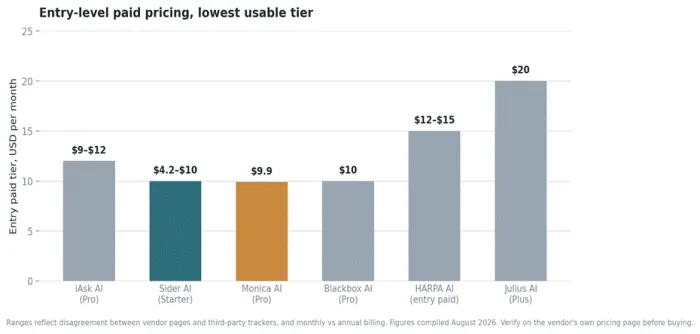
Figure 1. Entry-level paid pricing across the six tools. Ranges show where published sources disagree.
| Tool | Free tier | Entry paid | Next tier up | How you are metered |
|---|---|---|---|---|
| Monica AI | Capped daily messages, no advanced-credit pool | ≈ $9.90/mo (Pro) | ≈ $24.90/mo (Max) | Two pools: basic queries plus a separate advanced-credit pool |
| Sider AI | ≈ 30 basic credits/day, basic models only | ≈ $4–$10/mo | ≈ $12–$20/mo | Credit tiers; advanced caps apply even on 'unlimited', no rollover |
| HARPA AI | Functional free tier with limited quota | ≈ $12–$15/mo | One-time lifetime licence available | Megatokens, or bring your own API keys and pay providers directly |
| Blackbox AI | Unlimited chat plus basic autocomplete | ≈ $10/mo (Pro) | ≈ $20/mo (Pro Plus) | Tiered agent and premium-model request limits |
| Julius AI | ≈ 15 messages/month, a demo not a trial | ≈ $20/mo (Plus) | ≈ $45/mo (Pro) | Message and credit limits; 50% education discount |
| iAsk AI | Genuinely usable for research | ≈ $9–$12/mo (Pro) | Not clearly published | Query and upload limits on the free tier |
Table 3. Pricing structure and metering model. Compiled August 2026; verify before purchase.
The mistake to avoid: choosing a tier before you know your volume. Run a free tier for one full week and note the day you hit the wall. If it is day six, the entry paid tier is fine. If it is day two, you need the tier above, and buying the cheap one first wastes a month.
What each tool can actually do
The most useful way to read this table is to find the two rows that describe most of your week, then look across.
| Capability | Monica | Sider | HARPA | Blackbox | Julius | iAsk |
|---|---|---|---|---|---|---|
| Browser sidebar on any page | Yes | Yes | Yes | Extension only | No | No |
| Multiple frontier models | Yes | Yes, widest | Yes + own keys | Yes, very wide | Limited | No |
| Summarise pages, PDFs, video | Yes | Yes | Yes | No | PDFs only | Partial |
| Cited research output | Basic | Strong agents | Yes | No | No | Core strength |
| Acts on pages (clicks, forms) | No | No | Yes | No | No | No |
| Change monitoring / alerts | No | No | Yes | No | Scheduled reports | No |
| IDE integration | No | No | No | Yes, extensive | No | No |
| Runs code on your data | No | No | No | Yes | Yes, core | No |
| Image generation | Yes | Yes | Limited | Yes | Charts only | Paid tier |
| Works outside the browser | Yes | Yes | No | Yes | Web app | Web app |
Table 4. Capability coverage. "Yes" means the feature exists and works, not that it is best-in-class.
That table hides one thing worth making explicit: breadth and depth trade against each other. The generalists cover more rows; the specialists go further down the rows they cover. Neither is better in the abstract. It depends entirely on how concentrated your work is.
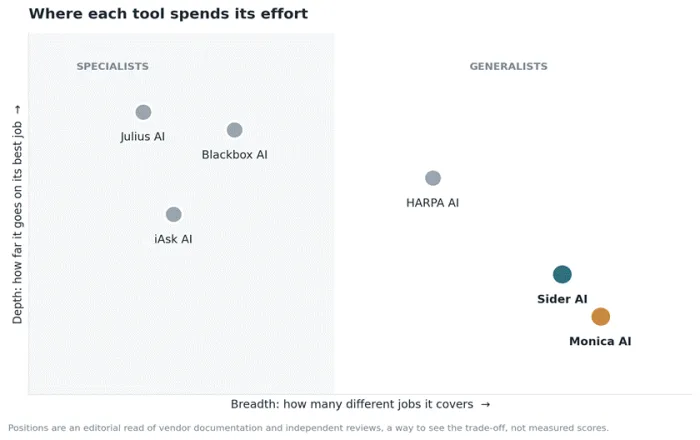
Figure 2. The breadth-versus-depth trade-off. Monica and Sider compete on coverage; the others compete on depth.
Which one should you actually pick?
Ranked lists are a poor way to choose software, because the right answer depends on your week rather than on an average. Find yourself in the left column instead.
| If this sounds like you | Pick | Why |
|---|---|---|
| Monica works fine, I just keep hitting credit limits | Sider AI | Same workflow, cheaper entry rung, wider model roster. Lowest-friction switch on this list. |
| I lose hours a week to repetitive browser tasks | HARPA AI | The only tool here that operates pages rather than reading them. Automate one task first, then expand. |
| Most of my prompts are code-shaped | Blackbox AI | Moves AI into the IDE where project context lives. Free tier makes evaluation nearly costless. |
| My real work is spreadsheets and reporting | Julius AI | Executes real analysis instead of describing it, and shows the code so you can verify results. |
| I mostly need fast answers I can cite | iAsk AI | Sourcing is the default behaviour, and the free tier is good enough to run properly. |
| I want one tool and I don't want to think about it | Stay on Monica | If nothing above described you, switching costs more in disruption than it saves in money. |
Table 5. Decision guide by situation.
The setup most people end up with
Worth saying plainly, because the one-tool framing does not survive contact with real work: very few people who leave Monica replace it with a single product. The common landing spot is one generalist plus one specialist.
• A sidebar assistant for the constant small stuff: summarising, rewriting, translating, quick questions.
• One deep tool for whatever your actual job is: code, data, or research.
That usually costs a little more than Monica alone, and it is worth being honest with yourself about whether the gain justifies it. If you are switching purely to save money, the calculation often does not work. If you are switching because Monica genuinely cannot do the thing you need, it usually does.
A short checklist before you commit
• Run the free tier for a full week and note which day you hit the limit. That single data point tells you more than any comparison table, including the ones above.
• Check the data terms if you handle client work, especially opt-out-of-training and retention controls, which are frequently enterprise-only.
• Test on a task you already know the answer to. It is the fastest way to catch a tool that is confident and wrong.
• Note the refund window before subscribing annually. Several of these are short and usage-capped.
• Do not migrate everything at once. Move one workflow, live with it for two weeks, then decide.
The short version
If you want the least disruptive upgrade, Sider AI is the pick: same habit, more headroom, a cheaper way in. If your problem is repetitive browser work rather than writing, HARPA AI is the only tool here that solves it. If you are a developer, Blackbox AI moves the work to where your code already lives and costs almost nothing to trial. If you spend your week in spreadsheets, Julius AI is worth the higher price. And if you mainly need answers you can cite, iAsk AI is cheap enough to keep open alongside whatever else you use.
And if none of that landed, Monica is still a good product, and staying put is a legitimate decision that most articles like this one will never tell you.





