

I did not plan on spending my morning arguing with a verification email, but that is exactly how my time with Easy-Peasy.AI began. The signup flow sent me a confirmation link, accepted my click, and then greeted me with a blank white page. Twice. A Google login finally let me through, and on the other side of that little hiccup sat one of the busiest AI dashboards I have opened all year.
Easy-Peasy.AI markets itself as an everything platform: chat, images, video, voice, transcription, chatbots, and a library of more than 200 writing templates. The one that caught my eye was the boldest of the bunch, a template literally named "Humanize AI Text To Bypass AI Detection." A claim that confident deserves a proper test, not a quick glance. So I generated a fresh piece of AI text with ChatGPT, ran it through the humanizer, and fed the result to two popular detectors to see who was telling the truth.
This review covers everything I found: the signup glitch, the interface, the detector results, the exact pricing I was shown, and what verified users on Trustpilot, G2, and Capterra are saying right now.
Quick Verdict
4.0 /5 ★★★★☆ OVERALL RATING | Easy-Peasy.AI is a genuinely useful all-in-one AI workspace at a fair price, held back by a paper-thin free tier and a flagship humanizer that only fools some detectors. Best for solo creators, marketers, and small teams who want dozens of AI tools on one bill. |
WHERE IT SHINES ✓ 200+ tools and templates in one clean interface ✓ GPT-5, Claude, and Gemini access on one bill ✓ Fast output, roughly 5 seconds in my test ✓ Strong ratings across review platforms | WHERE IT STUMBLES ✕ Humanized text still scored 100% AI on ZeroGPT ✕ Free tier allows one run per template ✕ Email signup glitched during my test ✕ Premium models are word-capped on every plan |
Easy-Peasy.AI Explained
Easy-Peasy.AI is a web-based AI content platform built around a simple pitch: stop paying for a writing tool here, an image generator there, and a transcription app somewhere else, and get the whole stack in one place. The hub of the experience is Marky, its conversational assistant, surrounded by a template library covering everything from blog posts to the AI humanizer I came to test.
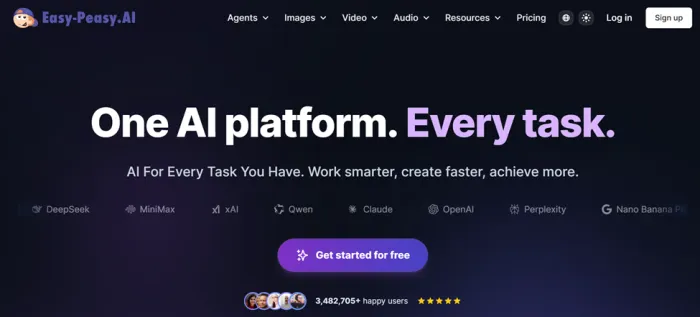
What separates it from smaller wrappers is model access. The pricing page openly lists Claude Opus, Claude Sonnet, GPT-5, and Gemini Pro alongside the company's own Standard model, so a single subscription puts several frontier models behind one text box. Whether the tools justify that subscription is the question this review digs into.
Key Features at a Glance
CHAT Marky Agent A conversational assistant for content, questions, and multi-step tasks. Recently updated and pinned at the top of the dashboard. | VISUAL AI Art & Images Text-to-image generation for social posts, thumbnails, and concepts. User reviews call the results hit or miss. |
WRITING 200+ Templates Blog posts, rewriters, grammar fixes, and the AI humanizer tested below. Each template has its own guided form. | VIDEO AI & Talking Videos Video generation plus a 2.0 talking-avatar tool for presenter-style clips without a camera. |
AUDIO Speech Tools Text to speech, speech to text, and an AI Note Taker that records conversations and returns transcripts with summaries. | AUTOMATION Bots & Workflows Custom chatbots trained on your data, plus a beta workflow builder for chaining tools together. |
My Real Test: Signup, Interface, and the Humanizer
Signing up was the bumpiest part
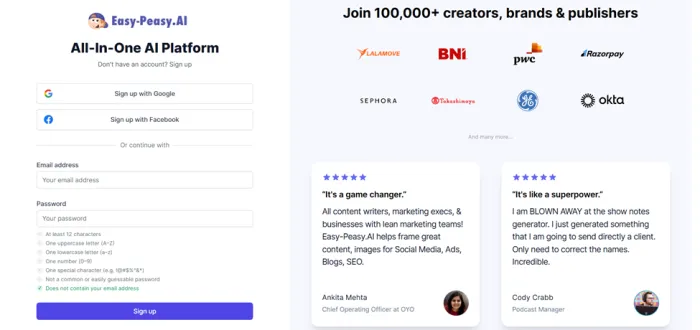
I started the normal way: email address, verification message, click the link. The mail arrived quickly and the link appeared to work, but after logging back in and verifying, the screen simply went blank. I repeated the whole loop and got the same empty page. Switching to the "Continue with Google" button solved it instantly, and I was inside within seconds.
FIELD NOTE If the email flow leaves you staring at a white screen, do not fight it. Google login worked on the first try and links to the same account. |
First look at the dashboard
The interface itself is tidy and beginner-friendly. A left sidebar lists every major tool, from Marky and Bots to AI Videos and Speech to Text, decorated with a small forest of "New," "Beta," and "2.0" badges. The home screen surfaces a Recommended Tools row (Marky, AI Art & Images, AI Note Taker) and a Get Inspired section stocked with templates and examples. Nothing about it feels intimidating, which matches what G2 and Capterra reviewers consistently say.
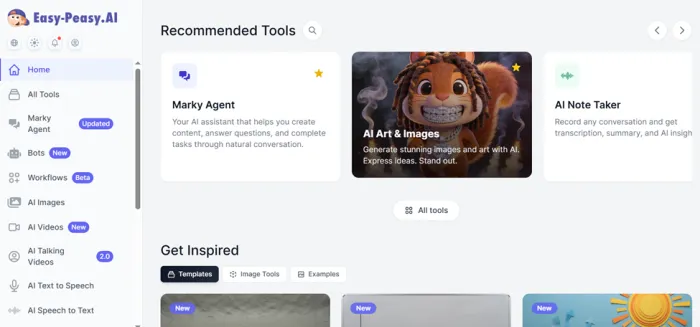
The home dashboard right after logging in with Google.
Testing the "Humanize AI Text" template
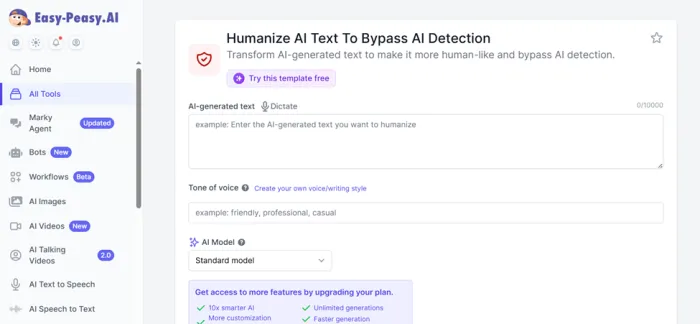
Here is exactly how the test went, step by step.
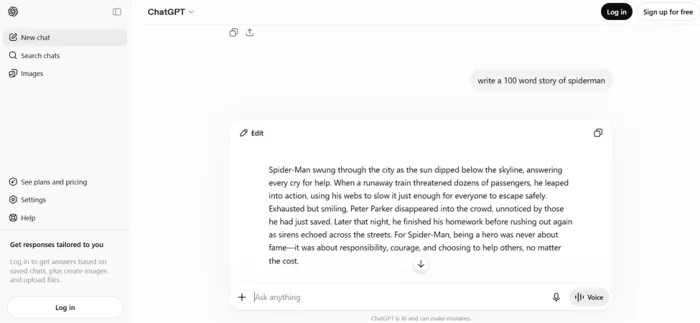
1. Generate a baseline with ChatGPT. I asked ChatGPT for a 100-word Spider-Man story and got a tidy 103-word piece with the classic AI fingerprint: long, flowing sentences and a neat little moral stapled to the end.
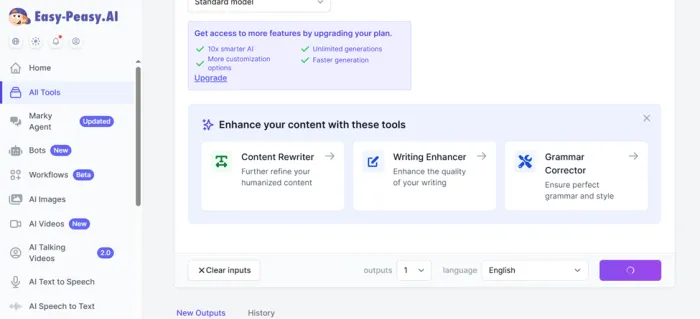
2. Feed it to the humanizer. The template offers a text box capped at 10,000 characters with a dictate option, a tone-of-voice field (I typed "Casual"), and an AI model dropdown. I stayed on the free Standard model; the smarter paid model sits behind an upgrade banner. Below that you pick output count and language, while the page cross-sells a Content Rewriter, Writing Enhancer, and Grammar Corrector.
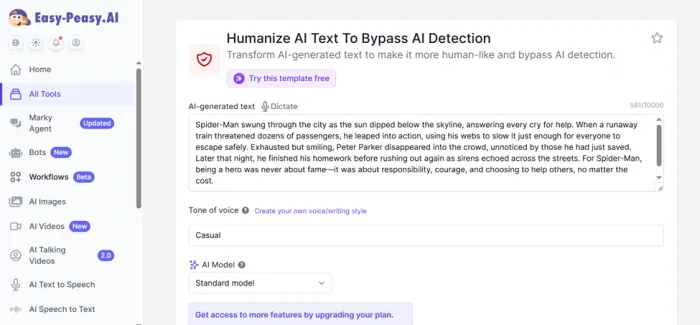
3. Wait about five seconds. Generation was fast. The rewrite chopped my long sentences into short, plain ones and swapped formal phrasing for something closer to a person retelling the story from memory.
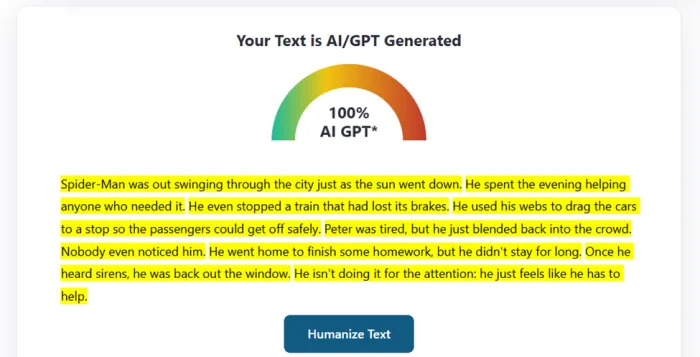
4. Run it through ZeroGPT. The humanized text was flagged instantly: "Your Text is AI/GPT Generated," 100 percent AI, with every single sentence highlighted in yellow. No partial credit, no hesitation.
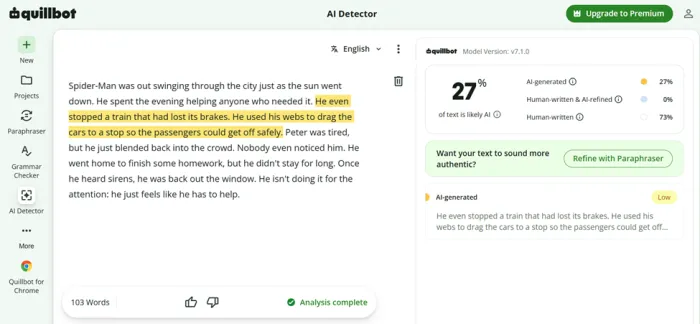
5. Run it through QuillBot. The exact same 103 words told a completely different story here: 27 percent likely AI, 73 percent human-written, with only the runaway-train sentences flagged, and even those at low confidence.
CHATGPT ORIGINAL "Spider-Man swung through the city as the sun dipped below the skyline, answering every cry for help..." | AFTER EASY-PEASY "Spider-Man was out swinging through the city just as the sun went down. He spent the evening helping anyone who needed it..." |
The detector duel
ZEROGPT 100% "AI/GPT Generated" with every sentence highlighted FAILED | QUILLBOT AI DETECTOR 27% 73% rated human-written, two sentences flagged at low confidence MOSTLY PASSED |
| DETECTOR | INPUT | RESULT | VERDICT |
|---|---|---|---|
| ZeroGPT | Humanized output, Standard model, "Casual" tone | 100% AI, full highlight | FAIL |
| QuillBot | Same humanized output, 103 words | 27% AI, 73% human, 0% AI-refined | PASS |
My honest read: the Standard model changes the surface of the text, and that is enough to slip past softer detectors like QuillBot, but stricter ones like ZeroGPT see straight through it. One sample is not a benchmark, and I could not test the premium "10x smarter" model, so treat this as a snapshot rather than a final grade. And to be plain: detectors are unreliable in both directions, and passing off AI work as your own where the rules forbid it is a bad idea regardless. I tested purely to measure the headline claim.
Then I hit the wall
Curious whether a second pass would improve the score, I loaded the template again. The entire form was greyed out behind a single message: "You've used your free trial for this template. Upgrade to continue using it." So the free tier for premium templates is exactly one generation each. Fair enough as a taste test, but plan your first run carefully, because you only get one.
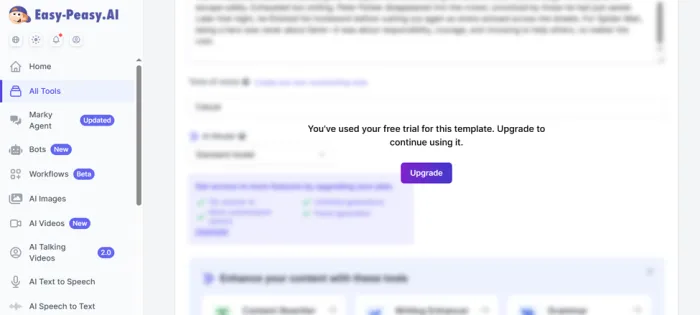
The paywall that appeared on my second attempt.
Easy-Peasy.AI Pricing Explained
Hitting that paywall sent me straight to the pricing page, and to its credit, the structure is easy to follow. When I first checked in July there were four paid tiers. Rechecking in August, the top "Unlimited 200" tier has quietly disappeared and the page now shows a free plan plus three paid ones, each available monthly or yearly, with yearly billing cutting the price roughly in half. One naming quirk matters: "Unlimited" refers only to the in-house Standard model. Premium models like Claude Opus, GPT-5, and Gemini Pro are always metered by a monthly word allowance.
| PLAN (YEARLY BILLING) | PER MONTH | BILLED YEARLY | PREMIUM MODEL WORDS | CREDITS | TRANSCRIPTION | TEXT TO SPEECH |
|---|---|---|---|---|---|---|
| Free | $0 | $0 | None, 1,000 words total | 1 image credit | 1 file | 1,000 chars |
| Starter | $8 | $96 | 25k Opus or 50k Sonnet/GPT-5/Gemini | 200 | 20 files | 25,000 chars |
| Unlimited 50 | $12 | $144 | 50k Opus or 100k Sonnet/GPT-5/Gemini | 300 | 30 files | 50,000 chars |
| Unlimited ★ | $16.50 | $198 | 100k Opus or 200k Sonnet/GPT-5/Gemini | 500 | Unlimited | 75,000 chars |
★ Marked "Most popular" on the pricing page. All three Unlimited tiers include unlimited use of the Standard model.
| PLAN (MONTHLY BILLING) | WORTH KNOWING |
|---|---|
| Starter | Roughly double the yearly rate. Watch for the STARTER50 first-month code |
| Unlimited 50 | Same limits as the yearly version, higher monthly cost |
| Unlimited | The tier the platform pushes hardest |
These are the exact figures shown to me in July 2026. AI pricing shifts often, so confirm on the official site before subscribing. Even so, the yearly Starter undercuts most single-purpose writing tools.
What Users Say Across Review Platforms
One tester's week is a small sample, so I pulled the current numbers from the three biggest software review sites to see how my experience compares with the crowd's.
TRUSTPILOT 4.4 /5 76 reviews · rated "Excellent" Praise centers on the sheer breadth of tools and responsive human support. The sharpest complaints involve billing disputes and unpredictable image generation. | G2 4.5 /5 25 reviews · 68% five-star Reviewers call it user-friendly and a real time-saver, while noting outputs can feel generic without careful prompting and the template count is overwhelming at first. | CAPTERRA 4.9 /5 10 reviews · Ease of Use 5.0 The smallest sample but the strongest scores: perfect marks for ease of use and customer service, 4.7 for features, and 4.5 for value for money. |

Two comments stood out to me while reading through the platforms, because together they capture the whole product:
"By far the best compilation AI utility out there."
Small-business reviewer on Trustpilot
"Fast, Helpful, and Easy but Sometimes a Bit Generic"
Review title on G2
That tension, an enormous toolbox that occasionally needs a human edit, matches my humanizer results almost exactly. The consensus complaints, word caps, refund friction, and image misses, are worth knowing but do not overturn the positive picture.
The Teams plans the main pricing page does not show you
The pricing page I have been quoting is the consumer one. There is a second pricing structure on the B2B page that never surfaces unless you go looking for it, and it changes who this product is for.
Teams plans start at three seats and scale to thirty. Every tier carries the same feature set, so you are buying seats rather than capability:
| TEAMS PLAN | PER MONTH (YEARLY) | BILLED YEARLY | IMAGE/VIDEO CREDITS |
|---|---|---|---|
| 3 seats | $48 | $576 | 400 |
| 5 seats | $83 | $996 | 400 |
| 10 seats | $150 | $1,800 | 400 |
| 20 seats | $280 | $3,360 | 500 |
| 30 seats | $360 | $4,320 | 500 |
Every Teams tier includes unlimited Standard model use, unlimited transcription, unlimited brand voices and chat personas, API access, enhanced transcription and priority support. The genuinely team-specific part is sharing: prompts, chats, documents, brand voices and images all move between seats, and there is a collaborative long-form editor and a shared prompt library.
Do the maths and the value is uneven. Three seats at $48 works out to $16 per seat, which is roughly the individual Unlimited price, so you are getting the sharing layer for free. Thirty seats at $360 is $12 per seat. But five seats at $83 is $16.60 per seat, slightly worse than buying three, so check the tier boundaries before you commit.
On compliance, the picture is stronger than I expected when I started this review. The company lists ISO 27001 and SOC 2 certification alongside GDPR and HIPAA compliance, and runs a public trust centre. That does not make it an enterprise platform, and I would still want to see the security documentation myself before putting regulated data anywhere near it, but it does mean a small team with a procurement checklist is not automatically ruled out.
Pros and Cons
| PROS | CONS |
|---|---|
| 200+ tools and templates under one subscription | Humanized text still failed ZeroGPT completely |
| Claude, GPT-5, and Gemini Pro access in one place | Free tier allows a single run per premium template |
| Clean, beginner-friendly interface | Email verification glitched during my signup |
| Fast generations, about five seconds in my test | "Unlimited" plans still cap premium-model words |
| Yearly pricing undercuts most big-name rivals | Best humanizer model is locked behind the paywall |
| 4.4 to 4.9 ratings across major review sites | Some Trustpilot reviewers report billing disputes |
Who Should (and Should Not) Use It
GET IT IF
| SKIP IT IF
|
Final Verdict
Remember that blank white screen from the beginning of this review? By the end of my testing, it had become a fitting metaphor for the whole product: a rough first impression hiding something genuinely worthwhile behind it. Once Google login got me through the door, almost everything else worked the way the marketing promised. The dashboard is friendly, the templates are fast, and the pricing is honest about what you get, even if the word "Unlimited" is doing some careful legal stretching.
The humanizer, the feature that pulled me in, earns a split decision. Fooling QuillBot with a 27 percent score is a real result; getting caught red-handed by ZeroGPT at 100 percent is too. If beating detectors is your entire reason for subscribing, my single test says the free Standard model will not get you there consistently. If you want an affordable, all-in-one AI workshop where the humanizer is just one drawer in a very large toolbox, the math changes completely.
My recommendation: start on monthly Starter with the STARTER50 code, spend your eight dollars stress-testing the two or three tools you would actually use daily, and only then commit to a yearly plan. That is exactly what I would do next, and this time I would skip the email form and go straight to the Google button.





