

I kept ChatGPT Plus running for a little over a year. It drafted cold emails at six in the morning, untangled spreadsheet formulas I was too fried to think through, and rewrote a resignation letter until it stopped sounding bitter.
Then my usage quietly dropped off, the twenty dollars kept leaving my account every month, and one Tuesday I finally sat down to switch it off. It took me longer than it should have, and not because the process is hard. I was clicking around inside the ChatGPT app looking for a cancel button that was never going to be there, because I had originally subscribed through my iPhone and Apple was the one charging me. That single detail is the reason most people fail to cancel on the first try, so it is where this guide starts.
The 30-second version Cancel in the same place that charges you, not the device you use ChatGPT on. Web, Apple and Google Play are three separate billing systems. Cancelling stops the next renewal. It does not delete your account, and it almost never triggers an automatic refund. Cancel at least 24 hours before your renewal date to be safe, and you keep full access until the current period ends. Your chats and settings stay put. Custom GPTs go read-only and are removed after 30 days if you do not resubscribe. |
First, work out who actually charges you
ChatGPT runs on three unconnected billing systems, and the cancel button only ever appears inside the one that took your money. Uninstalling the app changes nothing, and neither does cancelling in the wrong store. The fastest way to be certain is to open the receipt in your email or the line item on your card statement and read who the charge is from.
| If your receipt says | Then you were billed by | Use these steps |
|---|---|---|
| OpenAI or Stripe | OpenAI (web) | Cancel on the web |
| APPLE.COM/BILL | Apple | Cancel on iPhone or iPad |
| Google or Google Play | Cancel on Android | |
| A workspace or company invoice | Your workspace | Cancel a Business plan |
One warning worth flagging before you go further: it is entirely possible to be paying twice. A web subscription and a mobile subscription can run at the same time without either one knowing about the other, and ChatGPT billing is also separate from OpenAI API billing. If you have ever signed in on more than one device, check every channel above rather than assuming the first one you find is the only charge.
Cancel on the web (billed by OpenAI)
This is the path if your receipt says OpenAI or Stripe. It works the same way for Plus, Pro and Go, since all three consumer tiers sit on the same billing surface. Use a browser rather than the mobile app.
1. Go to chatgpt.com and sign in with the exact account named on your receipt. If you have more than one login, this matters more than anything else here.
2. Open your account menu from the profile icon, then choose Settings.
3. Select Billing. Some accounts show a Manage subscription link that opens the Stripe billing portal instead. Both routes reach the same place.
4. Under Cancel plan, select Cancel and confirm.
5. Watch for the confirmation. You should see an end date on the plan and get a confirmation email. If neither appears, the cancellation did not go through.
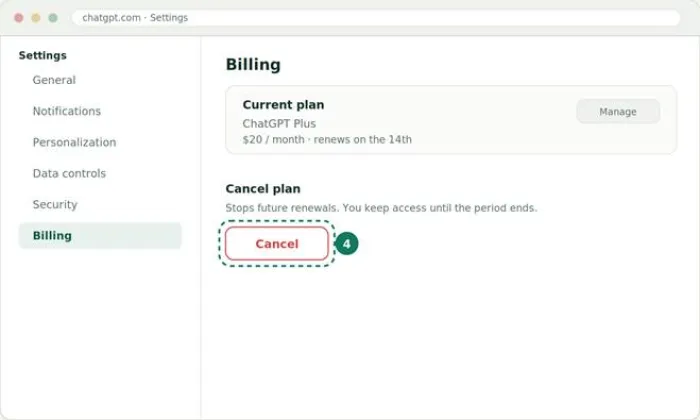
The Billing tab in ChatGPT settings. Step 4 is the Cancel button under Cancel plan.
Cancel on iPhone or iPad (billed by Apple)
If your receipt says APPLE.COM/BILL, Apple holds the subscription and OpenAI cannot cancel it for you. This trips up a lot of people, because the natural instinct is to open the ChatGPT app. The controls you need live in the iOS Settings app instead.
1. Open the Settings app on your iPhone or iPad. This is the grey gear icon, not the ChatGPT app.
2. Tap your name at the very top of the screen.
3. Tap Subscriptions.
4. Find and tap ChatGPT in the list of active subscriptions.
5. Tap Cancel Subscription and confirm.
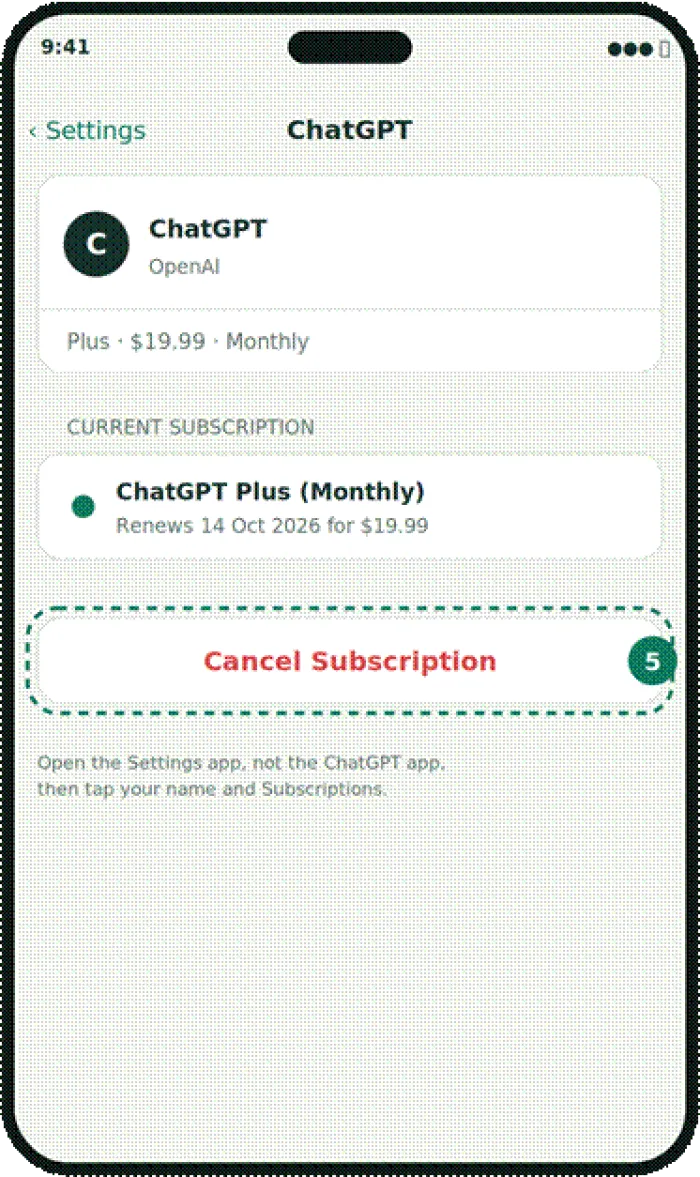
The ChatGPT subscription screen in iOS Settings, with the Cancel Subscription button at step 5.
If there is no Cancel button When you open ChatGPT under Subscriptions and see only an expiration date with no Cancel Subscription option, the subscription is already cancelled and will simply lapse on that date. There is nothing more to do. |
Cancel on Android (billed by Google Play)
Subscriptions bought on an Android device are handled by Google Play. You can start from inside the ChatGPT app, but going straight to Google Play is the more reliable route.
1. Make sure you are signed in to the Google account that bought the subscription. A different account on the same phone will not show it.
2. Open the Google Play app, tap your profile picture, then Payments & subscriptions.
3. Tap Subscriptions and select ChatGPT.
4. Tap Cancel subscription and follow the prompts to confirm.
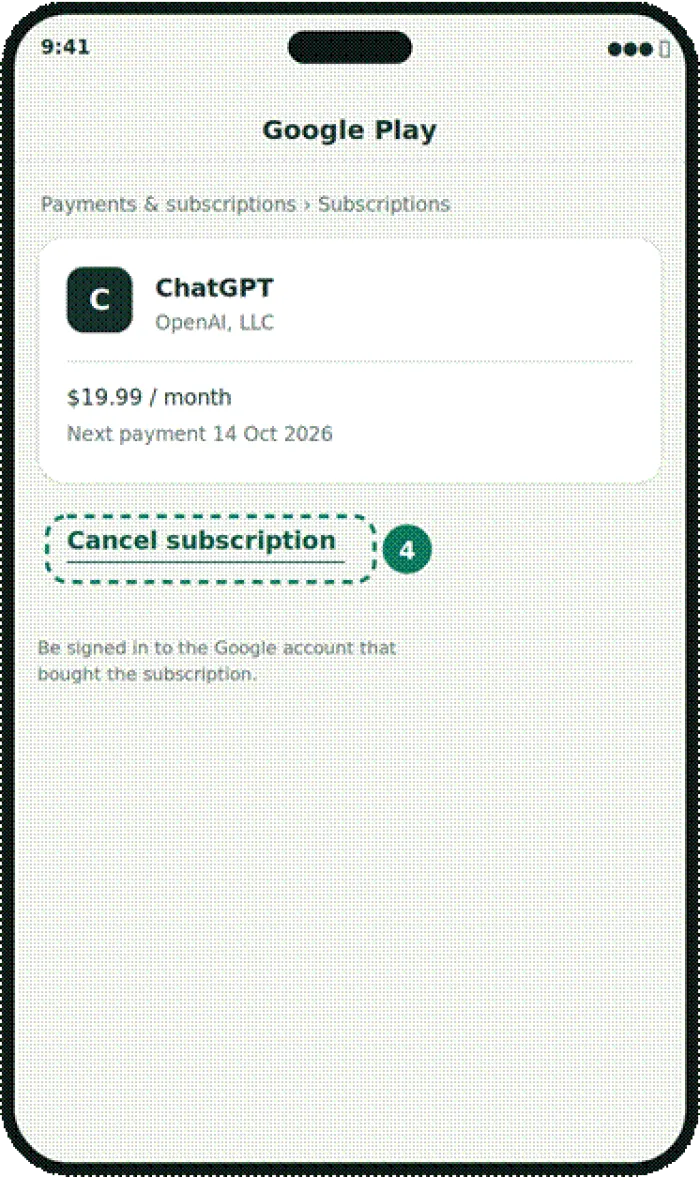
The ChatGPT subscription in Google Play, with Cancel subscription at step 4.
Alternatively, open the ChatGPT Android app, go to Settings and choose Manage subscription, which hands you off to the same Google Play screen.
Cancel a ChatGPT Business or Enterprise plan
Team and company plans do not live under personal settings. They are managed at the workspace level, and only a workspace Owner or Admin can make the change.
1. Open Workspace settings from the account switcher while signed in to the business workspace.
2. Go to Billing, then Manage plan.
3. Select Cancel subscription and confirm.
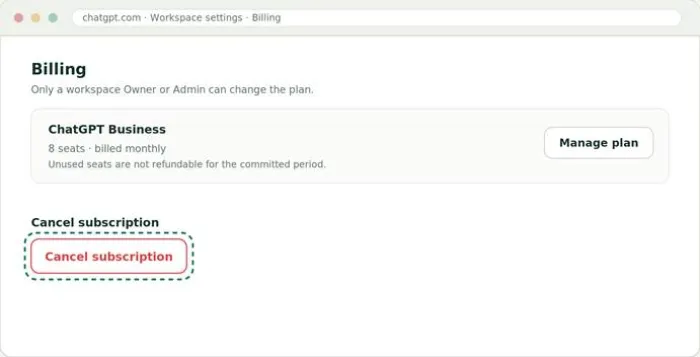
The workspace Billing screen. Cancellation lives behind Manage plan.
About seats Unused seats in a self-serve Business workspace are not refundable for the billing period you have already committed to. If you only need fewer seats rather than a full cancellation, an owner can schedule a seat reduction that takes effect on the next billing cycle instead. |
Timing: the 24-hour rule and when access ends
Two dates decide whether cancelling actually saves you money this month, and they are easy to get wrong.
| Cancel before the cutoff | Access does not stop today |
|---|---|
| Renewals process on your billing date. Cancel at least 24 hours before that date so the charge does not slip through. Leave it to the last hour and you may be billed for another full cycle. | Cancelling ends the renewal, not your current access. You keep every paid feature until the end of the period you already paid for, then the account drops to the free tier on its own. |
The most common mistake People delete the app or delete their whole account and assume the charges stop. They do not. Deleting your ChatGPT account cancels only subscriptions billed directly by OpenAI. It does not touch an Apple or Google Play subscription, which keeps renewing until you cancel it in that store. |
Refunds: what you can realistically get back
Here is the part I wish someone had told me plainly. Cancelling and getting a refund are two different requests, and the default answer to a refund is no. OpenAI's terms state that subscription payments are non-refundable, and there are no prorated refunds for a partial month once you have used the service. The exceptions come down to where you live and how quickly you act.
| Your situation | Typical outcome | Where to ask |
|---|---|---|
| Standard cancellation, service already used | No refund | Not eligible |
| EU, UK or Turkey, within 14 days of purchase | Prorated refund | OpenAI Support |
| South Korea, within 7 days of purchase | Full refund | OpenAI Support |
| Duplicate charge, billing error or unauthorised charge | Usually refunded | OpenAI Support |
| Brand new subscriber, minimal usage, within 48 hours | Case by case | OpenAI Support |
| Charge reads APPLE.COM/BILL | Apple decides | Apple Report a Problem |
To request a refund on a web or Google Play charge, sign in to ChatGPT with the account that was charged, open the Help Center, and use the chat widget in the bottom-right corner. The system shows a quick eligibility summary before it connects you to an agent, so you will know your odds early. For anything bought through Apple, OpenAI cannot help. You have to request it from Apple directly through their Report a Problem page. Discretionary refunds outside the clear regional windows are rare, so keep expectations low unless you fit one of the exceptions above.
What happens to your chats, GPTs and memory
Cancelling is far less destructive than most people fear. Nothing about your account disappears the moment you cancel. What changes is access to a handful of paid-only features.
| Item | Status after cancelling |
|---|---|
| Your chat history | Kept in full, readable on the free plan |
| Account, login and settings | Kept, nothing is deleted |
| Memory, projects and saved instructions | Stay attached to the account |
| Custom GPTs you built | Read-only, then removed after 30 days |
| Faster responses and priority model access | Lost when the paid period ends |
The one thing worth acting on is your custom GPTs. Once you cancel, the GPT Builder locks and anything you made drops to a view-only state. If you do not resubscribe, those GPTs are deleted from OpenAI's systems within 30 days. Resubscribing before that window closes brings them back exactly as they were, so if you built something you care about, either resubscribe in time or copy the important prompts and instructions out first.
Cancelling is not the same as deleting your account These are two separate actions. Cancelling stops the billing while keeping your data. Deleting your account, found under Settings then Data Controls, is permanent and wipes everything. If you subscribed through Apple or Google, delete the store subscription first, because deleting the account does not cancel it for you. |
If you change your mind: reactivating
Reactivating is genuinely quick, which is part of why cancelling feels low risk. As long as you are still inside the period you paid for, cancellation is reversible. Open the same Manage subscription page and choose Resubscribe, and the cycle simply continues with no gap. If the period has already lapsed and you dropped to the free tier, log back in, open the plan screen, and upgrade again. A fresh billing cycle starts from that new date, and your memory, projects and saved instructions come back attached to the account just as you left them.
My honest take after a year of paying for it
Cancelling ChatGPT is one of those tasks that feels bigger than it is. Once I understood that the cancel button lives with whoever charged me, the whole thing took under a minute. The genuine friction is not the number of clicks, it is the quiet second subscription hiding on a device you forgot about, and the assumption that deleting the app or the account stops the money. Neither does.
Would I tell someone to cancel? That depends on how they actually use it. When I was leaning on it daily, twenty dollars was easy to justify. When I noticed I had not opened it in three weeks, it was just as easy to switch off, especially knowing my chats stay put and I can walk back in whenever I want. That reversibility is the reassuring part. You are not burning a bridge, you are pausing a payment, and you can undo it before the current period even ends.
If you take one thing from this: read your receipt before you touch a single setting. It will tell you which of the four paths above is yours, and it will stop you doing what I did, which was hunting for a button in an app that was never going to have it.
Cancel in the right place, keep your data, and give it 24 hours of breathing room before your renewal date.





