The average reader can spot AI writing in about three sentences. Sometimes fewer. The giveaway is rarely grammar. It is rhythm, predictable cadence, and the strange feeling that every paragraph opens with the same kind of transition. AI drafts manage to sound competent and forgettable at the same time, which is a real problem when the point of the piece is to inform, persuade, or simply get finished.
This guide focuses on the editing layer that actually makes a draft sound human. Each tool below comes with verified 2026 pricing, real use cases, honest pros and cons, and a star rating that reflects what reviewers and long-time users have actually said. A no-tool manual workflow is included near the end, because software still cannot replace a careful read-through done with intent.
Why AI Writing Still Sounds Like AI
Large language models produce text by predicting likely next words. That alone explains most of the problem. The output stays close to the statistical middle of the road, which means safer word choices, uniform sentence lengths, and transitions that telegraph what is coming next. Human writers wander a little. They contradict themselves, change their minds mid-paragraph, drop in a stray observation. AI rarely does.
According to testing published in April 2026, the patterns detectors hunt for include repetitive sentence structure, uniform clause length, and over-formal phrasing. The same patterns also make content feel sterile to human readers. In other words, editing for clarity and editing for humanness turn out to be the same job.
The Tells That Give an AI Draft Away
Before reaching for any tool, it helps to know what to hunt for. A clean editing pass usually targets the same handful of recurring offenders. The chart below shows how often each pattern shows up in unedited AI drafts based on aggregated editor feedback from professional writing reviews published in early 2026.
| PATTERN | FREQUENCY IN UNEDITED AI DRAFTS |
|---|---|
| Uniform sentence length | ██████████████████████████████████████████████████ 88% |
| Repetitive transitions | ██████████████████████████████████████████████████ 81% |
| Overused phrases (delve, navigate, leverage) | ██████████████████████████████████████████████████ 74% |
| Hedge phrases (it is important to note) | ██████████████████████████████████████████████████ 69% |
| Listicle reflex (everything as bullets) | ██████████████████████████████████████████████████ 62% |
| Empty conclusions (in today's fast-paced world) | ██████████████████████████████████████████████████ 57% |
Source: Aggregated review data from Jotform, Medium editorial tests, and Tools for Writing benchmarks, 2026.
Spotting the pattern is half the work. The other half is fixing it without flattening the writing further. That is where the right tool, used in the right order, starts to matter.
Grammarly: The Real-Time Cleanup Layer
Grammarly remains the most-installed writing assistant on the market in 2026, and for good reason. Its strength is not deep style work. It is the constant, low-friction layer that runs inside every text field, catching subject-verb mismatches, tone slips, and the small errors that AI drafts somehow still produce. GrammarlyGO, the built-in AI feature, adds full-sentence rewrites and tone adjustments without forcing a separate workflow.
| RATING | ★★★★★ 4.6 / 5 |
| ASPECT | DETAIL |
|---|---|
| Best for | Everyday grammar, tone control, real-time editing inside browsers and apps |
| Free plan | Grammar, spelling, punctuation, limited clarity suggestions, ~100 AI prompts per month |
| Paid plan | Premium from $12 / month (annual), Business from $15 / user / month |
| Integrations | Browser extension, Microsoft Word, Google Docs, desktop apps, mobile keyboard |
| PROS | CONS |
|---|---|
| Catches subtle grammar issues missed by competitors | Premium pricing climbs quickly above competitors |
| Tone detector flags AI stiffness reliably | Sometimes overcorrects creative phrasing |
| Browser-wide coverage means no copy-paste | Limited deep style or pacing analysis |
Verdict: The smartest default for everyday editing. Pair it with a deeper tool for long-form work.
Hemingway Editor: The Readability Whip
Hemingway has stayed almost defiantly simple. Paste in a draft and the app color-codes every sentence by difficulty, flags adverbs, marks passive voice, and assigns a grade-level score. AI drafts often clock in at grade 12 or higher, which is fine for legal contracts and almost nothing else. Bringing the grade down to 7 or 8 is the single fastest way to make content feel human and scannable.
| RATING | ★★★★★ 4.4 / 5 |
| ASPECT | DETAIL |
|---|---|
| Best for | Cutting jargon, flagging long sentences, hitting target readability scores |
| Free plan | Web app at hemingwayapp.com, no account required |
| Paid plan | Desktop app $19.99 one-time, Hemingway Plus $10 / month with AI rewrites |
| Integrations | Web app and desktop only, no browser extension |
| PROS | CONS |
|---|---|
| Visual color coding makes problems impossible to miss | No grammar checker on the free tier |
| One-time desktop price is unbeatable | Light feature set compared to full suites |
| Forces a tighter, punchier draft | Can over-flag intentional stylistic choices |
Verdict: The cheapest, fastest way to drag AI prose down to a readable grade level. Best used as a final polishing pass.
ProWritingAid: The Deep Structural Editor
Where Grammarly does line edits and Hemingway does readability, ProWritingAid does structural analysis. The platform runs more than 20 different reports on a single document, from pacing and dialogue tags to overused words, sticky sentences, and cliche density. G2 ranked it the top Grammarly alternative in 2026 with a 4.2 / 5 rating. For long-form pieces, particularly anything over 1,500 words, the depth of feedback is in a different category from anything else on this list.
| RATING | ★★★★★ 4.5 / 5 |
| ASPECT | DETAIL |
|---|---|
| Best for | Long-form content, fiction, manuscripts, repeat-phrase hunting |
| Free plan | Basic grammar and limited reports |
| Paid plan | Premium ~$10 / month, lifetime license ~$399 one-time |
| Integrations | Microsoft Word, Google Docs, Scrivener, browser extension, desktop app |
| PROS | CONS |
|---|---|
| 20+ analytical reports unmatched at this price | Steeper learning curve than competitors |
| Lifetime plan pays for itself within three years | Plagiarism checks cost extra unless on Premium Pro |
| Scrivener integration is genuinely unique | Real-time corrections lag slightly behind Grammarly |
Verdict: The best investment for anyone editing 2,000+ words on a regular basis. The lifetime license is the standout deal of the category.
QuillBot: The Sentence-Level Rewriter
QuillBot does one job very well. It rewrites sentences. Nine paraphrasing modes (Standard, Fluency, Formal, Academic, Simple, Creative, Expand, Shorten, and Custom) cover almost every situation where an AI sentence needs to read more naturally. The synonym slider lets the writer control how aggressive the rewrite gets, which matters when keeping technical accuracy in place. QuillBot now claims more than 35 million users worldwide.
| RATING | ★★★★★ 4.1 / 5 |
| ASPECT | DETAIL |
|---|---|
| Best for | Reworking AI sentences, ESL writers, academic paraphrasing |
| Free plan | 125-word paraphrasing limit, 2 modes, basic grammar checks |
| Paid plan | Premium $8.33 / month (annual), Teams $7.50 / user / month |
| Integrations | Chrome extension, Google Docs, Microsoft Word |
| PROS | CONS |
|---|---|
| Excellent variety of paraphrasing modes | 125-word free cap forces chunking on long pieces |
| Affordable annual pricing | Paraphrased output occasionally drifts in meaning |
| Built-in plagiarism checker on Premium | Light on deep style or structural feedback |
Verdict: The right pick when individual AI sentences need a rewrite without changing the rest of the document. Best paired with a full editor.
Wordtune: The Multi-Option Rewriter
Wordtune, built by AI21 Labs, takes a slightly different angle from QuillBot. Instead of one rewrite, it offers three to five parallel suggestions per sentence, each with a different tone or length. Writers can scan the options, pick the best fit, or stitch together phrases from several. The Formal and Casual toggles work well for shifting AI's middle-of-the-road register either up or down.
| RATING | ★★★★★ 4.0 / 5 |
| ASPECT | DETAIL |
|---|---|
| Best for | Comparing multiple sentence rewrites side by side |
| Free plan | 10 rewrites per day, single line at a time |
| Paid plan | Plus $9.99 / month (annual) |
| Integrations | Browser extension, Google Docs, Microsoft Word, iOS app |
| PROS | CONS |
|---|---|
| Multi-suggestion interface speeds up editing decisions | No built-in grammar or plagiarism checker |
| Strong summarizer for articles, PDFs, and YouTube | Free tier feels restrictive within a day |
| Tone toggle is fast and intuitive | Narrower style range than QuillBot |
Verdict: The fastest way to break uniform AI rhythm by mixing rewrite styles inside one paragraph. Great as a finishing brush, not a primary editor.
Side-by-Side: How the Five Tools Stack Up
The right tool depends on what kind of editing the draft actually needs. The table below maps each option to its strongest use case and lowest-friction price point.
| TOOL | STRONGEST AT | ENTRY PRICE | RATING |
|---|---|---|---|
| Grammarly | Real-time grammar, tone | $12 / month | 4.6 / 5 |
| Hemingway | Readability, sentence simplicity | $19.99 one-time | 4.4 / 5 |
| ProWritingAid | Deep structural reports | $10 / month or $399 lifetime | 4.5 / 5 |
| QuillBot | Paraphrasing AI sentences | $8.33 / month | 4.1 / 5 |
| Wordtune | Comparing multiple rewrites | $9.99 / month | 4.0 / 5 |
The market behind the tools
These five products do not exist in a vacuum. The grammar checker software category is now valued at roughly $1.5 billion in 2026 and is forecast by Business Research Insights and Verified Market Reports to reach the $3.5 billion range by 2035, a compound growth rate close to 9 percent annually. Grammarly alone holds a $13 billion private valuation and ranks among the top ten US private tech companies by market cap, with corporate adoption growing 53 percent year over year. QuillBot, acquired by Course Hero, now serves more than 35 million users globally.
The Manual Editing Workflow That Actually Works
No tool replaces a deliberate read-through. The cleanest results come from a short, repeatable sequence applied to every AI draft before any software touches it.
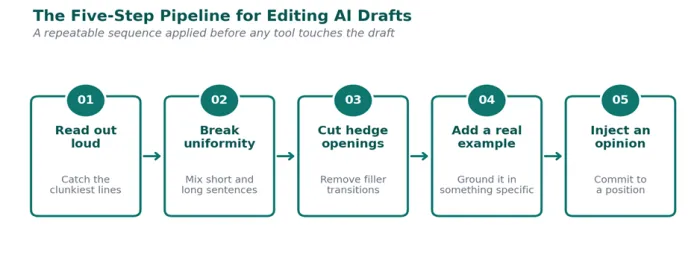
Step 1: Read the draft out loud
This single habit catches more AI-isms than any automated checker. Sentences that sound fine on screen often clunk in the mouth. Anywhere the voice trips, the prose needs a rewrite.
Step 2: Break sentence uniformity on purpose
If three sentences in a row run between 18 and 22 words, one of them needs to become five words or thirty. Variation in rhythm is the single biggest signal of a human writer at work.
Step 3: Replace hedged openings
Cut every phrase that begins with "It is important to note", "It is worth mentioning", or "In conclusion". These are filler. The sentence almost always works better without them.
Step 4: Add a real example
AI drafts deal in abstractions. Slipping in one concrete example, a specific number, a place, a brand name, or a moment, instantly grounds the writing in something a human would actually know.
Step 5: Introduce a small opinion
Even a mild stance ("This pricing is fair", "That feature feels underused") signals authorship. AI rarely commits to a position. Real writers do.
Common Mistakes That Keep AI Content Flagged
Plenty of editors run their drafts through three different tools and still end up with content that reads stiffly. A few recurring mistakes explain most of the failures.
Leaning entirely on paraphrasers. Tools like QuillBot and Wordtune are sentence-level. Running an entire article through them produces a different kind of generic writing, not human writing. The structure stays AI-shaped.
Editing for detectors instead of readers. AI detectors carry false-positive rates of 10 to 15 percent on free tiers. Optimizing prose to pass them often makes the writing worse, not better. Readers, not detectors, are the right audience.
Skipping the structural pass. Most AI drafts repeat the same three or four paragraph shapes (claim, evidence, conclusion). Mixing in a question, an anecdote, or a one-line paragraph breaks the pattern faster than any synonym swap.
Polishing too early. Running Grammarly on a draft before fixing structural problems means polishing sentences that should not exist. Cut and rewrite first, then run grammar checks.
Final Thought
Editing AI content well is less about hiding the source and more about taking responsibility for the writing. The tools listed above shorten the work, but the judgment, rhythm, examples, and opinion still belong to the person sitting at the keyboard.
After a few months of using these tools, the patterns become obvious. ProWritingAid catches repeated habits, Hemingway exposes bloated paragraphs, Grammarly works quietly in the background, QuillBot helps at sentence level but can drift on technical meaning, and Wordtune’s alternatives sometimes feel too similar. Platforms focused on AI-assisted publishing workflows, including Writenexa, also show where the market is heading: toward clearer structure, sharper editing, and content that feels intentionally shaped rather than simply “humanized.”
The deeper lesson is that AI drafts feel artificial less because of word choice and more because they avoid risk. They hedge, balance every claim, and settle into the safe middle. No paraphraser fixes that. The real fix is editorial nerve: picking a position, naming a specific tool, dismissing what does not work, and taking responsibility for the final piece.