I have worked through more face-swap tools than I would like to admit, and most of them put a login, a watermark, or a forgotten subscription between me and a simple result. Remaker AI let me start without any of that. No account, no card, a face swapped in seconds. For its core job, that first impression held up.
Push past the easy stuff, though, and the picture gets more honest. This is a tool with one genuinely excellent feature, a few decent ones, and some rough edges the marketing copy would rather you skip over. Here is the version I wish I had read before I started buying credits.
What Remaker AI Actually Is
Remaker AI is a browser-based platform built around AI face swapping for photos, videos, and GIFs, with a set of extra tools added over time. It launched in 2023 and has widened its scope since. You upload a source file and a target face, click swap, and the AI matches lighting, skin tone, and expression to blend the result.

Beyond the headline feature, the toolkit now covers:
- Photo and video face swap, including multi-face and batch processing for group shots.
- Background removal, which turns out to be one of its quietly strong tools.
- An AI image generator and upscaler, plus a talking-photo and text-to-video feature.
The whole thing runs in the browser on desktop and mobile, no install required. Accessibility comes before depth here. It suits someone who wants a clean result in three clicks, not someone tuning forty parameters.
First Impressions: Sign-Up to First Swap
You can run a basic swap with no account at all, which is rare and worth applauding. Make an account and you get a small starting credit balance plus a few free credits that refresh daily. The upload zones are labelled plainly as original and target, and my first swap came back in seconds.
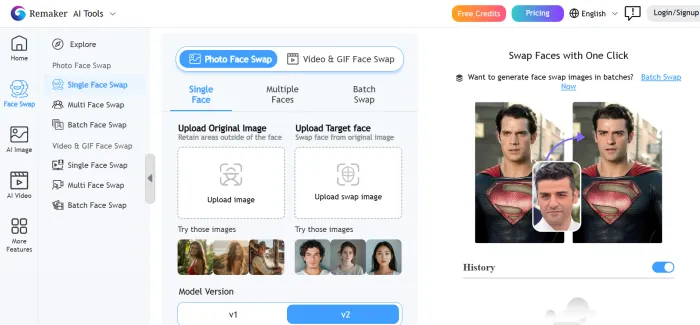
TABLE 1 · THE ONBOARDING RUN
| Step | What it felt like |
|---|---|
| No-login swap | Works, useful for a quick test before committing |
| Account creation | Optional and fast, grants starting credits plus daily top-ups |
| First photo swap | Seconds, clean blend on a well-lit single face |
| Multi-face group shot | Recognised each face, let me pick which to replace |
| Learning curve | Near zero for swaps, slight friction on the busier tool menu |
The catch surfaces quickly. What reads as “free” on the homepage runs into credit walls and paid prompts the moment you do anything heavier, a complaint that shows up again and again in user reviews.
The Credit System, Where It Gets Real
Remaker AI skips monthly subscriptions for credits you buy once and keep, which I prefer. Credits do not expire, so there is no end-of-month rush to use them. The free plan hands you a starter balance plus daily refreshers, enough to test things properly.
What is uneven is how different features eat into that balance. Photo work sips credits. Video drains them.
TABLE 2 · WHAT EACH ACTION COSTS YOU
| Action | Approx. credits | Reality check |
|---|---|---|
| Single photo face swap | 1 to a few | Cheap, the sweet spot of the tool |
| Background removal | Low | Reliable, great for product shots |
| Short video clip (5s) | ~20 | Free balance barely covers one |
| Video enhancement (~19s) | ~57 | Where budgets quietly evaporate |
For photo work and batch edits, the free daily credits and a cheap starter pack stretch a long way. For anyone living in video, the costs climb fast and the math stops being friendly.
Pricing Tiers
Numbers shift by region and by where you buy, so treat these as the shape of it rather than the gospel. One practical warning that came up more than once: prices through the mobile app reportedly run higher than the website for the same credits, so buy on the web.
TABLE 3 · CREDIT PACKS, ROUGHLY
| Tier | Rough price | What you get |
|---|---|---|
| Free | $0 | Starter credits on signup plus a few daily, watermark-free basics |
| Starter pack | ~$5.99 | About 200 credits, enough to trial every feature |
| Mid pack | ~$9.99–$19.99 | About 530 to 1,000 credits, the pick for regular photo work |
| Bulk | up to ~$299 | About 20,000 credits for heavy or video-driven use |
Credits being one-time and non-expiring is the real edge here, more than the technology. You are not renting access, you are buying a balance.
The biggest advantage is the pricing model, not the technology.
A sentiment echoed across several independent reviews
What People Say Across Review Platforms
I checked my own take against public sentiment, and the spread is wide enough to matter. A few honest caveats, because trust is the whole point of a review.
G2 and Capterra: Coverage is thin. Remaker AI appears in software directories, but there is no deep bank of verified business reviews like you would find for established SaaS. You will not get comparison-grade data, so do not lean on an aggregate score that barely exists.
Reddit and creator forums: The warmest corner. The recurring note is that Remaker produces cleaner swaps than rival free apps and handles multi-face group shots better than most, with processing speed singled out as a plus.
Trustpilot: The coldest corner, and not one to skip. Volume is low and the average sits around 2.5 out of 5, with complaints clustering on site downtime, features failing to generate, and support being hard to reach.
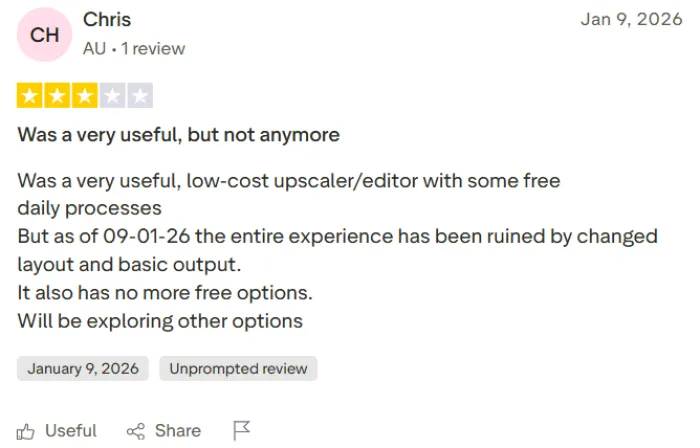
TABLE 4 · CROSS-MARKET SENTIMENT
| Platform | Signal | The gist |
|---|---|---|
| G2 / Capterra | Very thin | Listed, but no real aggregate to trust |
| Reddit / forums | Moderate, positive | Clean swaps, fast, strong on multi-face |
| Trustpilot | ~2.5 / 5 | Downtime, failed generations, weak support |
| App Store | ~4.3 / 5 | Praise for swap quality and results |
The point is not that one camp is lying. Satisfaction tracks closely with what people use it for. Those who came for face swaps and quick edits tend to be happy. Those who leaned on it as a stable production service, especially during outages, are not.
The Issues You Should Know About
No glossing over the rough parts.
- “Free” has an asterisk. Heavier tasks hit credit walls and paid prompts the homepage soft-pedals.
- Site downtime and intermittent failures. Several users report the tool failing to generate, sometimes for stretches at a time.
- Customer support lags. Slow or absent responses on billing and technical issues is the most consistent complaint.
- Video drains credits fast, and video enhancement tends to over-smooth fine texture.
- Contradictory terms. Despite the “no subscriptions” pitch, the fine print reportedly mentions auto-renewal, so read it and use a card with chargeback protection.
- Mobile pricing markup. The same credits can cost notably more in-app than on the website.
Who Should Use It, and Who Shouldn’t
GOOD FIT
- Casual users who want fast, fun face swaps with no install
- Social and meme creators needing quick GIF and photo edits
- E-commerce sellers leaning on batch background removal and upscaling
- Anyone who prefers buying credits once over a monthly subscription
POOR FIT
- Teams needing guaranteed uptime for time-sensitive production
- Heavy video workflows where credit costs spiral
- Anyone who needs responsive, dependable customer support
- Users wanting fine-grained manual editing control
One more, the obvious one: face-swap tech needs consent. Swap faces you have permission to use, and stay on the right side of both ethics and the platform’s own rules.
THE FINAL VERDICTA sharp tool for one job, held back by its plumbing After living with Remaker AI, the shape of it is clear. For face swaps and quick photo edits it is fast, clean, and refreshingly accessible, and the buy-once credit model is a real comfort next to subscription fatigue. For that core use, it delivers above its price. The drag is everything around the core. Reported downtime, thin support, the soft sell on “free,” and video costs that balloon all chip away at the trust. Use it for what it does best, buy a small credit pack before committing, keep your originals backed up, and read the terms before you pay. Treated as a sharp single-purpose tool rather than a production backbone, it rarely disappoints. |