

I can usually spot the 1 a.m. draft within two paragraphs. The throat-clearing opener, the point made twice in slightly different words, the conclusion that quietly gives up. After years of editing student writing, I expected AI to make all of that worse. Mostly it has done something stranger: it has made the blank page less frightening and the bad first draft far easier to fix.
Here is what the glossy reviews skip. The tool you pick matters less than where you use it. A paraphraser in the wrong spot can wreck a good paragraph, while a drafting assistant used as a sounding board can lift a shaky writer. I put the popular names through real assignments, on real deadlines, the way a student actually would. Below are the five worth your time, plus the category to skip.
The one rule that beats every tool
Start here, because it can save you a meeting with your professor. Student use of AI for homework jumped from 48% to 62% over the course of 2025, according to a nationally representative RAND survey, and writing helpers like Grammarly and QuillBot now reach about one in five students. This is not niche anymore. The guardrails, though, are thin: only about a third of students say their school has a clear, school-wide AI policy, and the rules often shift from one instructor to the next.
That gap is where people get burned. Roughly one in six students admits to submitting AI text they never even edited, which is the quickest path to a flagged paper. The fix is not complicated. Use AI to think, plan, check, and polish. Do not use it to produce sentences you cannot stand behind. Read your syllabus, ask what your instructor allows, and keep your own argument on the page. Most students already agree that brainstorming and looking up facts are fair game, while handing in finished answers is not. Trust that instinct.
| Smart, defensible use | Risky, often flagged |
|---|---|
| Brainstorming angles and counterarguments | Generating a full essay and submitting it as-is |
| Building an outline from your own notes | Pasting AI text in with no edits or fact checks |
| Asking for feedback on your draft’s logic | Using a “humanizer” to disguise AI authorship |
| Checking grammar, clarity, and citations | Keeping sources the AI clearly invented |
Table 1. The line most instructors draw, distilled from current student surveys.
Where each tool actually fits
Think of an essay as five moves, not one giant task. AI helps at every stage, but a different tool tends to shine at each. This is the map I kept returning to during testing.
| Stage | What you are doing | Where AI helps | Best fit |
|---|---|---|---|
| 1. Understand | Decoding the prompt, finding your question | Explains the brief, surfaces sub-questions | ChatGPT |
| 2. Plan | Outline, thesis, structure | Turns messy notes into a clean outline | ChatGPT, Jenni |
| 3. Draft | Getting words on the page | Sentence suggestions, beats writer’s block | Jenni, ChatGPT |
| 4. Rework | Tightening, rephrasing, tone | Rewrites clunky lines, varies phrasing | Wordtune, QuillBot |
| 5. Polish | Grammar, clarity, citations | Catches errors, formats references | Grammarly, QuillBot |
Table 2. No single tool owns the whole process. The students who get the most from AI tend to stack two or three, not marry one.
The best AI writing tools for students, tested
Ranked by how much they actually help with essays, not by marketing budget. Pricing and limits move quickly, so the figures here were checked in June 2026; confirm at checkout before you pay.
ChatGPT — the thinking partner
If you only try one, make it this one, and use it before and after you write rather than instead of writing. ChatGPT is at its best decoding a confusing prompt, turning scattered notes into an outline, explaining a dense reading in plain language, and playing a skeptical reader who pokes holes in your argument. Ask it to reverse-outline your finished draft and it will quietly expose the paragraph that does not actually say anything.

The hard limit is trust. It will invent citations that look real, complete with plausible authors and page numbers, and it will state wrong facts with total confidence. Never paste in a reference it hands you without confirming the source exists in Google Scholar or your library. As a ghostwriter it produces competent, forgettable prose that reads like everyone else’s. As a tutor that pushes you to sharpen your own thinking, it is hard to beat.
The free tier runs a capable GPT-5 class model and covers most studying and drafting. Plus, at twenty dollars a month, mainly buys breathing room on the limits plus Deep Research, which spins up a cited mini-report and is genuinely handy for a literature review. There is no student discount right now, though the cheaper Go tier sits at eight dollars.
| How it scores | Rating |
|---|---|
| Ease of use | ★★★★★ 5.0/5 |
| Essay usefulness | ★★★★★ 4.8/5 |
| Free tier value | ★★★★☆ 4.2/5 |
| Citation reliability | ★★★☆☆ 3.2/5 |
| Value for money | ★★★★☆ 4.3/5 |
| Overall verdict | ★★★★☆ 4.3/5 |
| At a glance | Detail |
|---|---|
| Best at | Brainstorming, outlining, explaining readings, reverse-outlining drafts |
| Free tier | GPT-5 class model; message caps tighten under heavy load |
| Standout | Deep Research (Plus) builds a cited mini-report from a question |
| Watch-out | Invents citations and states wrong facts with full confidence |
| Citations | None you can trust; verify every source it offers |
| Best for | Thinking through the essay, not writing it |
Grammarly — the safety net
This is the one to install on day one, because it works everywhere you type: your browser, Word, Google Docs, email. It catches the grammar slips, clarity tangles, and tone wobbles you stop seeing after staring at a paragraph for an hour. The free tier is not a crippled demo, either. You get real grammar, spelling, and tone checking, plus around a hundred AI prompts a month.
Pro, at twelve dollars a month on annual billing (thirty if you pay monthly), unlocks full-sentence rewrites, a plagiarism check, and a much larger AI allowance. The honest caveat: accept every suggestion and Grammarly will sand your voice down to corporate beige. It is a corrector, not a writer, so overrule it when it tries to make you sound like a press release. Reviewers rate the product highly, near 4.7 out of 5 on G2, but more harshly on billing, so set a reminder before auto-renew lands. One genuinely free route worth checking first: some universities provide Grammarly through a campus program.
| How it scores | Rating |
|---|---|
| Ease of use | ★★★★★ 5.0/5 |
| Essay usefulness | ★★★★☆ 4.3/5 |
| Free tier value | ★★★★☆ 4.3/5 |
| Academic fit | ★★★★☆ 4.2/5 |
| Value for money | ★★★★☆ 4.0/5 |
| Overall verdict | ★★★★☆ 4.4/5 |
| At a glance | Detail |
|---|---|
| Best at | Real-time grammar, clarity, and tone across all your apps |
| Free tier | Grammar, spelling, tone, and roughly 100 AI prompts a month |
| Standout | Lives inside the browser, Word, Google Docs, and email |
| Watch-out | Over-accepting suggestions flattens your personal voice |
| Citations | Plagiarism detection on the Pro plan |
| Best for | Catching mistakes before you hit submit |
QuillBot — the paraphrasing and citation workhorse
Around fifty million people use QuillBot, and most met it the same way: pasting a clunky sentence in and getting a cleaner one back. That is still its core strength, alongside summarizing dense readings, a solid grammar checker, and a citation generator that handles the formatting busywork. The free tier is unusually generous for this category. You get a 125-word paraphraser limit per run, two rewriting modes, a 1,200-word summarizer, and a free AI detector that needs no signup.
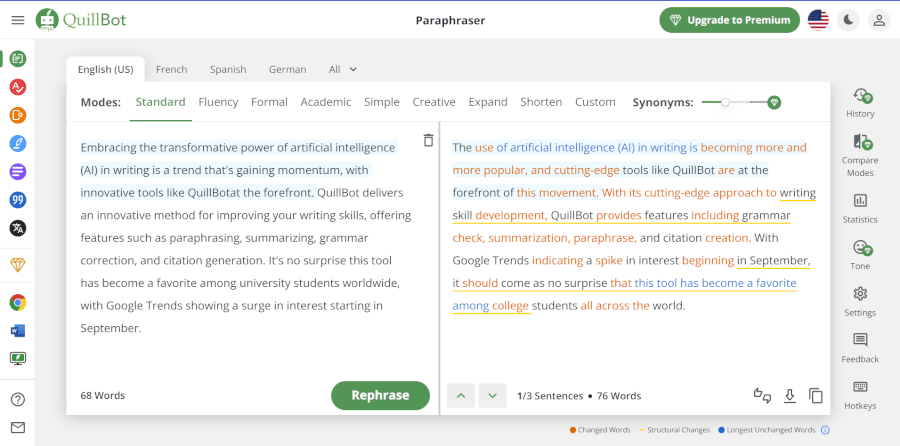
Premium, which lands somewhere between eight and twenty dollars a month depending on billing and current promotions, lifts the word caps and adds more modes plus a plagiarism checker. Use the paraphraser as an editing aid for your own sentences, not as a way to launder someone else’s text, because Turnitin can still flag reworded copying. And ignore the marketing around its Humanizer feature: it will not reliably fool AI detectors, so it is not a reason to upgrade.
| How it scores | Rating |
|---|---|
| Ease of use | ★★★★★ 4.9/5 |
| Essay usefulness | ★★★★☆ 4.4/5 |
| Free tier value | ★★★★★ 4.8/5 |
| Academic fit | ★★★★☆ 4.3/5 |
| Value for money | ★★★★★ 4.7/5 |
| Overall verdict | ★★★★★ 4.6/5 |
| At a glance | Detail |
|---|---|
| Best at | Paraphrasing, summarizing, grammar, and citation formatting |
| Free tier | 125-word paraphraser, 1,200-word summarizer, 2 modes, free AI detector |
| Standout | Free AI detector with no signup and no word limit |
| Watch-out | Paraphrasing copied text can still trip plagiarism checks |
| Citations | Built-in citation generator for common styles |
| Best for | Heavy reading weeks and tidying your own sentences |
Wordtune — the sentence-level specialist
Wordtune does less than Grammarly and does one thing better. It rephrases a single sentence several ways so you can pick the clearest version, shift the tone formal or casual, trim the length, or shake a sticky paragraph loose. For writers who know exactly what they mean but cannot quite land the phrasing, and especially for students writing in a second language, it feels like a patient editor sitting beside you.
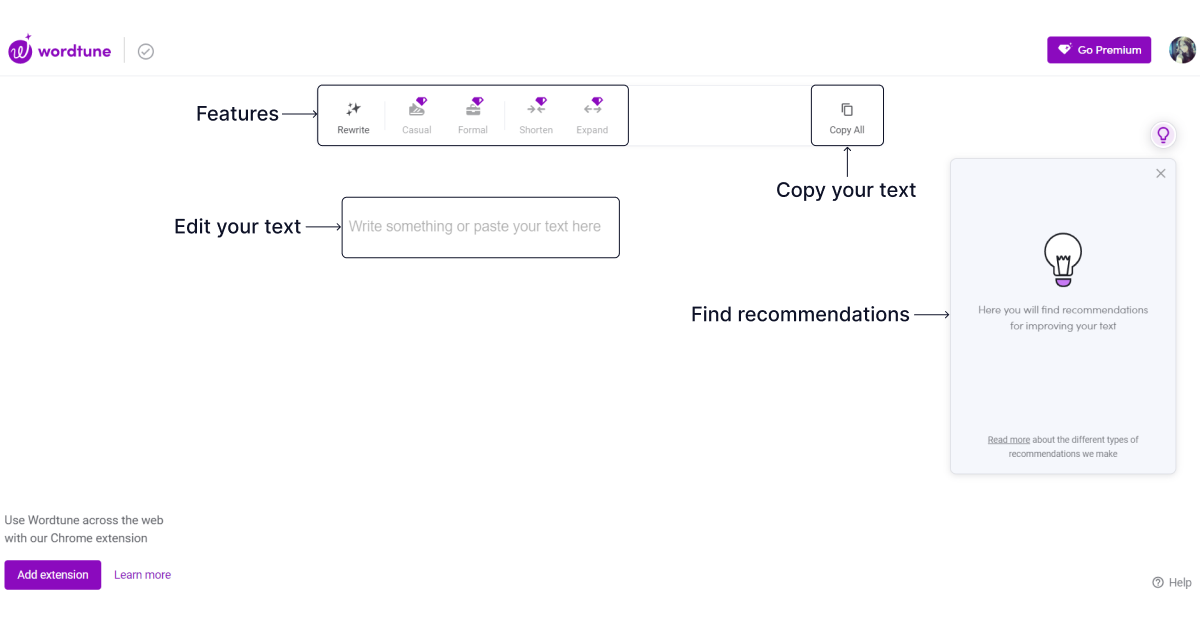
The free plan is tight, with ten rewrites a day and three summaries a month, so heavier users hit the wall fast. Paid plans open things up, roughly thirty rewrites a day on the mid tier and no caps on the top one, at about ten to twenty-five dollars a month, with promotions sometimes dropping the entry price. The honest read: it is lovely, but it overlaps heavily with QuillBot and Grammarly. If you already pay for one of those, Wordtune is a nice-to-have rather than a must, and it has no citation tools, so it belongs in the middle of the essay, not the end.
| How it scores | Rating |
|---|---|
| Ease of use | ★★★★★ 4.8/5 |
| Essay usefulness | ★★★★☆ 4.2/5 |
| Free tier value | ★★★☆☆ 3.2/5 |
| Academic fit | ★★★☆☆ 3.0/5 |
| Value for money | ★★★★☆ 3.6/5 |
| Overall verdict | ★★★★☆ 3.8/5 |
| At a glance | Detail |
|---|---|
| Best at | Rephrasing one sentence many ways; tone and length shifts |
| Free tier | 10 rewrites per day, 3 summaries per month |
| Standout | Excellent for ESL writers and unsticking paragraphs |
| Watch-out | Overlaps with Grammarly and QuillBot; no citation support |
| Languages | Rewrites in English; can translate from several languages |
| Best for | Mid-draft phrasing, if you do not already own a rival |
Jenni AI — built for academic writing
Jenni is the only tool here designed specifically for essays, research papers, and dissertations, and it shows. Instead of generating a whole essay from one prompt, it writes with you line by line, suggesting a sentence or two that you accept, reject, or rewrite, which keeps you in the driver’s seat. It drops in-text citations as you go, supports more than 2,600 styles including APA, MLA, Chicago, and Harvard, draws on a large academic database, and lets you upload source PDFs to cite directly.
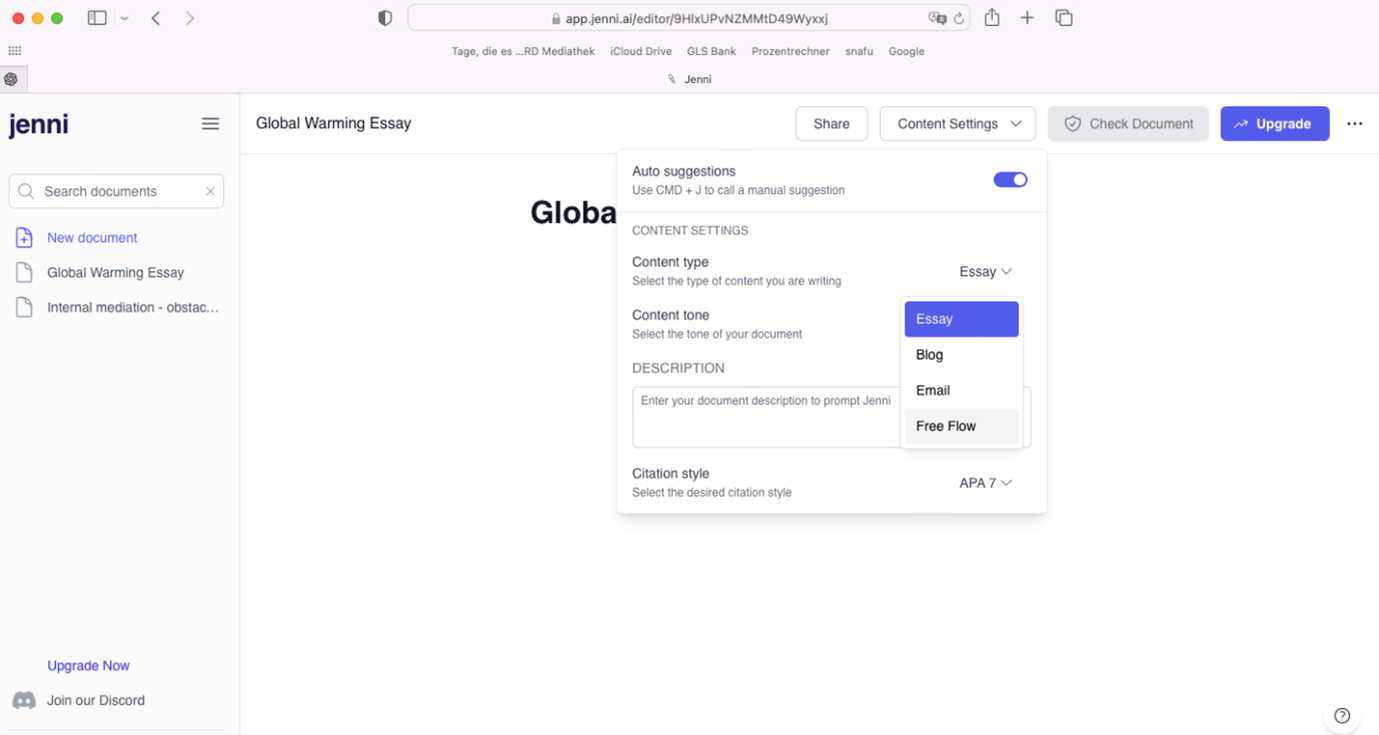
The free tier is strictly a test drive: 200 AI words a day and ten chat messages total, which you will exhaust in one sitting. The Unlimited plan runs twelve dollars a month on annual billing, more month to month. Its Smart Citations, which link a claim back to the exact passage in your source, are the standout and rare elsewhere. Two warnings from the field: verify every citation before you submit, since users report occasional outdated or mismatched sources, and cancel carefully, because billing complaints are a recurring theme in reviews. For thesis season, it earns its keep.
| How it scores | Rating |
|---|---|
| Ease of use | ★★★★☆ 4.3/5 |
| Essay usefulness | ★★★★★ 4.7/5 |
| Free tier value | ★★★☆☆ 2.6/5 |
| Citation power | ★★★★★ 4.6/5 |
| Value for money | ★★★★☆ 4.0/5 |
| Overall verdict | ★★★★☆ 4.1/5 |
| At a glance | Detail |
|---|---|
| Best at | Drafting academic essays and papers with citations built in |
| Free tier | 200 AI words per day, 10 chat messages total (trial only) |
| Standout | Smart Citations link a claim to the exact source passage |
| Watch-out | Citations need checking; billing complaints appear in reviews |
| Citations | 2,600+ styles including APA, MLA, Chicago, and Harvard |
| Best for | Thesis and dissertation season |
Head to head, by the job you need done
Here is the whole field on one screen. Read it as a starting point, then let your assignment and your budget decide.
| Tool | Best for | Free tier highlight | Main watch-out | From |
|---|---|---|---|---|
| ChatGPT | Thinking, outlining, explaining | Capable GPT-5 class model | Invents citations | $0 |
| Grammarly | Grammar and tone everywhere | ~100 AI prompts a month | Can flatten your voice | $0 |
| QuillBot | Paraphrasing and summarizing | Free AI detector, no signup | Reworded copying still flags | $0 |
| Wordtune | Sentence-level rephrasing | 10 rewrites a day | Overlaps with rivals | $0 |
| Jenni AI | Academic drafts with citations | 200 AI words a day | Verify every citation | $0 |
Table 3. Every tool has a usable free tier; the paid value depends entirely on how often you write.
Prefer to pick by task rather than by brand? Use this.
| When you need to… | Reach for | Why, and the runner-up |
|---|---|---|
| Understand a confusing prompt | ChatGPT | Plain-language breakdown you can interrogate |
| Outline from messy notes | ChatGPT or Jenni | Structure fast, then refine line by line |
| Beat writer’s block mid-draft | Jenni AI | Controlled sentence suggestions; ChatGPT for bursts |
| Rephrase a clunky sentence | Wordtune or QuillBot | Several options; pick the clearest |
| Summarize a long reading | QuillBot | 1,200-word summarizer free; ChatGPT for longer texts |
| Fix grammar and tone anywhere | Grammarly | Works in your browser, Word, and Docs |
| Format APA or MLA citations | Jenni or QuillBot | 2,600+ styles versus a quick generator |
| Check for plagiarism | Grammarly Pro / QuillBot Premium | Both paid; screen originality before submitting |
Table 4. The fastest way to choose: match the tool to the move, not the other way around.
And because price is usually the real deciding factor for students, here is the money view, with the figures I verified in June 2026.
| Tool | Free tier | Paid entry (verified Jun 2026) | Billing note |
|---|---|---|---|
| ChatGPT | GPT-5 class model, capped | Go $8/mo; Plus $20/mo | No student discount at present |
| Grammarly | Grammar, tone, ~100 prompts | Pro $12/mo annual ($30 monthly) | Check campus “for Education” access |
| QuillBot | 125-word paraphrase + detector | About $8–$20/mo, annual cheapest | 50M+ users; promos vary often |
| Wordtune | 10 rewrites/day, 3 summaries | About $10–$25/mo | No free trial of premium |
| Jenni AI | 200 words/day, 10 chats total | Unlimited $12/mo annual | Cancel carefully; verify citations |
Table 5. Prices and limits change without notice. Always confirm the current number before subscribing.
What reviewers actually say
Treat these as two different audiences, not one verdict. G2 and Capterra mostly collect verified business and productivity users, who skew positive, while Trustpilot is complaint-driven, so billing and support frustrations dominate there. ChatGPT is the sharpest example: the same product earns a 4.7 on G2 and a 1.6 on Trustpilot. The pattern worth noticing across the whole field is that auto-renew and refund disputes, not writing quality, drive most of the angry reviews.
| Tool | Trustpilot | G2 | Capterra | What reviewers actually say |
|---|---|---|---|---|
| ChatGPT | ★ 1.6/5 ~2,800 | ★ 4.7/5 ~1,900 | — | Power users rate it highly for work; the Trustpilot pile-on is about billing disputes and abrupt model changes. |
| Grammarly | ★ 3.5/5 ~10,400 | ★ 4.7/5 ~13,000 | ★ 4.7/5 ~7,200 | Adored as a product, but auto-renew charges drive most of its one-star reviews. |
| QuillBot | ★ 4.8/5 | ★ 4.4/5 ~68 | ★ 4.5/5 ~154 | Paraphrasing and the generous free tier win praise; the main gripe is premium pricing. |
| Wordtune | — | ★ 4.6/5 ~190 | ★ 4.4/5 ~80 | Strong marks for ease and rephrasing; reviewers most want a less limited free tier. |
| Jenni AI | ★ 4.1/5 ~145 | — | — | Citations and autocomplete earn the love; refund and billing friction is the recurring complaint. |
Table 6. Cross-platform scores captured June 2026. A dash means too few reviews on that platform to score. Read low Trustpilot numbers as a billing-and-support signal, not a quality verdict.
The honest bottom line
Start free. Every tool here has a no-cost tier that is enough to learn whether it fits how you work, and plenty of students never outgrow the free versions of two of them. If I were handing a first-year student a starter kit, it would be ChatGPT for thinking and Grammarly for polishing, both free, with QuillBot held in reserve for heavy reading weeks.
None of this writes the essay for you, and you would not want it to. The grade, and the actual learning, still come from the argument you build and the words you choose to defend it. The students who pull ahead with AI are not the ones using it to think less. They are the ones using it to think harder, faster, and with fewer 1 a.m. panics. Use it that way, and the blank page stops being the enemy.





