

The short version
| What you want to do | Top pick | Best free option | Typical price |
|---|---|---|---|
| Read ebooks | Kindle | Libby | $0 to $11.99/mo |
| Track your reading | The StoryGraph | StoryGraph (free) | $0 to $4.99/mo |
| Listen to audiobooks | Audible | Libby or Spotify | $0 to $14.99/mo |
| Do all three for free | Libby | Libby | $0 |
Here is the thing nobody tells you up front: “reading” has quietly split into three separate jobs, and almost no single app does all three of them well. You read ebooks. You keep track of what you have finished and what is next. And, more and more, you listen, on the commute, at the gym, while the dishes pile up. Each job has its own best apps, its own pricing quirks, and its own trade-offs that the marketing pages politely leave out.
This is the version I would hand a friend who reads a lot and is tired of guessing. We will walk through every app that earns a place on your phone for reading, tracking, and listening: what it is great at, where it quietly falls short, and what it really costs as of today. I have added a quick rating for each one so you can skim, plus a use-case picker and a few ready-made setups at the end. By the time you are done, you will have two or three apps, not twelve.
A quick look at where reading is headed
Print is not going anywhere, but the growth in reading is overwhelmingly digital, and the loudest story is audio. Knowing the lay of the land helps explain why the apps behave the way they do, especially around pricing.
• The global audiobook market sat somewhere between roughly $8.7 billion and $11 billion in 2025, depending on which research firm you ask, and most analysts expect double-digit annual growth from here. Many estimates cluster around a 25 to 26 percent compound rate, which would push it past $50 billion within a decade.
• North America is still the largest single market (around 44 percent of revenue), but Asia-Pacific is growing fastest as smartphones and local-language catalogs expand.
• Smartphones handle most listening, well over half of all sessions, which is why “the best audiobook app” really means “the best app on the phone in your pocket.”
• Subscriptions, not one-off purchases, are now the dominant way people pay, over half of audiobook spending. That is exactly why understanding each service’s pricing model matters so much.
• Two forces shape what people actually read: BookTok, where tens of millions of videos routinely turn older titles into bestsellers, and AI narration, which a majority of publishers are now experimenting with to produce audio faster and in more languages.
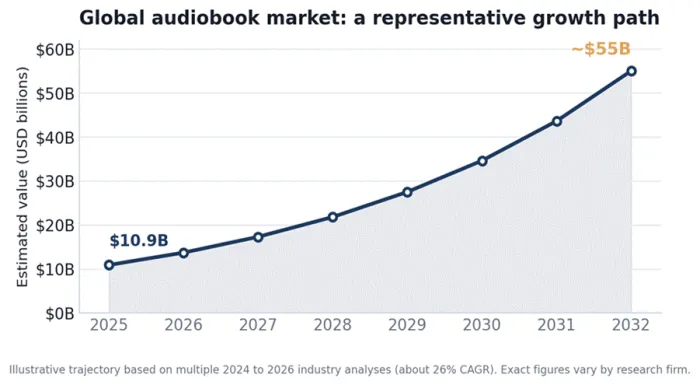
Audiobooks are the fastest-growing corner of the book world. (Illustrative projection; figures vary by research firm.)
| The takeaway: the field is competitive and moving fast, which is good for you. Prices, catalogs, and features change often, so treat any setup as something you can revise, not a marriage. |
First, separate the three jobs
The single most useful thing you can do before downloading anything is decide which of these three you care about, and how much.
1. Reading. Ebooks on a phone, tablet, or e-ink reader. The questions that matter: which store has the books you want, and how locked-in are you willing to be.
2. Tracking. Logging what you read, rating it, finding the next thing, and (if you like) sharing with friends. This is where reading becomes a habit you can see.
3. Listening. Audiobooks. The questions that matter: do you want to own them, rent access to a catalog, or borrow them free.
Most committed readers end up using two or three apps, one per job. A common, sensible combination is Kindle to read, StoryGraph to track, and Libby to listen for free. That is normal, and usually cheaper than forcing one app to do everything.
How to read what follows: each app gets a quick-facts box (who it is best for, where it runs, what it costs, what makes it special, and what to watch out for), a review scorecard, and the honest version of when to pick it and when to skip it. The star ratings are our editorial take, not a lab benchmark. All prices are standard US rates as of June 22, 2026 and can change; annual plans and free trials almost always lower the real cost.
Best apps for reading ebooks
These three cover nearly everyone. The choice mostly comes down to a single question: how much do you want to live inside Amazon’s ecosystem?
Amazon Kindle, the default for a reason
| Best for | Readers who want the biggest store, the smoothest cross-device sync, and do not mind Amazon’s ecosystem. |
| Platforms | iOS, Android, web, Kindle e-readers, Fire tablets, Mac and Windows. |
| Price | Free app; buy books individually. Kindle Unlimited $11.99/month (4M+ ebooks plus many audiobooks, all borrowed not owned). |
| Stands out | Unmatched catalog and self-published selection; Whispersync keeps your place across phone, tablet, and e-reader; strong accessibility (adjustable fonts, including OpenDyslexic). |
| Watch out for | Books are locked to Amazon’s apps and format; ebooks and audiobooks live in separate apps (Kindle vs Audible); KU leans indie and is light on big-publisher bestsellers; Amazon tracks reading behavior. |
Kindle is the default for a reason. If a book exists in English, it almost certainly exists on Kindle, and the reading experience is clean and reliable across every device you own. The standout feature for a lot of people is Whispersync: start a chapter on your phone at lunch, pick it up on a Kindle that night, and you land on the right page.
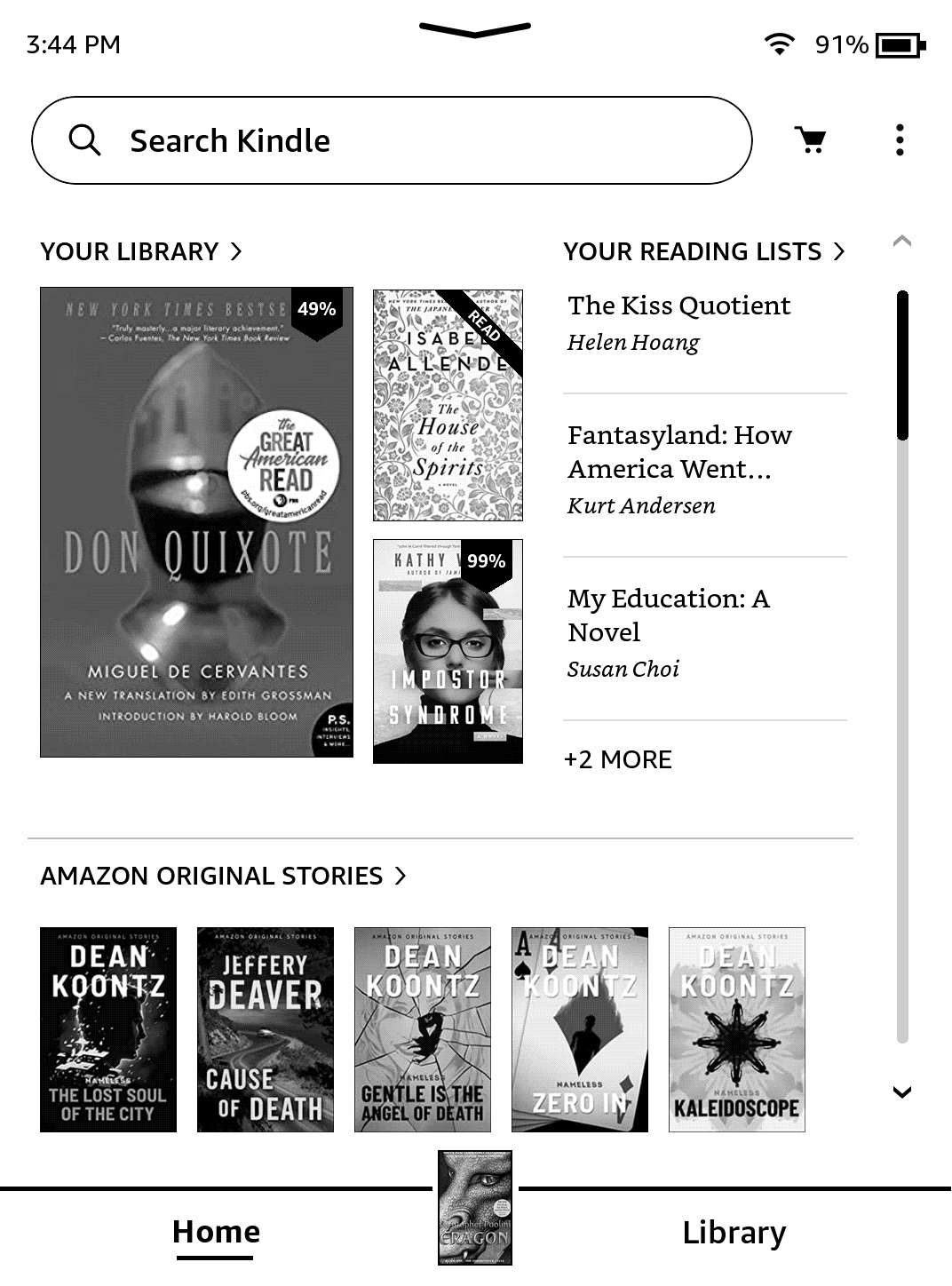
The catch is the walled garden. A book you buy on Kindle is a book you can only read in Kindle apps; there is no exporting it to a Kobo later. Kindle Unlimited is excellent value if you read three or more books a month and stay flexible about titles (it is strong on indie and series fiction); it is a weak deal if you want the latest big-publisher hardcover, since those are frequently missing. And remember, audiobooks are a separate purchase through Audible, not bundled in.
Review scorecard
| What we judged | Our rating | Quick take |
|---|---|---|
| Catalog and selection | ★★★★★ 5/5 | The biggest ebook store there is. |
| Reading experience | ★★★★★ 4.5/5 | Clean, reliable, superb cross-device sync. |
| Value for money | ★★★★★ 4/5 | KU pays off if you read 3+ books a month. |
| Openness and flexibility | ★★★★★ 2.5/5 | Locked to Amazon’s format and apps. |
| Overall | ★★★★★ 4.5/5 | The default for most readers. |
• Pick Kindle if: you already shop on Amazon, want the widest selection, or read across a phone and an e-reader.
• Skip it if: you care about owning portable, DRM-free files, or you want a single app for both reading and listening.
• Money tip: Kindle Unlimited runs frequent promos (often a few months for $0.99) and ships with long free trials on new Kindle devices.
Kobo, the open, indie-friendly alternative
| Best for | Readers who want a serious store that is not Amazon, native EPUB support, and easy library borrowing. |
| Platforms | iOS, Android, Kobo e-readers, web store. (No native macOS app.) |
| Price | Free app and store. Kobo Plus: $7.99/month for ebooks-only or audiobooks-only, or $9.99/month for both. |
| Stands out | Reads EPUB, including sideloaded files, natively; ebooks and audiobooks in one app; Libby/OverDrive borrowing built into Kobo devices; Pocket integration for saved articles; flexible single-format subscriptions. |
| Watch out for | Smaller catalog than Amazon for mainstream bestsellers; Kobo Plus is in about 34 countries and its titles read on Kobo apps/devices; sideloading on iOS takes a workaround. |
Kobo is the thinking reader’s alternative to Kindle. The core philosophical difference is openness: Kobo speaks EPUB, the open ebook format, so books you buy elsewhere, or download free from a site like Standard Ebooks, drop straight in. It also folds ebooks and audiobooks into one app, which Amazon stubbornly refuses to do.
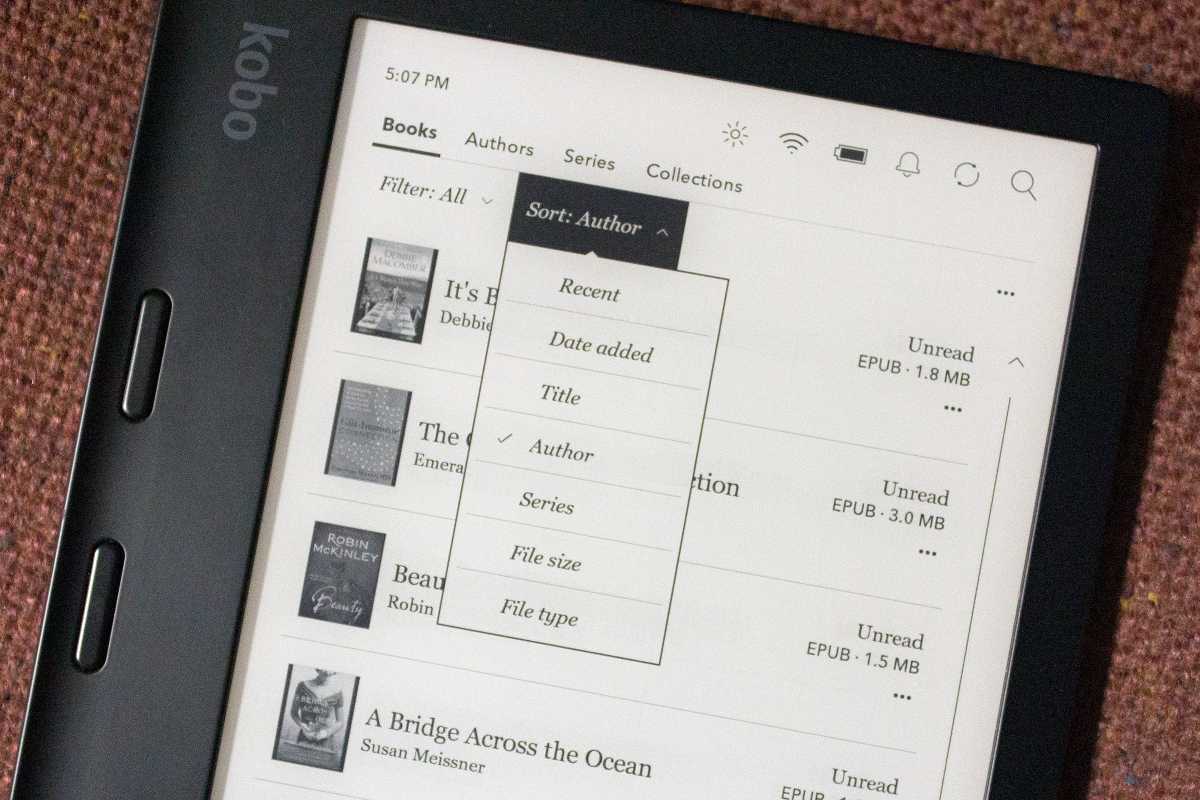
For library lovers outside the US, Kobo is often the better hardware bet, because OverDrive and Libby borrowing is baked into every Kobo e-reader. Kobo Plus is the most flexible subscription on this list (pay only for ebooks, only for audiobooks, or both), and it is a few dollars cheaper than Kindle Unlimited. The honest trade-off is selection: for the buzziest new releases from major publishers, Amazon simply has more.
Review scorecard
| What we judged | Our rating | Quick take |
|---|---|---|
| Catalog and selection | ★★★★★ 4/5 | Big, just thinner on major-publisher hits. |
| Reading experience | ★★★★★ 4.5/5 | Polished reader, native EPUB. |
| Value for money | ★★★★★ 4.5/5 | Flexible, cheaper Kobo Plus tiers. |
| Openness and flexibility | ★★★★★ 5/5 | Open formats and easy sideloading. |
| Overall | ★★★★★ 4.5/5 | The best non-Amazon choice. |
• Pick Kobo if: you want to avoid Amazon, own portable EPUB files, or borrow library books on a dedicated e-reader.
• Skip it if: you need the absolute widest catalog, or you read mostly on a Mac (there is no native app).
• Money tip: the split Kobo Plus plans mean an audiobook-only listener can pay $7.99 instead of bundling formats they will not use.
Apple Books, the zero-friction default for Apple users
| Best for | iPhone, iPad, and Mac users who want a polished, built-in reader with no subscription and no setup. |
| Platforms | iOS, iPadOS, macOS only. Pre-installed. |
| Price | Free app. Pay per book; there is no subscription tier. |
| Stands out | Already on your Apple devices; handles purchased books, your own EPUBs, and PDFs in one place; clean reader, good typography, syncs via iCloud; audiobooks sold individually too. |
| Watch out for | Apple-only (nothing for Android or Windows); no all-you-can-read subscription; no MOBI/AZW support; limited tools for organizing a large personal collection. |
Apple Books wins on zero friction. It is already installed, it ties into your Apple ID, and it quietly handles three things at once: books you buy from Apple, EPUB files you bring yourself, and the work PDFs you keep meaning to read. For someone who buys the occasional book and lives entirely on iPhone and Mac, it is the most painless option here.
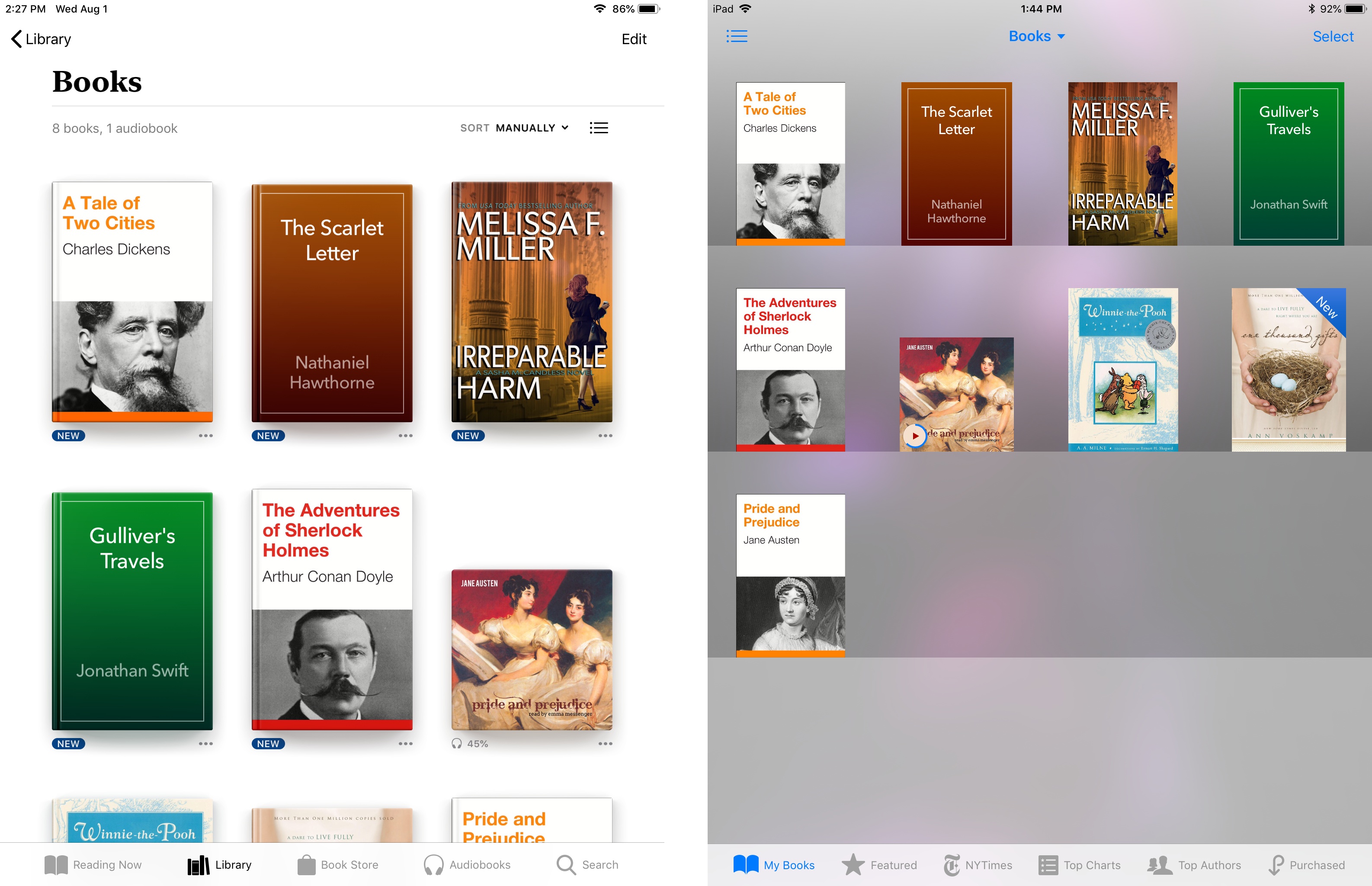
Its limits are exactly what you would expect. There is no subscription, so it is pay-as-you-go; there is nothing for Android or Windows, so the moment you switch phones your library is stranded; and it is not built to organize a sprawling, multi-source collection. Think of it as the reliable default rather than the power-user choice.
Review scorecard
| What we judged | Our rating | Quick take |
|---|---|---|
| Catalog and selection | ★★★★★ 3.5/5 | Solid store, but no all-you-can-read tier. |
| Reading experience | ★★★★★ 4/5 | Clean and nicely integrated on Apple. |
| Value for money | ★★★★★ 3.5/5 | Pay per book; fine for light readers. |
| Openness and flexibility | ★★★★★ 3.5/5 | Reads EPUB and PDF, but Apple-only. |
| Overall | ★★★★★ 4/5 | The zero-setup pick for Apple users. |
• Pick Apple Books if: you are all-Apple, want a built-in reader, and prefer buying books one at a time.
• Skip it if: you use Android or Windows, or you want an unlimited reading subscription.
| Bottom line on reading: all-in on Amazon and want the biggest store? Kindle. Want independence, EPUB files, and library borrowing? Kobo. Live entirely on Apple and just want it to work? Apple Books. |
Best apps for tracking what you read
Tracking is what turns “I should read more” into a habit you can actually see. The three apps below represent three different philosophies: the giant community, the data-rich modern tool, and the social book club.
Goodreads, the giant everyone already uses
| Best for | Readers who want the largest community, the most reviews, and automatic Kindle syncing. |
| Platforms | iOS, Android, web. |
| Price | Free (ad-supported in some regions). |
| Stands out | Around 150 million members and by far the biggest review database; the annual Reading Challenge and “Year in Books”; syncs automatically with Kindle; deep Amazon integration. |
| Watch out for | Interface has barely changed since Amazon bought it in 2013; weak stats; review-bombing and feed noise; your data feeds Amazon; whole-star ratings only. |
Goodreads is the incumbent, and its moat is people. With roughly 150 million members it holds more ratings and reviews than anything else, so almost every book, including obscure backlist, has a community verdict. If your friends already log books somewhere, it is probably here, and if you read on Kindle, Goodreads updates your progress automatically with zero effort.

What it is not is modern. The site looks and behaves much like it did over a decade ago, the social feed is mostly noise (“Jane added 15 books”), the stats are an afterthought, and you are limited to whole-star ratings. It is a capable log and an unmatched review archive; it is not a delightful product.
Review scorecard
| What we judged | Our rating | Quick take |
|---|---|---|
| Tracking and stats | ★★★★★ 2.5/5 | Basic logging, thin stats, whole stars only. |
| Community | ★★★★★ 5/5 | Unmatched reviews and member base. |
| Design and ease | ★★★★★ 2.5/5 | Dated and cluttered. |
| Value for money | ★★★★★ 4/5 | Free, with some ads. |
| Overall | ★★★★★ 3.5/5 | Great archive, tired product. |
• Pick Goodreads if: you want the biggest community and review archive, or you read on Kindle and want hands-off syncing.
• Skip it if: you care about clean design, detailed stats, or staying out of Amazon’s data ecosystem.
StoryGraph
| Best for | Data-loving readers who want mood and pace insights, content warnings, and an Amazon-free home. |
| Platforms | iOS, Android, web. |
| Price | Free; StoryGraph Plus $4.99/month or $49.99/year for advanced stats and extras. |
| Stands out | Mood- and pace-based recommendations; gorgeous free stats (genre, mood, pace, format); quarter-star ratings; user-sourced content warnings; one-click Goodreads import; independent and Black woman-owned. |
| Watch out for | Smaller community and review count than Goodreads; the mobile app can lag the web version; no automatic Kindle sync (you log progress yourself); buddy reads and some stats sit behind Plus. |
StoryGraph is what most people mean when they say “the app Goodreads should have become.” Instead of organizing books by popularity, it organizes them by feel: you tag mood (dark, hopeful, funny) and pace (slow, medium, fast), and the recommendation engine matches you on those dimensions rather than bestseller lists. The free stats page alone (mood pie charts, pace graphs, genre and format breakdowns) is the kind of thing other apps charge for.
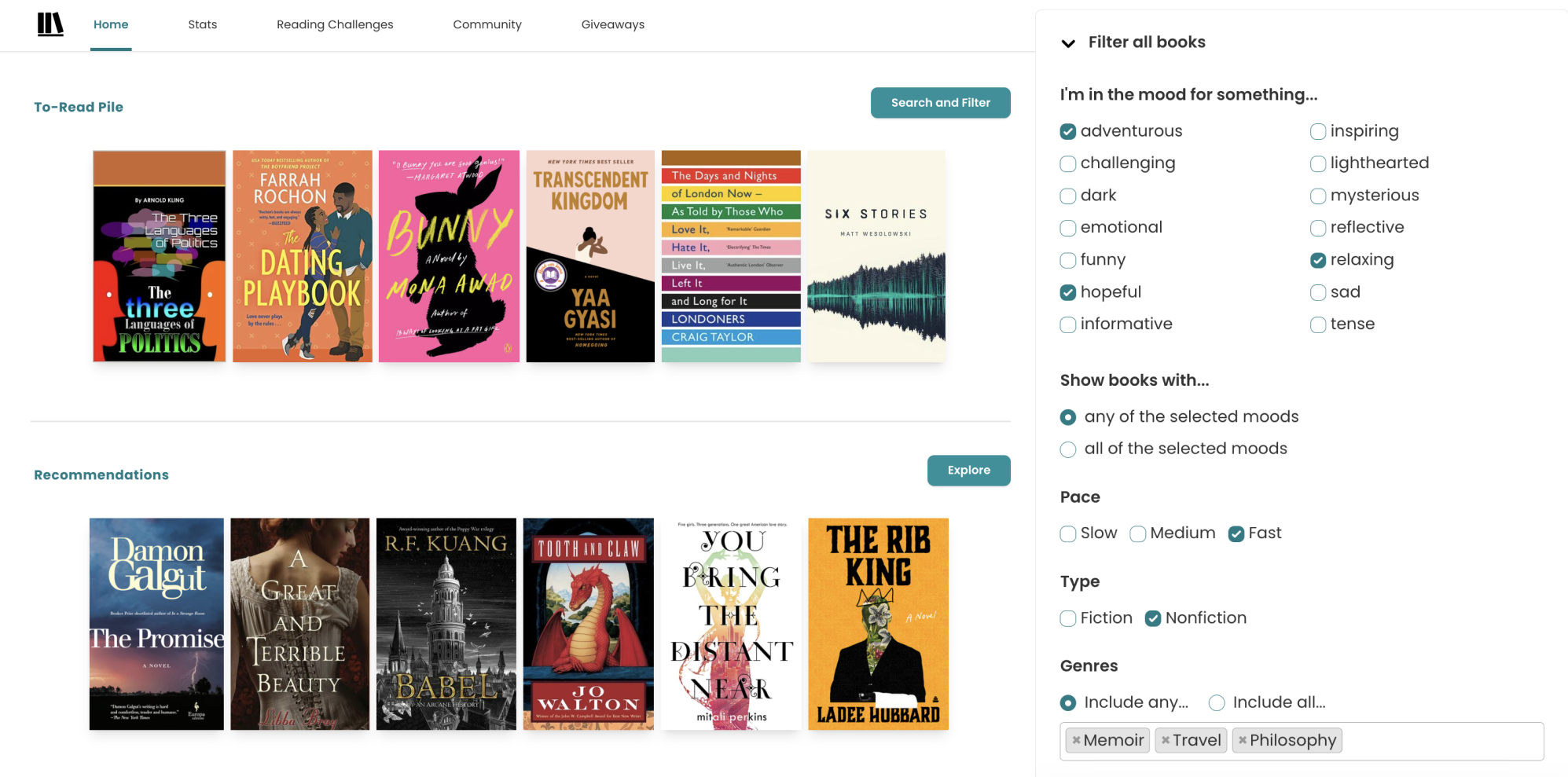
Two honest caveats. The community is far smaller than Goodreads, so a niche title may have a handful of reviews instead of hundreds, and there is no automatic Kindle sync; you update progress manually. For readers who value insight and privacy over a big social network, those are easy trades. For people who live for the comments section, maybe not.
Review scorecard
| What we judged | Our rating | Quick take |
|---|---|---|
| Tracking and stats | ★★★★★ 5/5 | Mood, pace, and genuinely gorgeous charts. |
| Community | ★★★★★ 3/5 | Smaller, but growing steadily. |
| Design and ease | ★★★★★ 4.5/5 | Clean, modern, has dark mode. |
| Value for money | ★★★★★ 5/5 | Most features are free. |
| Overall | ★★★★★ 4.5/5 | The best tracker today. |
• Pick StoryGraph if: you love reading stats, want recommendations by mood, or want to leave Amazon.
• Skip it if: you mainly want a large social network, or you want progress to sync from Kindle automatically.
• Money tip: the free tier covers most readers; Plus ($49.99/year) is for stats obsessives and buddy-read fans.
Fable, the social book club done right
| Best for | Social readers who want real book clubs and chapter-by-chapter discussion, not just a log. |
| Platforms | iOS, Android, web. |
| Price | Free to use; some books and club features may cost extra. |
| Stands out | 100,000+ book clubs (including expert- and celebrity-led), chapter-by-chapter discussions, a clean modern feed, half-star ratings and mood tags, around 3 million users. |
| Watch out for | Smaller book database and fewer reviews than Goodreads; some editions and older titles are missing; it is social-first, so solo trackers may find it busier than they want. |
Fable is the app for people who miss reading with other people. Where Goodreads’ social features feel like a ghost town and StoryGraph leans solitary, Fable is built around clubs, over a hundred thousand of them, with genuine chapter-by-chapter discussion and a feed that feels designed this decade. Stylistically it sits between the two: half-star ratings and mood tags, but with community at the center.
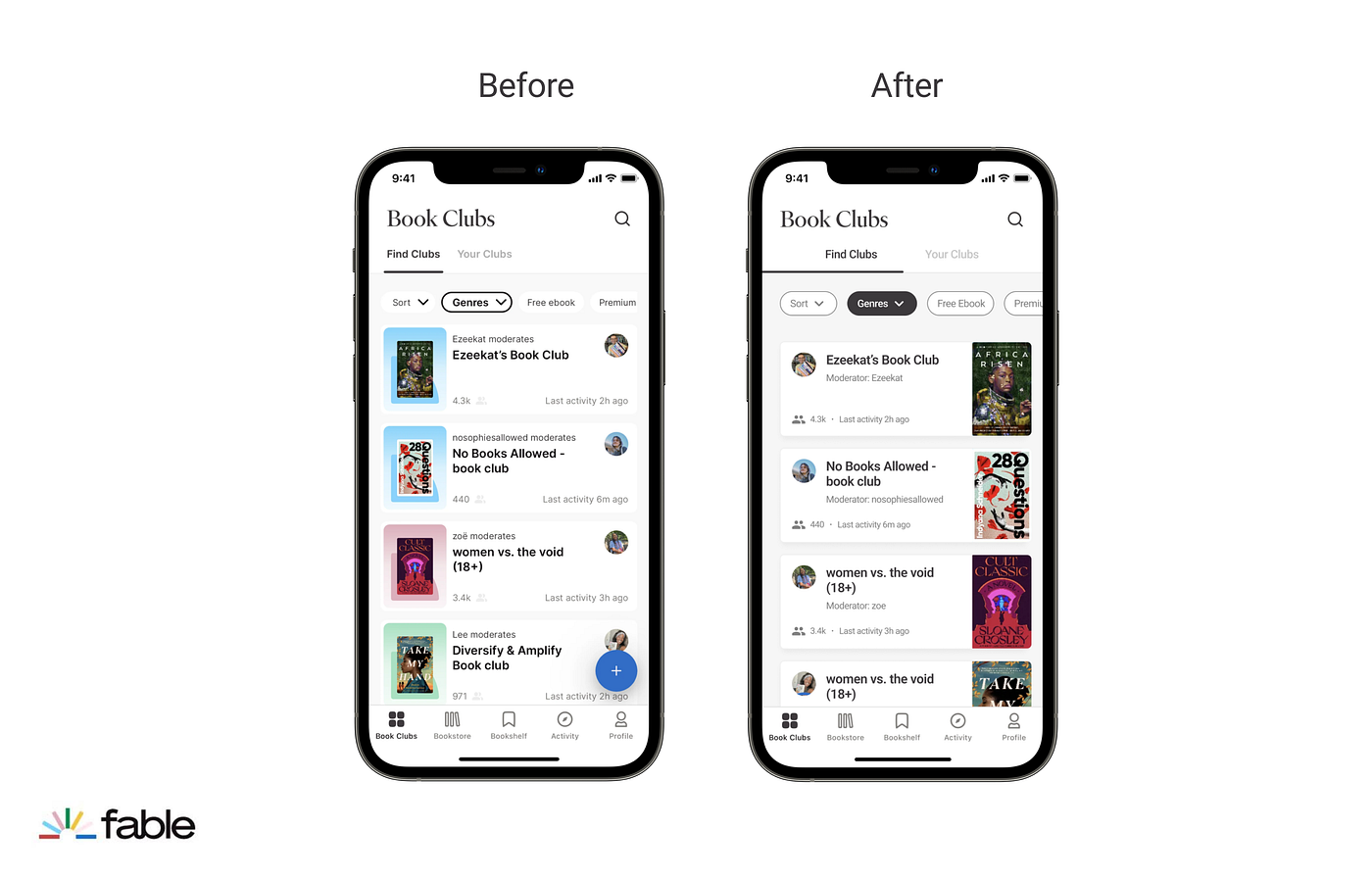
The trade-offs are the usual ones for a younger platform: the book database and review volume do not match Goodreads, and the occasional title or edition is missing. If buddy reading and discussion are your reason for tracking, Fable is the most enjoyable pick. If you just want a private, data-rich log, it is more than you need.
Review scorecard
| What we judged | Our rating | Quick take |
|---|---|---|
| Tracking and stats | ★★★★★ 3.5/5 | Half-stars and mood tags, lighter stats. |
| Community | ★★★★★ 4.5/5 | 100,000+ active book clubs. |
| Design and ease | ★★★★★ 4/5 | Modern, social-first feed. |
| Value for money | ★★★★★ 4/5 | Free core; some paid extras. |
| Overall | ★★★★★ 4/5 | The best app for reading together. |
• Pick Fable if: you want to read socially, join clubs, and discuss as you go.
• Skip it if: you want a private tracker or the deepest review archive.
| Bottom line on tracking: want the biggest community and effortless Kindle sync? Goodreads. Want beautiful stats and recommendations by mood, minus Amazon? StoryGraph. Want to actually read alongside other people? Fable. |
Best apps for listening to audiobooks
Audiobooks come down to one decision before features even enter the picture: do you want to own them, rent access to a catalog, or borrow them free from your library? These three, plus Libby in the next section, cover every answer.
Audible, the market leader
| Best for | Serious listeners who want the biggest catalog and to own titles permanently. |
| Platforms | iOS, Android, web, Alexa, Kindle Fire. |
| Price | Audible Plus $7.95/month (stream the Plus Catalog, no credits); Audible Premium Plus $14.95/month (catalog plus 1 owned-title credit); annual plans (12 credits for $149.50). 30-day free trial. |
| Stands out | Over a million titles and the deepest selection of exclusives and Originals; credits buy any title to keep forever; Whispersync pairs with matching Kindle ebooks; excellent app and Alexa integration. |
| Watch out for | The credit model confuses newcomers (Plus is streaming-only; ownership needs Premium Plus); credits expire after 12 months; you lose Plus Catalog titles if you cancel; it is an Amazon service. |
Audible is the market leader, and not by a small margin: by most estimates it commands the lion’s share of audiobook spending. Its catalog and exclusive Originals are unmatched, and the ownership model is the real draw: spend a credit and that audiobook is yours to keep, even if you cancel. Pair it with a Kindle copy and Whispersync lets you switch between reading and listening without losing your place.
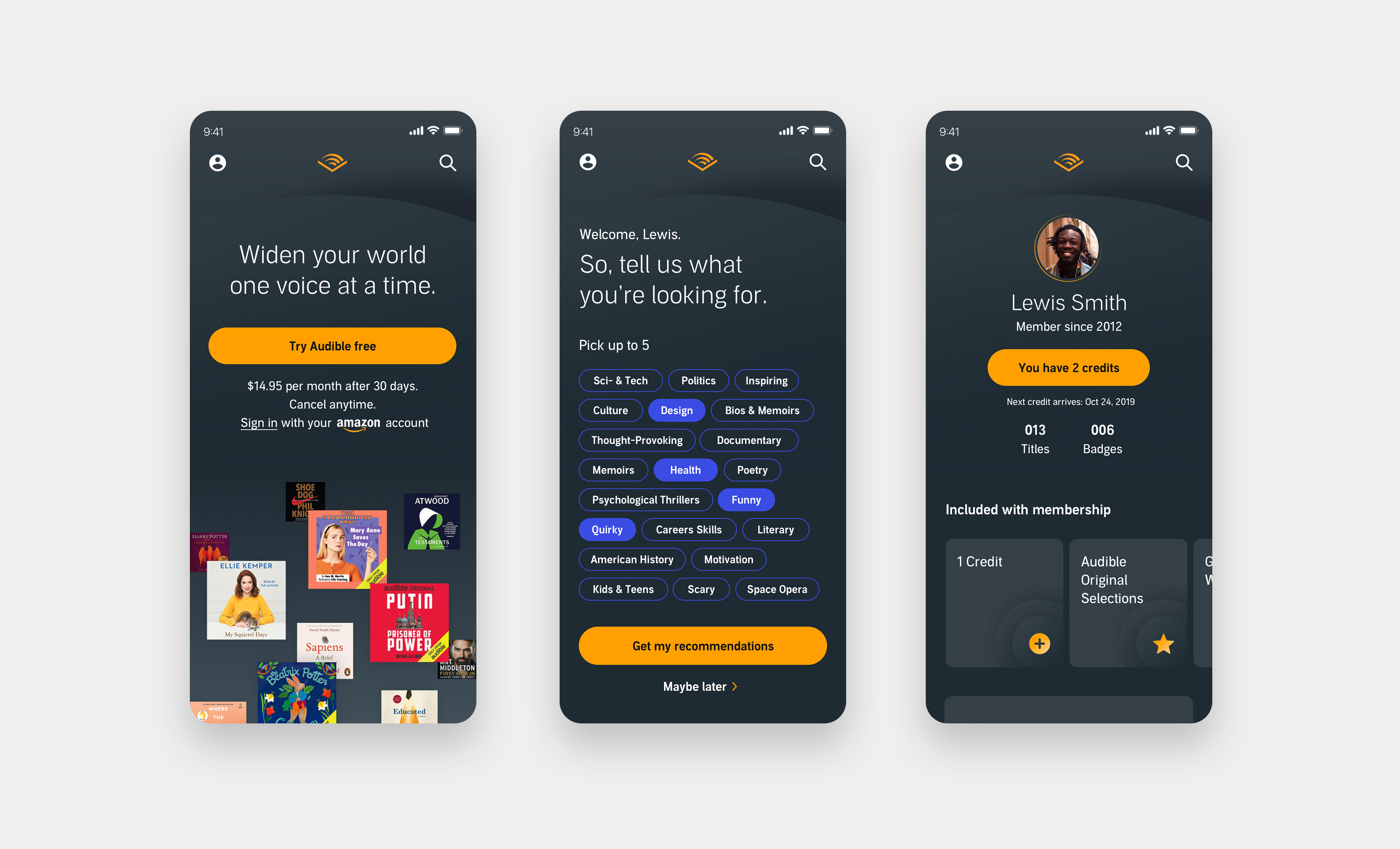
The thing to understand before subscribing is the two-bucket system. The Plus Catalog (included with any plan) is all-you-can-stream, but you do not keep those titles. The Premium selection (bestsellers and new releases) generally has to be bought, which is what your monthly credit is for. If you listen casually, the $7.95 Plus tier is plenty; to own new releases you need Premium Plus at $14.95, and the annual plan is the better per-book value.
Review scorecard
| What we judged | Our rating | Quick take |
|---|---|---|
| Catalog and selection | ★★★★★ 5/5 | Largest library, plus exclusives. |
| App and playback | ★★★★★ 4.5/5 | Excellent app, Alexa, Whispersync. |
| Value for money | ★★★★★ 3.5/5 | One credit a month at $14.95. |
| Ownership and flexibility | ★★★★★ 3.5/5 | You own credits, but DRM applies. |
| Overall | ★★★★★ 4.5/5 | The heavy listener’s default. |
• Pick Audible if: you listen a lot, want the biggest catalog, and like owning audiobooks.
• Skip it if: you want to avoid Amazon, prefer DRM-free files, or mostly listen to library books.
• Money tip: annual Premium Plus lowers the cost per credit, and you can pause a membership instead of canceling to keep unused credits.
Libro.fm, ownership that supports indie bookstores
| Best for | Listeners who want Audible-style ownership but want their money to support a local bookstore. |
| Platforms | iOS, Android, web. |
| Price | $14.99/month for 1 credit (plus 30 percent off extra audiobooks); annual plan $169.99 for 12 credits; a la carte too. Memberships in the US and Canada. |
| Stands out | A share of every purchase goes to an independent bookstore you choose; 600,000+ titles including the vast majority of NYT bestsellers; DRM-free downloads you keep and can move; credits never expire; pause or cancel anytime and keep what you bought. |
| Watch out for | Roughly the same monthly price as Audible without Amazon’s exclusives; you download titles rather than stream a giant included catalog; memberships limited to the US and Canada (gifts are global). |
Libro.fm is the values-driven alternative to Audible, and the pitch is simple: same credit model, same major-publisher catalog, but a portion of your spending goes to an independent bookstore of your choosing instead of Amazon. It is an employee-owned B Corp, the apps are polished, and, crucially, the files are DRM-free, so you genuinely own them and can move them around.
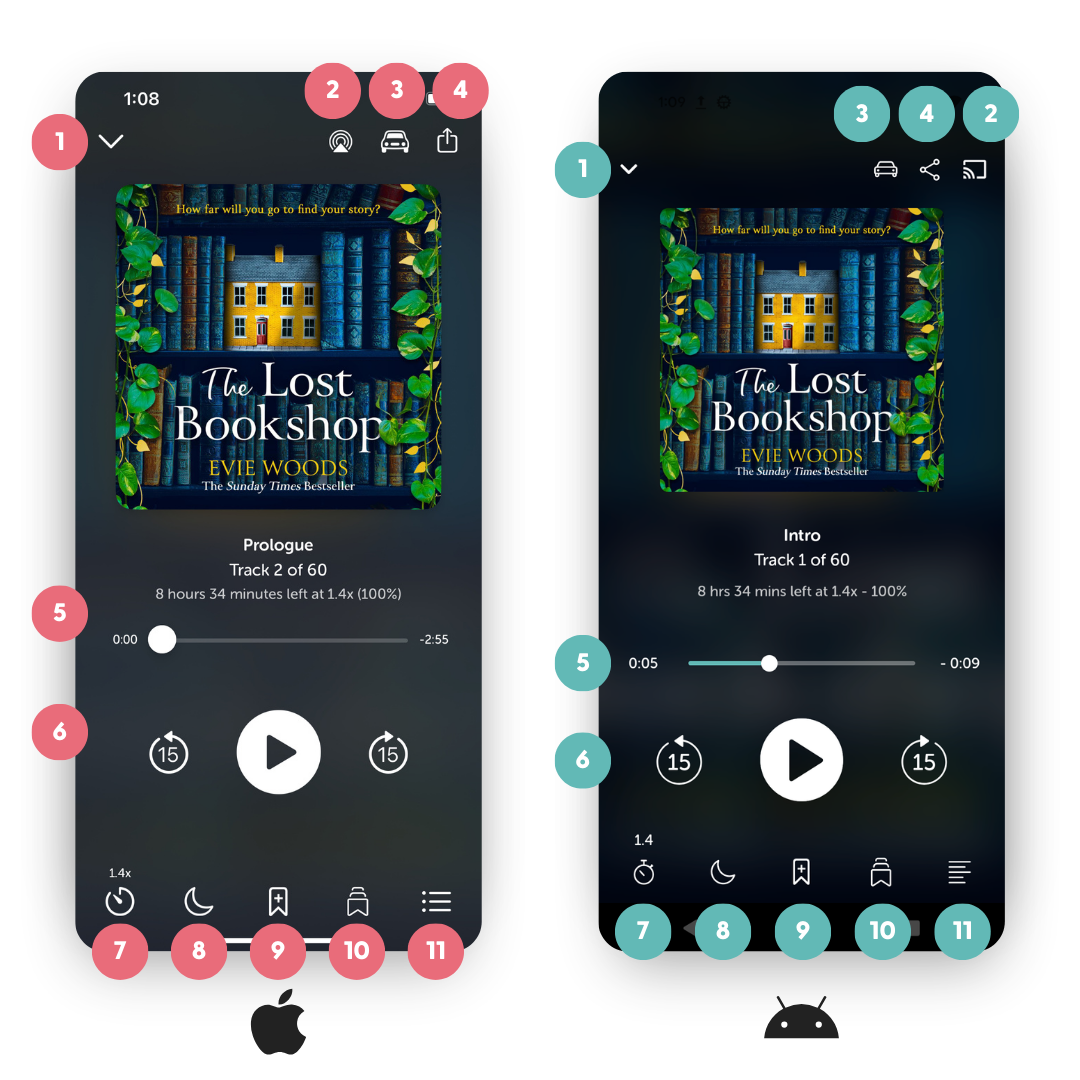
The honest comparison: at $14.99 a month it costs about the same as Audible Premium Plus and gives you one credit, so you are not saving money, you are redirecting it. You also will not find Audible’s exclusive Originals here. For a lot of readers, supporting a local shop and owning unlocked files is well worth matching the price. If raw catalog size and exclusives are the priority, Audible still edges it.
Review scorecard
| What we judged | Our rating | Quick take |
|---|---|---|
| Catalog and selection | ★★★★★ 4/5 | Nearly all bestsellers; no Audible Originals. |
| App and playback | ★★★★★ 4/5 | Clean app, download-based listening. |
| Value for money | ★★★★★ 3.5/5 | Same price as Audible, one credit. |
| Ownership and flexibility | ★★★★★ 5/5 | DRM-free files you truly keep. |
| Overall | ★★★★★ 4.5/5 | Best for ownership with a conscience. |
• Pick Libro.fm if: you want to own audiobooks and support indie bookstores, or you want DRM-free files.
• Skip it if: you want Audible’s exclusives, the lowest possible price, or you live outside the US and Canada.
• Money tip: the annual plan and frequent sales lower the per-book cost, and credits never expire.
Spotify Audiobooks, a bonus you may already be paying for
| Best for | People who already pay for Spotify Premium and want audiobooks as a bonus. |
| Platforms | iOS, Android, web, desktop, smart speakers (some devices excluded). |
| Price | Included with Premium Individual $12.99/month: 15 hours per month of audiobook listening. Extra hours via top-ups ($12.99 for 10 hours) or an Audiobooks+ add-on (about $11.99/month). Free-tier Audiobooks Access plan (US): $9.99/month. |
| Stands out | Audiobooks bundled into a subscription you may already have; a large, surprisingly current catalog (hundreds of thousands of titles); one app for music, podcasts, and books; strong BookTok-driven discovery. |
| Watch out for | The 15-hour monthly cap is easy to blow on a long novel; hours count at normal speed and do not roll over (rewinds and re-listens still burn time); on Family and Duo plans only the manager gets the hours by default; you do not own the books. |
Spotify is the most painless way to start listening if you already pay for it, because audiobooks are simply part of Premium. You get 15 hours a month from a large, current catalog, enough for roughly one average-length book, and it all lives in the app you already use for music and podcasts.

The cap is the whole story, though. Fifteen hours covers a typical novel but not a 40-hour epic, and time is metered at normal speed regardless of playback speed, so falling asleep mid-chapter or rewinding eats into your allowance. Unused hours vanish at month’s end, and on shared plans only the account manager gets them by default. It is a great casual add-on, not a heavy listener’s main tool.
Review scorecard
| What we judged | Our rating | Quick take |
|---|---|---|
| Catalog and selection | ★★★★★ 4/5 | Large and surprisingly current. |
| App and playback | ★★★★★ 4/5 | Familiar, all-in-one app. |
| Value for money | ★★★★★ 4/5 | A free bonus if you have Premium. |
| Ownership and flexibility | ★★★★★ 2/5 | 15-hour cap, no ownership. |
| Overall | ★★★★★ 3.5/5 | A great casual add-on. |
• Pick Spotify if: you already have Premium and listen to about a book a month.
• Skip it if: you read long books, listen heavily, or want to own titles.
| Bottom line on listening: biggest catalog and want to own titles? Audible. Ownership that supports a local bookstore? Libro.fm. Already pay for Spotify and listen lightly? Spotify. Want it all for free? Read on. |
The best free option that does almost everything
Libby
| Best for | Anyone with a library card who wants free ebooks and audiobooks, legally. |
| Platforms | iOS, Android, web; sends ebooks to Kindle (US); works on Kobo devices; CarPlay and Android Auto for audiobooks. |
| Price | Free. No subscription, no purchases, no late fees. |
| Stands out | Borrow ebooks, audiobooks, and magazines from your public library for $0; titles auto-return (no fines); add multiple library cards; adjustable reader and 0.6x to 3x audiobook speeds; built by OverDrive and used by thousands of libraries. |
| Watch out for | Popular titles have hold queues (waitlists); selection depends on what your library has licensed; loans are time-limited (often 7 to 21 days); you cannot keep titles after the loan ends. |
If you install only one app from this entire guide, make it Libby. With a free library card it turns your local public library into an ebook and audiobook store that costs nothing: borrow a title, read or listen in the app (or send ebooks to a Kindle in the US), and it returns itself automatically when the loan is up. No fines, ever. You can even stack multiple library cards to widen your selection.

The only real friction is the library model itself: bestsellers can have long hold queues, your library may not own a specific title, and loans expire. The smart move is to treat Libby as your first stop: check it before you buy anything, and place holds early on books you know you will want. Pair it with one paid service for the occasional must-read-now title and your annual book budget shrinks dramatically.
Review scorecard
| What we judged | Our rating | Quick take |
|---|---|---|
| Selection | ★★★★★ 4/5 | Huge, but subject to your library. |
| Reading and listening | ★★★★★ 4.5/5 | Capable reader and audiobook player. |
| Value for money | ★★★★★ 5/5 | Completely free, no fines. |
| Convenience | ★★★★★ 4/5 | Holds and waitlists are the catch. |
| Overall | ★★★★★ 4.5/5 | The best deal in reading, period. |
• Pick Libby if: you have a library card and want to read and listen for free.
• Skip it if: you refuse to wait for popular titles, or your library’s digital catalog is thin.
• Pro move: place holds on hot releases weeks ahead, and use the “deliver later” option so several holds do not all arrive at once.
What everything costs, side by side
Here is the money view. Notice that “best” rarely means “most expensive,” and that the single most powerful option on this whole list (Libby) is free.
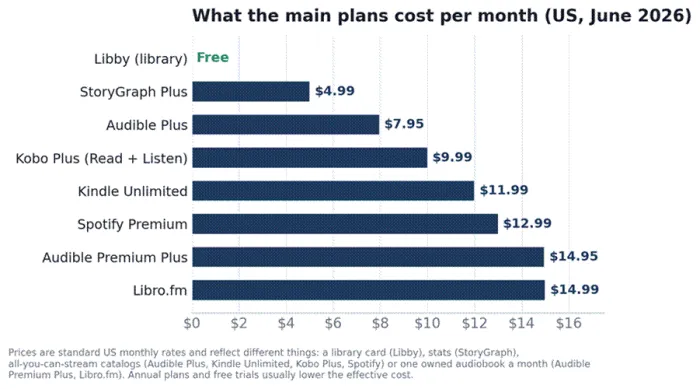
Monthly cost of the main paid plans. The bars represent different things, so see the pricing table below for what each one actually buys.
| App | Plan | Price (US/mo) | What you get |
|---|---|---|---|
| Libby | Library card | Free | Borrow ebooks, audiobooks, and magazines; titles auto-return |
| Goodreads | Free | Free | Tracking plus the largest review community |
| Apple Books | Pay per book | $0 sub | Built-in Apple reader; buy ebooks and audiobooks individually |
| The StoryGraph | Free / Plus | $0 or $4.99 ($49.99/yr) | Tracking and rich stats; Plus adds advanced stats and buddy reads |
| Audible Plus | Subscription | $7.95 | Stream the Plus Catalog (no owned credits) |
| Kobo Plus | Subscription | $7.99 / $9.99 | All-you-can-read ebooks and/or audiobooks ($9.99 for both) |
| Kindle Unlimited | Subscription | $11.99 | 4M+ ebooks plus many audiobooks (borrowed, not owned) |
| Spotify Premium | Subscription | $12.99 | Music, podcasts, and 15 hours per month of audiobooks |
| Audible Premium Plus | Subscription | $14.95 ($149.50/yr) | Plus Catalog plus 1 owned audiobook credit each month |
| Libro.fm | Subscription | $14.99 ($169.99/yr) | 1 owned audiobook credit per month; supports indie bookstores |
Prices are standard US monthly rates as of June 22, 2026 and exclude tax. Annual plans, student deals, and free trials lower the effective cost. Always confirm current pricing on the provider’s own page.
How to choose: by use case or by reader type
You do not need all of these apps. Below are two ways to land on the right set quickly: a use-case picker for when you have one specific job in mind, and a few ready-made setups for common types of reader.
The quick use-case picker
| If you mainly want to... | Use this | Why, and the runner-up |
|---|---|---|
| Read for free, ebooks and audio | Libby | Free with a library card; the first place to check |
| Own a huge ebook library | Kindle | Biggest store and best cross-device sync |
| Avoid Amazon and keep EPUB files | Kobo | Open format, easy sideloading; Apple Books also works |
| See beautiful reading stats | The StoryGraph | Mood and pace analytics, free, and no Amazon |
| Read in big online book clubs | Fable | 100,000+ clubs with chapter-by-chapter chat |
| Own audiobooks, biggest catalog | Audible | Market leader; credits you keep forever |
| Own audiobooks, support indies | Libro.fm | DRM-free files; a cut goes to a local bookstore |
| Listen casually on Spotify Premium | Spotify | 15 hours a month bundled into your plan |
| Read on a Kindle device | Kindle + Libby (US) | Send borrowed library books straight to the Kindle |
| Read on iPhone with zero setup | Apple Books | Built in, and handles your EPUBs and PDFs too |
Ready-made setups
Pick the one that sounds like you and adjust from there. The monthly figures are rough and assume you skip optional extras.
| If you are... | Build this stack | Roughly /mo |
|---|---|---|
| The budget reader who will wait | Libby for ebooks and audiobooks, plus Goodreads or StoryGraph to track | $0 |
| The Amazon-native | Kindle (or Kindle Unlimited) + Audible Premium Plus + Goodreads | about $27 (or about $15 without KU) |
| The independent or privacy-minded | Kobo or Kobo Plus + Libro.fm + The StoryGraph | about $25 (or about $15 a la carte) |
| The all-Apple minimalist | Apple Books + Libby + The StoryGraph | $0, then pay per book |
| The social reader | Kindle or Libby to read + Fable for clubs + Spotify (if already subscribed) | $0 to $13 |
| The heavy audiobook listener | Audible Premium Plus annual (or Libro.fm) + Libby for overflow + StoryGraph | about $12 to $15 |
The final verdict
After all the comparisons, here is where I keep landing. You do not need a dozen apps. You need two or three that quietly match how you read, and then you need to stop shopping and start reading.
If I had to hand you one recommendation to start today, it is this: install Libby and connect your library card. It is free, it covers both ebooks and audiobooks, and for a huge number of people it is genuinely all they need. Add a tracker you enjoy opening, StoryGraph if you love stats and want to skip Amazon, Goodreads if you want the biggest community and effortless Kindle syncing. Then, and only then, pay for one thing: Audible or Libro.fm if you want to own audiobooks, Kindle Unlimited or Kobo Plus if you tear through ebooks faster than the library can lend them.
That is it. Three apps, often under $15 a month, sometimes nothing at all. Live with that setup for a month, notice which app you actually reach for, and adjust. The best reading setup was never the one with the most features. It is the one that gets out of your way and keeps you turning pages, or pressing play. Happy reading.
| My picks at a glance: Best free, do-everything app: Libby. Best ebook store: Kindle, or Kobo if you want independence. Best tracker: The StoryGraph. Best for owning audiobooks: Audible, or Libro.fm to support indie bookstores. |





