A creator's daily workflow now compresses four full-time jobs into one operator's calendar: research, drafting, editing, and distribution. AI is what makes that compression viable. According to inBeat Agency, 91 percent of creators now use generative AI in some form. Whop's 2026 data puts daily AI tool usage at 84 percent among professional creators, and Adobe's global creator survey reports that 86 percent have integrated creative AI into their core production process.
That adoption has settled into a recognisable pattern. Most professional creators in 2026 use four tools, one for each phase of the workflow. They research with Perplexity AI, draft with Claude, polish with Grammarly, and distribute with Buffer. This guide breaks down each tool with verified May 2026 pricing, current ratings from G2, Capterra, TrustRadius, and Trustpilot, and the specific scenarios where each one delivers the strongest return.
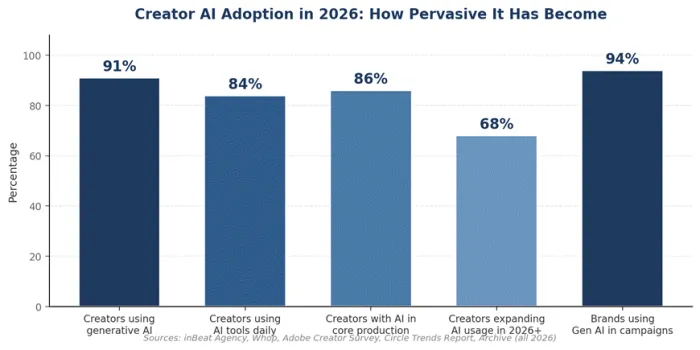
Figure 1: AI adoption across the creator economy in 2026, compiled from public industry surveys.
Perplexity AI: The Research Layer
Perplexity is built on retrieval-augmented generation. Each query is fanned out across the live web, the most relevant passages are retrieved, and a large language model synthesises a response with numbered citations attached to every claim. Pro subscribers can route queries through models from OpenAI, Anthropic, Google, and Perplexity's own Sonar family. Deep Research mode runs autonomous multi-source investigations and produces structured briefs that often span several thousand words with consistent citation. Comet, Perplexity's AI browser, became free across iOS, Android, Windows, and macOS in March 2026 after launching the previous summer as a Max-only feature.
The defining advantage is the audit trail. Every output points to a specific source, which lets a creator verify a statistic in seconds rather than reconstructing the search manually. According to FelloAI's pricing analysis, Pro subscribers receive unlimited Pro Search queries and around twenty Deep Research runs per day. Independent testing by SimilarLabs reports Perplexity has crossed 100 million monthly active users.
Pricing
| Plan | Price (USD) | Best Suited For |
|---|---|---|
| Free | $0 | ~5 Pro Search queries per day, casual fact-checking |
| Pro | $20/mo or $200/yr | Unlimited Pro Search, ~20 Deep Research runs/day, multi-model access |
| Max | $200/mo | Heavy Labs and Computer use, priority access to new models |
| Enterprise Pro | $40/seat/mo | Shared Spaces, SSO, 500 daily research queries per user |
| Enterprise Max | $325/seat/mo | Audit logs, SCIM, full Labs and model tier |
Strengths and Weaknesses
| Strengths | Weaknesses |
|---|---|
| Citation-grounded answers reduce verification time significantly | Occasional citation errors where source does not contain attributed claim |
| Multi-model routing through GPT, Claude, Gemini, and Sonar in one interface | Weak on long-form drafting and creative writing tasks |
| Spaces feature maintains persistent project research files | Team features gated behind Enterprise Pro at $40/seat |
| Free Comet browser brings agentic search into the browsing layer | 8x price gap between Enterprise Pro ($40) and Enterprise Max ($325) |
| G2 ease-of-use score of 95% and ease-of-setup of 97% | Customer support widely reported as slow and AI-driven |
Reviews and Ratings
| Platform | Rating | Reviews | Common Themes |
|---|---|---|---|
| G2 | 4.7 / 5 | 150+ | Praised for speed and citation transparency; criticised for usage limits |
| Capterra | 4.7 / 5 | 19+ | Strong scores for free-tier value and real-time web data |
| TrustRadius | 4.5 / 5 (9.0/10) | 100+ | Positive on research workflows, weaker on enterprise governance |
| Trustpilot | 1.6 / 5 | 180+ | Heavy billing complaints, surprise charges, and cancellation friction |
| Product Hunt | Positive | Active | Power users cite Deep Research and Comet browser as standout features |
Who Benefits Most
Perplexity is best suited for journalists, analysts, researchers, newsletter writers, and content strategists who run frequent fact-led queries. The Pro tier at twenty dollars per month pays back on the first long-form article. Free is sufficient for casual users; Max is overkill unless Labs and Computer workflows run continuously. Teams with fewer than fifty seats often hit the cost gap between Enterprise Pro and Enterprise Max and should negotiate directly with Perplexity sales.
Claude: The Drafting Layer
Anthropic's Claude is a family of models with three production tiers. Haiku 4.5 is the fastest and cheapest; Sonnet 4.6, released February 2026, is the workhorse priced at three dollars per million input tokens and fifteen dollars per million output tokens; Opus 4.6 is the flagship for the most complex reasoning and agentic workflows. Claude's standard context window runs to 200,000 tokens with up to one million tokens available on enterprise plans, which lets a single prompt ingest a full manuscript or multiple long documents at once.
In practice, Claude is the model writers reach for when output has to feel deliberate. Projects retain context across conversations, which is why a freelance copywriter can upload a style guide, three sample pieces, and a brief, then draft a 3,000-word article that reads as an extension of the existing body of work. Cowork, Anthropic's agentic feature for autonomously coordinating multi-step tasks across documents, expanded from Max-only to all Pro subscribers in January 2026.
Pricing
| Plan | Price (USD) | Best Suited For |
|---|---|---|
| Free | $0 | Light daily use; tight message caps but full 200K context |
| Pro | $20/mo | All models including Opus, Projects, Cowork, Claude Code, Workspace integrations |
| Max 5x | $100/mo | 5x Pro usage, priority access during peak hours |
| Max 20x | $200/mo | 20x Pro usage; Claude as a continuous workstation |
| Team | $25/user/mo (annual) | 5-seat minimum, central billing, never used for training |
| Enterprise | Custom | SSO, expanded context, advanced security and compliance |
Strengths and Weaknesses
| Strengths | Weaknesses |
|---|---|
| Strongest long-form coherence and tone consistency in its class | Refuses or hedges on edge-case creative prompts more than peers |
| 200K to 1M token context window for document-heavy work | No first-party image or video generation |
| Projects retain memory across conversations for client or topic work | Free tier message caps run out quickly during heavy work sessions |
| Cowork agent included on Pro for multi-step autonomous tasks | Max plans add usage capacity but no genuinely new features |
| Team and Enterprise data never used for model training | Trustpilot reports billing issues and slow customer support |
Reviews and Ratings
| Platform | Rating | Reviews | Common Themes |
|---|---|---|---|
| G2 | 4.6 / 5 | 122+ | Praised for clear, structured responses; criticised for usage caps |
| Capterra | 4.6 / 5 | 80+ | Strong on writing and code; concerns about shrinking limits |
| Gartner Peer Insights | 4.4 / 5 | 79 | Enterprise users cite long-document analysis as primary value |
| Trustpilot | 2.5 / 5 | Active | April 2026 wave of billing and gift-subscription complaints |
| Product Hunt | Positive | Active | Artifacts, Projects, and Claude Code cited as standout features |
Who Benefits Most
Claude is the right tool for independent journalists, technical writers, ghostwriters, content strategists, authors, and marketing teams producing analyst reports or executive briefings. It is not the strongest fit for high-volume short copy (where ChatGPT or Jasper compete more directly) or for creators who need image generation in the same tool. Pro at twenty dollars per month is the natural entry point; Max tiers only become economical for users running Claude as a continuous workstation.
Grammarly: The Editing Layer
Grammarly, now part of Superhuman following its 2025 corporate restructuring, has evolved from a 2009-era spell checker into the editing layer that polishes the output of every other tool in a creator's stack. The platform combines a long-running grammar engine with a generative AI layer (formerly GrammarlyGO) capable of full-sentence rewrites, tone adjustments, brand voice training, and prompt-based drafting. Its plagiarism checker compares text against 16 billion web pages and ProQuest academic databases. According to Grammarly's own data, the platform serves more than 30 million daily users and 70,000 teams, integrating with over 500,000 apps and websites through browser and desktop installations.
In practice, Grammarly compresses the editorial pass that most creators would otherwise skip. Real-time suggestions on grammar, clarity, conciseness, and tone appear as the writer types. Pro and Enterprise tiers add brand voice training that learns a writer's preferred style from 3-4 sample documents, then applies it automatically to new writing. According to G2, Grammarly ranks #1 in its Winter 2026 Grid Report for AI Writing Assistants.
Pricing
| Plan | Price (USD) | Best Suited For |
|---|---|---|
| Free | $0 | Grammar, spelling, basic tone, 100 AI prompts/month |
| Pro | $12/mo annual or $30/mo | Full-sentence rewrites, plagiarism checker, 2,000 AI prompts/month |
| Enterprise | Custom | Style guides, SSO, BYOK encryption, DLP, unlimited AI usage |
Strengths and Weaknesses
| Strengths | Weaknesses |
|---|---|
| Real-time editing across 500,000+ apps and websites | Not a content generator; cannot draft 2,000-word blog posts |
| Plagiarism checker covers 16 billion web pages and ProQuest | Pro AI cap of 2,000 prompts per month is tight for heavy use |
| Brand voice training learns style from 3-4 sample documents | Monthly Pro pricing ($30) is steep versus annual rate ($12) |
| Privacy-positive: does not sell user content or use it for ads | Suggestions occasionally overcorrect casual writing into corporate tone |
| G2 reports avg implementation of 0.9 months and 11-month payback | Trustpilot users report desktop app instability and refund issues |
Reviews and Ratings
| Platform | Rating | Reviews | Common Themes |
|---|---|---|---|
| G2 | 4.7 / 5 | 13,234 | 82% rate 5 stars; praised for ubiquity and accuracy |
| Capterra | 4.5 / 5 | 4,400+ | Strong for student and team writing; some find Business pricing steep |
| TrustRadius | 4.6 / 5 (9.2/10) | 300+ | Top-Rated badge in Writing and Proofreading category |
| Gartner Peer Insights | 4.6 / 5 | 2,496 | Enterprise praise for tone consistency and brand-voice features |
| Trustpilot | Mixed (~4.0) | 9,600+ | Desktop app stability and refund handling are recurring complaints |
Who Benefits Most
Grammarly works for nearly anyone who writes professionally: students, freelance writers, marketers, sales teams, customer support, and executives. The natural pairing is Claude or ChatGPT for drafting and Grammarly for editing. Annual Pro at twelve dollars per month is the practical entry point. Monthly Pro is rarely worth thirty dollars unless used for less than four months total. Free is genuinely useful for casual users, but the 100-prompt monthly cap on AI features hits quickly for active writers.
Buffer: The Distribution Layer
Buffer's defining choice is per-channel pricing instead of per-user. Paid plans support unlimited team members, and cost scales only with the number of social accounts connected. The Free plan covers three channels with a queue of ten scheduled posts each. Essentials starts at five dollars per channel per month annually; Team is ten dollars per channel per month annually with approval workflows, custom permissions, and branded reports. The former Agency tier was folded into Team in December 2025.
The platform supports 11 networks: Instagram, Facebook Pages, X, LinkedIn, TikTok, Pinterest, YouTube, Google Business Profile, Threads, Bluesky, and Mastodon. Buffer's AI Assistant, included unlimited on every paid plan and even the free tier, generates captions, repurposes content across platforms, and adapts tone. Start Page provides a free link-in-bio builder. The math for agencies is sharp: a three-person team managing ten channels pays roughly one hundred dollars per month on Buffer's Team plan, versus around nine hundred dollars on Sprout Social's per-seat Professional plan.
Pricing
| Plan | Price (USD) | Best Suited For |
|---|---|---|
| Free | $0 (3 channels, 10 posts each) | Brand-new creators with 1-3 social accounts |
| Essentials | $5/channel/mo annual ($6 monthly) | Solo creators with unlimited scheduling and AI Assistant |
| Team | $10/channel/mo annual ($12 monthly) | Teams and agencies needing approvals, branded reports, unlimited users |
Strengths and Weaknesses
| Strengths | Weaknesses |
|---|---|
| Per-channel pricing with unlimited team members at all paid tiers | Per-channel cost rises sharply at 15+ channels for solo users |
| Supports 11 networks including Bluesky, Threads, and Mastodon | No native social listening or full unified inbox |
| Unlimited AI Assistant included on free and all paid plans | Analytics are shallower than enterprise tools like Sprout or Agorapulse |
| Free Start Page link-in-bio replaces Linktree subscription | AI Assistant less sophisticated than Lately or Jasper for content ideation |
| Capterra ease-of-use score of 4.6/5; 84% of support inquiries answered in 24h | Trustpilot users report glitchy posts and inconsistent publishing |
Reviews and Ratings
| Platform | Rating | Reviews | Common Themes |
|---|---|---|---|
| G2 | 4.3 / 5 | 1,071+ | Praised for simplicity; criticised for limited analytics |
| Capterra | 4.5 / 5 | 1,491+ | Ease-of-use rated 4.6/5; clean interface widely cited |
| TrustRadius | 4.0 / 5 (8.0/10) | 900+ | Strong for SMB scheduling; weaker on engagement and listening |
| Trustpilot | 2.1 / 5 | 93 | Customer support and publishing reliability are most cited issues |
| G2 (Active Users) | 195,000+ | MAU | $23.2M ARR; bootstrapped 75-person team based fully remote |
Who Benefits Most
Buffer fits solopreneurs, freelance social media managers, content marketers at small companies, and agencies focused on publishing rather than enterprise reporting. The sweet spot is three to seven channels for an individual or up to fifteen channels for an agency leveraging unlimited team members. Operations needing deep listening, full unified inbox, ad attribution, or governance across forty-plus channels are better served by Hootsuite, Sprout Social, or Agorapulse, even at significantly higher cost.
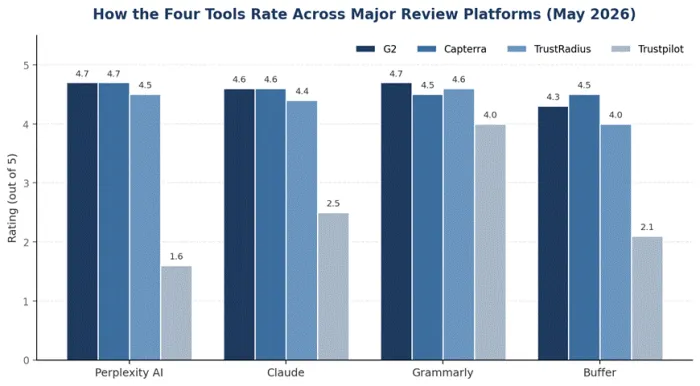
Figure 2: Rating comparison across major B2B review platforms, May 2026.
Final Takeaways
The pattern across all four tools is consistent. Each holds ratings above 4.5 on major review platforms where buyers compare functional value against alternatives, while Trustpilot scores dip mostly because of billing and support friction, which buyers should weigh separately rather than treating as a verdict on product quality. For a solo creator on annual billing in May 2026, a stack at roughly 63 dollars per month compares very favourably with hiring a part time research assistant for ten hours, which typically runs into several hundred dollars. Specialisation still beats consolidation; each tool dominates its category precisely because it does not try to do everything. That is also why focused SEO and workflow hubs like Writenexa sit naturally alongside this stack as a way to turn generic capabilities into concrete, search friendly output. In the end, the workflow you build around these tools is what turns them into a sustainable 2026 creator business.