Finishing a strong ninety-minute podcast should feel like a win. Instead it often feels like homework, because buried in that recording sit a dozen clips that could carry a whole week of posting, and cutting them by hand used to swallow an entire afternoon.
AI clipping tools exist to erase that afternoon. To find the ones that actually deliver, the leading apps that turn long videos into shorts were run through the same unforgiving footage: rambling interviews, uneven audio, two-shot camera angles, the kind of content that separates real tools from hype. This guide ranks the five that matter, with a clear pick for every kind of creator and budget.
Why short-form clips matter in 2026
Short-form video stopped being a side experiment a while ago. By 2026, video is expected to account for roughly 82% of all internet traffic, and short clips now pull in around 2.5 times more engagement than their long-form counterparts across social platforms. The platforms have reorganized around the format: YouTube Shorts alone passed 2 billion monthly users and serves more than 200 billion views a day, while TikTok and Instagram Reels sit at 1.6 billion and 1.8 billion users respectively.
All of that demand has poured straight into the software that makes clipping painless. The AI video editing tools market was valued at around $1.6 billion in 2025 and is forecast to reach $9.3 billion by 2030, a compound annual growth rate north of 42%. That is one of the steepest curves in creator software, and a new clipping app seems to launch every other week.
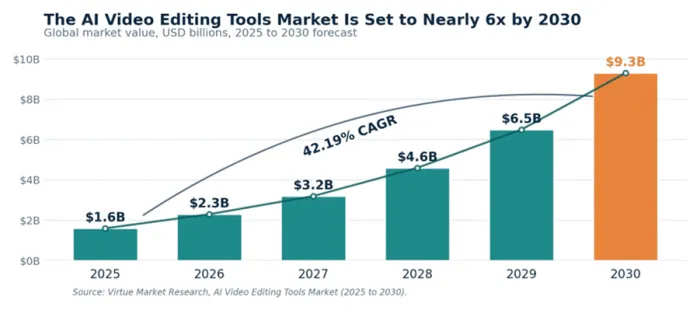
Figure 1: The AI video editing tools market, 2025 to 2030 forecast.
The math behind repurposing is what makes it irresistible. A single thirty-minute video can realistically yield five to ten shorts, each aimed at a slightly different viewer. One recording becomes a week of content. Marketers have noticed, too: roughly 85% now rate short-form video as the most effective format in their content mix, and short clips consistently rank as the top return-on-investment driver across recent surveys.
What makes an AI clipping tool worth it
Most of these apps make the same landing-page promise: paste a link, get viral clips. That much is table stakes in 2026, so the real differences live underneath the headline. A handful of factors separate a tool worth paying for from one that churns out what creators now call AI slop.
• Highlight detection accuracy. The engine should find the moments that actually land, not chop a video into arbitrary chunks. In side-by-side testing on a podcast with three pre-identified standout moments, the strongest tools surfaced all three inside their top ten clips, while weaker ones missed one or two.
• Auto-reframing and face tracking. Horizontal footage has to become vertical without decapitating anyone, which only gets harder the moment two speakers share the frame.
• Caption quality and languages. Most short-form video is watched on mute, so accurate, well-timed captions carry the message. Broad language coverage matters for a global audience.
• Editing depth. This decides whether the AI output can be refined inside the same app or has to be exported to a second editor that carries its own monthly fee.
• Pricing model. Per-minute and per-video billing behave very differently once longer recordings enter the mix, and that gap is where budgets quietly disappear.
Weighed together, these five factors explain why two tools at the same price can produce wildly different results. The five below score well on most of them, each leaning into a particular strength.
The best AI tools to turn long videos into shorts
No single app wins for everyone. The five below earned their place on the same test footage, each for a different strength, with key pointers and an honest pros-and-cons read for every one. Each ran the same ninety-minute, two-speaker podcast with three pre-identified standout moments, scored on how many it surfaced, how cleanly it reframed the two-shot, and whether a finished clip could be scheduled without leaving the app.
Opus Clip: best for most creators

Opus Clip pioneered the paste-a-link workflow and still ships the most complete toolkit in the category, which is why it is the default first stop for most creators. Reviews on G2 and Capterra lean positive, with users repeatedly praising how much time it saves and how quickly it turns raw footage into publish-ready shorts. In testing, its highlight detection was the sharpest of any tool here.
• Virality score. Ranks every clip using eighteen analysis parameters, so the strongest moments surface first.
• ClipAnything search. Pulls clips around any theme on request, such as every moment a guest mentions pricing, which saves real time on long, unscripted recordings.
• Full Pro editor. Adds text-based editing, AI B-roll, filler-word removal and a built-in scheduler, so most clips never need a second app.
| Pros | Cons |
|
|
Bottom line: For daily creators who want one tool to take a video from raw to ready, Opus Clip is the safest pick.
Vizard: best for podcasts and teams
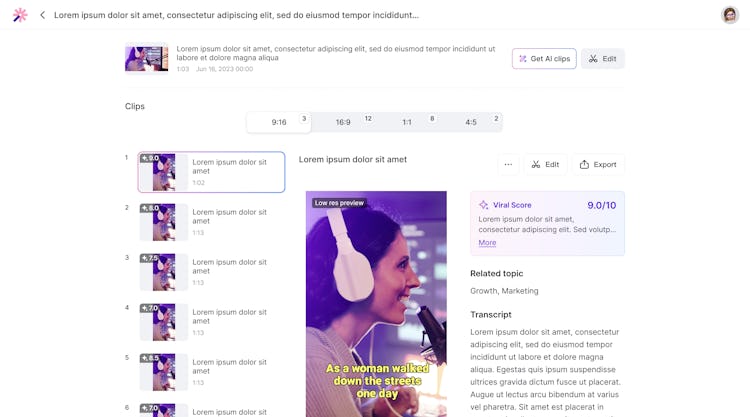
Vizard has owned the long-form-to-short-form niche for serious content teams since 2022, with tens of thousands of paying users and a workflow built around editing a video by editing its transcript. Reviewers who have run the whole field tend to call it the most mature, enterprise-grade option, especially for interview-heavy content where the transcript editor genuinely changes how fast a clip comes together.
• Text-based editing. Cut a clip by deleting words from the transcript, the way anyone edits a document.
• 100+ caption languages. Best-in-class coverage for reaching a global audience, with accurate, well-timed text out of the box.
• Eight-hour source ceiling. Handles all-day workshops and marathon webinars, with API access from the Creator tier for building it into a pipeline.
| Pros | Cons |
|
|
Bottom line: For podcast studios, webinar teams and agencies, Vizard earns its price.
Klap: best for hooks and global reach
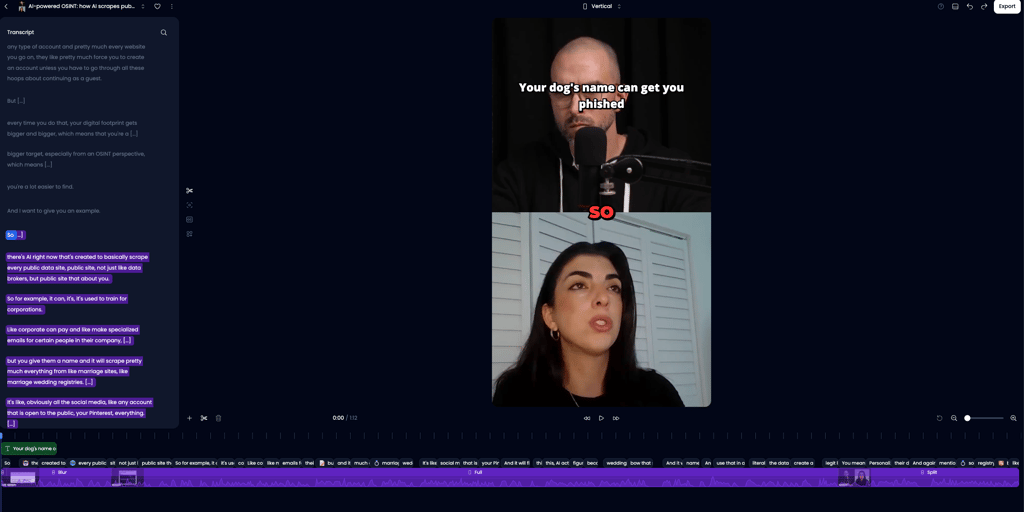
Klap takes a sharper line than the all-rounders, with a clipping model trained specifically on viral short-form data rather than general highlight detection. The result is a tool that reaches for hooks and payoffs first, and a virality score grounded in the actual content, audience and current trends, which makes it a more honest read on how a clip might perform.
• Viral-trained model. Leans toward hooks, payoffs and emotional peaks rather than evenly spaced cuts.
• AI dubbing in 29 languages. Ahead of most rivals for reaching non-English audiences, turning one clip into versions for several markets.
• Unlimited regenerations. Re-run the AI on any project at no extra credit cost, so iterating on a clip never eats into upload minutes.
| Pros | Cons |
|
|
Bottom line: For high-volume creators chasing hooks and a worldwide audience, Klap is hard to beat.
Submagic: best for captions

Submagic built its name on one thing done exceptionally well, which is bold, animated, perfectly timed captions, and it remains the benchmark for on-screen text. Users like how fast it moves and how polished the output looks with almost no effort. The trade-off showed up in testing, where its highlight detection lagged the leaders.
• Three-click flow. Turns a long video into finished clips with minimal fuss, approachable even for someone new to video editing.
• Signature captions. The strongest on-screen text styling in the category.
• Free trial. A few videos to test the workflow before paying.
| Pros | Cons |
|
|
Bottom line: When captions are the whole aesthetic and the clips are already chosen, Submagic wins.
CapCut: best free option

CapCut earns its place for a different reason than the rest: it is the most capable tool on this list that costs nothing, which is part of why it has passed a billion downloads worldwide. The catch is that it does not detect highlights, so the AI shortcut the other tools provide simply is not there.
• Full editing suite. Effects, captions, transitions and templates, all free.
• A billion-plus downloads. A mature, widely supported app with constant updates.
• Manual control. Every clip is selected and trimmed by hand, which rewards patience but costs time at scale.
| Pros | Cons |
|
|
Bottom line: For creators with time, a tight budget and low volume, CapCut is unbeatable value.
How the tools compare
One pricing rule matters more than the headline numbers. Per-minute billing, used by Opus Clip and Vizard, charges for the length of the source video, so a sixty-minute podcast costs the same whether it yields two clips or twenty. That is gentle on short uploads and punishing on long ones, where credit-based tools can work out cheaper. Free tiers are real across the board, but watermarks, short expiry windows and locked editing make them better for testing than for daily publishing. The table below lines the five up side by side.
| Tool | Best for | AI highlight detection | Editing depth | Starting price |
|---|---|---|---|---|
| Opus Clip | Most creators | Excellent: 18 parameters | Full editor with AI B-roll | Free; from $15/mo |
| Vizard | Podcasts and teams | Strong, structured content | Text-based transcript editor | Free; from ~$19.99/mo |
| Klap | Hooks and global reach | Strong, viral-trained | Moderate, prompt reclipping | From ~$14/mo (annual) |
| Submagic | Caption-first polish | Moderate | Caption-focused flow | Free trial; paid plans |
| CapCut | Free, manual editing | None, manual selection | Full manual editing suite | Free |
Which tool fits which creator
The matcher below pairs common situations with the tool most likely to fit, the fastest way to skip the trial-and-error and land on the right clipper the first time.
| If this sounds like the work | Best pick | Why it fits |
|---|---|---|
| One creator posting daily from YouTube videos | Opus Clip | Most complete toolkit, strong detection and fair annual pricing |
| A podcast or webinar team repurposing long episodes | Vizard | Transcript editing, 100+ languages and an eight-hour source ceiling |
| Chasing hooks and a global, multi-language audience | Klap | Viral-trained model plus AI dubbing in 29 languages |
| Captions and on-screen text are the whole brand | Submagic | Best-in-class animated captions in a simple flow |
| Low budget, low volume, happy to edit by hand | CapCut | A full editing suite at no cost |
How to fit them into a workflow
Knowing the best tool is only half the job. The creators getting the most out of these apps treat them as a rough-cut engine, not an autopilot. A reliable workflow tends to follow four steps.
1. Feed in the strongest source. A clear, well-lit recording with decent audio gives the AI far more to work with than a noisy, rambling one. Quality in, quality out.
2. Run the first pass, then trust the score. The virality or engagement score is a filter, not a verdict. It quickly separates the obvious winners from the filler so human attention goes where it counts.
3. Polish the human details. Tighten the hook in the first two seconds, fix any caption that misheard a word, and confirm the reframe kept faces centered. This is where taste beats automation.
4. Schedule across platforms. Most of the leading tools publish straight to TikTok, Reels and Shorts, which removes the last manual step and keeps a consistent posting rhythm.
The pattern across every successful setup is the same: the AI handles speed and volume, and the human handles judgment and storytelling.
Final verdict
After the same footage went through every tool, the ranking is clear. Opus Clip is the best all-round choice for most creators: the sharpest highlight detection, the deepest editor, and ClipAnything for finding exact moments, all at an annual price that undercuts its own reputation for being expensive.
The rest win by specialty. Vizard owns long-form and team work, Klap leads on hooks and 29-language dubbing, Submagic is unmatched on captions, and CapCut does remarkable work for free. The category has outgrown the gimmick phase, which is why the market is racing toward $9 billion. The smart move is simple: match the tool to the footage and the budget, then let it handle the volume while the creative calls stay human.