I made a brand-new account and pushed Hypernatural's AI video platform through its real first-run flow: a Google login, an empty token bar, a one-click Cleopatra character, a full auto-generated script, and the exact moment the subscription wall appears. Here's what actually happens, with pricing in plain US dollars.
Tested June 2026 · Verdict: 3.9 / 5
| Hypernatural at a glance | |
| Product | Hypernatural (Hypernatural Systems, Inc.) |
| Category | AI video generation, text / script-to-video |
| Best for | Short-form storytellers, marketers, and creators |
| Platforms | Web, iOS, Android |
| Sign-up | Google login |
| Free tier | Stock-only video, 30-second cap, social-platform export only, watermark removed |
| Paid plans (annual) | Creator $12/mo, Pro $22/mo, Ultimate $48/mo, Enterprise (custom) |
| Pricing model | Subscription + generation credits (6,000 / 18,000 / 96,000 per year) |
| Watermark | Removed on every paid plan |
| What I tested | Sign-up → library character → script generation → customization → “Make Video” |
| My score | 3.9 / 5 (free experience and onboarding) |
Effortless to start, paywalled to finish
Hypernatural makes the first ten minutes feel effortless. Sign-up is a single Google login, a preloaded character drops you straight into a finished-looking script, and the creative options (narrator, aspect ratio, character) are genuinely easy to use. The catch sits where it always does with AI video: the export. The moment I clicked Make Video, I was routed to the subscription page. If you're evaluating Hypernatural, treat the free account as a guided demo of the script-and-styling engine rather than a way to ship finished videos.
How I tested Hypernatural
I created a fresh account from scratch (no prior history and no credits spent) and worked through the default path a first-time user is nudged toward: pick a character from the library, let the tool write a script, adjust the creative options, and try to export. I stopped at the paywall rather than purchasing, so this review covers onboarding, script generation, and the customization experience. It does not cover final rendered-video quality, which sits behind a paid plan; where that matters, I've flagged it and pointed to the platform's own claims and outside coverage.
Signing up: one Google login, and a token bar at zero
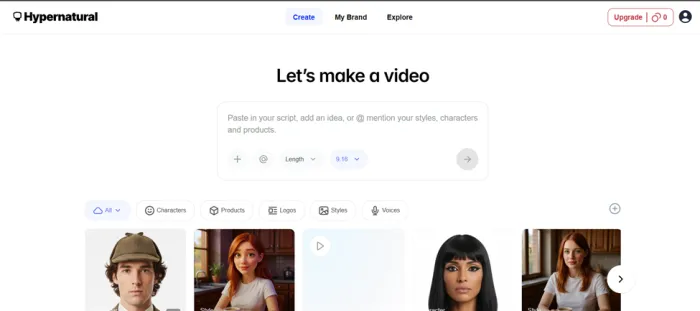
The front door is simple. The only sign-in option presented was Google login, so I logged in with my email through Google and was inside in seconds, with no password to create and no long form to fill out.

The first thing I checked was the credit meter. On my brand-new account, the token bar read empty. It starts you at zero before you've generated anything. That's worth knowing going in: there's no large “welcome” balance waiting for you, so the interface frames credits as something you unlock rather than spend freely from day one.
FIELD NOTE Fresh account, nothing used yet: the token / credit bar showed empty (0). Plan your expectations around that. You're signing in to explore, not to draw down a free stack of credits. |
The Cleopatra test: from one click to a full script
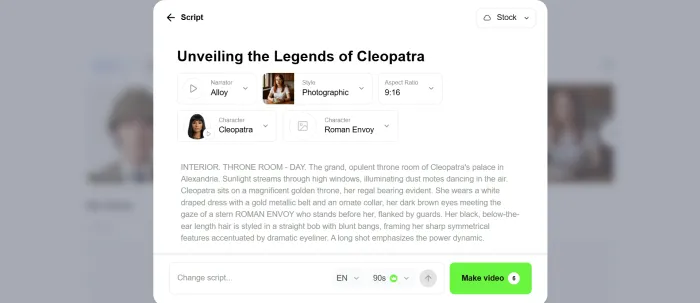
To see how fast it gets you to something usable, I used a preloaded Cleopatra character pulled straight from Hypernatural's character library. Tapping it didn't drop me onto a blank canvas. Instead, the project opened with a prompt already written in for me:
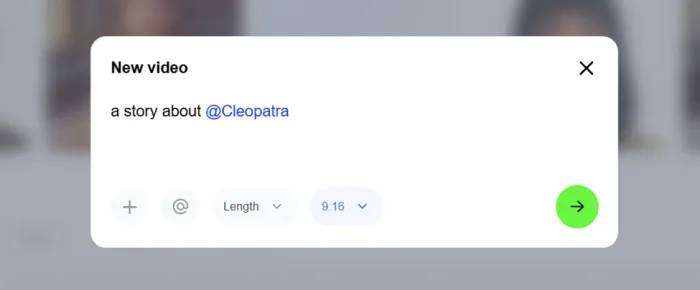
THE PRE-FILLED PROMPT “a story about @Cleopatra” |
From that single line, Hypernatural generated a full script on its own. More useful than the script itself was what surrounded it. The editor laid out clear creative controls: a narrator-style selector, an aspect-ratio option (so you can target vertical Reels and Shorts or wider formats), the character itself, and a Change Script option for rewriting or regenerating the words.
This is the part Hypernatural does well. The on-ramp from “I have nothing” to “I have a scripted, styled video project” is short, and the choices are presented in plain language rather than buried in menus.
Hitting “Make Video”: where the paywall appears
Then I clicked Make Video, and I landed on the subscription page.
That's the honest edge of the free experience. You can browse the library, generate and rewrite scripts, and set up your narrator, aspect ratio, and character without paying. But the step that turns all of that into an actual exported video is gated behind a paid subscription. In my test the gate appeared on a project built around a custom library character (Cleopatra), and custom characters are a paid-tier feature on Hypernatural's plans, which likely explains why the export step asked me to upgrade.
For anyone budgeting their time: don't assume “free” means “free finished video.” It means free to design the video.
What Hypernatural actually is
Hypernatural is an AI video platform built for storytellers and short-form creators. The core idea is to start from almost anything (a prompt, a script, a podcast, audio, or a character) and have the tool assemble a narrated, captioned, full-length video rather than a glitchy three-to-six-second clip. These are the features that define it:
• Script tools that generate or rewrite a video script from a short prompt.
• A character system with consistent characters you can reuse across scenes and videos.
• A large style library (hundreds of templates) plus the ability to build custom styles.
• 40+ premium AI narrators for voiceover.
• Aspect-ratio control and cinematic motion (zooms, pans, parallax) for social formats.
• Audio / video uploads with AI captions and transcription.
It runs on the web, iOS, and Android, so a project can move between desktop and phone.
Hypernatural pricing
Hypernatural is free to start, then sells tiered subscriptions built around generation credits: the currency that AI image and video rendering consumes. The plans below are taken from Hypernatural's official pricing page, billed annually (the annual option is where the advertised ~52% saving lives; month-to-month costs more). All prices are in US dollars.
| Plan | Price (annual) | Credits / yr | Custom characters | Best for |
|---|---|---|---|---|
| Free | $0 | Starter allotment* | None | Trying the script and style engine |
| Creator | $12 / mo | 6,000 | 4 | Solo creators posting regularly |
| Pro (Recommended) | $22 / mo | 18,000 | 12 | High-volume creators and small teams |
| Ultimate | $48 / mo | 96,000 | 48 | Agencies and multi-brand work |
| Enterprise | Custom | Custom | Custom | Teams needing seats and support |
*The free tier is stock-only, caps videos at 30 seconds, and exports to social platforms only. Every paid plan removes the watermark.
How the credits translate: credits roughly track video length. Independent testing (Fast Company) and Hypernatural's own help docs put a paid Creator-level month at around 25 minutes of finished video, and the Pro tier at roughly 75 minutes. If you lean on text-to-video and B-roll generation, credits go faster, which is the main reason heavy users size up to Pro.
Who Hypernatural is for
Across testing, Hypernatural fits four clear use cases:
| Best for | Typical use case | Why Hypernatural fits |
|---|---|---|
| Short-form creators | Reels, Shorts, TikTok | Scripted, narrated videos produced fast |
| Marketers and small businesses | Explainers and product ads | A consistent mascot or character across videos |
| Podcasters | Captioned video clips | Repurposes existing audio into video |
| Storytellers | Longer-form narratives | Full-length videos, not six-second clips |
THE SIMPLE VERSION If you start with a script, an idea, or audio and want a narrated short-form video out the other end, Hypernatural is built for you. It's a weaker fit if you need a genuinely free way to export finished videos, or frame-level editing control closer to a traditional editor. |
Pros and cons
What works
• Frictionless sign-up via a single Google login.
• Near-instant on-ramp: a preloaded character writes a full script for you.
• Clear creative controls: narrator, aspect ratio, character, and one-tap script rewriting.
• Watermark removed on every paid tier, not just the top one.
• Cross-platform: web, iOS, and Android.
• Transparent, public pricing in clear tiers.
What to watch
• New accounts open with an empty token bar: no free balance waiting.
• Export is paywalled: “Make Video” routed straight to the subscription page in testing.
• Credit-based pricing means cost scales with how much you generate.
• Annual billing carries the headline discount; month-to-month is pricier.
• Final video quality can vary and may need manual tweaking (per third-party reviews).
Final verdict
3.9 / 5 Free experience and onboarding Scored on what I tested: sign-up, script generation, and customization, not final render quality. |
| Metric | Score |
|---|---|
| Sign-up and onboarding | 4.5 / 5 |
| Script generation | 4.2 / 5 |
| Creative control | 4.0 / 5 |
| Free-tier transparency | 3.0 / 5 |
Hypernatural earns its reputation for making AI video approachable. From a cold start I went from a Google login to a fully scripted, styled Cleopatra project in minutes, and the creative controls are among the clearest in the category. The honest limitation, and the reason this score isn't higher, is that the free tier behaves like a polished demo: the token bar starts at zero and the Make Video button leads to checkout. If you're willing to commit, the $12 Creator tier is the natural starting point; if you generate a lot, $22 Pro is the volume sweet spot. Just go in understanding that you're paying to export, not to create.