Choosing an AI video generator in 2026 can feel like wandering a crowded marketplace where every stall promises miracles and most hand back mush. Two names keep cutting through that noise: AutoDraft AI and Hypernatural AI. Both turn a few lines of text into something watchable. Both promise to erase the slow, expensive parts of video production. Yet they pull in noticeably different directions the moment a real project gets underway.
AutoDraft leans into animation, conjuring cartoon scenes, expressive characters, and stylised worlds from a single prompt. Hypernatural feels built for the social feed, turning a script, a podcast clip, or a half-formed idea into a polished reel before the kettle finishes boiling. After weeks of pushing genuine projects through each one, from explainer shorts to story-driven reels, the honest takeaway is less about crowning a single winner and more about fit. The right pick depends on the kind of story being told, the budget on the table, and whether deep manual control feels comforting or exhausting. What follows breaks down exactly where each tool earns its keep.
AutoDraft AI vs Hypernatural AI at a glance
For anyone short on time, the table below distils the core differences before the deeper analysis begins.
| Attribute | AutoDraft AI | Hypernatural AI |
|---|---|---|
| Best for | 2D animation and cartoon storytelling | Short-form social and narrated video |
| Core focus | Animated scenes, characters, motion | Script and podcast to share-ready video |
| Output style | Stylised 2D, anime, comic looks | Realistic plus 200+ styles and Pika clips |
| Voice options | Hundreds of presets, voice cloning | 40+ premium lifelike voices |
| Character consistency | Yes, reusable across scenes | Yes, across scenes and styles |
| Platforms | Web browser only | Web, iOS and Android |
| Free plan | Generous, largely full features | Limited: 30-second cap, watermark |
| Starting price | About $10 per month | $12 per month |
| Maker | Allbots Technologies (India) | Hypernatural Systems (United States) |
What AutoDraft AI is built for
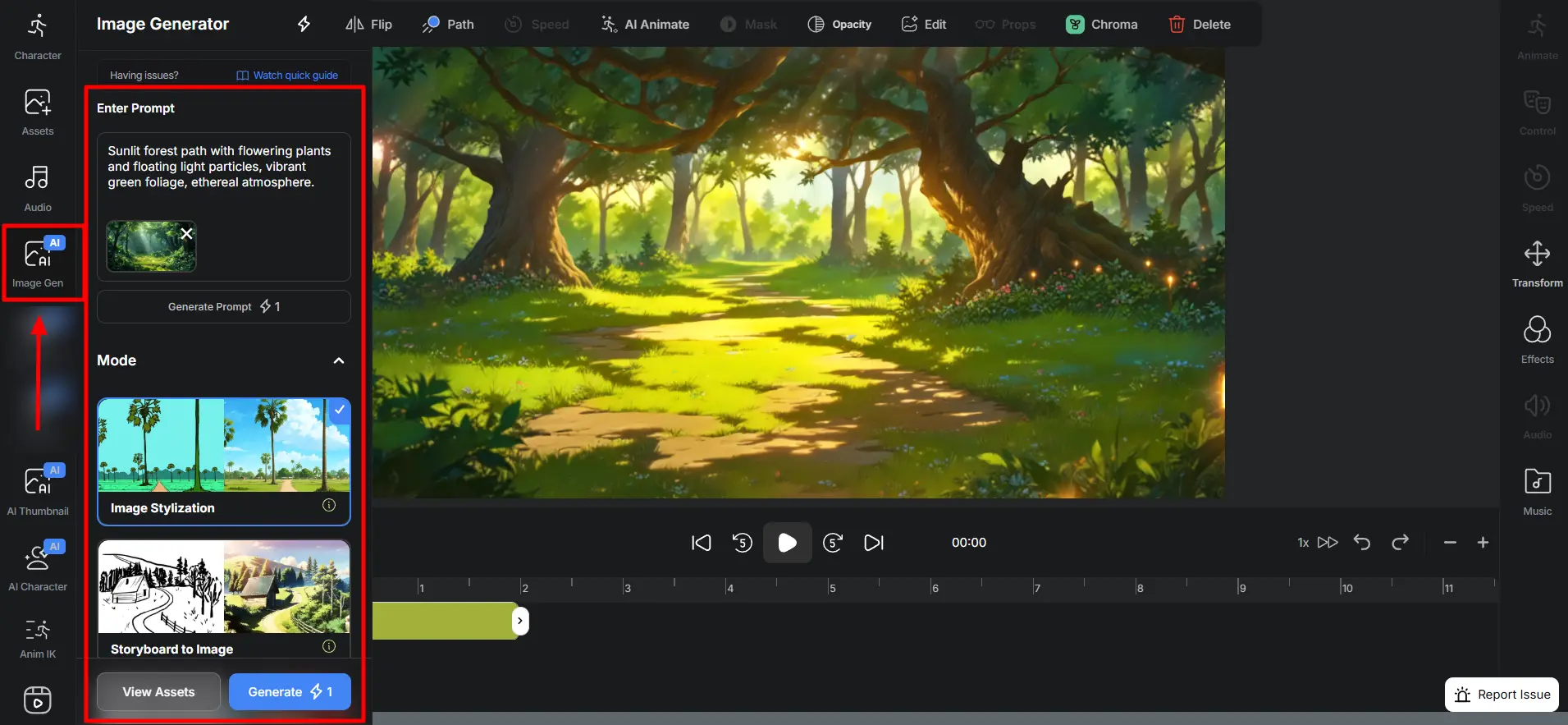
AutoDraft AI, from the India-based studio Allbots Technologies, treats animation as its home turf rather than a bolt-on feature. It turns text, sketches, or storyboards into animated scenes with unusual granular control: characters can be generated from a description and reused across scenes, backed by a deep motion system the company lists at more than a thousand action controls and over a hundred facial expressions with lip-sync.
Where it shines:
• Deep character and motion control, with more than a thousand action presets, suited to cartoon, anime, and explainer styles
• Multiple starting points beyond text prompts, including sketches, storyboards, and flat-colour layouts
• A generous free tier, with the company stating around 90 percent of the platform is usable at no cost
• Hundreds of voiceover presets spanning US, UK, India, and Middle East accents, plus voice cloning for a signature sound
• Royalty-free music, an AI thumbnail maker, 4K cloud downloads, and a low entry price that keeps heavy experimentation affordable
• Custom model training and API access on enterprise plans, for studios that need a consistent house style
Where it falls short:
• Browser only, with no desktop or mobile app, so work stays tethered to a connected session
• Built for stylised 2D rather than photorealism, so realistic looks are not its strength
• Complex prompts can need a few tries, and the credit system takes a short while to read clearly
The short version: AutoDraft rewards creators who want to direct a scene rather than simply generate one, and it pays back the extra effort with output that looks deliberately made.
What Hypernatural AI is built for
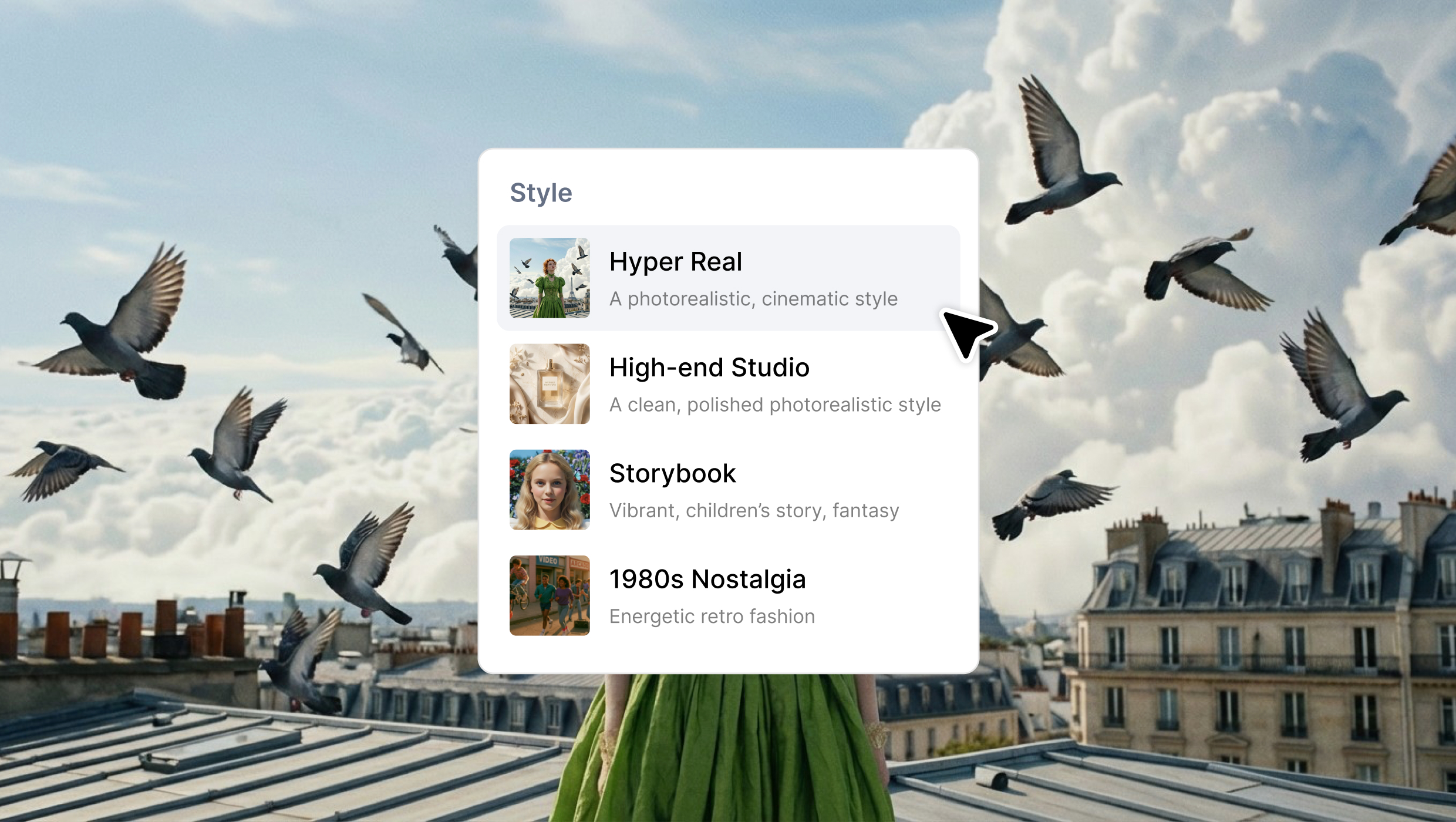
Hypernatural AI, from the United States company Hypernatural Systems, aims at a different finish line: share-ready video for storytellers, marketers, and creators who live on TikTok, Instagram Reels, and YouTube. Feed it a script, a podcast episode, a loose idea, or existing footage, and it assembles narration, visuals, captions, and effects into a clip engineered to perform in a feed. Video length is uncapped, from a ten-second teaser to a long-form upload that runs for an hour.
Where it shines:
• Lifelike AI narration from more than forty premium voices, with custom voices for a branded sound
• A library of more than two hundred templates plus a Pika partnership for photorealistic, anime, comic, and fantasy clips
• Consistent characters that hold their look across scene changes and even across different visual styles
• Cinematic zoom, pan, and parallax, auto-generated B-roll, and remixable captions tuned for the feed
• Brand, logo, and product tools, plus audio uploads with automatic transcription
• Apps for web, iOS, and Android, still a rarity among polished video tools
Where it falls short:
• A limited free tier: one-time credits, basic narrators, a thirty-second cap, and a watermark
• Credits do not roll over, and heavy text-to-video or B-roll generation drains them quickly
• Less frame-level control, so reshaping one specific motion is never really the point
The short version: Hypernatural is built for volume and polish rather than frame-by-frame control, turning rough inputs into feed-ready video with very little hands-on work.
Putting both to the test on a real project
Numbers on a page rarely capture how a tool feels with a deadline looming, so both platforms got the same brief: a sixty-second explainer for a fictional productivity app, built from one short script and nothing else. Here is how that played out.
| From the test | AutoDraft AI | Hypernatural AI |
|---|---|---|
| Turnaround | About 20 minutes to a first cut | Under 5 minutes to a postable clip |
| What it produced | Animated scene, named characters, lip-sync | Caption-driven reel, narrator, matched B-roll |
| Editing needed | Some, to refine motion and timing | Almost none before export |
| The feel | Hand-built studio cartoon | Fast, feed-ready polish |
| Best suited to | A recurring animated series | Social posts at speed |
One tool rewards craft and patience with character-rich animation; the other rewards speed and instinct with polished, postable video. Neither stumbled on the brief. They simply solved it in different languages.
Where the AI video market is heading
Both tools are riding a steep wave rather than a passing trend, and that backdrop shapes how quickly each one keeps shipping new features.
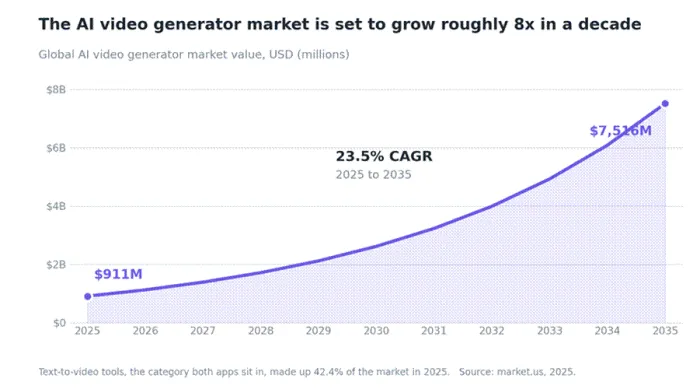
Figure 1. The AI video generator market is projected to grow nearly eightfold between 2025 and 2035. Source: market.us, 2025.
The numbers behind the chart:
• Research firm market.us values the global AI video generator market at roughly 911 million dollars in 2025, rising toward 7.5 billion dollars by 2035, a 23.5 percent compound annual growth rate
• Text-to-video, the exact category both tools occupy, already made up 42.4 percent of the market in 2025
• Switching costs stay low today, so the safer bet is the tool that fits current projects rather than waiting for a market still taking shape
• Both vendors ship updates frequently, so a feature gap today can close within a release or two
Feature face-off
Specifications only reveal so much, so the table below pairs the raw feature list with the behaviour that surfaced during testing. The differences are less about what each tool can do and more about where each one chooses to spend its effort.
| Feature | AutoDraft AI | Hypernatural AI |
|---|---|---|
| Text to video | Yes | Yes |
| Animation and motion | 1,000+ action controls, lip-sync | Cinematic zoom, pan, automatic motion |
| AI characters | From text, 100+ style templates | Consistent across scenes and styles |
| Visual sourcing | Sketch and storyboard to scene | AI B-roll plus Pika generative clips |
| Captions | Not advertised | Automatic and fully remixable |
| Voice options | Hundreds of presets, cloning | 40+ premium voices, custom voices |
| Video length | Short-form animated scenes | Unlimited length |
| Export quality | 4K cloud downloads | HD exports |
| Mobile apps | Browser only | iOS and Android |
| Brand and logo tools | Not advertised | Yes, with product tools |
| API access | Yes, for teams | Not advertised |
| Custom model training | Yes, on enterprise plans | Not advertised |
Scored across the dimensions that matter most to working creators, the contrast becomes easier to see at a glance.
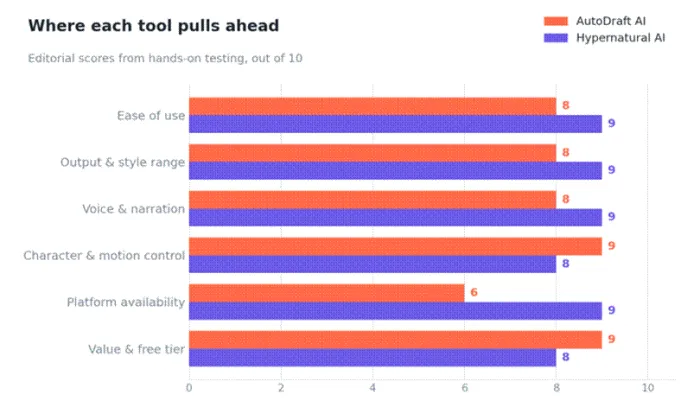
Figure 2. Editorial scores from hands-on testing, rated out of 10.
How the scores break down:
• Output and style: Hypernatural casts the wider net with realistic footage, 200-plus templates, and Pika clips; AutoDraft goes deep in stylised 2D, which is exactly what cartoon and explainer creators want.
• Voice and control: Both narrate well, but Hypernatural's premium voices sound more natural, while AutoDraft hands animators finer control over expressions, lip-sync, and movement.
• Ease and platforms: Hypernatural feels frictionless and moves between web, iOS, and Android; AutoDraft is richer but browser-only, with a gentle learning curve.
• Characters: A real strength on both sides, holding their look across scenes, so the deciding factor is hands-on direction versus hands-off speed.
Pricing compared
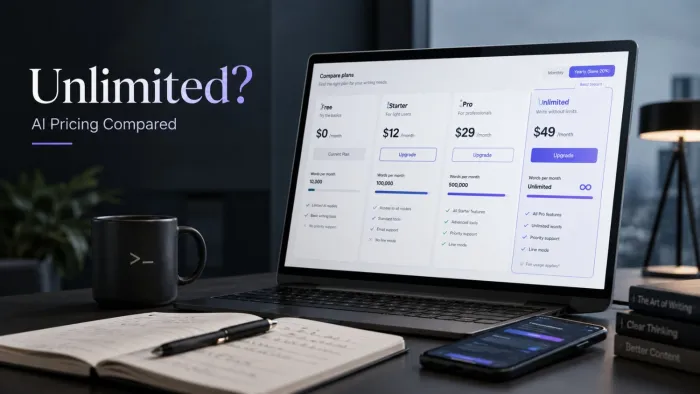
Cost often settles the decision, and here the two diverge in a genuinely interesting way. The headline rates sit close, but the value behind them depends heavily on how many credits each plan actually includes.
| Tier | AutoDraft AI | Hypernatural AI |
|---|---|---|
| Free | Generous access, 4K downloads, no card | 100 one-time credits, 30s cap, watermark |
| Starter | Base: about $10/mo, 1,000 credits/mo | Creator: $12/mo, about 500 credits/mo |
| Pro | Pro: about $32/mo, 4,000 credits/mo | Pro: $22/mo, about 1,500 credits/mo |
| Advanced | Bundled within the Pro tier | Ultimate: $48/mo, about 8,000 credits/mo |
| Enterprise | Custom, with custom model training | Custom, team seats and support |
Prices reflect the lowest advertised monthly rate; monthly-only billing runs higher, and figures are worth confirming on each official site.
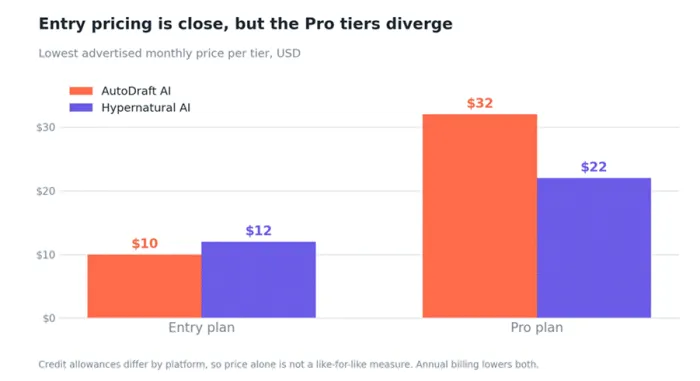
Figure 3. Lowest advertised monthly price by plan tier.
Reading the pricing:
• Entry tiers: close together, with AutoDraft's Base around 10 dollars a month and Hypernatural's Creator at 12 dollars.
• Pro tiers: Hypernatural's Pro runs about 22 dollars and undercuts AutoDraft's Pro at roughly 32 dollars, yet AutoDraft hands over far more raw credits at that level.
• Credits: not interchangeable between platforms, since each charges differently per generation, so a side-by-side price tag is only a starting point.
• Free and annual: both discount annual billing and both offer a free tier, though AutoDraft's is the more forgiving for testing before paying a cent.
For light or occasional use, AutoDraft tends to stretch further thanks to its low entry price and roomy free tier. For steady, high-volume output, Hypernatural's mid and upper tiers pack in the larger credit pools, which is exactly what a busy social schedule burns through.
Which one to choose
There is no universal winner here, only a better match for a given goal. The quickest way to decide is to start from the kind of content on the calendar.
• Animators and cartoon creators: AutoDraft is the natural home, with motion, expression, and character control that few rivals match at the price.
• Social and short-form creators: Hypernatural turns scripts and podcasts into feed-ready reels fast, and its mobile apps suit a post-from-anywhere routine.
• Marketers and small businesses: Hypernatural's polished narration, brand and logo tools, and template breadth make quick promotional content painless.
• Educators and explainer channels: AutoDraft brings animated lessons to life, while Hypernatural shines for script-built explainers that skip a talking head.
• Budget-first testers: AutoDraft's generous free tier lets a project take real shape before any subscription.
• Teams and agencies: AutoDraft's API and custom model training suit a managed pipeline, while Hypernatural's brand tools and mobile apps speed up client-ready social output.
Anyone still torn can sign up free on both within an afternoon, and a single real project tends to reveal which workflow feels natural and which one quietly fights back.
The final verdict
After the last clip rendered and the credit counters settled, the comparison resolved into something refreshingly simple. These two are not really rivals so much as specialists pointed at different problems. AutoDraft AI is the better animation studio, rewarding patience with expressive, consistent 2D work and an entry price that practically invites play. Hypernatural AI is the better short-form storyteller, marrying lifelike narration to quick, stylish output and the rare convenience of true mobile apps.
The bottom line:
• Choose AutoDraft AI for cartoons, comics, and richly animated explainers, especially when shaping every frame is part of the fun.
• Choose Hypernatural AI for fast, feed-ready social video, where voice quality and a clean finish decide whether a clip even gets watched.
Both are improving at pace, both are affordable, and neither will feel like a wasted afternoon. The marketplace may still be crowded, but for these two particular stalls, the choice finally feels clear instead of confusing.