Upload a grainy phone selfie from 2018 and, seconds later, get back a version sharp enough to pass for a studio portrait, then drop your face into a movie poster just to see what happens. That blend of the genuinely useful and the purely playful is the entire pitch behind Pica AI, and it helps explain why a small Hong Kong team has built one of the more talked-about consumer photo apps of 2026.
This review walks through what Pica AI actually does, how well each tool holds up in real use, what it costs once the free credits run dry, and how it compares to the alternatives most people weigh up. The aim is straightforward: enough detail to decide whether it deserves a spot on your phone, or your credit card, without the marketing gloss.
The short version Pica AI bundles four tools (face swap, photo enhancer, AI headshots, and old-photo restoration) into an interface a first-timer can navigate in minutes. The enhancer and headshot generator are the strongest pieces. Free credits are tight, top-tier plans run pricey, and video swaps can be slow. It’s a strong pick for casual creators and anyone who needs a quick, LinkedIn-ready portrait; a weaker one for professional print work or heavy video editing. |
What Pica AI is, and why people are trying it now

Pica AI is a consumer photo platform that combines four things casual users actually reach for: face swapping, photo enhancement, old-photo restoration, and stylized avatars. It was launched in 2023 by Hong Kong–based developer WEGITAL HK LIMITED, and you can use it either in a browser at pica-ai.com or through its iOS and Android apps. On Apple’s App Store, the app holds a 4.5-out-of-5 rating across roughly 835 reviews as of early 2026, which is respectable for a category where users grade harshly the moment a face swap looks even slightly uncanny.
The pitch is simple: skip Photoshop, skip Lightroom, drop an image in, pick a tool, and wait a few seconds. The output is usually good enough for social media, dating profiles, and quick creative experiments, if not always polished enough for professional print.
Why the surge in attention now? Two trends are converging, and Pica AI rides both at once:
• One-click enhancement went mainstream. People would rather keep one app than juggle five.
• LinkedIn turned AI headshots into a craze through 2025 and into 2026, with users paying a few dollars for studio-style portraits instead of booking a photographer.
It’s a category expanding fast, which is exactly why a lightweight, do-it-all app has found an audience.
$1.5B projected size of the AI face-swap software market by 2033, per Verified Market Reports | ~34M AI images generated per day in 2026, roughly 394 every second (Everypixel) | 4.5/5 average App Store rating across ~835 reviews as of early 2026 |
For context on that scale: Everypixel’s 2026 tracker estimates more than 30 billion synthetic images have been produced since the first consumer generators arrived in 2022. Every new photo app, Pica AI included, is competing for attention against that backdrop, which puts a premium on being easy and fast rather than feature-dense.
How Pica AI works under the hood
The product is web-first, with native iOS and Android builds wrapping a near-identical interface. You sign up with a Google or Discord account in under a minute, and no credit card is required for the free tier, so you can try every tool before spending anything.
Behind the simple buttons, Pica AI stacks several AI models, each handling a different job:
• Face swap pairs a face-recognition model that locates the target face with a generative model that maps a new face onto the body, preserving lighting and expression.
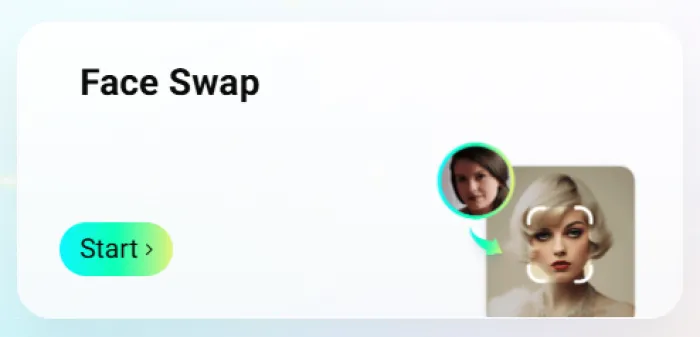
• Photo enhancer leans on a super-resolution model trained on large libraries of low-to-high-resolution image pairs, the same broad approach used by tools like Topaz.
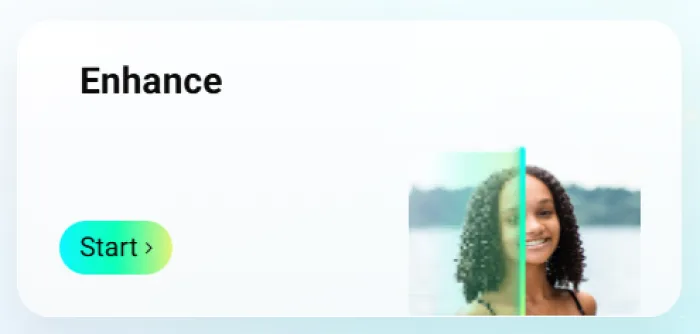
• Avatars run on a stylization model that reinterprets a selfie as anime, fantasy, oil painting, or cyberpunk.
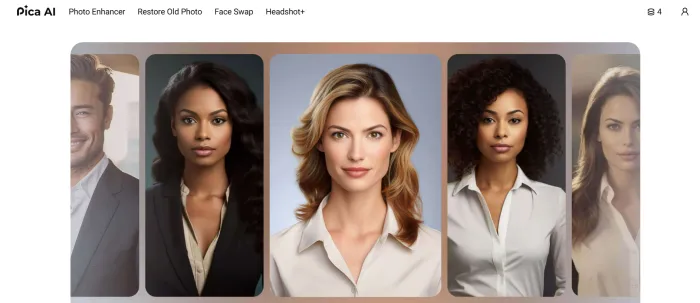
One detail worth flagging: as of late 2025, the pica-ai.com site shows a banner indicating its Photo Enhancer has been upgraded to, and now routes through, the engine behind Artguru, a sister product from the same developer. In practice, that means enhancement results improved noticeably over the 2024 version, while face swap, headshots, and avatars stayed on Pica AI’s own pipeline.
Crucially, none of this complexity is exposed to the user. The landing page shows buttons that say “Face Swap Now” and “Enhance Now.” You click, you wait, an image appears. For a consumer product, that restraint is the right call.
The core features, tested
Six capabilities matter from day one. Everything else can wait until you’ve found your footing.
Face swap (photos and video)
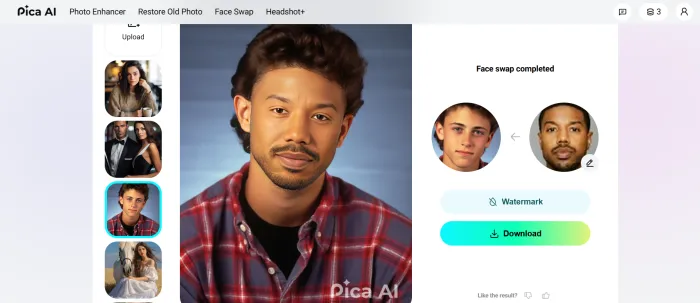
You upload a source face and a target image or video, and the app does the rest. Pica AI handles single faces, group shots with up to three faces at a time, and short videos. The model does a solid job keeping expressions and lighting consistent on clean, well-lit, front-facing photos. Extreme angles, partially hidden faces, and big sunglasses still trip it up. Photo swaps return in seconds; video swaps take meaningfully longer and burn more credits, and some testers have reported waits stretching past twenty minutes for longer clips.
AI photo enhancer
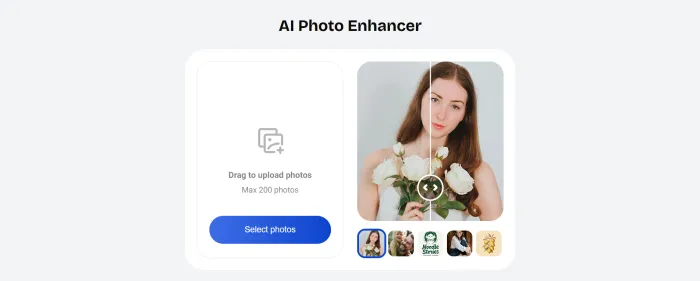
Feed it a blurry or low-resolution image and it returns a sharper, cleaner version, deblurring old camera-phone shots, sharpening scans, and pushing resolution toward 4K. Since it began routing through the Artguru engine in October 2025, this is arguably Pica AI’s most reliable tool. A word of caution from testing: running the same image through multiple passes tends to flatten natural skin texture, so one or two passes is the sweet spot.
AI headshot generator
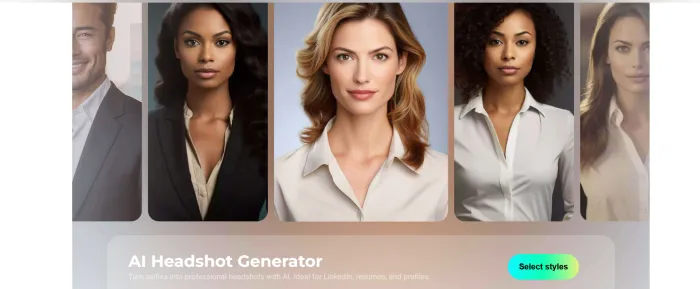
This is the feature paying the bills in 2026. Upload a handful of casual selfies and the app produces professional-looking portraits across a range of backgrounds and outfits, corporate, creative, or casual. Because it reads facial detail from your own photos, the results still look like you rather than a generic stock model. For most people this is the cheapest, fastest route to a polished LinkedIn photo.
$150–$400 Typical cost of a one-hour studio headshot session, the expense Pica AI’s headshot tool undercuts for a few dollars. |
Old-photo restoration
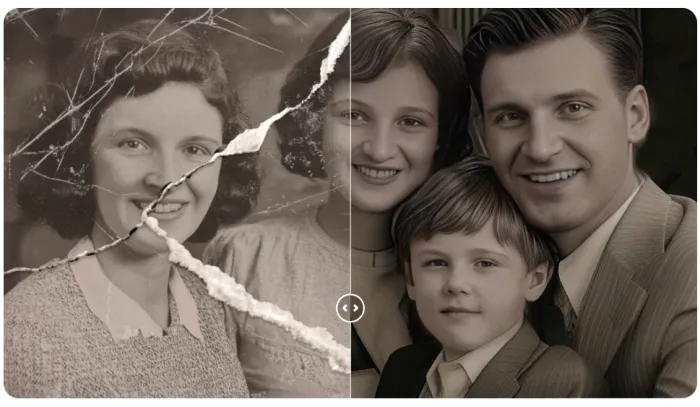
The emotional feature. Point it at a faded scan of a grandparent and it rebuilds color, removes damage, and recovers detail. It’s not flawless on badly torn originals, but it’s surprisingly capable on family-album scans from the 1980s and 1990s, often producing the version of a photo you wish you’d always had.
Magic Avatars and AI art
The playful half. Drop a selfie into a style pack (anime, oil painting, fantasy warrior, cyberpunk, watercolor) and get stylized portraits back. You can also generate images from a text prompt, so a “cat astronaut in watercolor” for the group chat doesn’t require installing a separate generator.
Background editing
Rounding out the kit, you can erase a cluttered background, swap in a new scene, or generate one from scratch. It’s not a Photoshop replacement, but it’s enough for product shots, ID-style photos, and casual cleanups.
Who uses Pica AI, and for what
The tools above map onto a handful of real-world jobs. Here’s where Pica AI tends to earn its keep, and which feature to reach for in each case.
| Use case | Best for | Tool to use | What you get |
|---|---|---|---|
| LinkedIn & resume photos | Job seekers, professionals | AI Headshot generator | Studio-style portraits from selfies, no photographer |
| Social content & memes | Creators, casual users | Face swap (photo & video) | Eye-catching, shareable swaps in seconds |
| Restoring old family photos | Families, hobby archivists | Old-photo restoration | Color, detail, and damage repair on faded scans |
| Marketing & product visuals | Small businesses, marketers | Enhancer + background editing | Higher-res images and clean, on-brand backgrounds |
| Avatars & profile pictures | Dating, gaming, social profiles | Magic Avatars / AI art | Stylized portraits, from anime to oil painting |
| Rescuing low-quality shots | Anyone with a blurry photo | Photo enhancer | Deblurred, upscaled images pushed toward 4K |
How to use Pica AI to enhance a photo in one click
If you want a clear before-and-after in under five minutes, this path works reliably:
1. Open pica-ai.com or the mobile app and create a free account with Google or Discord.
2. Select Enhance from the main menu.
3. Upload your photo. JPG and PNG files of a few megabytes are fine.
4. Choose an enhancement level; most people should start on the default.
5. Wait five to fifteen seconds while the model processes the image.
6. Preview the result and check the eyes and fine detail for artifacts.
7. Download the enhanced version.
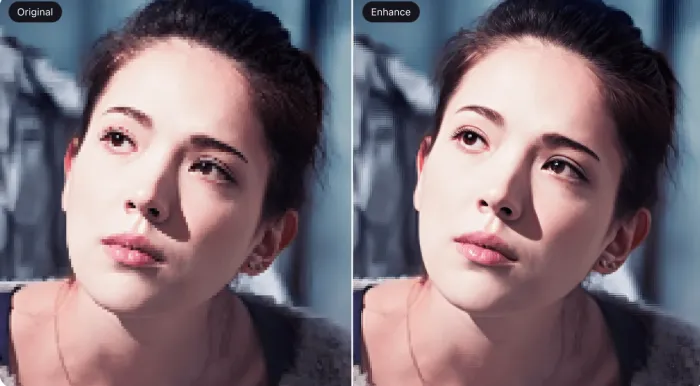
The free tier resets a small daily allowance of credits, and a single enhancement typically costs one credit. Face swap follows almost the same flow: upload a target, add a source face, and tap Generate. Finished images export as JPG, while video swaps come back as GIF or MP4. If a result isn’t quite right, a second pass with a different setting often fixes it; just don’t keep hammering the button on the same file.
Is Pica AI safe? Privacy and your photos
Face tools handle more personal material than an ordinary photo editor. You are uploading your own face, and often your family's faces, to a server you do not control. That deserves more than a one-line reassurance, so here is what the policies actually say and what they leave open.
| Question | What the policy says | What it means for you |
|---|---|---|
| Who runs it? | WEGITAL HK LIMITED, Hong Kong, launched 2023 | A registered company with public terms, not an unknown app |
| Where are photos processed? | Uploaded to and processed on their servers | Nothing stays on your device. Assume every upload leaves your phone. |
| How are they stored? | Encryption and cloud storage | Standard wording, but no stated retention period in days |
| Can I delete my photos? | Yes, at any time | Download first, then delete yourself. Do not rely on automatic clearing. |
| Can I delete my account? | Yes, in-app, no email needed | Removes your account and personal data, minus legally required records |
| How fast are privacy requests answered? | Within 45 days | Slower than the usual 30-day GDPR norm, so ask early |
| Who do I contact? | support@pica-ai.com | One address for both billing and privacy |
| Is there an age limit? | Legal age required; avatars state 18+ or 21+ | Not a suitable app for children's photos |
Three rules if you use it:
Do not upload anything you would hate to see leaked. No ID documents, no medical images, no photos of children, nothing intimate. This is the baseline for every cloud face tool, not just this one.
Download, then delete. Save your finished images, then clear them from your account. Deleting them yourself is the only retention control you actually hold.
Watch for copycat apps. Face swap tools attract clones in app stores that mimic the real listing. Install from links on pica-ai.com, or check the developer name reads WEGITAL HK LIMITED.
Pica AI pricing, the free plan, and credits
Pica AI runs on a credit system layered over a freemium model. The free version hands you a small daily allowance, enough to try each tool once or twice, while paid tiers raise those caps, unlock higher-quality output, and add premium packs. The figures below reflect the App Store listing and web pricing seen in 2026; note that exact numbers shift over time and vary by platform and region, so treat them as a guide and confirm on the site before you buy.
| Plan | Approx. monthly price | What you get |
|---|---|---|
| Free | $0 | Daily credits, basic face swap and enhancement, watermark on some outputs |
| Premium Lite | ~$5.99 | Higher daily credits, priority processing, basic avatars |
| Premium Plus | ~$19.99 | Larger credit pool, all headshot packs, all art styles |
| Premium Max | ~$39.99 | Maximum credits, commercial usage rights, batch processing |
| Add-on packs | ~$2.99–$3.99 | One-time Magic Avatar packs and extra headshot bundles |
Representative Pica AI plans and pricing as observed in 2026. Verify current rates in-app, as they change.
A few practical notes before you buy:
• Add-on packs are one-time purchases, not subscriptions.
• Billing differs by platform. Mobile runs through the App Store or Google Play; web goes through a standard card processor.
• Commercial rights sit with the top tier. Anyone putting output into paid ads should budget for Premium Max, not the entry plan.
• The entry price moves a lot. Listing sites have reported roughly $4.99 to $9.99, another reason to confirm before committing.
If you only need a single round of headshots for a profile refresh, a one-time pack or a single month of the cheapest plan is the low-risk way to find out whether the tool works for you. There’s no need to commit to an annual subscription to test it.
Using Pica AI for LinkedIn and professional headshots
The fastest-growing use case for Pica AI in 2026 is LinkedIn headshots, and the math behind that is easy to follow. A local photographer typically charges $150 to $400 for a one-hour session; Pica AI charges a few dollars for a batch of AI portraits that, in most cases, look like they could have come from a studio.
A workable process for a profile update:
1. Gather five to ten casual selfies from different angles: clean face, decent lighting, no sunglasses.
2. Upload them to the Headshot tool.
3. Choose a style: corporate, creative, or casual.
4. Let the app generate a batch, usually twenty to forty candidates.
5. Pick the two or three best, discarding any where eyes or teeth look off.
6. Crop to square and upload to LinkedIn.
One honest caveat: the output is good, not perfect. Hairlines occasionally drift, and clothing details can look synthetic under close inspection. For a small circular profile photo, those flaws rarely register. For a printed billboard, they would. The rule of thumb is to match the tool to the stakes, and for a digital profile picture, Pica AI clears the bar comfortably.
Pica AI vs the alternatives
The AI photo space is crowded, and the names people most often weigh against Pica AI fall into two camps: novelty face-swap apps and broader photo editors. Here’s how the main contenders compare at a glance.
| Tool | Main strength | Free tier | Best for |
|---|---|---|---|
| Pica AI | All-in-one: swap, enhancer, headshots, restoration | Daily credits | Casual creators who want one simple app |
| Reface | Fast, fun video face swaps and GIFs | Limited, ad-supported | Quick social and meme content |
| FaceApp | Age, smile, and style filters on portraits | Watermarked | Playful face transformations |
| Picsart | Full mobile editing suite plus AI tools | Generous, ad-supported | Hands-on editing and design |
| Artguru | Strong enhancer and AI portraits | Free credits | Enhancement and avatar quality |
How Pica AI compares to popular alternatives. Pricing is indicative and changes frequently.
The short read: if you want a single, friendly app that covers swapping, enhancement, and headshots without a learning curve, Pica AI is a sensible default. If your priority is rapid-fire video swaps, Reface is purpose-built for it. For genuinely hands-on editing and design control, Picsart goes much deeper. And because Pica AI’s enhancer now shares an engine with Artguru, the two produce comparable enhancement results, so the choice between them often comes down to which interface and pricing you prefer.
What the 2026 deepfake rules mean for you
Face swap tools stopped being purely a creative question in 2026. Two sets of rules arrived around the time this review first published, and both change how you are allowed to use your images.
The EU now requires visible deepfake labels
The EU AI Act's transparency obligations under Article 50 became applicable on 2 August 2026. Two duties matter for anyone using a face swap tool. The AI provider must mark its output in a machine-readable way, through metadata, watermarking or fingerprinting. And the person who publishes the image, which means you, must add a visible label that a viewer can see the moment they encounter it. A hidden machine-readable tag does not satisfy this on its own.
The definition is wider than most people expect. You must label the image even if you had no intention of deceiving anyone, and even if the person shown does not exist, as long as the result plausibly resembles a real person or event. Narrow exceptions exist for clearly artistic, satirical or fictional work. The rules apply to any business serving EU users no matter where the business is based, and images generated before 2 August 2026 do not need labelling retroactively.
| Who you are | What you must do from 2 August 2026 |
|---|---|
| Normal user posting a swap for fun | Add a visible AI label if it could pass as real |
| Creator or brand posting to EU users | Visible deepfake label at first view, every time |
| Anyone posting AI text on public-interest topics | Disclose it, unless a human genuinely edited it |
| Marketer running paid ads with AI portraits | Label it, and check your plan allows commercial use |
Fines reach up to €15 million or 3% of worldwide annual turnover, with the smaller figure applying to small businesses and start-ups.
The US now has a 48-hour takedown clock
The TAKE IT DOWN Act's notice-and-removal rules took effect on 19 May 2026. Covered platforms must give people a clear way to report intimate images shared without consent, including AI-generated fakes, and must remove them and any known copies within 48 hours. The FTC enforces this, with civil penalties reported at $53,088 per violation. The criminal part of the law, aimed at whoever creates and shares the image, has been active since May 2025, and the first federal conviction under it came in April 2026.
What this means for you as a Pica AI user
Nothing changes if you put your own face on a movie poster for a group chat. Quite a lot changes if you publish swaps of other people.
| Step | Check | If the answer is no |
|---|---|---|
| 1 | Is it your own face? | Go to step 2 |
| 2 | Did the person agree? | Stop. Do not post it. |
| 3 | Could someone mistake it for real? | Add a visible AI label in the post itself, not in your bio |
| 4 | Will EU users see it? | Labelling is mandatory, not optional |
| 5 | Does your plan include commercial rights? | Only the top tier does. Upgrade or do not monetise it. |
| 6 | Is it intimate, sexual, or of a child? | Do not. This carries criminal liability. |
Pica AI shows consent reminders in the face swap flow, but a reminder is not a legal defence. The responsibility sits with whoever publishes the image.
Pros and cons
What works • Genuinely beginner-friendly: clean interface and one-click tools • Four useful tools in a single app, no account-hopping • Enhancer is reliable since the Artguru engine upgrade • Headshots undercut studio pricing dramatically • Free tier with no credit card needed to start • Restoration shines on old family-album scans | What to watch • Free daily credits run out quickly • Top-tier plans are expensive for casual use • Video swaps can be slow, occasionally very slow • Some longtime users felt a 2025 update changed swap quality • Commercial rights are locked to the priciest plan • Billing and credit complaints appear on review sites |
Is Pica AI worth it?
The verdict A capable, friendly all-rounder, with eyes-open caveats Pica AI does what it sets out to do: it makes face swaps, photo enhancement, headshots, and restoration accessible to people who have no interest in learning Photoshop. The enhancer and headshot tools are the standouts, and the price of entry is low enough to test risk-free. It’s the right tool for casual creators, anyone refreshing a LinkedIn photo, and people restoring old family pictures. It’s the wrong tool for professional print work, heavy or time-sensitive video editing, or anyone who needs ironclad billing transparency, so read the plan terms and cancel carefully if you only wanted a one-off. 4.0 / 5, recommended for casual use |