The first time an AI tool turned a flat sketch into a walking character, it felt like cheating. It also looked terrible. Two years on, that gap between the promise and the playback has mostly closed, and the honest problem now is the opposite one: there are too many decent options, and most listicles rank them by who paid for the placement rather than by what the tool is good at.
So this guide skips the leaderboard theatre. Five tools made the cut, each because it owns a specific job better than the rest. The pricing was pulled from live vendor pages, the funding figures come from market trackers, and every tool here has a section on where it falls apart, because a recommendation that hides the downside is just an advertisement wearing a lab coat.
The fastest way through what follows: figure out the job first, then jump to the matching tool. Cinematic clips point to Runway, quick social video to Pixverse, animating a character from a still to Viggle, business training to Vyond, and serious 3D character work to Cascadeur. Everything else here exists to back up those five calls with real numbers.
The money tells a clearer story than the hype
AI video sat at roughly $11.2 billion in global market value in 2025, and the capital chasing it is not spread evenly. The funding that flowed into the category last year clustered around a handful of names, which is a useful signal for anyone trying to bet on tools that will still exist in eighteen months. Runway alone pulled in more than every other pure-play animation startup combined.
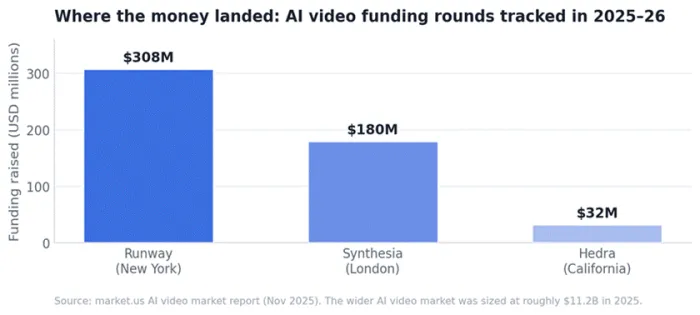
Reported funding rounds, 2025 to early 2026. Capital concentration is one rough proxy for which platforms can fund the next model generation.
The takeaway is not that the biggest raise wins. It is that the well-funded platforms can afford to retrain frontier models while smaller tools coast on last year's weights. That matters for animation specifically, where output quality is tied directly to how recent the underlying model is. A tool that looked state-of-the-art in early 2025 can feel a generation behind by the time a project ships, and the platforms with deep balance sheets are the ones quietly shipping the upgrades that keep them current.
There is a second reason the concentration matters for buyers rather than investors. Animation work tends to live inside a subscription and a saved project library, so switching tools later carries a real cost in relearning and re-exporting. Betting on a platform with the runway to survive a funding winter is, in practice, a way of protecting that sunk effort. The names that raised the most are not automatically the best, but they are the least likely to vanish mid-project.
The five tools at a glance
Before the deep dives, here is the whole shortlist in one frame. Prices reflect the cheapest plan that produces commercial-ready, watermark-free output, billed annually where that option exists.
| Tool | Best at | Entry cost | Output style |
|---|---|---|---|
| Runway | Cinematic clips and edits | $15 / mo | Photoreal and stylised live-action video |
| Pixverse | Fast text and image to video | ~$10 / mo | Stylised short clips with audio |
| Viggle | Character motion transfer | Free / ~$10 / mo | Animated characters from a still |
| Vyond | Business and training video | ~$54 / mo | Corporate-friendly 2D scenes |
| Cascadeur | 3D character and game motion | Free / $8 / mo | Physics-accurate 3D keyframe |
Figures verified against vendor pricing pages, May 2026. Annual billing assumed where it lowers the monthly rate.
Where each tool actually sits
Price alone is a bad filter. A free tool that fights every creative decision can cost more in wasted hours than a paid one that does what is asked. The map below plots each pick on two axes that matter more than the sticker price: how cheaply it reaches usable commercial output, and how much hands-on control it hands back over the final frame.
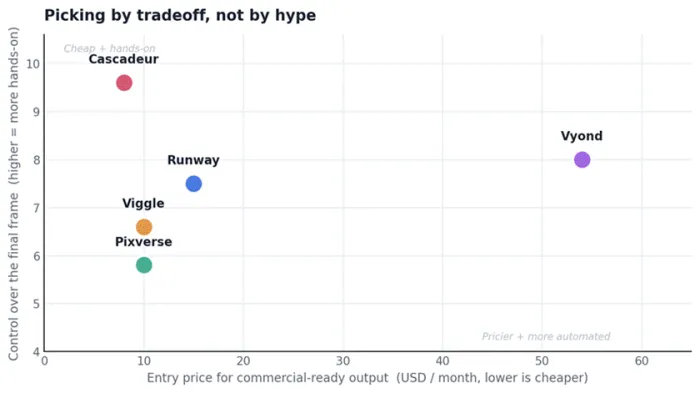
Editorial positioning based on tested workflows. Viggle trades breadth for one sharp specialism; Cascadeur trades the broadest control for a steeper learning curve.
The reviews, tool by tool
Each tool below gets the same treatment: a quick spec card to scan in seconds, a short read on what it actually feels like to use, the strengths worth paying for, the weak spots nobody mentions in the ads, and a one-line answer to the only question that matters, which is whether it fits the work in front of someone right now.
Runway: the choice when it has to look like real footage
| Best for | Filmmakers, editors and marketers needing cinematic clips plus editing in one place |
| Entry price | Free trial credits, then Standard around $15 / month |
| Output | Photoreal and stylised live-action video, 5 to 10 second clips |
| Standout | Directed editing: change a clip by instruction instead of regenerating it |
| Watch out for | Credit burn on iteration and queue waits at busy times |
Runway is the tool the rest of the field measures itself against, and the funding chart above hints at why. Its Gen-4 and Gen-4.5 models build coherent scenes with believable motion, and crucially it bolts that onto a real editing suite, so a clip can be generated, trimmed and graded without ever leaving the tab. For anyone who has lost an afternoon shuttling files between a generator and a separate editor, that is the whole pitch.
What works well
▪ Directed editing means revisions are described, not regenerated, which is where most of the real time savings live.
▪ Generation and timeline editing sit in one workspace, removing the export-import shuffle.
▪ Output quality is at or near the top of the category for live-action-style motion.
Where it falls short
▪ Reviews through early 2026 flag queue times of 10 to 20 minutes even on paid tiers.
▪ Gen-4.5 video runs about 25 credits per second, and failed generations still cost credits, so budgeting 10 to 15 percent waste is realistic.
▪ No offline desktop app, no custom model training, and the mobile app is iOS only.
Who it is really for Anyone whose output has to pass as camera footage and who will iterate inside one tool. Heavy iterators can escape credit anxiety on the $95 Unlimited plan, but that is overkill for most.
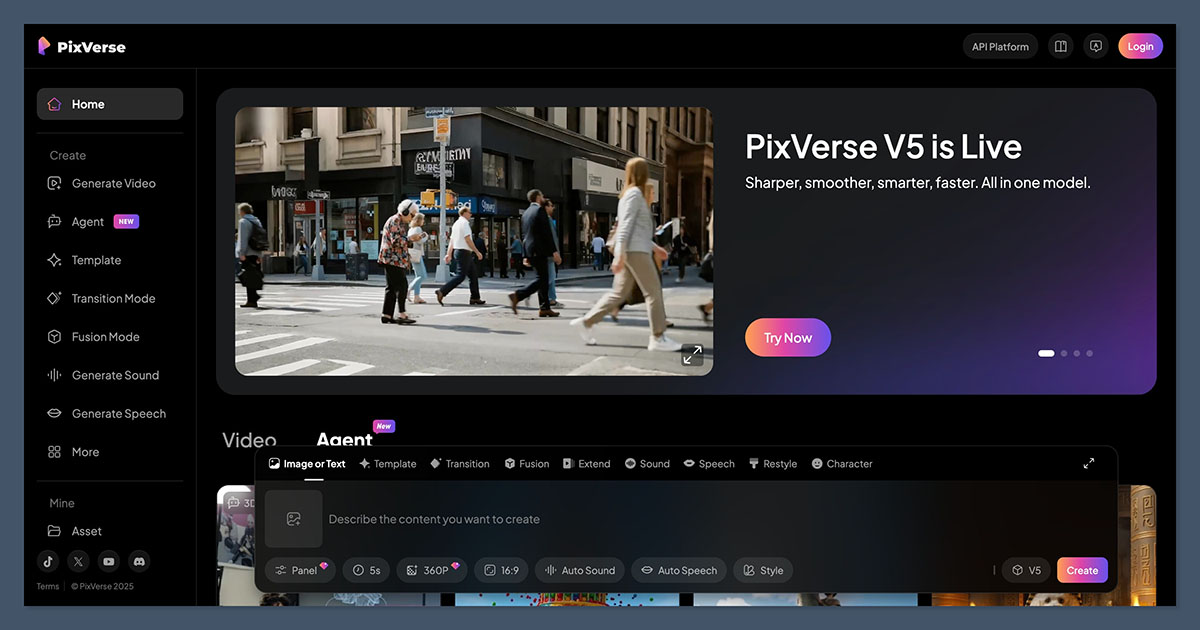
Pixverse: the fast all-rounder for social video
| Best for | Creators making quick stylised clips for TikTok, Reels and Shorts |
| Entry price | Free tier (~50 credits / month), paid from around $10 / month |
| Output | Text, image and video to video, 360p up to 4K, 5 to 15 second clips |
| Standout | Native audio with lip-sync and a character reference for consistent faces |
| Watch out for | Stronger on stylised looks than on photoreal; quality dips on longer clips |
Pixverse is the generative all-rounder, turning a prompt, a still image or an existing clip into finished video in well under a minute. The recent model versions added native audio generation with sound effects, music and automatic lip-sync, plus a character reference system that holds a face steady across multiple shots, which is exactly the trick most short-form generators fumble. For someone who needs three usable clips before lunch rather than one perfect one by Friday, this is the workflow.
What works well
▪ Genuinely fast generation, often inside a minute, which suits the volume social content demands.
▪ Built-in audio and lip-sync remove a whole separate production step.
▪ Character reference keeps a face consistent shot to shot, a common failure point elsewhere.
Where it falls short
▪ Noticeably stronger on stylised visuals than photoreal ones, because stylisation hides small motion errors.
▪ Quality degrades as clips get longer, introducing artifacts that force extra attempts.
▪ Retries consume credits, so the headline price understates real spend for heavy iterators.
Who it is really for Social-first creators who value speed and stylised polish over cinematic realism. For true photoreal work, Runway or Kling stay steadier.
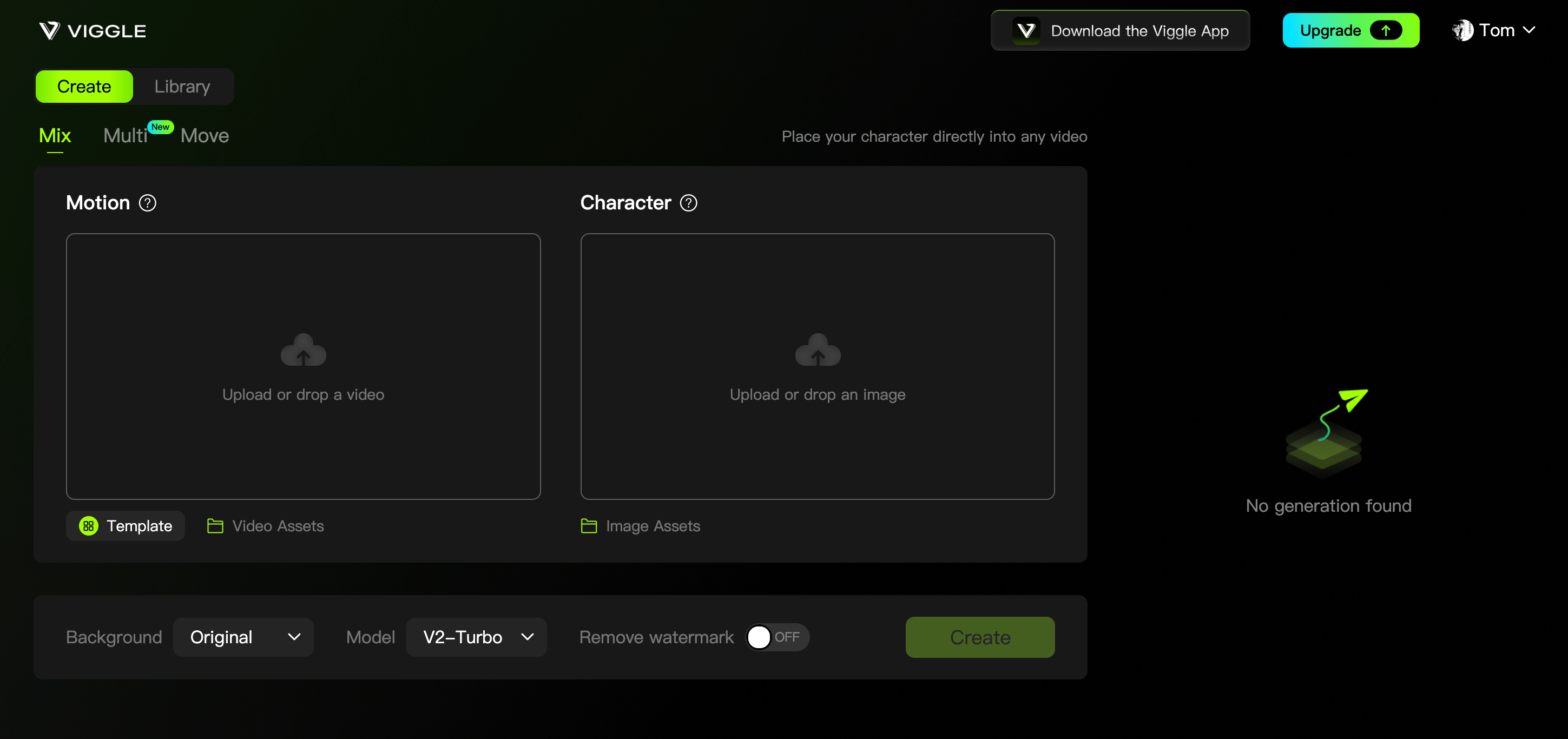
Viggle: bringing a single character to life from a still
| Best for | Animating one character or photo using motion from a reference clip |
| Entry price | Free with daily refreshed credits, paid plans around $10 / month |
| Output | Short character animations, generally under 15 seconds, no audio |
| Standout | JST-1 physics-aware motion transfer that keeps the character consistent |
| Watch out for | Single specialism only; check commercial-use terms before publishing |
Viggle does one thing and does it unusually well. Upload a character image and a reference video of someone moving, and its physics-aware model maps that motion onto the character, holding the figure together instead of melting between frames the way generic generators often do. Because it understands joints, angles and weight, the result moves like it has a skeleton rather than like a paper cutout, which is exactly why it went viral with creators and meme makers. The free tier runs on daily credits, so casual experimenting costs nothing but patience.
What works well
▪ Best-in-class motion transfer: borrow any movement from a reference clip and apply it cleanly.
▪ Character consistency holds across the whole clip, avoiding the usual frame-to-frame drift.
▪ A genuinely usable free tier lowers the barrier to trying it.
Where it falls short
▪ Clips are short, generally under 15 seconds, and there is no audio support at all.
▪ Customisation beyond the motion-transfer workflow is limited; it is not a generator or an editor.
▪ Commercial rights vary by plan and are worth reading closely before any paid project.
Who it is really for Creators with a character image who want it moving fast, then plan to finish elsewhere. Pair it with an editor for cutting and sound.
Vyond: the workhorse for business and training video
| Best for | Teams producing training, internal comms and e-learning at scale |
| Entry price | 14-day trial, then Premium around $54 / month billed annually |
| Output | Scene-based 2D business animation, AI avatars, 70-plus language translation |
| Standout | Polished corporate look plus team features built for repeat production |
| Watch out for | Per-seat pricing climbs fast; best extras gated to top tiers |
Vyond is the enterprise standard for animated business video, and an AWS case study cites it as used by a majority of Fortune 500 companies among its 20,000-plus business customers. It has repositioned around AI features such as text-to-video, AI avatars and instant translation into more than 70 languages, while keeping the scene-based 2D animation that made it a fixture in corporate training departments. The appeal is not novelty, it is reliability: a team can turn out on-brand training videos week after week without reinventing the format each time.
What works well
▪ Output looks corporate-appropriate by default, which matters for formal training and comms.
▪ Built for teams, with the consistency and collaboration features repeat production needs.
▪ Translation into 70-plus languages makes one video reusable across regions.
Where it falls short
▪ Pricing is seat-based and steep; a five-person team clears several thousand dollars a year quickly.
▪ Desirable extras like brand management and premium voices sit behind the top tiers.
▪ The free trial watermarks exports, which several reviewers call the nudge that forces an upgrade.
Who it is really for Organisations producing business video repeatedly, where budget is not the constraint. For one-off or personal projects, it is hard to justify.
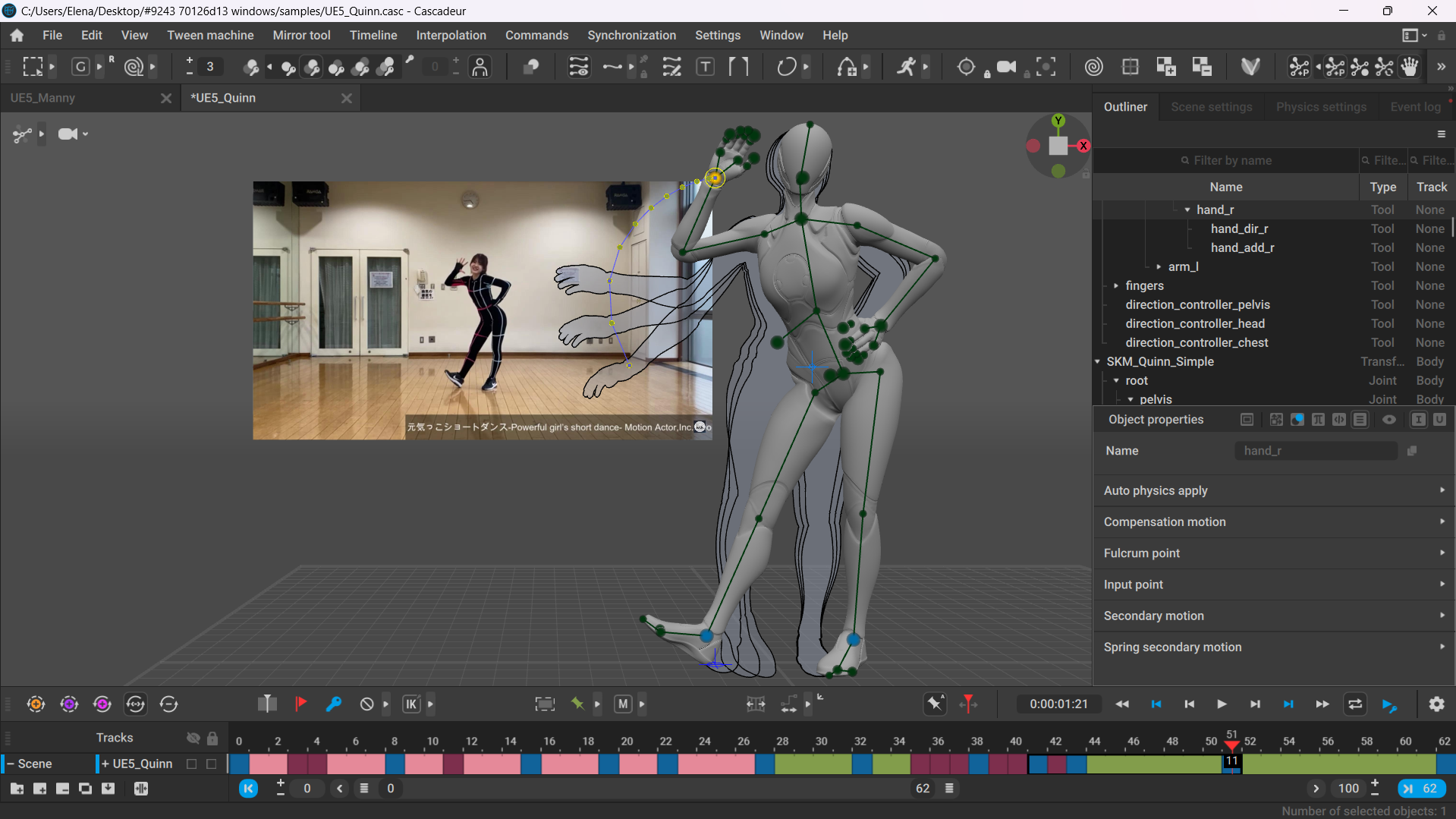
Cascadeur: real 3D character animation with an AI co-pilot
| Best for | Game developers and 3D animators wanting AI-assisted, physics-accurate motion |
| Entry price | Free for non-commercial, Indie around $8 / month, Pro around $33 / month |
| Output | Physics-accurate 3D keyframe animation, exports to FBX, USD and more |
| Standout | AutoPosing plus a physics engine, with full manual control at every step |
| Watch out for | It is real software with a real learning curve, not a prompt-to-video tool |
Cascadeur is the outlier here and the most interesting pick for anyone serious about 3D character work. It is standalone keyframe software where the AI assists rather than replaces: AutoPosing suggests physically plausible poses, the physics engine keeps motion grounded, and an inbetweening tool fills the gaps, while the animator keeps full control throughout. It cleans motion capture, retargets between rigs and exports to standard formats, so it slots into a Blender, Maya or game-engine pipeline rather than trapping work inside a browser.
What works well
▪ AI assistance speeds up posing and inbetweening without taking the wheel away from the animator.
▪ The physics engine keeps motion believable, which is the hardest part of character animation to fake.
▪ Standard exports (FBX, USD, DAE) drop straight into existing 3D and game pipelines.
▪ Annual Indie and Pro plans convert to a perpetual licence after a year, so the last version stays usable.
Where it falls short
▪ Real animation software means a real learning curve; it will not make a video from a sentence.
▪ The free version cannot export to engine-ready formats, only the proprietary .casc file.
▪ macOS support is limited to recent Apple-silicon machines.
Who it is really for Developers and animators building characters that must move with weight and intent. For a marketer wanting a clip by lunchtime, it is the wrong tool entirely.
Head to head on the things that decide it
Most buying regret comes from a mismatch on one of four points: what the tool outputs, how it bills, whether it can be used commercially, and where the work goes afterward. The table below lines all five up on exactly those.
| Tool | Core output | Billing model | Free tier use | Real weak spot |
|---|---|---|---|---|
| Runway | Generative video clips | Subscription + credits | Trial only, watermarked | Queue waits, credit waste |
| Pixverse | Generative short clips | Subscription + credits | ~50 credits monthly | Weaker on realism, longer clips |
| Viggle | Character motion transfer | Subscription + credits | Free, daily credits | Short clips, no audio |
| Vyond | Business 2D scenes | Per-seat subscription | 14-day trial only | Expensive at team scale |
| Cascadeur | 3D character motion | Subscription to perpetual | Free, non-commercial | Steep learning curve |
How these picks were made
Every tool here was evaluated against the same four checks rather than a star rating pulled from thin air. First, pricing was confirmed on the live vendor page in May 2026, not quoted from older roundups, because animation tools have changed their plans repeatedly over the past year. Second, each tool had to own a distinct job rather than overlap with another pick. Third, the funding and market figures come from named trackers, not vendor marketing. Fourth, nothing made the list without a documented weakness, since a tool with no downside usually means the review simply stopped looking.
Tools that ranked highly on other lists purely on the back of self-awarded badges were left off. A recommendation is only as honest as the failure it is willing to name.
Final verdict
After living in these tools across real projects, the cleanest mental model is to stop asking which is best and start asking which is best for the next hour of work. Runway gets reached for when a clip needs to look like it came off a camera. Cascadeur comes out when a character has to move like it has bones and weight. The other three each win a lane cleanly, and trying to force one tool to cover all of them is how good afternoons get wasted.
The wider lesson is duller and more useful than any single pick: the AI exploring ideas and the traditional craft refining them are not rivals. The strongest results still come from generating fast, then finishing by hand. The tools changed. That part did not.