

IN SHORT I generated a paragraph in ChatGPT, confirmed three detectors flagged it as 100% AI, then ran it through GPT Scrambler and tested it all over again. The before and after genuinely surprised me. |
Why I tried it, and how I got in
I'll be honest: I started out skeptical. I've lost count of how many AI humanizers promise to turn robotic text into something a real person would write, only to fall apart the second I paste the result into a detector. So when I found GPT Scrambler, I didn't want to take the marketing at its word. I wanted to run my own experiment and see whether it held up.
Getting in took less than a minute. The sign-up screen offered two routes: continue with Google, or sign in with email. I chose email, and instead of making me invent another password, it dropped a magic link into my inbox. One click and I was through. A passwordless login is exactly the kind of low-friction start I appreciate when I'm testing a tool rather than committing to it.
My plan was simple: take a clearly AI-written paragraph, prove the detectors saw it as AI, push it through GPT Scrambler, then test the rewrite on those same detectors. The humanizing pass took about 5 to 7 seconds, fast enough that I checked it had really done something. Most of my afternoon went into the testing, and everything below is exactly what I found.
What GPT Scrambler actually is
Before I show you my numbers, here's the quick version of what I was testing. GPT Scrambler is an AI text humanizer, or a "scrambler," as the name suggests. You paste in content from a tool like ChatGPT, Claude, or Gemini, and it rewrites the passage so it reads more like a person typed it, and so it slips past AI content detectors. It bills itself as more than a synonym swapper. Instead of trading out individual words, it reworks sentence structure, rhythm, and phrasing, which are the underlying patterns detection algorithms tend to catch.
80%+ Bypass success rate ADVERTISED | 5+ AI detectors targeted PER THE TOOL | 5-7s Per humanizing pass IN MY TEST | 20+ Languages supported ENTRY TIER |
It's aimed squarely at the detectors people actually run into: GPTZero, Turnitin, Copyleaks, ZeroGPT, and OpenAI's own tooling. The makers advertise a success rate around 80% or higher against these systems, and they pitch it at content creators, marketers, professionals, and students working with AI-assisted drafts. One thing I want to flag up front: the company openly states it isn't built for academic dishonesty, and asks you to follow your own institution's rules.
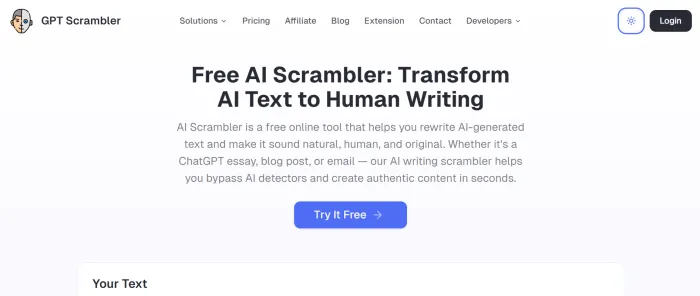
There are two ways to use it. A full web app handles longer pieces, and a Chrome extension does quick in-browser rewrites. There's even an integration that drops the humanizer into tools like Claude Desktop and Cursor for the more technical crowd. For this review, I stuck with the core web experience.
How I tested it
How I logged in
Before any testing, I had to get into the tool, and this part was refreshingly painless. GPT Scrambler keeps sign-in simple, with no long form to fill out and no password to remember.
1. On the sign-in screen, I had two options: continue with Google, or sign in with email.
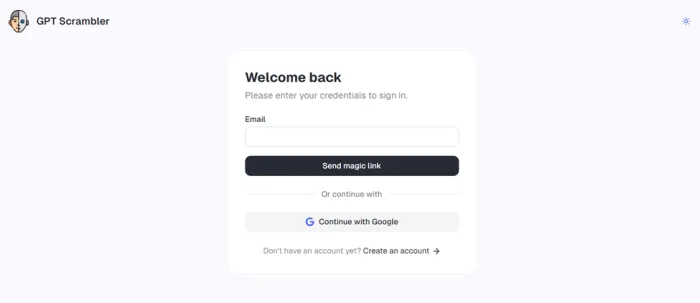
2. I went with email and entered my address. There was no password to create.
3. GPT Scrambler emailed me a magic link within a few seconds.
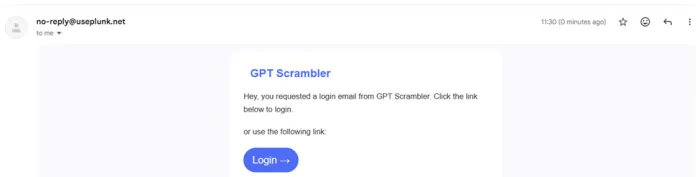
4. I clicked the link, and it dropped me straight into the dashboard, logged in and ready to go.
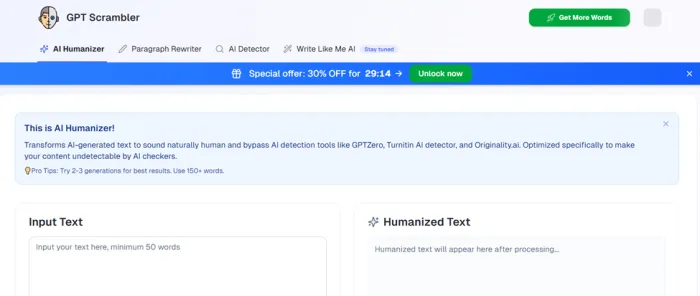
Start to finish, it took less than a minute. I'm a fan of passwordless, magic-link logins like this one: there's one less password to manage, and nothing standing between you and actually trying the tool.
I wanted a test that was clean and easy to repeat, so I kept my method dead simple. First, I asked ChatGPT to write a short reflective paragraph. Then I set a baseline by running that paragraph through three separate detectors: ZeroGPT, GPTZero, and QuillBot's AI Detector. I picked those three because they're among the most widely used, and each works a little differently.
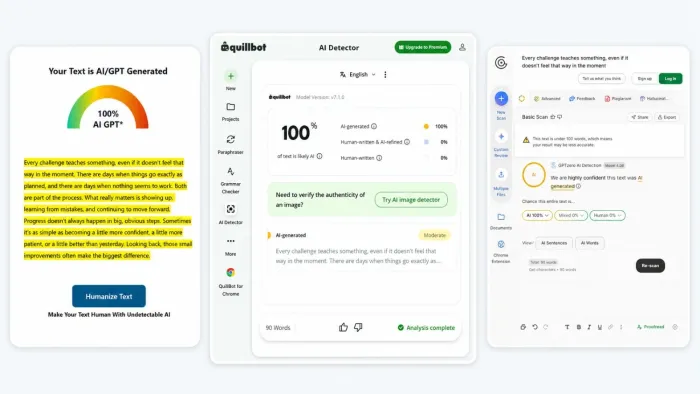
The verdict came back unanimous: all three flagged my text as 100% AI-generated. No surprise, really, given it came straight out of ChatGPT. Then came the part I was actually curious about. I dropped the exact same paragraph into GPT Scrambler, hit humanize, waited those few seconds, and copied out the rewritten version.
Test setup at a glance
| Test detail | What I used |
|---|---|
| Source text | Short reflective paragraph generated in ChatGPT |
| Humanizer | GPT Scrambler |
| AI detectors | ZeroGPT, GPTZero, QuillBot |
| Original detector result | 100% AI on all three |
| Humanizing passes | 1 |
| Processing time | About 5–7 seconds |
| Retesting method | Same rewritten passage tested on the same three detectors |
| Sample size | Sub-100-word passage |
This matters because the test was deliberately simple: one piece of AI-generated text, one humanizing pass, and the same detectors before and after. It makes the before-and-after comparison easy to follow, but it is still a single-sample experiment rather than a large benchmark.
The output, side by side
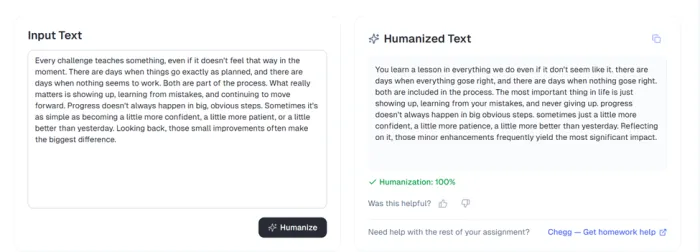
Here's the original on the left, and exactly what GPT Scrambler handed back on the right. I've broken it into matching chunks so you can see precisely what it changed.
| Original (ChatGPT) | After GPT Scrambler |
|---|---|
| "Every challenge teaches something, even if it doesn't feel that way in the moment." | "You learn a lesson in everything we do even if it don't seem like it." |
| "There are days when things go exactly as planned, and there are days when nothing seems to work. Both are part of the process." | "there are days when everything gose right, and there are days when nothing gose right. both are included in the process." |
| "What really matters is showing up, learning from mistakes, and continuing to move forward. Progress doesn't always happen in big, obvious steps." | "The most important thing in life is just showing up, learning from your mistakes, and never giving up. progress doesn't always happen in big obvious steps." |
| "Sometimes it's as simple as becoming a little more confident, a little more patient, or a little better than yesterday. Looking back, those small improvements often make the biggest difference." | "sometimes just a little more confident, a little more patience, a little more better than yesterday. Reflecting on it, those minor enhancements frequently yield the most significant impact." |
The meaning carried over cleanly. The phrasing, rhythm, and even a few spellings shifted on purpose (more on that below).
With the rewritten text in hand, I sent it back through all three detectors, using the same tools and the same settings, to see how far the scores moved. That's where it got interesting.
The detector results
Here's the side by side scoring. The "before" column is my original ChatGPT paragraph, and the "after" column is the GPT Scrambler version, scored on the identical detector.
| Detector | Original ChatGPT text | After GPT Scrambler |
|---|---|---|
ZeroGPT zerogpt.com | 100% AI | 0% AI, flagged "human written" 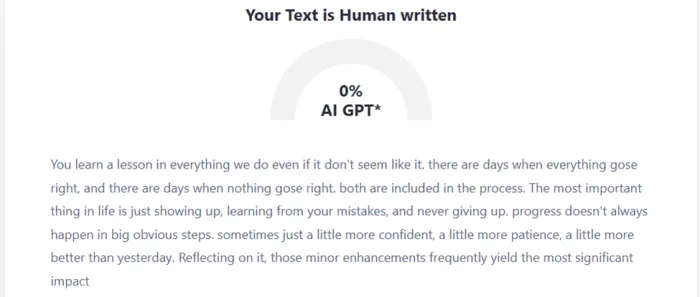 |
GPTZero gptzero.me | 100% AI | Mixed: 31% AI, 69% mixed, 0% human; 0 of 7 sentences flagged as AI 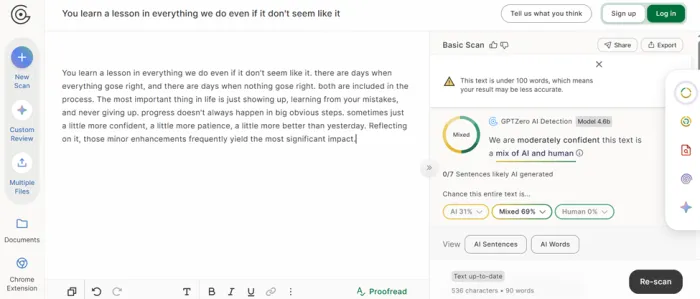 |
QuillBot quillbot.com | 100% AI | 0% AI; 100% human-written 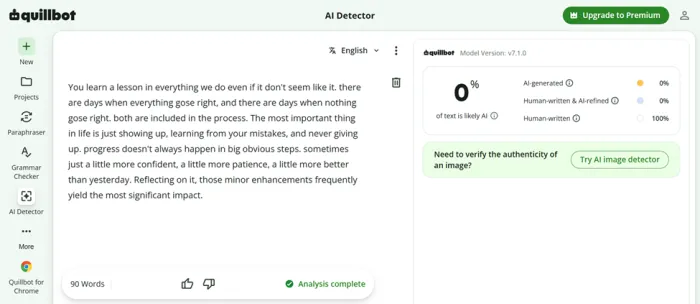 |
My screenshots of each result are included above. Detector behaviour can vary from run to run, so treat these as a snapshot of my test, not a guarantee.
What these results actually tell us
| The test shows | The test does not show |
| GPT Scrambler substantially changed detector scores on this passage | That every passage will get the same result |
| ZeroGPT moved from 100% AI to 0% AI | That ZeroGPT can always be bypassed |
| QuillBot moved from 100% AI to 0% AI | That QuillBot will classify every GPT Scrambler output as human |
| GPTZero's reported AI portion dropped to 31% | That GPTZero was completely bypassed |
| One humanizing pass produced a large change | That additional passes would improve results |
| The test worked on a short paragraph | That the same results will occur on a full essay or article |
That distinction is important. An AI detector produces a classification estimate; it does not independently establish who authored a piece of text.
Two of the three detectors went from a hard 100% AI to a clean 0%. On ZeroGPT, my rewritten paragraph was labelled human-written outright, and QuillBot scored it as fully human. That's a dramatic swing, and honestly more than I expected from a single pass.
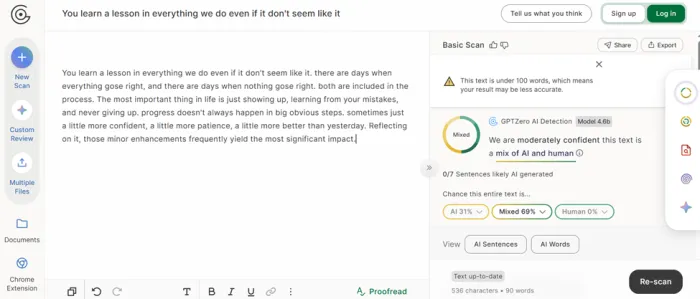
GPTZero was the tougher critic, but even there the result moved a long way. It came back as "mixed" rather than human, with a 31% AI reading. I'd read that one carefully, though: GPTZero flagged zero of the seven sentences as likely AI-generated, and reported 0% human, which dropped the whole thing into its "mixed" bucket. So even the strictest detector in my test stopped calling it AI. It simply couldn't confidently call it anything. For a tool working on a sub-100-word sample, which detectors openly warn lowers their accuracy, I'd count that as a partial win rather than a miss.
AI detection has changed since these tools first appeared
| Detector/platform | Relevant context | What it means for this review |
| ZeroGPT | Used in my hands-on test | Fell from 100% AI to 0% AI on my passage |
| GPTZero | Used in my hands-on test | Fell from 100% AI to 31% AI, but classified the text as mixed |
| QuillBot | Used in my hands-on test | Fell from 100% AI to 0% AI |
| Turnitin | Not included in my hands-on test | Results from the other three detectors shouldn't be assumed to apply to Turnitin |
| OpenAI classifier | No longer publicly available | References to an OpenAI text detector are historical rather than a current public detection option |
There are two particularly important updates here.
Turnitin's current AI Writing Report can detect text that it considers likely AI-generated even when that text may have been modified by an AI paraphraser or bypasser. On August 4, 2026, Turnitin also simplified its report so likely AI-generated text and AI-generated text further modified by paraphrasers or bypassers appear within one unified AI-generated category.
OpenAI, meanwhile, retired its public AI-text classifier on July 20, 2023 because of its low accuracy. OpenAI reported that the classifier identified 26% of AI-written examples in its evaluation set while incorrectly flagging human-written text 9% of the time.
About the output quality
Now for the part a purely promotional review would skip. If you re-read the humanized column, you'll spot some rough edges: "even if it don't seem like it," "everything goes right," "a little more better than yesterday." Those aren't accidents. Slipping in small, human-style imperfections is part of how this whole category of tool beats detection. Detectors hunt for the suspiciously smooth, uniform cadence of AI writing, so a few natural slips in grammar and spelling actually read as human.
The practical takeaway for me was this: treat the output as a strong first draft, not a finished piece. In my test the rewrite held onto the original meaning well, but I'd still run a quick proofread to fix the typos before publishing anything client-facing or academic. Five minutes of light editing gets you text that passes detectors and reads clean, which is the best of both worlds.
Features at a glance
Here's what you get, and what I made of each piece after using it.
| Feature | What it does | My take |
|---|---|---|
| Humanizer (core) | Rewrites AI text so it reads human and dodges detectors | Fast and the main reason to use it |
| Built-in AI detector | Scan a passage for AI without leaving the app | Saved me the tab-juggling I did during testing |
| Writing analyzer | Studies how you write so output leans to your voice | The most underrated feature here |
| Speed | Around 5 to 7 seconds per pass on short text | Quick enough that it never broke my focus |
| Chrome extension | In-browser rewrites with light, moderate, or heavy levels | Handy for quick, one-off jobs |
| Integrations | Works inside tools like Claude Desktop and Cursor | Nice if you're technical |
| Languages | Around 20 on the entry tier, more on higher plans | Useful for non-English content |
| Free tier limit | Roughly 200 words per pass, not stated upfront | Plan around it, or upgrade for volume |
Pricing: what it costs
Here's a detail I appreciated: GPT Scrambler doesn't push you into a monthly subscription. Pricing is built around one-time word-credit packs, so you buy a set number of words once and spend them whenever you like. There's a free tier too (that roughly 200-word cap I ran into), which is fine for testing, but for real work you'll want one of the three paid packs.
| Pack | Price | Words | Cost / 1,000 words | Best for |
|---|---|---|---|---|
| Starter | $1.99 one-time | 2,000 | ~$1.00 | Small, one-time needs |
Student Recommended | $3.99 one-time | 5,000 | ~$0.80 | Best value for regular use |
| Pro | $9.99 one-time | 15,000 | ~$0.67 | Large projects and power users |
Prices as shown on the billing page at the time of writing; check the site for the latest.
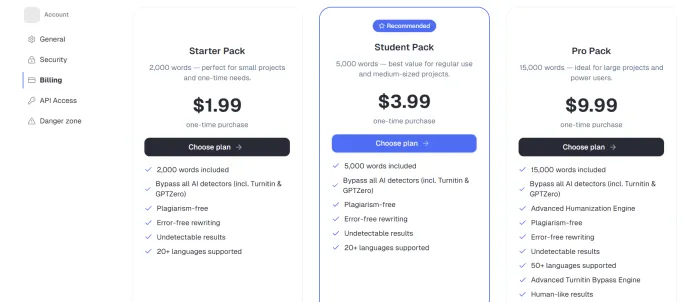
Every pack includes the core kit: detector bypass (Turnitin and GPTZero included), plagiarism-free and error-free rewriting, and undetectable results. The Pro pack adds the extras, 50+ languages instead of 20+, an Advanced Humanization Engine, an Advanced Turnitin Bypass Engine, and human-like results. On a per-word basis the Pro pack is the cheapest, but for most people the $3.99 Student Pack is the sweet spot: 5,000 words is plenty for regular use, and it's the option the tool itself flags as recommended.
Who it's for: use cases
Based on how it behaved in my testing, here's where I think GPT Scrambler genuinely earns its place, and what to keep in mind for each.
| Use case | How GPT Scrambler fits | Keep in mind |
|---|---|---|
| Bloggers and creators | Turns stiff AI drafts into publish-ready copy in seconds | Proofread the typos before it goes live |
| Marketers and SEO | Helps AI-assisted copy read naturally and avoid detector flags | Verify with the built-in detector first |
| Students (allowed uses) | Refines AI-assisted drafts; the analyzer nudges toward your voice | The tool says it isn't for cheating; follow your school's rules |
| Non-native English writers | Loosens robotic phrasing, with support for many languages | Output may still need a light grammar pass |
| Teams and freelancers | Fast turnaround, plus a Chrome extension and integrations | The free word cap means you'll likely upgrade for volume |
How it compares: alternatives
GPT Scrambler isn't the only humanizer out there, so here are a few names worth knowing if you want to shop around. One honest caveat: I only ran my hands-on detector test on GPT Scrambler itself. The rest are based on their reputation and public information, and free tiers and pricing change often, so verify before you commit.
| Tool | Best known for | Free tier |
|---|---|---|
GPT Scrambler | Fast AI-to-human rewriting with a built-in detector. Cleared two of three detectors in my test. | Yes, about 200 words per pass |
| Undetectable AI | A long-established humanizer with broad detector coverage and a free AI checker. More name recognition; paid for real volume. | Limited (daily credits) |
| QuillBot | A paraphrasing and grammar suite with a free AI detector. A great all-rounder, but less specialized for pure evasion. | Yes |
| GPTHuman AI | A humanizer popular with students. User reviews are mixed, so test it on your own text before relying on it. | Yes (low word limits) |
What other users and reviewers say
My test is a single data point, so I went looking for outside perspectives to sanity-check it. Coverage of GPT Scrambler leans toward dedicated review sites and listings rather than the big aggregate-rating platforms, so apply the usual caution to affiliate-flavoured write-ups. That said, the recurring themes lined up neatly with what I saw.
| Source | What they say |
|---|---|
DetectionDrama Review site | Ran it through their own detector tests and rated its performance a genuine step above most humanizers, while noting it's built for evasion rather than general polish. |
BuildorNot Tools analysis | Highlights the sub-5-second processing, the side-by-side original-vs-output preview, and that the engine deliberately adds "natural imperfections," the exact behaviour I saw in my own output. |
Chrome Web Store Official listing | Emphasizes one-click ChatGPT-to-human conversion and the customizable scrambling levels (light, moderate, heavy). |
Social mentions User feedback | Real users recommend it as a free option, with one noting that its free features hold up well even against rivals' paid tiers. |
For wider context: the entire AI-humanizer category gets debated heavily on places like Reddit and Trustpilot, where results swing wildly from one tool to the next. Against that backdrop, clearing two of three detectors cleanly puts GPT Scrambler on the stronger end of what I've come across.
Pros and cons
Everything from my testing, boiled down to the quick pointers.
Pros • Passwordless magic-link login; I was in within a minute • Cleared ZeroGPT and QuillBot (100% AI down to 0%) • Fast, roughly 5 to 7 seconds per pass • Built-in AI detector saves tab-juggling • Writing analyzer learns your voice • Chrome extension, integrations, and multilingual support | Cons • Output needs a proofread; the typos are intentional but visible • GPTZero still read it as "mixed," not human • Undisclosed 200-word limit on the free tier • Short samples lower detector accuracy on every side • Best results sit behind paid plans for longer text |
My final verdict
So, did it win me over? Mostly, yes, and I did not expect to be writing that. I came in ready to catch another humanizer falling flat. Instead, I watched a paragraph that three detectors unanimously branded 100% AI come back reading as fully human on two of them, and "mixed" (without a single sentence flagged as AI) on the third.
The login was painless, the rewrite took seconds, and the bundled detector plus the style-learning analyzer are the kind of features that tell me someone actually thought about my workflow, not just the headline trick. It isn't flawless, though, and I'd be doing you a disservice to pretend otherwise. The output shows up with deliberate typos and small grammar slips that you'll want to clean up before anything goes live, GPTZero stayed stubborn, and the unannounced 200-word ceiling on the free plan is a mild annoyance you'll find the hard way, just like I did. None of that is a dealbreaker, but it does mean this is a tool you work with, not one you blindly trust.
My rating: 4.2 / 5 Bottom line: if you want a fast, genuinely capable AI humanizer and you're willing to give the output a quick polish, GPT Scrambler earns a place in your toolkit. I'd start on the free tier to try it on your own writing, lean on the built-in detector to verify before you publish, and only upgrade once you've confirmed it works for your specific use case. Based on my testing, it does most of what it promises, and that's more than I can say for a lot of tools in this space. |





