In recent years, the world of digital art has witnessed a profound transformation with the emergence of AI-powered creative tools. Among them, Tensor.Art has rapidly distinguished itself as a versatile platform that empowers users to generate high-quality visual content without the need for expensive hardware or advanced technical knowledge. By combining intuitive interfaces, advanced AI models, and a vibrant community, Tensor.Art offers a unique blend of creativity, accessibility, and innovation.
Understanding Tensor.Art and Its Functionality
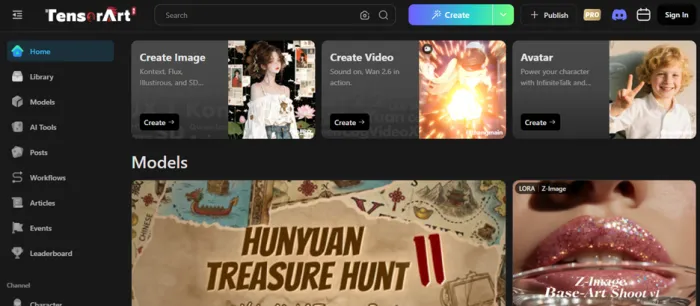
Tensor.Art is more than just an AI image generator; it is a comprehensive cloud-based creative ecosystem that enables users to produce, customize, and share AI-generated visual content. Its design balances accessibility for beginners with advanced capabilities for experienced users, making it a versatile tool for creative exploration.
Core Modes of Operation
Tensor.Art supports several modes of creative generation, each tailored to different use cases:
a) Text-to-Image Generation
At the heart of Tensor.Art lies its ability to transform textual descriptions into vivid imagery. Users provide prompt sentences or phrases describing what they want and the AI interprets these instructions to generate corresponding visuals. The AI is trained on a variety of datasets, enabling it to understand concepts such as lighting, composition, style, and subject matter. This allows users to create anything from photorealistic landscapes to fantastical illustrations or anime-style art.
b) Image-to-Image Transformations
Beyond creating images from scratch, Tensor.Art allows users to modify existing images. By uploading an image, users can instruct the AI to adjust its style, colors, details, or composition. This is particularly useful for refining concepts, enhancing artwork, or experimenting with different artistic interpretations of the same base image.
c) Node-Based Workflow System
One of Tensor.Art’s most advanced features is its node-based interface. Inspired by tools like ComfyUI, this system allows users to break down image generation into modular steps, connecting nodes that represent different operations or functions. For example, a node can define the prompt, another can modify style, and a third can adjust post-processing parameters. This modular approach provides granular control over the creative process, enabling experimentation with complex workflows while keeping the interface intuitive for users who want more depth.
Model Library and Customization
Tensor.Art hosts a vast library of AI models, including both pre-trained official models and community-contributed models. Users can select models based on style, resolution, or specialization whether they want photorealism, anime, fantasy, or abstract art.
In addition, the platform supports LoRAs (Low-Rank Adaptation models) and style modifiers, allowing users to further fine-tune outputs. This flexibility ensures that whether a user wants a general-purpose image or highly stylized art, the platform can deliver.
Cloud-Based Processing
Unlike traditional AI art tools that require powerful local hardware, Tensor.Art operates entirely in the cloud. This has several advantages:
- No local GPU needed: Users can generate high-resolution images on devices without powerful graphics cards.
- Scalable performance: The platform can handle multiple simultaneous generation tasks efficiently.
- Accessibility: Users can access Tensor.Art from virtually any internet-connected device desktop, laptop, or even mobile.
This cloud-first design makes Tensor.Art particularly appealing to casual users, educators, and professionals who want immediate results without investing in expensive hardware.
Community and Collaborative Features
Tensor.Art emphasizes community engagement, allowing users to:
- Share their creations publicly for inspiration or feedback.
- Explore models, prompts, and outputs shared by other creators.
- Collaborate with other artists or AI enthusiasts to refine techniques or workflows.
Community models often include unique artistic styles or specialized datasets, expanding creative possibilities beyond the built-in official models. This crowdsourced creativity helps keep the platform dynamic and continuously evolving.
Accessibility and Ease of Use
Despite its advanced capabilities, Tensor.Art remains highly user-friendly. Beginners can start with simple prompts and templates, while intermediate users can explore model selection, parameter adjustment, and prompt refinement. Advanced users benefit from the node-based workflow system and model customization, giving them complete control over the generation process.
The platform also implements credit-based access for free users, ensuring that even without a subscription, individuals can explore AI art responsibly and gradually expand their capabilities as they learn.
Integration and Use Cases
The functional flexibility of Tensor.Art makes it suitable for a wide range of applications:
- Digital Art & Illustration: Rapidly generate concept art or fully polished pieces.
- Storyboarding & Concept Design: Visualize scenes or characters for games, movies, or books.
- Learning & Experimentation: Understand AI’s interpretation of artistic styles and creative prompts.
- Marketing & Social Media Content: Quickly generate visuals for campaigns, posts, or advertisements.
Its combination of AI sophistication, community contributions, and cloud accessibility ensures that Tensor.Art is not just a tool, but a creative ecosystem for diverse users.
In short, Tensor.Art is a comprehensive AI art platform that merges powerful generation models, flexible workflows, and community-driven resources, allowing anyone from casual hobbyists to professional designers to explore, experiment, and create high-quality visual content without the traditional barriers of cost or technical expertise.
Key Features of Tensor.Art
- Text-to-Image Generation
- Converts descriptive prompts into high-quality AI-generated images.
- Supports diverse styles including photorealism, anime, fantasy, and abstract art.
- Image-to-Image Transformation
- Modify or enhance existing images using AI.
- Allows style transfer, color adjustments, and creative reinterpretation of visuals.
- Node-Based Workflow System
- Modular system for advanced image generation control.
- Enables linking functional nodes for custom workflows, style adjustments, and post-processing.
- Balances power for advanced users with accessibility for beginners.
- Extensive Model Library
- Thousands of pre-trained and community-contributed models.
- Includes specialized checkpoints and LoRAs for fine-tuning style and output quality.
- Cloud-Based Processing
- No need for high-end local hardware; works on any device with internet access.
- Scalable and fast generation of images and videos.
- User-Friendly Interface
- Intuitive and accessible for beginners.
- Advanced options available for users seeking deeper customization.
- Community Engagement and Sharing
- Explore and use models shared by other creators.
- Share your creations with the community for feedback and inspiration.
- Participate in collaborative creative workflows.
- Tiered Accessibility & Pricing
- Free tier with daily credit limits for casual experimentation.
- Premium plans unlock higher resolution, faster rendering, and commercial use rights.
- Versatile Creative Applications
- Ideal for digital art, concept art, storyboarding, and marketing visuals.
- Supports experimentation, learning, and professional creative workflows.
- Safety and Moderation
- Content moderation to prevent inappropriate material.
- Cloud storage with secure handling of user data.
Who Can Benefit from Tensor.Art
- Hobbyists and Creative Explorers
- Individuals interested in experimenting with AI-generated art.
- Casual users who want to visualize ideas without technical barriers.
- Digital Artists and Illustrators
- Professionals seeking to create concept art, illustrations, or digital paintings.
- Users who want to enhance productivity by generating drafts or inspiration quickly.
- Game Designers and Concept Artists
- Designers creating environments, characters, and assets for games.
- Ideal for brainstorming ideas and producing visual prototypes efficiently.
- Writers and Storytellers
- Authors and content creators who want to visualize scenes or characters from their narratives.
- Supports creating storyboards, cover art, and illustrative visuals.
- Marketing and Social Media Professionals
- Users who need high-quality visual content for campaigns, social posts, or advertisements.
- Can quickly generate engaging images without hiring a designer.
- Educators and Students
- Teachers and learners exploring AI art, creative design, or digital media.
- Useful for interactive learning and practical experimentation with AI creativity.
- Researchers and AI Enthusiasts
- Those interested in studying AI’s interpretation of art, style, and creativity.
- Ideal for experimenting with model performance and visual outputs in different domains.
Tensor.Art is designed to cater to both casual users and professional creatives, making it highly versatile for anyone interested in visual storytelling, design, or AI experimentation.
Pricing and Accessibility Considerations
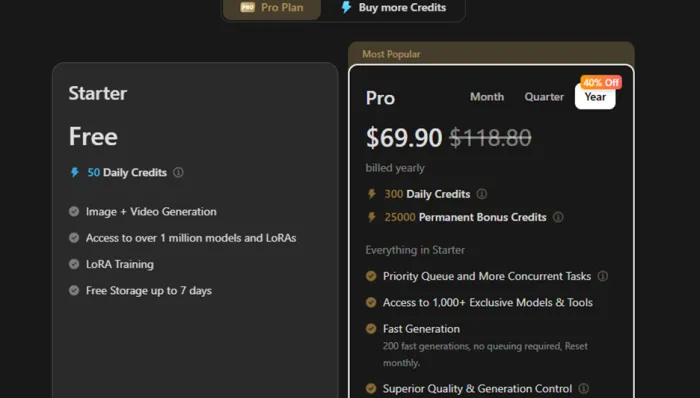
Tensor.Art is designed to be accessible to a wide range of users, from hobbyists experimenting with AI art to professionals needing high-quality outputs for commercial purposes. Its pricing model and cloud-based infrastructure reflect this inclusivity, allowing users to choose a plan that fits their needs and budget.
1. Free Tier: Exploration and Learning
Tensor.Art offers a free tier that provides limited daily credits for users to experiment with AI-generated images. Key aspects include:
- Daily Credit Limit: Users can generate a set number of images per day, sufficient for casual experimentation or learning.
- Access to Core Models: Free users can explore a selection of official and community-contributed AI models, enabling a variety of artistic styles.
- Cloud-Based Generation: Even without a premium subscription, free users can create high-quality images without requiring a high-end GPU or powerful local hardware.
- Ideal for Beginners: Those new to AI art can understand the platform’s workflow, test prompts, and explore creative possibilities without financial commitment.
Limitations:
- Restricted generation speed and resolution compared to premium tiers.
- Some advanced models and node-based features may be locked.
- Commercial use may not be permitted under the free tier.
2. Premium Tiers: Enhanced Capability and Professional Use
For users requiring more flexibility, higher resolution outputs, or commercial rights, Tensor.Art offers paid subscription plans. Features of premium tiers typically include:
- Increased Generation Limits: Generate more images per day or month, supporting professional workflows or extensive experimentation.
- Faster Rendering Speeds: Priority processing in the cloud ensures quicker turnaround times, which is especially useful for iterative creative processes.
- High-Resolution Outputs: Ability to generate images at larger dimensions, suitable for print, professional projects, or detailed digital art.
- Access to Advanced Models: Unlock specialized AI models, LoRAs, and unique artistic styles contributed by the community or platform developers.
- Commercial Usage Rights: Premium users often gain the ability to use generated images for business or monetized projects, broadening professional applicability.
Pricing varies depending on the level of credits, speed, and commercial licensing included. While exact subscription costs should be checked on the official Tensor.Art pricing page, the platform generally offers flexible options, allowing users to select plans that match their creative needs and budget.
3. Cloud-Based Accessibility
A key strength of Tensor.Art is its cloud-first approach, which affects both accessibility and pricing considerations:
- No Local GPU Required: Users do not need expensive hardware to generate high-quality images. The cloud infrastructure handles all computationally intensive processes.
- Cross-Device Access: Users can access the platform from desktops, laptops, or even mobile devices, provided there is an internet connection.
- Scalability: The cloud setup allows multiple tasks to be handled simultaneously, ensuring smooth performance for both free and premium users.
- Lower Barrier to Entry: Because hardware costs are eliminated, more users can explore AI creativity, making Tensor.Art a truly inclusive platform.
4. Maximizing Value
Whether on a free or premium plan, users can maximize their experience by:
- Experimenting with Community Models: Many free models provide excellent outputs and unique styles.
- Efficient Credit Usage: Planning prompts and experimenting in batches helps make the most of daily or monthly limits.
- Learning Node-Based Workflows: Even with limited access, understanding the modular workflow can improve results and prepare users for premium features.
- Exploring Tutorials and Community Resources: Tensor.Art’s community contributes prompts, templates, and guides that can enhance creativity without additional costs.
Strengths and Limitations
| Aspect | Strengths | Limitations |
| Ease of Use | Intuitive web interface suitable for beginners; simple prompt-based image generation. | Advanced features like node-based workflows may have a learning curve for new users. |
| AI Models | Extensive library of official and community-contributed models; supports diverse styles (anime, photorealism, fantasy, abstract). | Some specialized or high-quality models may be behind premium tiers. |
| Image Generation | Supports both text-to-image and image-to-image transformations; capable of high-quality outputs. | Free tier limits daily credits, resolution, and generation speed. |
| Node-Based Workflow | Offers granular control over image creation; supports complex, modular workflows. | Complexity may overwhelm beginners; requires practice to master advanced features. |
| Cloud-Based Processing | No need for local GPU or expensive hardware; accessible from any device with internet. | Dependent on internet connectivity; large or frequent tasks may require premium access for faster processing. |
| Community Features | Enables sharing creations, exploring other users’ models, and collaboration; fosters inspiration and learning. | Community moderation is sometimes inconsistent; inappropriate content may appear. |
| Pricing & Accessibility | Free tier available for casual use; premium tiers provide enhanced speed, resolution, and commercial rights. | Premium features require subscription; free tier may feel restrictive for power users. |
| Use Cases | Suitable for hobbyists, professional artists, game designers, marketers, and educators. | While versatile, highly specialized professional use (e.g., print-ready commercial art) may require premium subscription. |
| Safety & Privacy | Cloud-based storage with content moderation and secure handling of user data. | Users need to be cautious with sensitive data; moderation may not catch all inappropriate content. |
Safety, Privacy, and Trust Considerations on Tensor.Art
As AI art platforms become increasingly popular, understanding the safety, privacy, and trust mechanisms of a platform like Tensor.Art is essential. Tensor.Art collects certain personal and usage data to operate its services effectively. This includes account information, email addresses, preferences, and activity logs. The platform uses this data to enhance user
experience, improve features, and ensure security, while asserting that personal information is not sold to third parties. Cloud storage is employed to manage this data securely, and Tensor.Art implements measures designed to prevent unauthorized access or misuse.
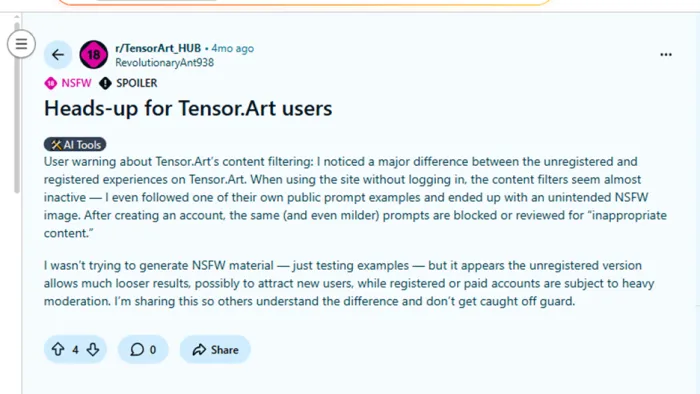
Content safety is a central concern for the platform. Tensor.Art enforces a Safe For Work policy, blocking the generation of NSFW content and restricting prompts or outputs that involve illegal, harmful, or exploitative material. This includes strict rules against sexualized depictions of minors, unauthorized use of celebrities’ likenesses, hate speech, and other illegal or unsafe content. Automated filters, combined with human review, help maintain a safe environment, although community feedback has indicated that moderation can sometimes be inconsistent, especially for unregistered users
Tensor.Art’s terms of use clarify user rights and responsibilities. While users generally retain rights over the AI-generated content they create, commercial usage and access to advanced models often require a premium subscription. Legal compliance is mandatory, and violation of rules or laws may result in account suspension or termination. Users are advised to periodically review these policies to ensure their activities remain compliant.
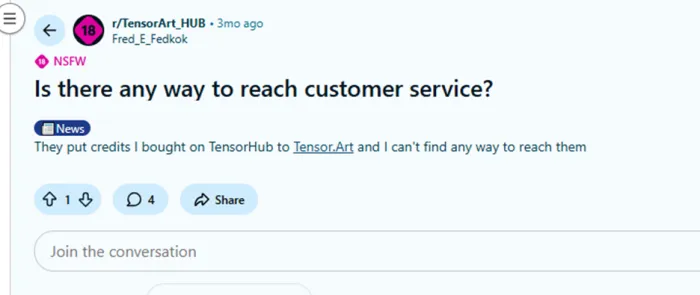
Trust is reinforced through community engagement and moderation, but some users report challenges with support responsiveness or account management. This underscores the importance of understanding platform policies, moderating personal usage responsibly, and using shared community resources wisely
In summary, Tensor.Art combines creative freedom with structured safeguards. Its privacy practices protect user data, its content policies promote safety and legal compliance, and its moderation system aims to maintain a trustworthy environment. Users can benefit most when they actively familiarize themselves with these rules and engage responsibly within the community.
Real-World Use Cases of Tensor.Art
- Digital Art and Illustration
Tensor.Art enables artists to generate high-quality digital illustrations quickly. Whether creating original characters, fantasy landscapes, or abstract artwork, artists can use AI-generated images as a starting point, inspiration, or even final pieces. The platform’s flexibility allows for experimentation with multiple styles and compositions, saving significant time compared to traditional manual illustration. - Concept Design for Games and Media
Game designers, animators, and visual storytellers can use Tensor.Art to produce concept art for characters, environments, or objects. The ability to generate multiple variations rapidly allows teams to iterate on ideas and visualize projects before investing in detailed production. This streamlines brainstorming and supports faster creative workflows in the entertainment industry. - Marketing and Advertising Visuals
For marketers and social media professionals, Tensor.Art provides a quick way to generate compelling visuals for campaigns, promotional material, or social media content. Its diverse style options allow the creation of graphics that are visually engaging and aligned with brand aesthetics, without relying solely on traditional designers for every asset. - Storytelling and Creative Writing Support
Writers, novelists, and content creators can leverage Tensor.Art to visualize scenes, characters, or entire story worlds. AI-generated imagery helps bring abstract ideas to life, supports moodboarding, and allows creators to develop richer narratives by pairing visuals with text, enhancing the reader or audience experience. - Educational and Learning Applications
Educators and students in art, design, or AI-related fields can use Tensor.Art as a practical learning tool. It offers hands-on exposure to AI creativity, allowing learners to understand the interplay between prompts, AI models, and generated output. The platform also serves as a resource for teaching digital art techniques or exploring the ethical implications of AI in creative fields. - Rapid Prototyping and Ideation
Tensor.Art is ideal for rapid prototyping of ideas across creative industries. Designers can quickly generate visual drafts, test concepts, or explore multiple directions before committing to detailed work. This reduces the time and cost of initial ideation phases while expanding creative possibilities. - Community Collaboration and Inspiration
Users can participate in community-driven projects, explore shared models, and collaborate on creative experiments. This environment encourages knowledge exchange, exposes users to new artistic techniques, and inspires innovation by combining AI capabilities with human creativity.
Conclusion
In an era where AI is reshaping the boundaries of creativity, Tensor.Art stands out as an empowering tool that bridges technology and artistic expression. Its combination of intuitive design, powerful AI capabilities, community engagement, and cloud-based accessibility ensures that creativity is no longer limited by technical constraints. Whether you are an aspiring artist, a professional designer, or simply curious about AI-generated art, Tensor.Art offers a compelling environment to explore, experiment, and bring your imagination to life.