

I did not set out to write a roundup. I had a systematic review stuck at forty percent since March, roughly 140 PDFs I had skimmed and not really read, and a supervisor asking for a full draft by month end. So I signed up for everything, put the same three questions through each tool, and kept a spreadsheet of what came back.
Three weeks later the spreadsheet said something I was not expecting. The tools that saved me real time were not the ones that write. They were the ones that read. Every hour I got back came from screening, extraction and citation checking. The drafting tools mostly produced text I spent longer fixing than I would have spent writing it badly myself and revising once.
I also learned the hard way that two of these tools will hand you references that do not exist. Not broken links. Papers never published, with plausible authors and a DOI resolving to something else entirely. That happened in week one and it changed how I used everything afterwards. So this is not a feature list copied off pricing pages. It is what held up, what quietly broke, and what I still pay for now the review is submitted.
How I judged them
| Item | Detail |
|---|---|
| Test period | 21 days, one live manuscript |
| Field | Health behaviour, plus two cross-checks in materials science |
| Queries | The same 3 questions per tool, run twice |
| Verification | Every returned citation checked in Crossref |
Scores are mine, weighted toward one thing: how much output I could use without re-checking from scratch. A tool that finds forty papers and gets six wrong is worse than one that finds twenty and gets none wrong, because I have to verify all forty either way.
Table 1. All eight scored, pricing verified 28 July 2026
| Tool | Buy it for | Free tier enough? | Annual | Monthly | Score |
|---|---|---|---|---|---|
| Elicit | Screening and pulling data out of papers | Capped credits, enough to judge it | $12 | $49 | 9.1 |
| Undermind | Finding what everything else missed | 3 deep searches a month | $16 | - | 8.8 |
| scite | Checking a claim survived the last decade | Too thin to be useful | $12 | $20 | 8.6 |
| Consensus | Answering a question in ninety seconds | Resets monthly, genuinely usable | $9 | $45 | 8.4 |
| Gemini Notebook | Questions across your own PDF pile | 50 sources, most people stay here | Bundled | - | 8.3 |
| ResearchRabbit | Seeing the shape of a field | Full product, no time limit | $10 | - | 8.2 |
| SciSpace | Getting through a paper you cannot parse | Tight caps, runs out fast | $12 | $70 | 7.8 |
| Paperpal | Language and pre-submission checks | 200 edits a month, about two sessions | $12 | $25 | 7.6 |
Pricing moves constantly and several vendors run region-based or student rates. Every figure was checked on 28 July 2026. Confirm on the vendor page before you buy.
If you only want to be told what to buy
The honest answer depends less on your field than on what stage of the work keeps stalling. This is the table I wish someone had handed me in week one.
Table 2. Pick by situation rather than by feature list
| If this is you | Start here | Add when you can | Do not bother |
|---|---|---|---|
| Undergraduate or taught masters | ResearchRabbit and Gemini Notebook, both free | Consensus free tier | Anything paid, for now |
| PhD student running a review | Elicit Plus | scite for the month before submission | SciSpace, it overlaps Elicit |
| Postdoc or faculty, publishing often | Elicit Pro | scite annual, Undermind per project | Drafting tools of any kind |
| Clinician checking evidence fast | Consensus | scite for contested claims | Elicit, unless you run reviews |
| Writing in English as a second language | Paperpal annual | Elicit for the reading load | Generic grammar tools |
| Reading well outside your field | SciSpace | Gemini Notebook for your own set | Undermind until you have scoped it |
The eight tools, ranked
Elicit
BEST OVERALL Free / ~$12 / $49 Pro · ~138M papers · Screening and extraction · 9.1 / 10
Elicit changed my workflow rather than speeding it up. You give it a question, it returns papers, then you add columns: sample size, study design, outcome measure, effect direction. It fills the grid by reading the papers. A fortnight of tabbing between PDFs and a spreadsheet became about a day and a half of checking a grid it had already populated.

Roughly one cell in ten needed correcting, usually where a paper buried something in a supplementary file. But correcting a wrong cell takes thirty seconds. Building the row from nothing takes twenty minutes.
HELD UP
• Custom extraction columns, best in category
• Finds papers using different vocabulary for the same idea
• Clean CSV and BibTeX export for PRISMA workflows
GAVE ME TROUBLE
• Quality drops when only the abstract is accessible
• Weak on theoretical work with no measurable outcomes
• Big jump from the $12 tier to the $49 tier
Bottom line. If you are doing a literature review with any structure to it, this is the one to buy first. Everything else on this list is optional in a way Elicit is not.
Undermind
BEST FOR HARD QUESTIONS Free / ~$16 a month annual · Agentic citation-trail search · Niche and cross-field topics · 8.8 / 10
Undermind is slow on purpose. You describe a topic, it disappears for several minutes, reads full texts where it can, follows citation trails, and returns a report plus a coverage estimate of how thoroughly it thinks it searched. That number is why I kept it. Nothing else here tells you when you have probably run out of relevant literature.
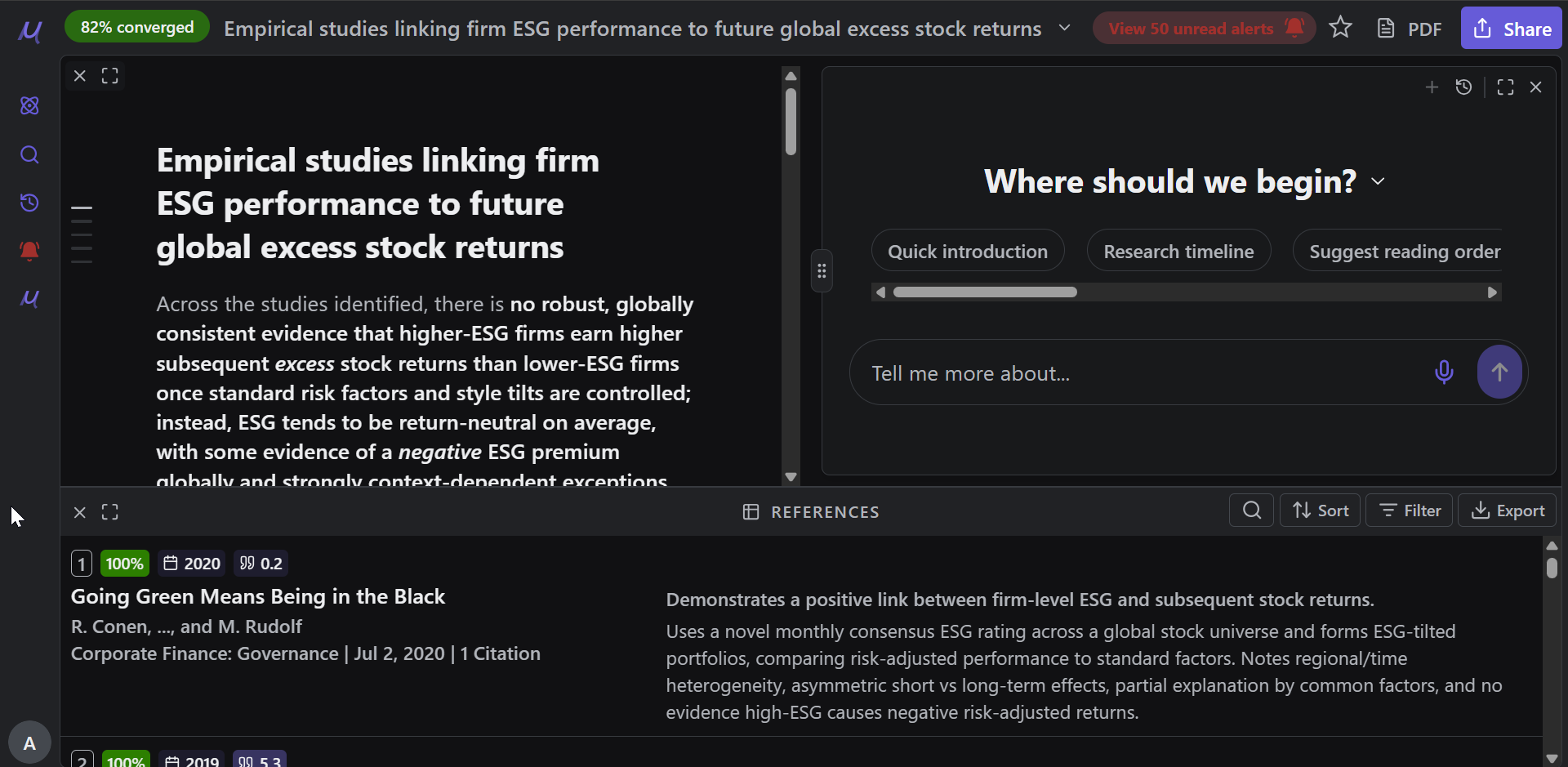
It found four papers I had missed after two months of searching, all in adjacent fields using different terminology. That is the job it does. Ask it something broad and well covered and it will underwhelm you.
HELD UP
• Surfaces genuinely obscure work in neighbouring fields
• Coverage estimate gives a defensible stopping point
• Explains why each paper was retrieved
GAVE ME TROUBLE
• Each search takes minutes, so no casual browsing
• Free tier covers evaluation and not much more
• Poor first stop for broad, unscoped topics
Bottom line. Buy it for the last twenty percent of a search, once the obvious papers are already in your library and you suspect something is missing.
scite
BEST FOR CITATION CHECKING $20 a month, ~$12 annual · 1.2B+ citation statements · Testing whether a claim holds · 8.6 / 10
scite does not count citations, it classifies them. For any paper you get how many later papers supported the finding, contrasted it, or merely mentioned it, with the sentence from each citing paper. Citation counts tell you a paper was noticed. This tells you whether it survived.
Reference Check earned its keep. Upload your manuscript and it flags references carrying editorial notices, retractions, or a real body of contrasting citations. It caught a paper in my list that had picked up a correction I had not seen.
HELD UP
• Supporting versus contrasting counts change how you read
• Catches retractions before a reviewer does
• Extension surfaces the data on journal sites
GAVE ME TROUBLE
• Most citations classify as mentioning, accurate but unhelpful
• Contrasting citations are rare outside contested areas
• Humanities coverage is thinner than the sciences
Bottom line. Not a discovery tool. Buy it for the fortnight before submission and run your whole reference list through it.
Consensus
BEST FREE TIER Free / ~$9 to $12 · 200M+ papers · Quick evidence checks · 8.4 / 10
Consensus answers yes-or-no research questions and shows a meter of how the retrieved studies split. It is the tool I opened most often and thought about least, which sounds like an insult and is not. When you need to know in ninety seconds whether a claim is broadly supported before building a paragraph on it, nothing else is close.
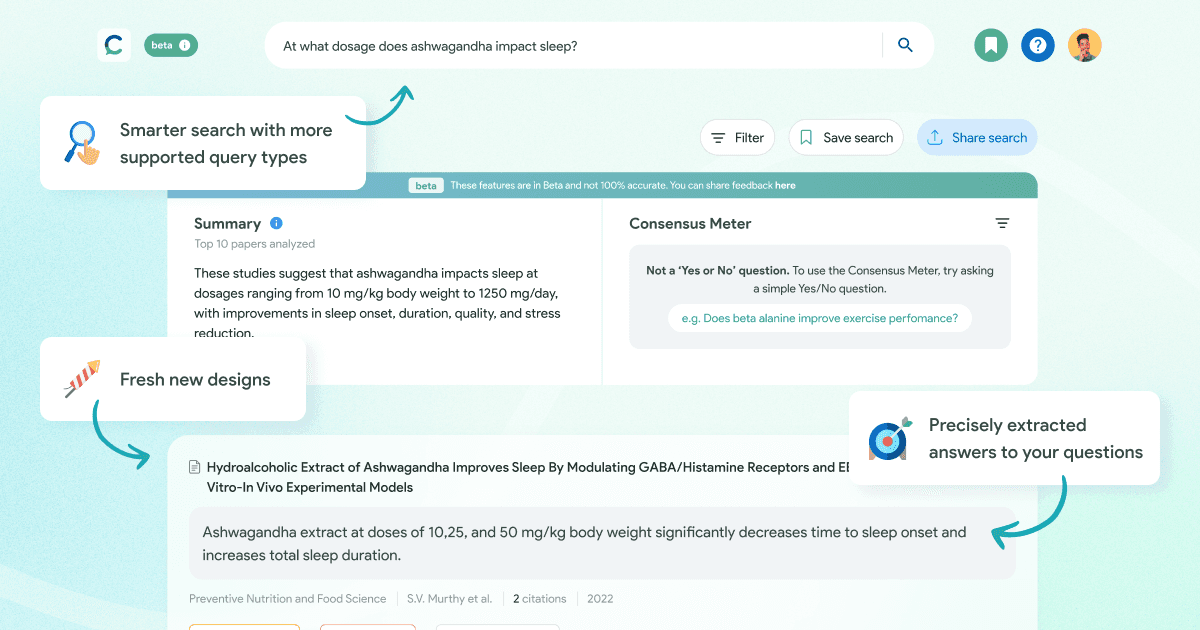
The meter summarises the top retrieved studies. It is not a meta-analysis, and that distinction matters. It also refreshes its free allowance monthly instead of handing you a one-time credit pool, which makes it the most usable free tier here.
HELD UP
• Every claim links straight back to its paper
• Free allowance resets monthly, so it stays usable
• Exports to Zotero, Mendeley and EndNote on all tiers
GAVE ME TROUBLE
• The meter can imply more agreement than the studies support
• Struggles with anything not phrased as a testable claim
• Not exhaustive, so never use it alone for a review
Bottom line. Start free, stay free for a month, and only upgrade if you find yourself hitting the analysis cap every week.
Gemini Notebook (formerly NotebookLM)
BEST FOR YOUR OWN PDFS Free / Google AI plans · 50 sources per notebook free · Synthesis you can trace · 8.3 / 10
Google renamed NotebookLM to Gemini Notebook on 16 July 2026. Same product, same site, new logo, so ignore anything saying it was discontinued. What matters is that it answers only from documents you upload, with an inline citation on every sentence that jumps to the exact passage. When sources are fixed, that constraint removes the fabrication problem almost entirely.
I used it as a reading assistant, not a search tool. Twenty-five papers into one notebook, then questions like which of these used an intention-to-treat analysis. The free plan allows fifty sources per notebook, which is the wall most people hit first.
HELD UP
• Answers grounded in your uploads, with traceable citations
• Free tier is unusually generous
• Audio overviews are good for reviewing on a commute
GAVE ME TROUBLE
• No cross-notebook search, so large libraries fragment
• No formatted citation export
• Check policy before uploading unpublished data
Bottom line. The best free tool in this article, provided your project fits inside one notebook. It stops being useful the moment it does not.
ResearchRabbit
BEST FOR MAPPING A FIELD Free / RR+ ~$10 a month · 310M+ articles · Snowballing and lineage · 8.2 / 10
Feed it a few papers you already trust and it draws the citation network around them, time on one axis and influence on the other. Within ten minutes you can see what everything descends from, where the clusters sit, and which corner of the field you have been ignoring. It is the fastest way I know to orient yourself somewhere unfamiliar.
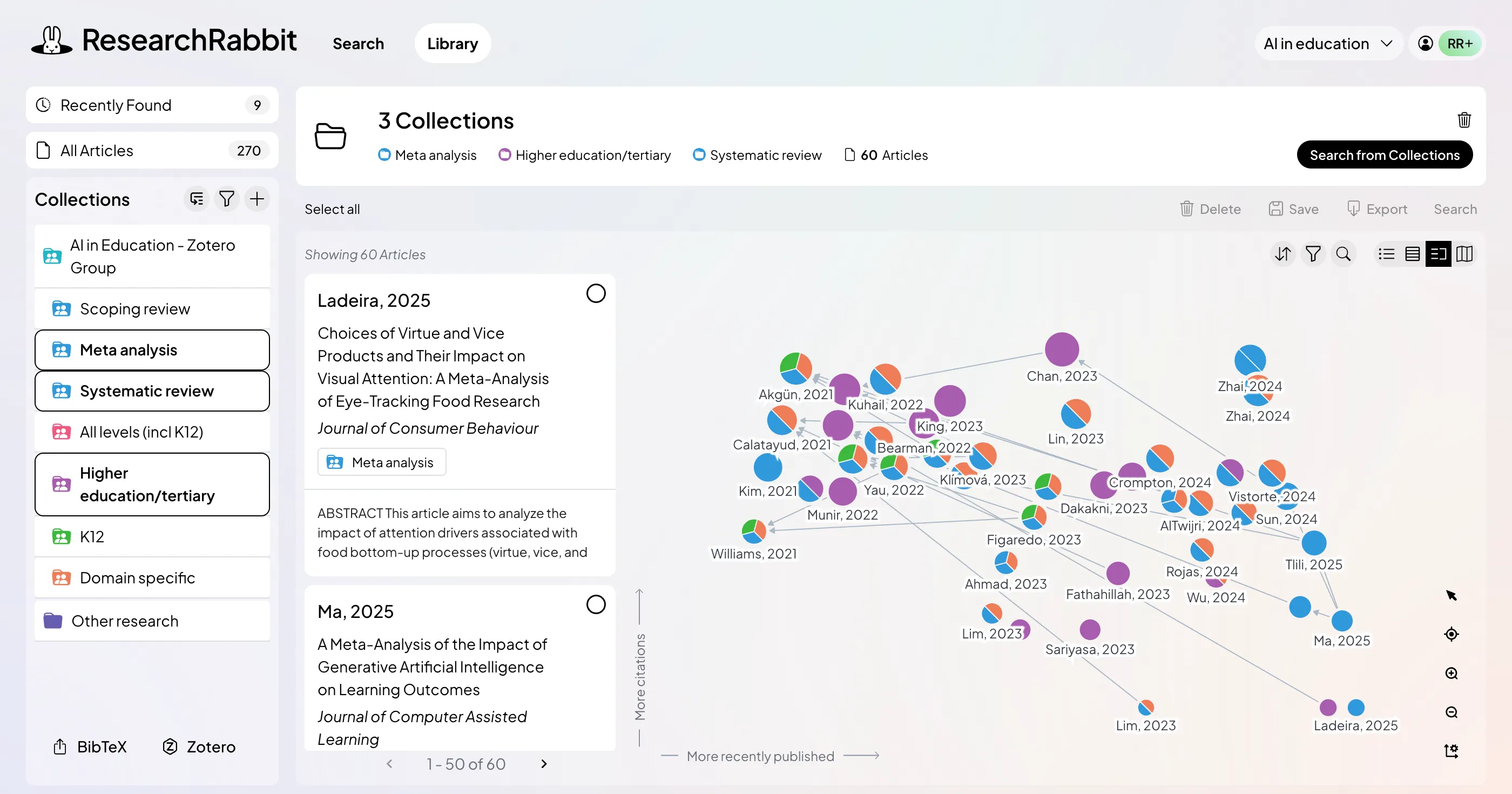
The Zotero sync is the quiet reason it stays. Your library appears as collections, new finds save back in one click, and the export and import shuffle disappears. It was free for years and has since added a paid tier, but the free version still covers what most individual researchers need.
HELD UP
• Graphs make gaps visible in a way lists never do
• Two-way Zotero sync, smoothest integration here
• Suggestions improve as your collection grows
GAVE ME TROUBLE
• No AI summarisation, so it pairs with Elicit
• Networks get crowded past a few hundred nodes
• Output depends heavily on your seed papers
Bottom line. Free, fast, and the first thing I open when starting in a field I do not know. There is no reason not to have an account.
SciSpace
BEST FOR DENSE PAPERS Free / ~$12 to $20 · 280M+ papers · Reading outside your field · 7.8 / 10
SciSpace tries to be everything: search, PDF chat, writing, journal formatting, patent search. Everything-tools usually disappoint and this one mostly does not, though the parts are uneven. Chat with PDF is the strong piece. Highlight a paragraph of statistics you cannot follow, ask what it means, and it explains with the passage alongside so you can check it.

Deep Review sits on the top tier, priced well above the standard plan and a real commitment. For most people the mid tier is the sensible stopping point. Treat the writing tools as a bonus, not a reason to subscribe.
HELD UP
• Handles methods, tables and equations well
• Useful when reading outside your specialism
• Extension works on Google Scholar and PubMed
GAVE ME TROUBLE
• Deep Review sits on a tier most will not justify
• Abstract-only access quietly weakens some answers
• Many jobs, none of them best in class
Bottom line. Worth it if reading is your bottleneck rather than finding. If you already have Elicit, the overlap is real.
Paperpal
BEST BEFORE SUBMISSION Free / $25 a month, $139 a year · 200 free edits a month · Language and journal checks · 7.6 / 10
Paperpal comes out of Cactus Communications, which has been doing academic editing for two decades, and it shows. It corrects toward scientific register rather than general readability. Grammarly will happily flatten a hedged claim into a confident one. Paperpal mostly leaves hedges alone, because in academic writing the hedge is the point.
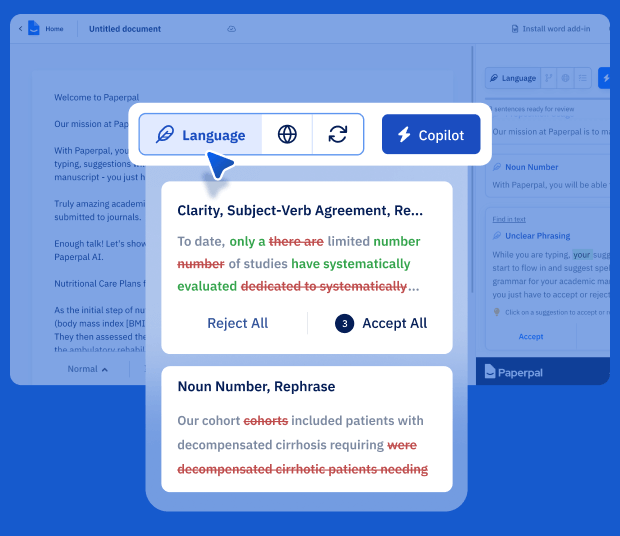
Its submission checks cover structure, reference formatting and technical compliance. They do not tell you whether the science is ready, whether the journal is a sensible target, or whether a reviewer will find a hole. Do not mistake one for the other.
HELD UP
• Best academic tone correction I tested
• Runs in Word, Google Docs and Overleaf at no extra cost
• Annual pricing is under half the monthly rate
GAVE ME TROUBLE
• Heavy rewrites soften novelty claims into safe phrasing
• Free tier lasts about two serious editing sessions
• Submission checks are technical, not scientific
Bottom line. Accept sentence-level suggestions, reject paragraph-level rewrites, and you will get most of the value.
Two I stopped paying for
Jenni AI does what it says: inline autocomplete, citations inserted as you write, thousands of styles. It broke my writing rather than helped it. Accepting a suggested sentence is easy, and after twenty of them the paragraph argued something slightly different from what I meant. The auto-suggested citations needed checking every time, which cancelled out the speed. If autocomplete suits how you think, the annual plan is cheap. It did not suit mine.
General chatbots for drafting. I still use them daily for reasoning out loud, restructuring an argument, and explaining a method three different ways. Not for text that goes into the manuscript, and never for finding citations. That is where the fabricated references came from.
Why you verify every reference, every time
This is not caution for its own sake. It is the best documented failure mode in AI-assisted research writing, and the numbers are worse than most people assume.
| Figure | What it measured |
|---|---|
| 55% | of GPT-3.5 references in a 2023 Scientific Reports study were fabricated outright, against 18% for GPT-4, across 636 citations |
| 43% | of the GPT-3.5 references that were real still contained substantive errors in volume, issue or page details |
| 28.6% | hallucination rate for GPT-4 on systematic review prompts in a 2024 JMIR analysis of 471 references |
| 38% | DOI validity in humanities prompts in one cross-model audit, against 71% for the natural sciences |
The pattern underneath is the useful part. Fabrication tracks how often a topic appears in training data. One GPT-4o study found roughly 6% fabrication on a heavily studied condition like major depressive disorder, rising to around 28% for less studied ones. The model invents sources precisely when you are working on something original, which is exactly when you are least equipped to notice.
Tools that retrieve from a real index, then cite what they retrieved, do not have this failure mode in the same way. Tools that generate a citation from memory do.
Elicit, Consensus, scite and Undermind search first and answer second. A general chatbot answers first. It is the difference between a librarian and a very confident person who has read a lot.
What journals actually require you to disclose
Most tool roundups skip this, and it is the part that can cost you a publication. The position across standards bodies settled in 2023 and has tightened since. Every body below prohibits listing AI as an author, so the table covers what actually varies.
Table 3. Where the disclosure goes, and what each one catches you on
| Publisher or body | Where the statement goes | The part people miss |
|---|---|---|
| ICMJE | Cover letter and manuscript, both | Writing help goes in acknowledgements. Data collection or analysis goes in methods. Two different places. |
| COPE | Per the journal's own format | Position covers reviewers and editors too, not only authors. |
| Elsevier | Its own section, before the references | Policy updated September 2025. AI-generated images are not permitted at all. |
| Wiley | Methods, or a disclosure or acknowledgements section | Which section depends on what the tool actually touched. |
| SAGE | Only when the AI generated something | Refining your own wording counts as assistive and needs no disclosure. Generating new text does. |
| Science (AAAS) | Detailed reporting in the manuscript | Strictest of the set. Expects tool names and versions, sometimes the prompts. |
Three rules run through all of it. Software cannot be an author, because it cannot be held accountable. You remain responsible for every word, including anything a tool produced. And AI output is never a citable source, so a reference must point to a real, verifiable publication.
Check your specific target journal, not just the publisher. Requirements vary between titles in the same house, and the ICMJE recommendations were revised in January 2026 with an expanded section covering AI across the whole publishing workflow. If you review for a journal, most policies now prohibit putting someone else’s manuscript into a general AI tool at all, on confidentiality grounds.
The order I would use these in
Table 4. Eight stages, and what each one costs you
| Stage | What I open | Cost | What you get out of it |
|---|---|---|---|
| 1. Orient yourself | ResearchRabbit | Free | Three seed papers, read the map, find the clusters you did not know about. |
| 2. Search properly | Elicit, Undermind | Paid | Elicit for structured retrieval. Undermind when you suspect something is still missing. |
| 3. Screen and extract | Elicit | Paid | Extraction tables. This is the step where the days come back. |
| 4. Read the hard ones | Gemini Notebook, SciSpace | Mixed | Notebook for your own PDF set. SciSpace when a single paper is defeating you. |
| 5. Sanity check claims | Consensus, scite | Mixed | Consensus for speed. scite for whether a finding actually held up. |
| 6. Write it | Nothing | Free | No tool. This is the part where the thinking happens. |
| 7. Audit and polish | scite, Paperpal | Paid | Reference Check across the whole bibliography, then Paperpal for language and compliance. |
| 8. Disclose | Nothing | Free | Write the statement your target journal requires before you submit, not after a reviewer asks. |
What I still pay for
The review went in on the nineteenth. Here is what survived the trial: Elicit annually, scite for a month either side of submission, and free accounts on ResearchRabbit, Consensus and Gemini Notebook that I use constantly and have never paid for. I cancelled the rest. Undermind I will resubscribe to when the next project starts, because it earns its money in bursts rather than continuously.
If you want one recommendation and nothing else: buy Elicit, keep ResearchRabbit and Gemini Notebook open in other tabs, and verify every reference before it enters your bibliography. That costs about $12 a month and did roughly eighty percent of what all eight tools did together.
What I keep coming back to is how little of this was about writing. I went looking for tools to help me write a paper and came away with tools that help me read faster, search wider and check harder. The writing stayed where it was, which is me, a document, and an uncomfortable number of afternoons. I think that is right. The argument is the paper. Everything else is logistics, and logistics is what these things are good at.
The real change is that I no longer trust my own reading of a field after a week in it. Undermind found four papers I had missed. scite showed me a correction notice on a source I had cited without checking. Both were my failures, not the literature’s, and I would not have caught either one alone.





