94% of marketers plan to use AI for content in 2026 | $58B global AI content marketing market size, 2026 | 91% drop in cost per minute of AI video vs traditional | 2.2 hrs average weekly hours saved per creator |
Quick Verdict
Content tools moved from "nice to have" to "hard to operate without" in roughly two years. In 2026, 94% of marketers plan to use AI in content creation, the AI content marketing category is worth around $58 billion, and the average worker saves 2.2 hours per week using these tools at all. None of that means more tools is better. The teams winning are the ones picking three to five workhorse apps and going deep, not the ones with 20 trial subscriptions and no workflow.
This guide does not list every tool. It lists eight that earn their cost, organised alphabetically because ranking creative tools by quality alone tends to ignore who is actually doing the work. Each tool gets a non-generic explanation, a quick facts table, and a clear answer to one question: who is this for?
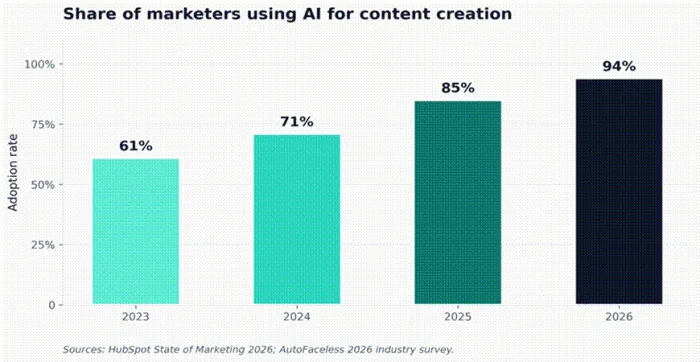
Figure 1. Adoption climbed 33 points in three years. The remaining gap is mostly compliance-heavy industries.
The numbers that should shape your stack
Before tools, the data. These six metrics show where the leverage actually is in 2026, and where the traps are.
| Metric | Where things stand in 2026 | Why it matters to you |
|---|---|---|
| AI adoption | 94% of marketers planning to use AI in 2026, up from 61% in 2023 | Skipping AI is no longer a neutral choice; it is a productivity gap |
| Time saved | Average 5.4% of work hours per week, roughly 2.2 hours per creator | That is a full extra publishing slot every month, with no extra hires |
| Video economics | Cost per minute fell from about $4,500 to about $400; 13 days down to 27 minutes | Short-form video is finally cheap enough for solo creators to ship daily |
| Email lift | AI-assisted emails report 41% click-through rate uplift over non-AI peers | Better subject lines and personalisation move the needle, not just speed |
| Quality penalty | Unedited AI content performs 34% worse in AI search citations; edited content performs 12% better | Human editing is the difference between visibility and invisibility in 2026 |
| Trust gap | 52% of consumers disengage when they suspect content is AI-generated | Use AI for leverage, not for voice; readers can tell the difference |
Where AI fits in a real creator workflow
Tools without a workflow burn money. The diagram below shows the five stages most creators move through every week, with the apps that earn their place at each step. The pattern that works is one tool per stage, not three competing tools at every stage.
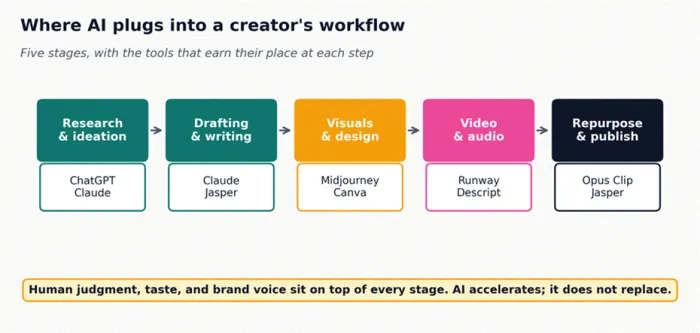
Figure 2. Five stages of a content cycle and the tools that map to each.
Why the math finally works
The single biggest economic shift in 2026 was video. Producing one minute of finished marketing video used to involve a small crew, a few days of edit work, and a cost in the low four figures. AI-assisted workflows cut both the time and the cost by an order of magnitude, which is why short-form video has become a default for solo creators rather than a stretch goal.
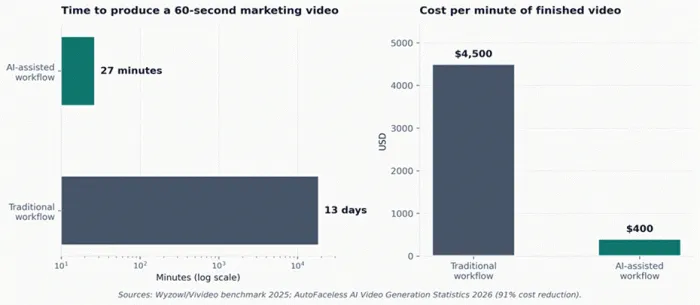
Figure 3. The cost and time collapse in short-form video production, 2025 vs 2026.
The eight tools that earn their cost
Alphabetical, not ranked. Each tool covers a different stage of the workflow above, and most creators end up using two or three of these together rather than all eight.
Canva
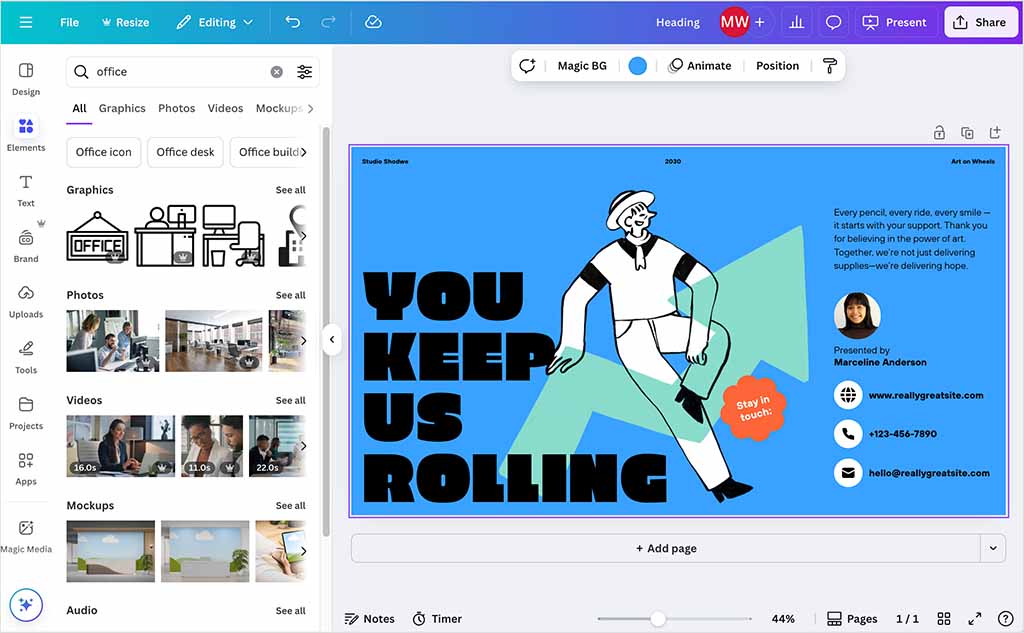
Magic Studio inside Canva turned a templated design tool into a prompt-to-publish system. Type "summer skincare carousel, soft peach palette, 6 slides" and Magic Design lays out the full set in seconds, pulling from your brand kit if you have one set up. Background removal, Magic Eraser, and the AI image generator handle most of the small fixes that used to mean opening a separate editor.
| Pricing | Free tier covers most design work; Pro $15 / month, Teams $30 / month per first 5 users |
| Standout feature | Magic Design generates a full multi-slide layout from one prompt with your brand colours and fonts applied |
| Output formats | Static graphics, short video, presentations, PDFs, print, animated GIFs |
| Watch out | Default templates are highly recognisable; customise heavily or you risk looking like every other Canva user |
| Best for | Solo creators and small teams who need polished social and thumbnail graphics every single day without a designer on staff |
What earns it a slot in 2026:
•Brand Hub keeps logos, fonts, and colour codes one click away across every project
•Resize once, export 12 platform aspect ratios with copy and layout adapted automatically
•Stock library is deep enough that most posts can be finished without touching Midjourney or Adobe Stock
ChatGPT

GPT-5 is the strongest general reasoner most creators have on call. Where Canva gives you visuals, ChatGPT gives you the spine of an article, the outline of a 12-email nurture sequence, or the rewrite of a clunky opening paragraph. It is the broadest tool in the stack, and that breadth is the point.
| Pricing | Free tier (GPT-5 with daily caps); Plus $20 / month, Team $25 / user / month, Pro $200 / month |
| Standout feature | Custom GPTs let you bottle a workflow (audience persona, tone, examples) and re-run it without re-prompting |
| Output formats | Text, code, structured data, images via DALL-E 3, file analysis, voice mode |
| Watch out | Defaults to safe, generic prose; results improve sharply with role + audience + constraint prompting |
| Best for | Brainstorming, outlining, and structural editing where you want a wide net rather than a precise voice |
What earns it a slot in 2026:
•Reasoning models handle multi-step research briefs better than any general-purpose competitor
•File analysis reads PDFs, spreadsheets, and slide decks without third-party tooling
•Custom GPTs are shareable inside a team, so a brand-voice prompt only has to be written once
Claude
Where ChatGPT is the broad utility, Claude is the long-form writer. The prose comes out more natural on first draft, with less of the listicle reflex that AI text is known for. Projects keep style guides, transcripts, and source documents in the same workspace, so a writer can pull a 6,000-word feature out of a research dossier without re-uploading anything.
| Pricing | Free tier with daily caps; Pro $20 / month, Max $100 or $200 / month, Team $25 / user / month |
| Standout feature | Projects bundle files, instructions, and chats so context never has to be re-pasted |
| Output formats | Long-form prose, code, data analysis with Code Execution, slide and document drafts |
| Watch out | Stricter content limits than some competitors; some marketing edge cases get refused or softened |
| Best for | Long-form articles, essays, and reports where voice and structure matter more than raw generation speed |
What earns it a slot in 2026:
•Best-in-class faithfulness on summarisation: rewrites stay closer to source meaning than rivals
•Artifacts panel renders code, tables, and documents alongside the chat for in-place iteration
•Search past chats and memory features cut down on context-setting on repeat tasks
Descript

Descript broke the most stubborn rule in video editing: you no longer move clips on a timeline. The app transcribes the audio at around 85% accuracy on first pass, and then you edit the transcript like a Google Doc. Delete the sentence in the text, the cut happens in the video. For interview podcasts and talking-head YouTube, the workflow change is measured in hours, not minutes.
| Pricing | Free Hobbyist plan with watermark; Creator $24 / month, Business $60 / month per editor |
| Standout feature | Edit the transcript and the timeline edits itself, including filler-word removal in one click |
| Output formats | Audio (MP3, WAV), video up to 4K, SRT captions, social cuts in 9:16 and 1:1 |
| Watch out | Overdub voice cloning needs a clean 10-minute training sample to sound natural; rushed samples produce a flat clone |
| Best for | Podcasters, YouTubers, and course creators who record more than they edit and need the editing time to shrink |
What earns it a slot in 2026:
•Studio Sound removes room echo and background noise in one click, no audio engineer required
•Eye Contact uses AI to correct gaze when you read from a script off-screen
•Auto-publishes to YouTube, Spotify, and social with chapter markers and show notes generated
Jasper
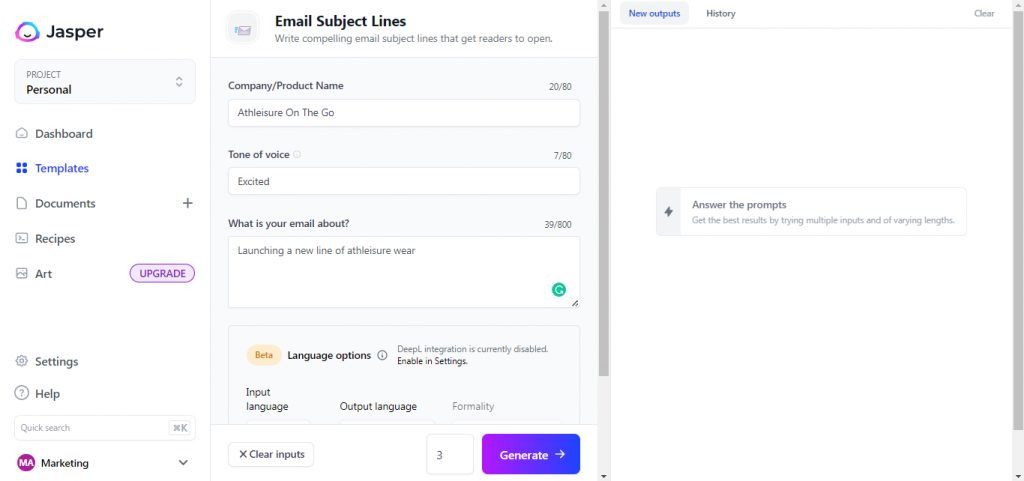
Jasper is the only tool on this list explicitly built for marketing teams rather than individual creators. Brand IQ ingests your style guide, past content, and product positioning, and outputs copy that stays inside those rails across campaigns, channels, and ad copy. Where ChatGPT is a sharp tool, Jasper is a managed production line.
| Pricing | No permanent free plan; Creator $49 / month, Pro $69 / month, Business custom from around $800 |
| Standout feature | Brand IQ enforces a single voice across every output, every user, every campaign |
| Output formats | Long-form articles, ad variants, emails, product descriptions, multi-step campaign briefs |
| Watch out | Pricing is steep for solo creators; the workflow only pays off once you have a real campaign cadence |
| Best for | In-house marketing teams and content agencies running multi-channel campaigns at scale |
What earns it a slot in 2026:
•Canvas plans, drafts, and reviews a full campaign in one workspace instead of toggling tabs
•Agents execute structured marketing tasks like keyword expansion and competitor briefs autonomously
•Native integrations with HubSpot, Webflow, and Google Docs keep approved copy moving downstream
Midjourney
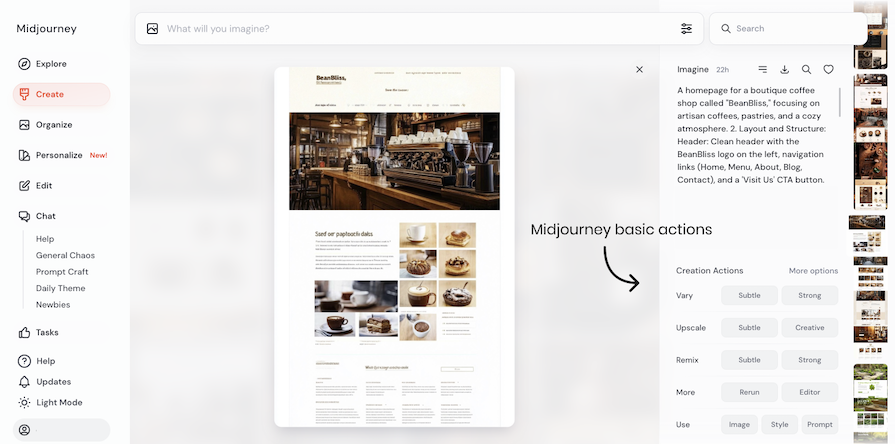
Midjourney V7 is the choice when a creator wants an image that does not look like an image. The model leans hard into atmosphere, lighting, and composition rather than literal interpretation, which makes it the wrong tool for product mockups and the right tool for editorial heroes, blog cover art, and album work. The V7 release pushed render quality up and reduced the "AI face" tells that older models could not shake.
| Pricing | No free tier; Basic $10 / month (200 minutes fast GPU), Standard $30, Pro $60, Mega $120 |
| Standout feature | Style references and character references hold a visual identity across an entire shoot or campaign |
| Output formats | Square and landscape stills up to 2048 x 2048; vector-style outputs via Niji for illustration |
| Watch out | Hands and complex anatomy still drift; budget time for re-rolls or inpainting on faces and crowds |
| Best for | Bloggers, editorial designers, and creative directors who need original imagery with a distinctive house style |
What earns it a slot in 2026:
•The web app finally puts everything inside one interface, including upscaling, variations, and editing
•Personalisation profiles bias outputs toward your taste once you have rated a few hundred images
•Commercial licence is included on all paid plans, which keeps blog usage rights clean
Opus Clip

Opus Clip solves one specific problem with industrial focus: turning a 45-minute podcast or webinar into 10 platform-ready short clips, captioned, hooked, and reframed for vertical. The Virality Score predicts which moments are most likely to perform on TikTok and Reels, which sounds gimmicky until you run it on a back catalogue and find that half of your best episodes were sitting on unmined hooks.
| Pricing | Free 60 upload minutes / month; Starter $19, Pro $29, Business $99 / month for 500 minutes |
| Standout feature | ClipAnything finds and clips any topic, quote, or emotional beat across long-form footage |
| Output formats | 9:16 vertical, 1:1 square, and 16:9 horizontal cuts; auto captions in 30+ languages |
| Watch out | Auto-hooks sometimes lead with weak openers; review the first three seconds of every clip before publishing |
| Best for | Podcasters and YouTubers turning long-form into a steady stream of shorts without hiring an editor |
What earns it a slot in 2026:
•Active speaker tracking keeps the right face in frame even on multi-guest interviews
•B-roll and emoji suggestions add visual interest to talking-head clips automatically
•Direct scheduling to TikTok, Reels, Shorts, and LinkedIn means the clip never has to download
Runway
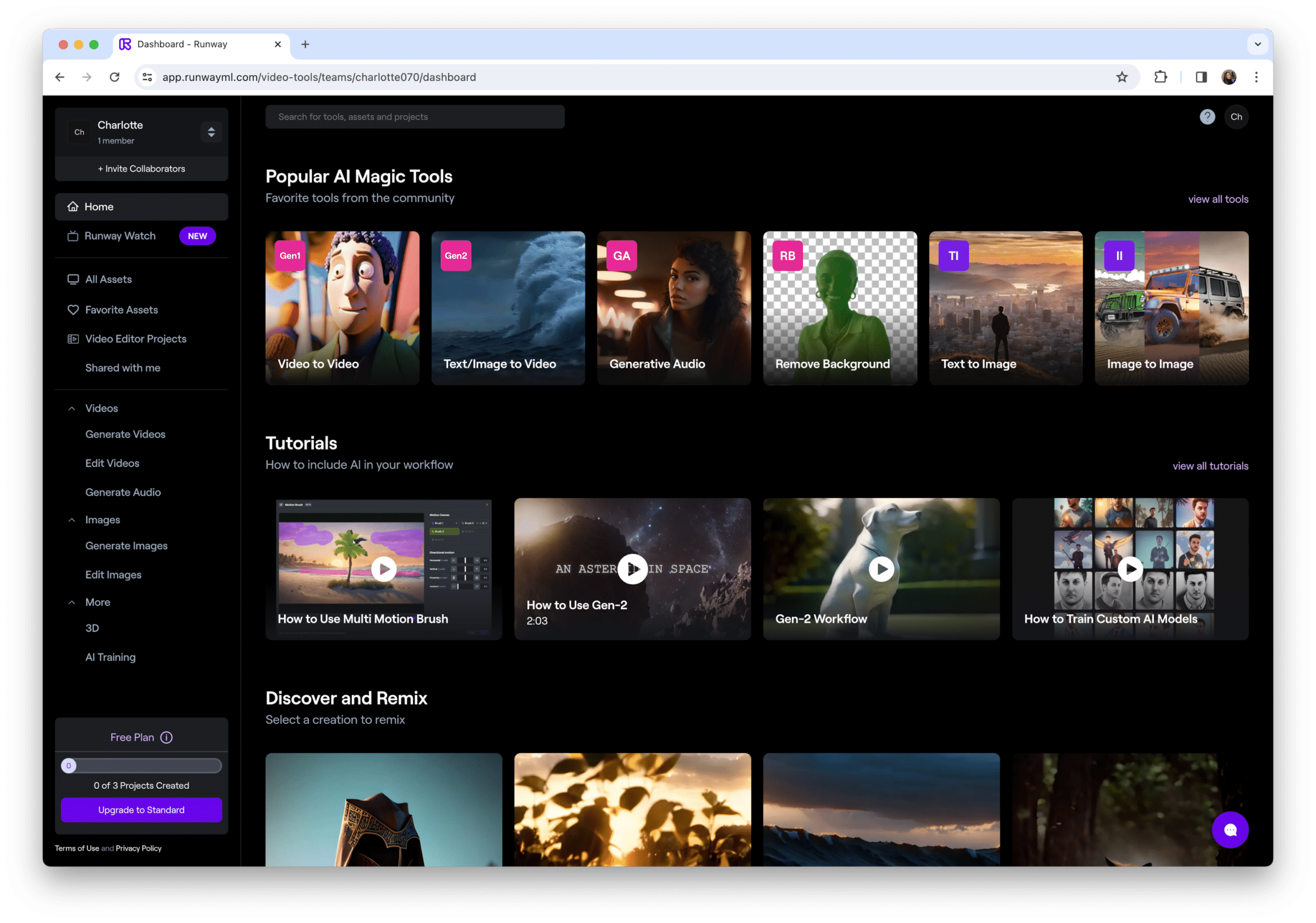
Runway is where generative video stopped being a curiosity and started replacing stock footage line items. Gen-4 produces 10-second clips at 1080p with coherent motion and lighting that holds up on a thumbnail. The platform also keeps the tools that made it a YouTuber favourite: green-screen removal without a green screen, motion tracking, and frame interpolation that smooths shaky handheld.
| Pricing | Free tier with 125 credits and watermark; Standard $15, Pro $35, Unlimited $95 / month |
| Standout feature | Act-One transfers a real actor's facial performance onto an AI-generated character in seconds |
| Output formats | Generated video clips up to 10 seconds, image-to-video, background removal, motion tracking exports |
| Watch out | Outputs are still recognisably AI on close inspection; use them for B-roll, transitions, and stylised inserts rather than as a hero shot |
| Best for | YouTubers and short-form video makers who need cinematic inserts and visual effects without a production crew |
What earns it a slot in 2026:
•Gen-4 image and video models share a consistent visual language, so stills and motion match
•Frame iteration lets you fix one beat in a clip without regenerating the whole shot
•Workspace collaboration handles team review without exporting drafts to Frame.io or Dropbox
Compare them side by side
Pricing and free tiers
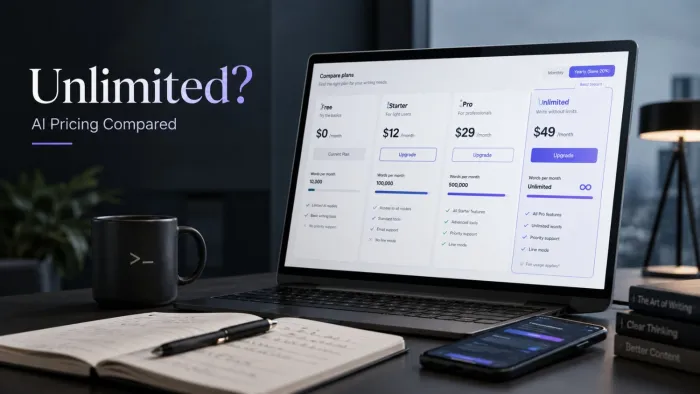
The free tiers are the fastest way to test the workflow assumptions above. Cost stops mattering once you commit to a stack; what matters then is whether your team will actually use it.
| Tool | Starting paid plan | Free tier | Annual sweet spot |
|---|---|---|---|
| Canva | $15 / month (Pro) | Generous: most design tools, limited AI credits | Pay annual for ~17% saving on Pro |
| ChatGPT | $20 / month (Plus) | GPT-5 with daily caps; slower at peak times | Team plan at $25 / user for shared workspaces |
| Claude | $20 / month (Pro) | Daily usage cap on the latest model | Max plan for power users who hit Pro limits |
| Descript | $24 / month (Hobbyist) | 1 hour transcription / month, watermarked exports | Creator plan at $35 unlocks 10 hours and AI features |
| Jasper | $49 / month (Creator) | 7-day trial only, no permanent free tier | Pro plan at $69 / month for brand voice and multi-user |
| Midjourney | $10 / month (Basic) | None as of 2026; trial periods only | Standard plan at $30 for unlimited relaxed generations |
| Opus Clip | $19 / month (Starter) | 60 upload minutes / month | Pro plan at $29 / month for 150 minutes and HD export |
| Runway | $15 / month (Standard) | 125 one-time credits, 720p export, watermarked | Pro plan at $35 for 2,250 credits / month and longer clips |
Where creators actually spend
Writing remains the largest line item in most creator AI budgets, which surprises people who only hear about video generation in the press. The honest reason is that text is the connective tissue of every campaign, so most creators end up paying for a writing tool first and a visual tool second.
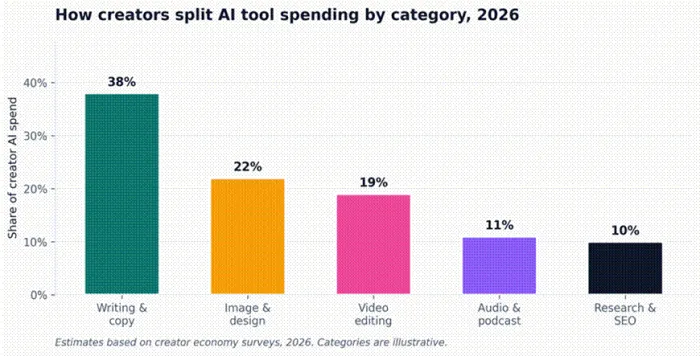
Figure 4. Estimated share of creator AI spend by tool category, 2026.
Use case fit, tool by tool
The matrix below shows where each tool is the right call, where it is a serviceable second choice, and where you should leave it on the shelf. Pick the column that matches what you publish, then pick the highest-rated row that fits your budget.
| Tool | Blog & SEO | Social copy | Images | Short video | Long video | Podcast | Research |
|---|---|---|---|---|---|---|---|
| Canva | ★ | ★ ★ ★ | ★ ★ | ★ ★ | ★ | · | ★ |
| ChatGPT | ★ ★ | ★ ★ | ★ | · | · | · | ★ ★ ★ |
| Claude | ★ ★ ★ | ★ ★ | · | · | · | · | ★ ★ ★ |
| Descript | · | ★ | · | ★ ★ | ★ ★ ★ | ★ ★ ★ | · |
| Jasper | ★ ★ | ★ ★ ★ | ★ | · | · | · | ★ |
| Midjourney | · | ★ | ★ ★ ★ | · | · | · | · |
| Opus Clip | · | ★ ★ | · | ★ ★ ★ | ★ | ★ ★ | · |
| Runway | · | ★ | ★ ★ | ★ ★ ★ | ★ ★ ★ | · | · |
Legend: ★ ★ ★ best in class ★ ★ strong fit ★ usable · not the right tool
How to build your stack without overpaying
Most creators do not need eight tools. The optimal stack in 2026 is usually three to five apps, and the choice depends almost entirely on what you publish most often.
If you are a blogger or newsletter writer
Start with Claude for drafting, ChatGPT for research and reformatting, and Canva for cover art. Total: roughly $55 per month, and the writing quality will be the bottleneck long before the toolkit is.
If you are a YouTuber or podcaster
Descript replaces both your editor and your transcription service. Add Opus Clip for shorts, Runway for inserts and effects, and one writing tool for scripts and show notes. Stack runs about $80 per month and replaces a freelance editor that would cost five times that.
If you are a marketing team
Jasper for the campaign engine, Claude or ChatGPT for the heavier lifting on briefs and analysis, Canva for templated assets, and Midjourney for hero images that do not look like stock. Budget around $200 per seat per month, which is well below the cost of an extra content hire.
A word on the limits
AI tools have a real ceiling that no pricing tier will move. They are excellent at scale, structure, and speed, and they are unreliable at originality, taste, and trust. The single most important number in this guide is the one that says 52% of consumers disengage when they think content is AI-generated. The teams that win in 2026 are the ones that use AI to clear the runway, then put a human in the cockpit before publishing. That order matters more than which tools you pick.
Five mistakes that quietly waste your subscriptions
Most creators do not lose money on a single bad tool. They lose it across a stack that grew without a plan. After watching enough teams build and rebuild their setups, the same five patterns keep showing up.
•Stacking tools with overlapping jobs. Paying for Jasper, Copy.ai, and Writer at once usually means three half-used logins, not three productivity wins. Pick one writing brain and put your prompts and brand voice there.
•Skipping the brand voice setup. Brand IQ in Jasper, Projects in Claude, and Custom GPTs in ChatGPT all exist for the same reason: a 30-minute setup pays for itself in fewer rewrites. Most creators never run it.
•Publishing first-draft AI output. Edited AI content outperforms both pure AI and pure human content. Unedited AI content sits at the bottom of the visibility table in 2026. The edit is not optional.
•Buying annual plans before testing. Free tiers and 7-day trials are enough to find out whether the tool fits your workflow. Annual commitments belong to tools you have already used for at least 30 days.
•Treating AI as a voice instead of a multiplier. Use it for outlines, research, captions, alt text, and repetitive variations. Reserve your own writing for the parts of a piece that carry the brand, the opinion, or the story.
The takeaway
Pick fewer tools, learn them deeply, and keep editing what they produce. The data on quality and trust is clear: unedited AI content underperforms, edited AI content outperforms both pure AI and pure human-written work. The eight tools in this guide are not a shopping list. They are the candidates worth testing against your actual publishing rhythm. The right stack is the smallest one that lets you ship consistently, in your voice, without burning out.