
The honest backstory
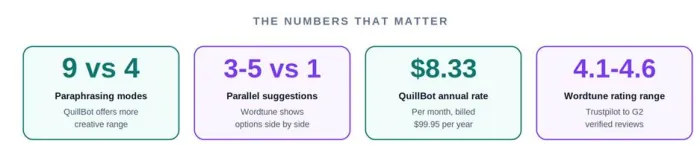
Confession from someone who has paid for both: this comparison was supposed to take five minutes. Same category, same promise. Pick a winner, move on.
It took a week. Because these tools are not fighting for the same trophy.
One wants to be a full writing studio. The other wants to do one thing well, inside the apps you already use. Which is better depends entirely on what your week of writing looks like.
Inside QuillBot: the full writing suite
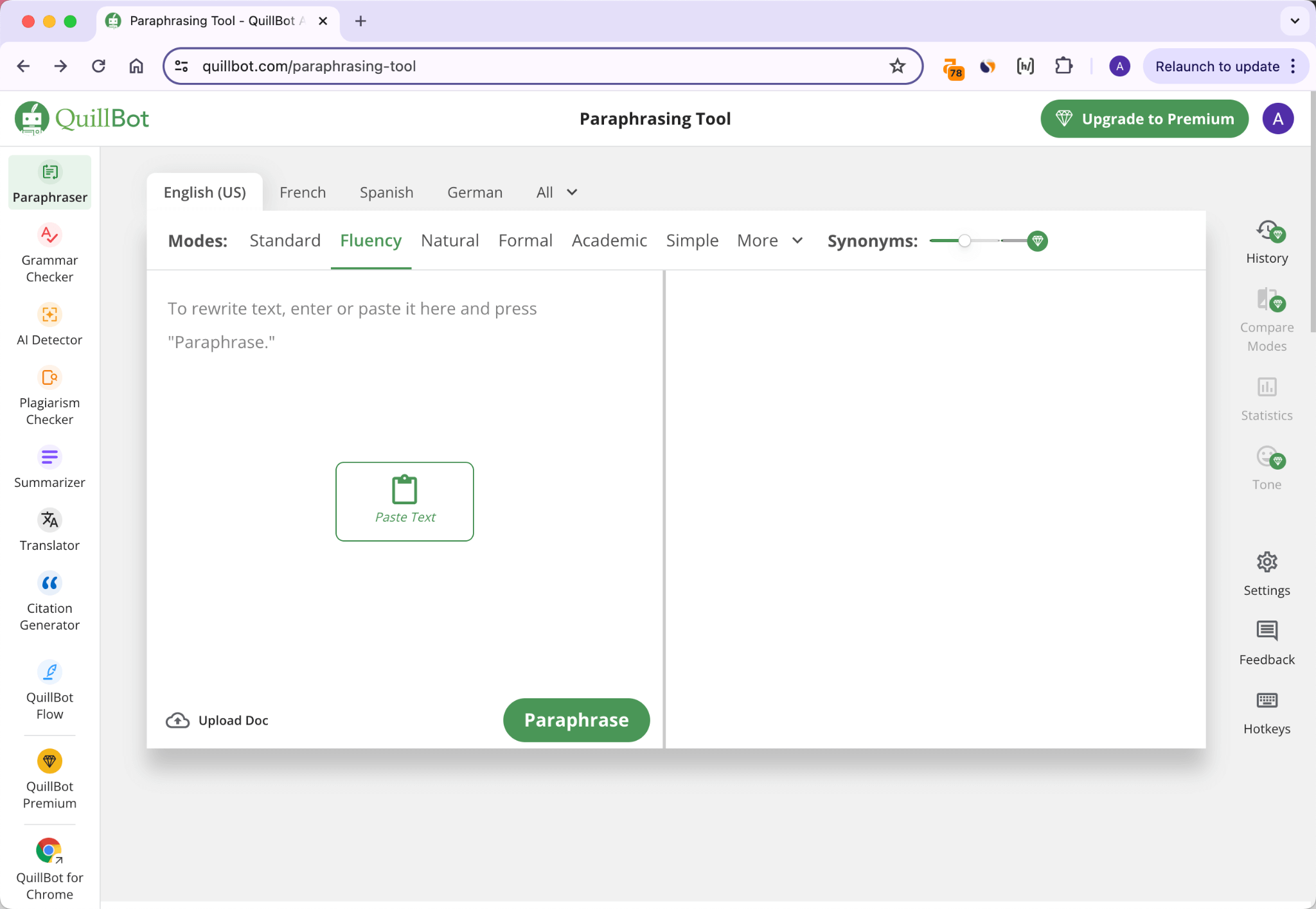
QuillBot has stopped behaving like a paraphraser. The web app now bundles nine separate utilities, from grammar checking to a citation generator covering 1,000+ styles.
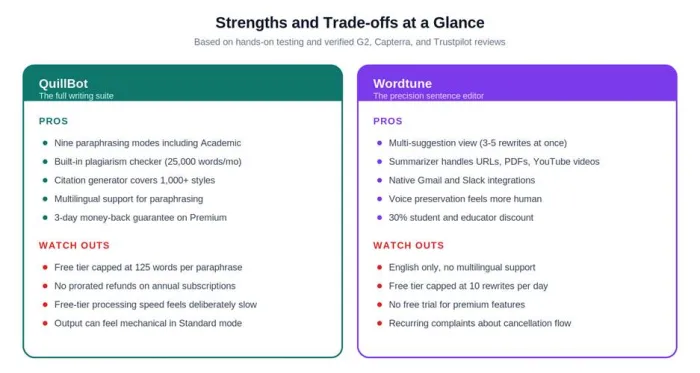
The paraphraser runs nine modes. The standout is Academic, which preserves technical accuracy without bending meaning. The synonym slider and Freeze Words feature give writers real control over output, which most competing tools lack.
The free tier is the weak point. The 125-word cap and slower processing speed are clearly designed to push users toward Premium. For light use, fine. For serious work, the free plan breaks fast.
QUICK TAKE QuillBot earns its price on Premium, not Free. The $8.33 annual rate is hard to argue against for academic and research writers. |
Inside Wordtune: precision over breadth
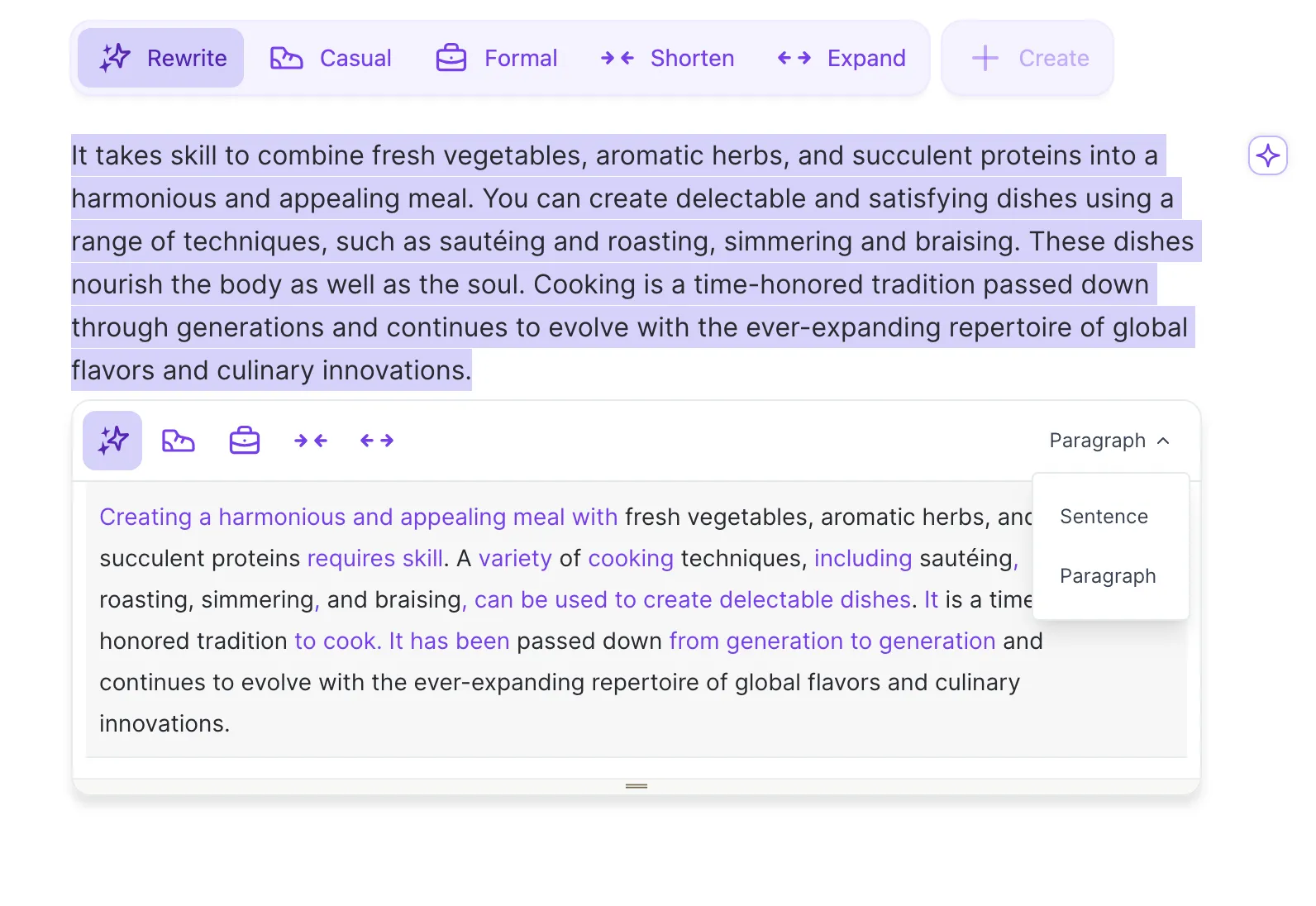
Wordtune asks a different question: not "what tools do you need this week," but "how should this sentence read right now."
Highlight any sentence on the web and Wordtune shows 3 to 5 rewrites at once. That parallel-suggestion view is the single biggest reason loyal users refuse to switch.
The summarizer surprises people. It handles pasted text, URLs, PDFs, and YouTube videos. For research-heavy work, that range removes real friction. The big caveat: Wordtune is English-only.
QUICK TAKE Wordtune feels less like a paraphraser and more like a thoughtful editor over your shoulder. Better for daily comms, weaker for academic work. |
What changed in 2026
QuillBot added an AI Detector and AI Humanizer. The Humanizer hits roughly a 42 percent bypass rate against major AI detectors, per Aithor's April 2026 testing. Useful for cleanup, not for high-stakes work.
Wordtune's updates are quieter. Faster suggestions, longer PDF and YouTube inputs, cleaner Gmail and LinkedIn integration. Depth over breadth, as usual.
WORTH KNOWING Neither tool reliably bypasses Turnitin, Originality.ai, or GPTZero. Treat AI detection features as drafting aids, not anti-detection shields. |
Where each tool pulls ahead
A feature list flattens everything. The scorecard reflects actual performance across six common writing workflows.
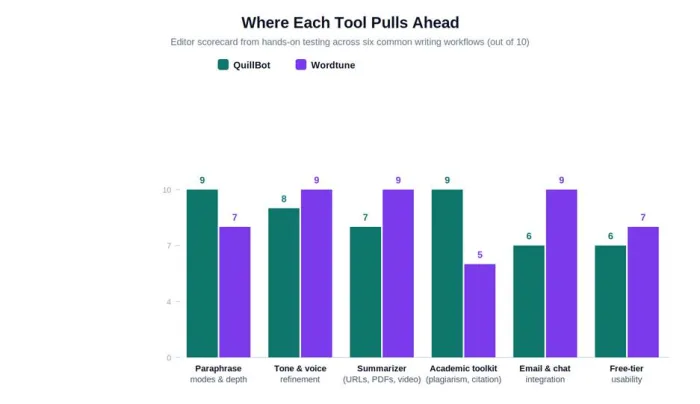
Scoring based on hands-on testing and verified G2, Capterra, and Trustpilot reviews.
The pattern: QuillBot wins on depth and academic tooling. Wordtune wins on tone, summarization, and daily-comms integration.
Feature by feature
Specs verified against QuillBot.com, Wordtune.com, G2, Capterra, Tekpon, and Sapling.
| Feature area | QuillBot | Wordtune |
|---|---|---|
| Paraphrasing modes | 9 modes including Academic, Custom | 4 modes: Casual, Formal, Shorten, Expand |
| Free-tier limit | 125 words per paraphrase | 10 rewrites per day |
| Summarizer scope | Text + uploaded docs (6,000 words) | Text, URLs, PDFs, YouTube videos |
| Plagiarism checker | Premium: 25,000 words/month | Not included |
| Citation generator | 1,000+ citation styles | Not included |
| Integrations | Chrome, Docs, Word, iOS, Android | Chrome, Docs, Word, Gmail, iOS |
| Languages | Multilingual paraphrasing | English only |
| Best fit | Academic, research, batch work | Inline editing, emails, daily comms |
Pricing in 2026
Verified against official pages and cross-checked with Tekpon and Capterra in April 2026.
| Plan tier | QuillBot | Wordtune | Includes |
|---|---|---|---|
| Free | $0 (125-word cap) | $0 (10 rewrites/day) | Core rewriting, basic grammar |
| Monthly | $19.95 | $9.99 to $19.99 | Full features, more capacity |
| Annual | $8.33/mo | ~$9.99/mo billed yearly | Best value, unlimited use |
| Team | $7.50/user | Custom pricing | Shared seats, admin controls |
| Student | $6.25/mo | 30% off with .edu | Full premium at student rate |
PRACTICAL NOTE QuillBot offers a 3-day money-back guarantee. Wordtune does not offer a premium free trial. Neither tool refunds canceled annual plans. |
Two workflows, same destination
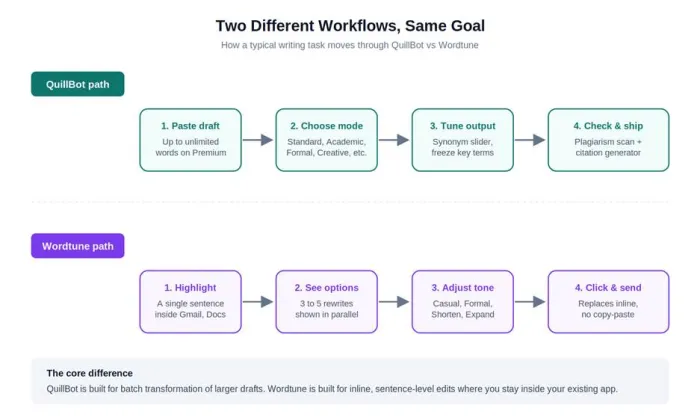
Writers who refine after drafting reach for QuillBot. Writers who edit as they type, especially in Gmail and Slack, reach for Wordtune. Mismatching the tool to the workflow is the main reason cancellations happen.
What real users actually say
Verified ratings aggregated from G2, Capterra, and Trustpilot in 2026.
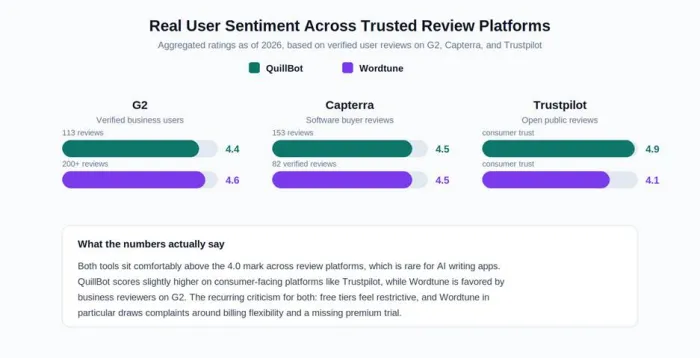
Sources: G2 (113 / 200+ reviews), Capterra (153 / 82), Trustpilot.
Three patterns emerge. Free tiers feel restrictive on both. Users report 25 to 40 percent time savings. Billing is the most common complaint, especially Wordtune cancellations and the missing premium trial.
Who actually benefits from each tool
Six common situations, mapped to the right pick.
| Your situation | Pick | Why |
|---|---|---|
| Grad student writing a thesis | QuillBot | Academic mode + plagiarism checker + citation generator. Student plan: $6.25/mo. |
| Marketer clearing 40 emails daily | Wordtune | Sits inside Gmail. Multi-suggestion view removes copy-paste loop. |
| Content team on long-form articles | Both | QuillBot for tone shifts. Wordtune for sentence polish. ~$18/mo combined. |
| Non-native English writer | Wordtune | Parallel suggestions work as a confidence check on tone. |
| Freelancer with 8-10 clients | Both | Wordtune for drafts and comms. QuillBot for final polish. |
| Small business owner writing copy | QuillBot | More functionality at $8.33/mo. Wordtune Advanced caps at 30 rewrites/day. |
OBSERVATION The fastest way to waste money is buying the wrong plan. Free tiers exist for testing. Annual rates exist for committed users. Monthly rates rarely make sense. |
How to test before paying
Test against the kind of writing the subscription will actually handle, not generic sample paragraphs. Both free tiers are useful for this.
For QuillBot: run the same 200-word passage through Standard, Academic, and Creative modes. The differences reveal how the tool handles tone.
For Wordtune: edit a real Gmail draft using the extension. Three days of testing tells you whether the multi-suggestion view actually saves time.
TESTING TIP Run the same passage through both tools on the same day. Whichever output sounds closer to your natural voice is the one worth paying for. |
A simple way to pick
The entire comparison, collapsed into three branches.
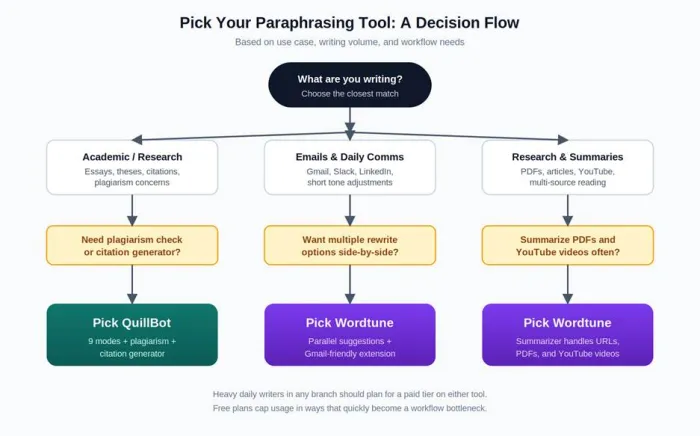
Use case is the strongest predictor of which tool earns its subscription back.
The verdict, plainly stated
After a week with both: QuillBot is the safer purchase for most serious writers. Wordtune is the more enjoyable tool day to day. Those are not the same thing.
Pick QuillBot for research papers, multilingual work, and anything where plagiarism risk is real. At $8.33 monthly billed annually, the suite holds up.
Pick Wordtune for emails, social posts, and short-form output inside other apps. The multi-suggestion view genuinely feels like having an editor over your shoulder.
The writers I trust most run both. About $18 per month combined, less than a single hour of editing services.
One honest closing note: neither tool produces writing that genuinely sounds like you out of the box. Both shift voice in subtle ways. The best work still comes from humans who read the output and decide whether it says what they meant.
BOTTOM LINE QuillBot for breadth and academic safety. Wordtune for speed and tone. The right question is not which tool is better. It is what your week of writing looks like. |