
Why this comparison exists
I have been switching between Grammarly and ProWritingAid for almost four years now. Some weeks Grammarly catches things ProWritingAid misses. Other weeks ProWritingAid rescues a chapter that Grammarly waved through without comment. Both tools are very good, but they are good at very different things.
Most online comparisons treat them as rivals in the same lane. They are not. After running thousands of documents through both, the choice almost always comes down to one question: what kind of writing fills the calendar? A founder writing investor updates, a novelist on draft six of a thriller, and a content marketer reviewing brand tone all need different things from a writing assistant.
This piece breaks the comparison down on pricing, features, accuracy, real user reviews, and fit for different writers. Every figure comes from the official Grammarly and ProWritingAid pricing pages, plus verified review data from G2, Trustpilot, and Capterra.
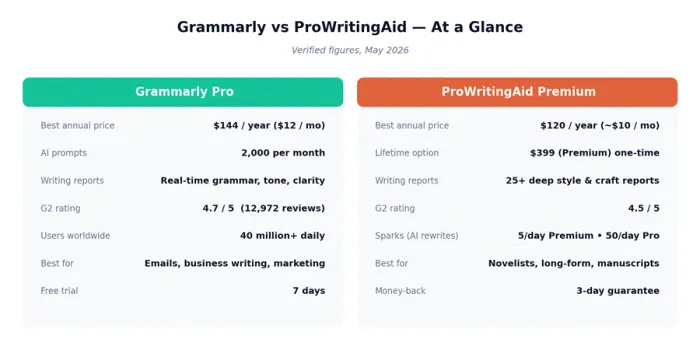
The quick verdict
| Pick Grammarly if you... | Pick ProWritingAid if you... |
|---|---|
| Write across many short formats every day (emails, Slack, docs, social, marketing copy). | Work on long-form projects (novels, manuscripts, memoirs, reports above 5,000 words). |
| Need a fast, invisible editor that runs everywhere from browser to mobile keyboard. | Want 25+ deep reports on style, pacing, dialogue, and structure. |
| Want generative AI built in with 2,000 prompts per month on Pro. | Use Scrivener, or want a one-time lifetime license at $399. |
| Care more about clarity and tone than craft and rhythm. | Care more about craft and depth than speed and ubiquity. |
Grammarly: the world's most-used writing assistant
Grammarly is the most widely adopted writing tool in the category, with over 40 million daily active users, presence in 96% of the Fortune 500, and roughly $700 million in annualized revenue as of early 2026. The brand sits inside Superhuman after the 2026 merger, and the product has grown well past basic grammar correction into a full AI writing assistant.
What Grammarly does well
•Real-time everywhere. Works in browsers, desktop apps, Microsoft Office, Google Docs, mobile keyboards, and over a million other apps. Suggestions appear as a person types.
•Tone detection and rewrites. Detects mood (confident, friendly, formal) and rewrites entire sentences on demand to match a chosen tone.
•Generous AI quota on Pro. 2,000 generative AI prompts per month, enough for serious daily drafting.
•Best free plan in the category. 100 AI prompts per month, plus grammar, spelling, and tone detection across the web.
•AI Detector and Humanizer. Native AI-generated text detection that ProWritingAid does not match.
•Strong team features. Brand voice, style guides, analytics, and knowledge share built into the Pro tier.
Where Grammarly falls short
•Shallow on long documents. Generative AI tools only process about 1,000 words at a time, so big-picture critique on novels or long reports is limited.
•No lifetime option. Subscriptions only. Monthly billing at $30 is two and a half times the annual rate.
•No Scrivener integration. A real friction point for fiction writers.
•Occasional voice flattening. Reviewers sometimes complain that rewrites strip personality from short-form writing.
•English only. Supports US, UK, Australian, Canadian, and Indian English variations, but not other languages.
What Grammarly users say
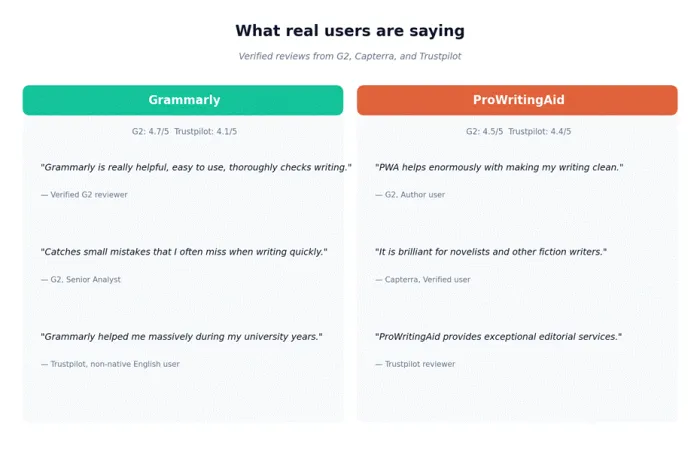
"Grammarly is really helpful, easy to use, thoroughly checks writing." Verified G2 reviewer, January 2026
"Catches small mistakes that I often miss when writing quickly." G2, Senior Analyst review
"Grammarly helped me massively during my university years." Trustpilot, non-native English user
ProWritingAid: the writer's craft tool
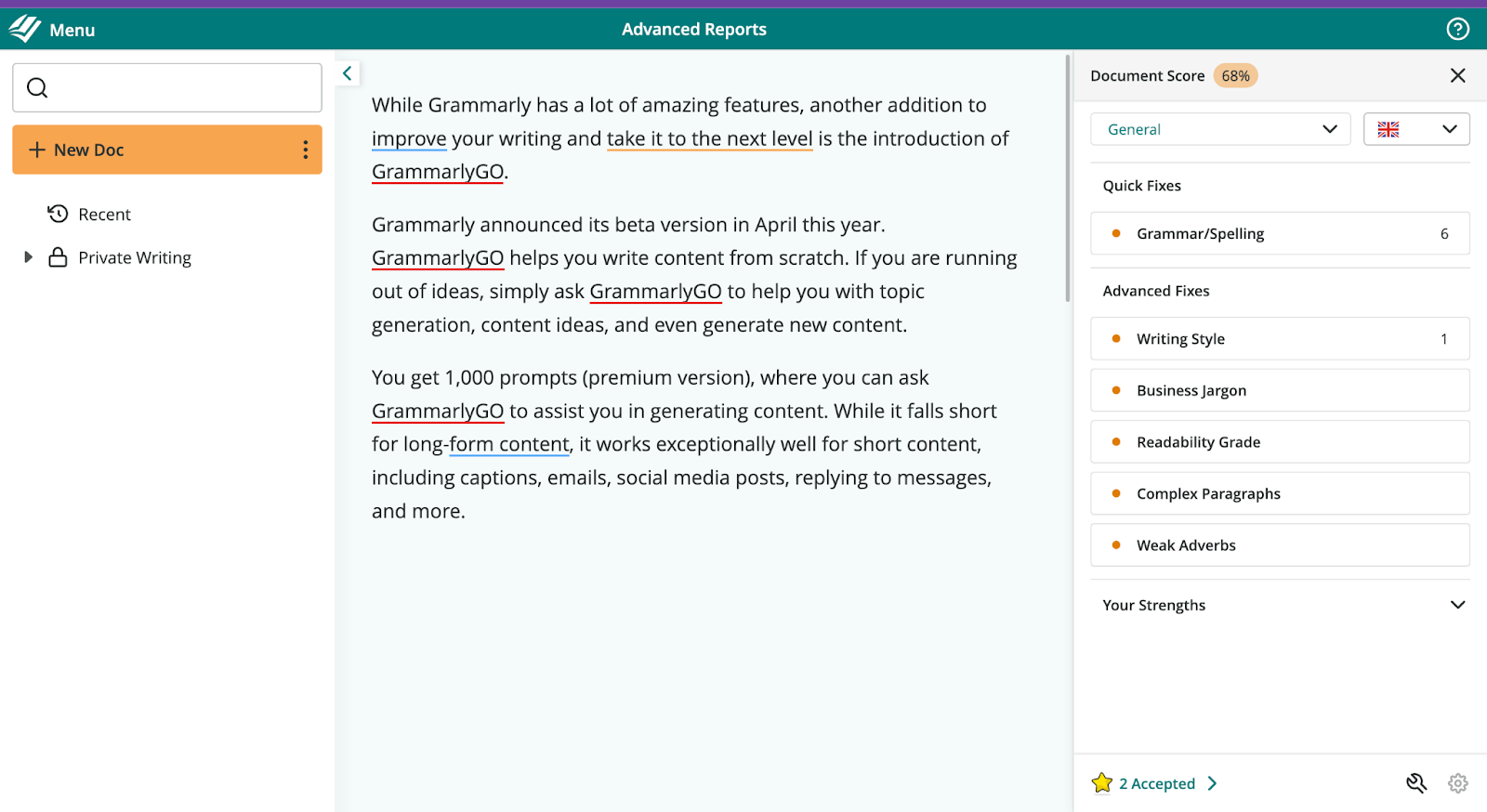
ProWritingAid has been on the market since 2013, built by Orpheus Technology, and positions itself as a writing-craft coach rather than a grammar checker. The brand pulls a smaller user base than Grammarly but holds strong ground in the indie author and self-publishing market, where its depth of reports and Scrivener integration are difficult to replace.
What ProWritingAid does well
•25+ writing reports. Pacing, sentence variety, dialogue tags, overused words, sticky sentences, transitions, readability per paragraph, and more.
•Lifetime license. $399 one-time for Premium, $699 for Premium Pro. Breaks even against the annual plan in 3.3 years.
•Scrivener integration. Native plugin for the long-form writing tool that authors and screenwriters depend on.
•Author comparison. Compares writing style against 90 fiction authors across genres.
•Custom style guides. Available on the Premium plan, not just Enterprise.
•Chapter Critique. AI-powered story-level feedback on full chapters within seconds.
Where ProWritingAid falls short
•Heavier interface. Reports take time to render on long documents, and the browser extension feels slower.
•Free plan is restrictive. Checks only 500 words at a time, two report runs per day, and three Sparks per day.
•Tight AI quota on Premium. Only 5 Sparks per day on the standard Premium plan. Premium Pro lifts this to 50 per day.
•No mobile keyboard. Grammarly offers iOS and Android keyboards. ProWritingAid does not.
•Short refund window. 3-day money-back guarantee on annual and lifetime plans, no refunds on monthly billing.
•English only. Same single-language limitation as Grammarly.
What ProWritingAid users say
"PWA helps enormously with making my writing clean." G2, Author user
"It is brilliant for novelists and other fiction writers." Capterra, Verified user
"ProWritingAid provides exceptional editorial services." Trustpilot review
How each tool handles real writing scenarios
Specs on a comparison table only go so far. The honest test is how each tool handles the kinds of documents writers actually produce. The notes below come from independent head-to-head tests run by Manuscript Report and OnyxRanked in 2026, plus consensus patterns across hundreds of verified G2 and Capterra reviews.
Catching grammar and typo errors
•Manuscript Report's 10,000-word manuscript test (47 planted errors). Grammarly caught 44, ProWritingAid caught 42. The difference is small, but Grammarly edged ahead on punctuation and subject-verb agreement.
•Speed of detection. Grammarly highlights errors within roughly 1 second on most browsers. ProWritingAid takes 2 to 4 seconds for the same passage, especially on longer documents.
•False positives. ProWritingAid flags fewer false positives in fiction (intentional fragments, stylized dialogue). Grammarly aggressively corrects these unless the writing domain is set to creative.
Rewriting sentences and paragraphs
•Grammarly tone rewrites. Selecting a paragraph and asking for a more confident, friendly, or formal tone produces natural-sounding output. The voice rarely collapses on short text.
•ProWritingAid Sparks. More restrained. Sparks tend to preserve original phrasing, suggesting tightening or expansion rather than full rewrites. Better for craft work, slower for quick edits.
•AI-generated drafts. Grammarly handles drafting prompts ("Write a follow-up email after a call") more fluently. ProWritingAid focuses Sparks on existing text, not creation from scratch.
Editing long documents
•Manuscripts above 5,000 words. Grammarly's generative AI can only analyze 1,000 words at a time, which limits chapter-level feedback. ProWritingAid runs the full document through 25-plus reports in one pass.
•Pacing and rhythm. Only ProWritingAid surfaces sentence-length variance, paragraph-by-paragraph readability, and dialogue density. Grammarly has no equivalent.
•Repeated words across chapters. ProWritingAid's overused-words report catches phrases that repeat across an entire manuscript. Grammarly checks paragraph-level repetition only.
Pricing
Every figure below comes from grammarly.com/plans and prowritingaid.com/pricing, checked in May 2026. Regional pricing applies for India, Europe, and the UK. Tax may be added at checkout.
| Plan | Monthly | Annual | Lifetime |
|---|---|---|---|
| Grammarly Free | $0 | $0 | Not offered |
| Grammarly Pro | $30 / month | $144 / year ($12/mo) | Not offered |
| Grammarly Enterprise | Custom quote | Custom quote | Not offered |
| ProWritingAid Free | $0 | $0 (500-word cap) | Not offered |
| ProWritingAid Premium | $30 / month | $120 / year ($10/mo) | $399 one-time |
| ProWritingAid Premium Pro | $36 / month | $144 / year ($12/mo) | $699 one-time |
Three pricing takeaways
•Annual billing saves about 60% over monthly on both tools.
•ProWritingAid Premium beats Grammarly Pro on annual price by $24 per year.
•ProWritingAid Premium lifetime ($399) is the cheapest long-term option in the entire writing-assistant category.
Free vs paid: what each tier actually gets
| Tier | Grammarly | ProWritingAid |
|---|---|---|
| Free plan | Unlimited document length, grammar and spelling, tone detection, 100 AI prompts per month. | 500-word cap per check, grammar and spelling, 2 reports per day, 10 Rephrases and 3 Sparks per day. |
| Paid value | Plagiarism, AI Detector, Humanizer, 2,000 AI prompts, full-sentence rewrites, brand tones. | Unlimited word count, 25+ writing reports, custom style guides, Chapter Critique, author comparison. |
| Trial / refund | 7-day free trial of Pro. Prorated refund when downgrading. | No free trial. 3-day money-back guarantee on annual and lifetime plans. |
The Grammarly free plan is more generous in raw usage (unlimited document length, more AI prompts). ProWritingAid's free plan is built to demonstrate the tool, not to be a daily driver. Anyone planning to use either tool seriously will need to pay.
Feature comparison
Both tools share the basics (grammar, spelling, plagiarism, AI rewrites). The differences show up once writing gets longer or more creative.
| Feature | Grammarly Pro | ProWritingAid Premium |
|---|---|---|
| Grammar and spelling | Real-time, very fast | Real-time, slightly slower |
| Style analysis | Clarity, conciseness, tone | 25+ in-depth craft reports |
| Generative AI prompts | 2,000 per month | 5 Sparks/day (Premium), 50/day (Pro) |
| Plagiarism detection | Included with Pro | Pay-per-use or Pro tier |
| AI detector | Yes, with Humanizer | Not available |
| Document length | Unlimited | Unlimited (Free plan capped at 500 words) |
| Scrivener support | Not available | Native plugin |
| Author comparison | Not available | Compares against 90 fiction authors |
| Mobile keyboard | iOS and Android | Not offered |
| Microsoft Word add-in | Yes | Yes |
| Google Docs | Native integration | Native integration |
| Custom style guide | On Pro and Enterprise | On Premium and Premium Pro |
| Chapter Critique tool | Not available | 1/day Premium, 3/day Pro |
| Live workshops | Not offered | Included with Premium Pro |
Integrations: where each tool plugs in
| Platform | Grammarly | ProWritingAid |
|---|---|---|
| Chrome / Safari / Firefox / Edge | Yes | Yes |
| Microsoft Word (Windows and Mac) | Yes | Yes |
| Google Docs | Native | Native |
| Microsoft Outlook | Yes | Yes |
| Slack and Microsoft Teams | Yes | Browser only |
| Scrivener | Not supported | Native plugin |
| Mobile (iOS / Android) | Keyboard and app | Browser only |
| Desktop editor | Yes (Win and Mac) | Yes (Win, Mac, Linux) |
| Apps and websites covered | 1,000,000+ | Limited to listed integrations |
Where each tool actually wins, by writer type
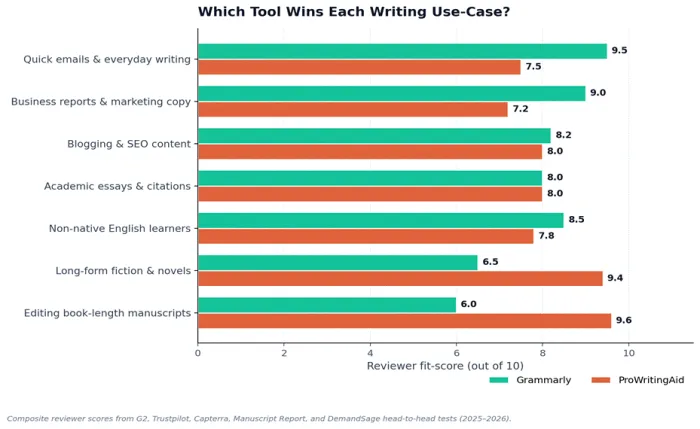
Reviewer consensus across G2, Trustpilot, Capterra, Manuscript Report, OnyxRanked, and DemandSage's head-to-head tests lines up clearly when scored by use case. The chart below shows the fit-score (out of 10) for each tool across seven common writing scenarios in 2026.
Key patterns from the data
•Grammarly dominates everyday writing. Quick emails, business reports, and marketing copy all score 9.0 or higher on Grammarly, compared to 7.2 to 7.5 on ProWritingAid.
•ProWritingAid dominates long-form. Long-form fiction and book-length manuscripts score 9.4 and 9.6 on ProWritingAid, but only 6.5 and 6.0 on Grammarly. The gap is the widest in any category.
•It is a tie on academics. Both tools score 8.0 on academic essays and citations. Personal preference matters more than raw capability.
•Non-native English learners. Grammarly edges out ProWritingAid (8.5 versus 7.8) thanks to faster real-time feedback and clearer error explanations.
Verified reviewer ratings, side by side
Pros and cons at a glance
| Grammarly Pro | ProWritingAid Premium |
|---|---|
+ Works everywhere a person writes + Fastest real-time corrections in the category + 2,000 AI prompts per month + Native AI detector and Humanizer + Mobile keyboard for iOS and Android + 4.7 / 5 on G2 (12,972 reviews) | + 25+ deep writing reports + Lifetime license available ($399) + Scrivener integration for novelists + Author-comparison report + Custom style guides on Premium + 4.5 / 5 on G2 |
− No lifetime option − Generative AI limited per analysis − No Scrivener support − Monthly plan is 2.5x the annual rate − Single language (English only) − Occasional voice flattening on rewrites | − Heavier and slower interface − Free plan capped at 500 words − Only 5 Sparks per day on Premium − No mobile keyboard − 3-day refund window only − Single language (English only) |
Which one fits which writer
Best for everyday professionals
Choose Grammarly. Short emails, marketing copy, customer-support messages, and internal docs all benefit from real-time correction and tone control. The annual Pro plan at $12 per month is fair value for anyone whose work depends on clear writing. The tone-detection feature alone is worth the upgrade for anyone who writes client-facing messages, since it flags writing that reads as too blunt or too apologetic before the message goes out.
Best for novelists and long-form authors
Choose ProWritingAid. The 25-plus reports were built for manuscripts. Pacing, sentence variation, dialogue tags, and overused words all become essential once a document crosses 5,000 words. The $399 lifetime Premium license is also the most cost-effective long-term deal in the entire writing-tool category.
Best for students and academics
Either tool works. Grammarly is friendlier for non-native writers thanks to clearer explanations and faster suggestions. ProWritingAid is stronger for theses and longer papers where structure and pacing matter. Many universities offer Grammarly free through campus licenses, so check there first.
Best for content teams and businesses
Grammarly Pro and Enterprise win here. Brand tone, style guides, knowledge share, and analytics are deeper than ProWritingAid's team features. Atlassian, Zoom, and Databricks are among 50,000 organizations using it across the Fortune 500.
Best for writers who can afford both
Run them together. Grammarly stays on in the background for everyday writing, and ProWritingAid runs on dedicated editing passes for long projects. Combined annual cost is $264 per year. Combined cost with ProWritingAid's lifetime license averages closer to $144 per year over five years.
Final verdict
If forced to keep only one, I would keep Grammarly. The writing I do every day is short, scattered across many surfaces, and benefits more from a fast invisible editor than from a slow thorough one. Grammarly has saved me from embarrassing typos in client emails, LinkedIn posts, and last-minute drafts more times than I can count. That kind of value is hard to give up.
But the moment I sit down to write something long, anything past five thousand words where structure and pacing matter, I switch to ProWritingAid and do not look back. The pacing report alone has rescued drafts I thought were finished. Grammarly cannot see what ProWritingAid sees on a manuscript.
So the honest answer is rarely either-or. Grammarly is the daily driver for most professionals. ProWritingAid is the deep workshop tool for serious long-form work. For anyone choosing one, pick based on the writing that fills the calendar, not based on which brand is more famous.
Key takeaways
•Both tools are excellent. The choice is about fit, not quality. Grammarly is faster and broader. ProWritingAid is deeper and more thorough.
•Verified pricing for 2026: Grammarly Pro costs $144 per year. ProWritingAid Premium costs $120 per year, with a $399 lifetime option that no other tool in the category offers.
•Use case decides the winner. Short and frequent writing favors Grammarly by 1.5 to 2 points in reviewer scores. Long-form writing favors ProWritingAid by 3 points or more.
•Free plans matter. Grammarly's free tier is genuinely useful for casual users. ProWritingAid's free tier is a limited demo, not a daily driver.
•Running both is reasonable. Combined yearly cost is $264 per year, or roughly $144 per year averaged over five years with ProWritingAid's lifetime license.