
Here is what a recent audit of a 218 post client blog turned up: 74 of those posts had not earned a single Google click in twelve months. The fix meant cutting 31, merging 22 into stronger pages, and refreshing another 40. Ten weeks later, organic clicks were up 19 percent, and not one new article had been published in that window.
That pattern shows up on almost every established site. Most blogs do not have a content volume problem. They have a dead weight problem, and the fix is a structured website content audit rather than more publishing.
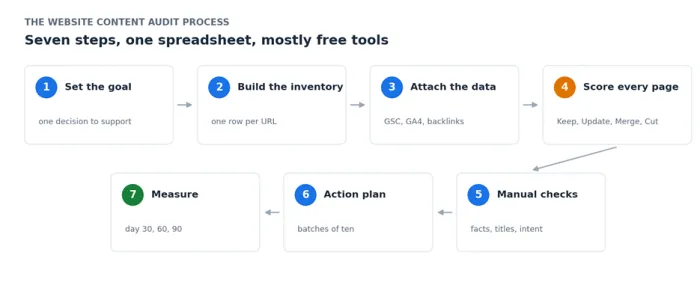
This guide lays out the complete working process, with the exact spreadsheet columns, the scoring rules, and mostly free tools. The theory side is covered in a separate post on what a content audit is, so this one stays hands on from the first step to the last.
| The short version: List every URL on your site, attach twelve months of Search Console and GA4 data to each one, score every page as Keep, Update, Merge, or Cut, then work through the fixes in monthly batches. A site under 500 pages can be fully audited in about two days with free tools. |
What You Need Before You Start
Five tools cover the entire job for most sites. Four of them cost nothing.
| Tool | What it does in the audit | Cost |
|---|---|---|
| Google Search Console | Clicks, impressions, and average position for every URL | Free |
| Google Analytics 4 | Engagement time and key events (GA4's current name for conversions) | Free |
| Screaming Frog SEO Spider | Crawls your site to build the master URL list | Free up to 500 URLs |
| Ahrefs Webmaster Tools | Backlink data for your own verified site | Free |
| Google Sheets or Excel | The audit workbook where everything lands | Free |
If you already pay for Ahrefs or Semrush, use them for rank tracking and bulk backlink exports. But do not let the lack of paid tools stop you. Search Console and GA4 hold the two numbers that decide most page verdicts anyway: clicks and conversions.
Step 1: Decide What the Audit Is For
An audit without a goal turns into a color coded spreadsheet nobody opens twice. Before pulling any data, write down the single decision this audit should support.

The three most common versions:
| Traffic recovery. Organic traffic has been flat or falling. The column that matters most: the clicks trend across the two most recent six month periods. |
| Index cleanup. You are migrating, rebranding, or trimming a bloated archive. The columns that matter most: impressions and referring domains, because they tell you what is safe to remove. |
| Conversion focus. Traffic looks fine but leads are thin. The column that matters most: key events per page. |
The goal changes how you score later. A post pulling 40 visits a month looks like a Cut in a traffic audit and a clear Keep in a conversion audit if those 40 visitors book calls.
Step 2: Build the Content Inventory
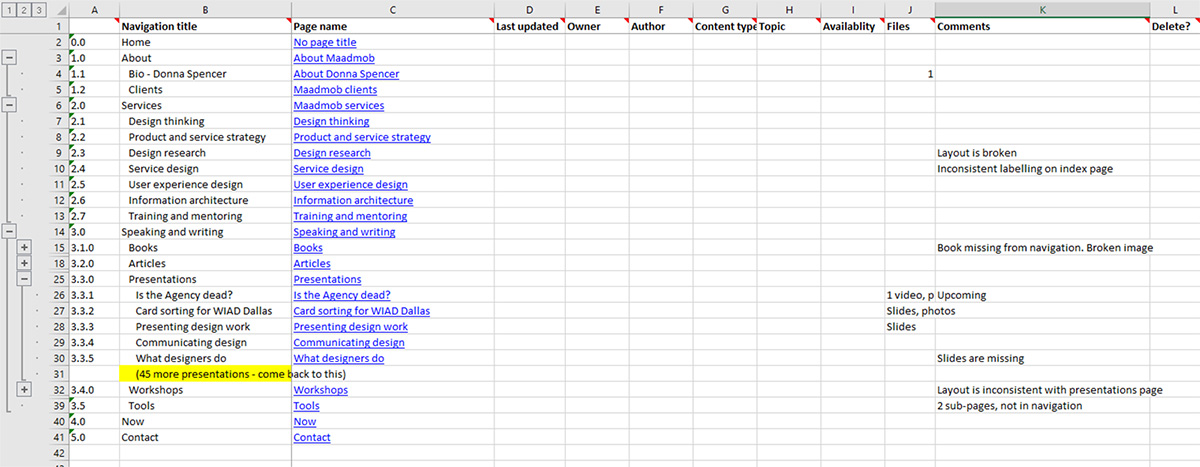
You need one row per URL. Not the URLs you remember publishing. Every URL Google can actually reach.
For sites under 500 pages: Open Screaming Frog, keep the default Spider mode, enter your domain, and let the crawl finish. Filter the results to HTML only, then export. The free licence caps at 500 URLs, which covers most blogs and small business sites comfortably.
For larger sites: Either buy the Screaming Frog licence or export your XML sitemap (usually at yourdomain.com/sitemap.xml) and paste the URLs into your sheet as a starting list.
Then cross check against Google. Open Search Console, go to the Pages report under Indexing, and export the indexed URLs. Any address Google has indexed that your crawl missed is an orphan page, a page with no internal links pointing to it. Add those rows manually. Orphans are often the exact pages dragging overall quality down.
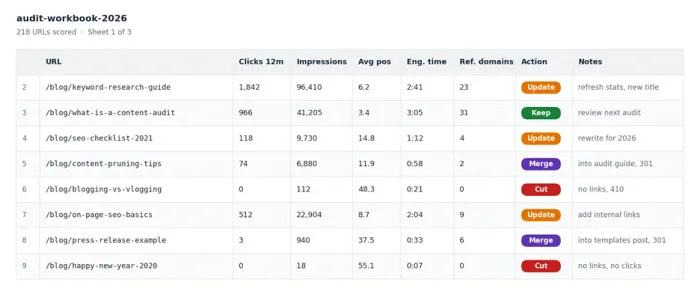
Set these columns up in your workbook:
| Column | Where the data comes from |
|---|---|
| URL | Crawl or sitemap export |
| Title tag | Crawl export |
| Publish and last updated dates | Your CMS |
| Word count | Crawl export |
| Target keyword | Your notes or rank tracker |
| Clicks (12 months) | Search Console |
| Impressions (12 months) | Search Console |
| Average position | Search Console |
| Average engagement time | GA4 |
| Key events | GA4 |
| Referring domains | Ahrefs Webmaster Tools |
| Action | You, in Step 4 |
| Priority | You, in Step 6 |
| Notes | You |
One housekeeping task before moving on: clean the URL column. Strip tracking parameters and make trailing slashes consistent. Mismatched URL formats are the most common reason lookups break in the next step, and broken lookups quietly poison every verdict after that.
Step 3: Attach Twelve Months of Performance Data
Search Console. Open Performance, set the date range to the last twelve months, switch to the Pages tab, and export. Two limits worth knowing: the interface export stops at 1,000 rows, and Search Console only stores sixteen months of history. Bigger sites should pull data through the free Looker Studio connector instead of the export button. And because history caps at sixteen months, a full year over year comparison is not possible, so compare the most recent six months against the six before them instead.
GA4. Go to Reports, then Engagement, then Pages and screens. Pull views, average engagement time, and key events per page. If an older guide you are reading talks about conversions, that metric was renamed to key events in GA4. Same data, new label.
Backlinks. Verify your site in Ahrefs Webmaster Tools and export referring domains per URL. This column exists for one reason: to stop you from deleting pages that have quietly earned links over the years.
Join everything in the sheet. Use XLOOKUP or VLOOKUP against the URL column, then spot check ten rows by hand. If lookups return errors, your URL formats do not match between exports. Fix that before trusting a single number.
Step 4: Score Every Page as Keep, Update, Merge, or Cut
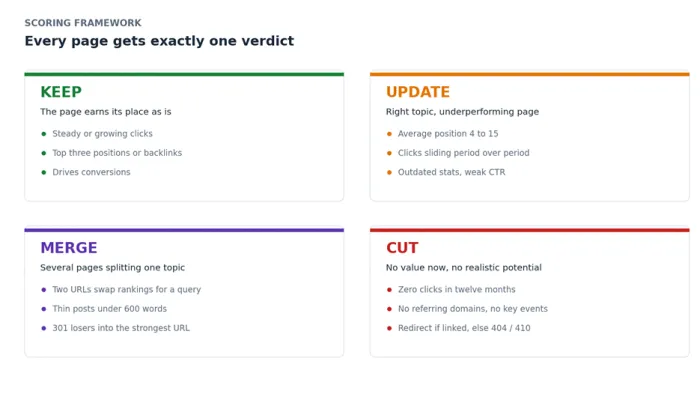
This is the heart of the audit. Work down the sheet one row at a time and give every page exactly one of four actions.
| Action | When it applies | Signals to look for |
|---|---|---|
| Keep | The page earns its place as is | Steady or growing clicks, top three positions, backlinks, or conversions |
| Update | Right topic, underperforming page | Position 4 to 15, clicks sliding across the two six month windows, outdated stats or screenshots, low CTR for its position |
| Merge | Several pages splitting one topic | Two URLs swapping rankings for the same query, or a cluster of thin posts under 600 words circling one subtopic |
| Cut | No value now, no realistic potential | Zero clicks, near zero impressions in twelve months, no referring domains, no key events, topic no longer relevant |
Two rules that prevent expensive mistakes:
| Check backlinks before any Cut. A page with referring domains never simply gets deleted. It gets a 301 redirect to the closest relevant live page so the link value transfers instead of evaporating. |
| Merge into the strongest URL. Move the useful sections into whichever page has the best history, then 301 the weaker addresses to it. Google typically consolidates the signals over the following weeks. |
For a page with no links and no traffic at all, remove it and let it return a 404 or 410. Redirecting hundreds of worthless URLs to your homepage helps nobody and can look manipulative.
Step 5: Manual Quality Checks on the Update Pages
Numbers pick the pages. Eyes decide the fixes. For every page marked Update, run the same six checks:
• Search the target query in a private window. Read the current top three results. If they are all tools and yours is an essay, or all listicles and yours is a story, the format is the problem, not the writing.
• Verify every fact on the page. Stats, prices, screenshots, product names, anything with a date attached. One screenshot from 2022 can undermine an otherwise strong page.
• Judge the title against its CTR. A page sitting in the top five with a click through rate under 2 percent almost always has a title problem rather than a content problem.
• Read only the first two sentences. If the intro has not addressed the query by then, rewrite the opening before anything else.
• Count internal links pointing in. Aim for at least three from related posts. A quality page with no internal links behaves like an orphan no matter how good it is.
• Leave the date alone unless the content changes. Bumping the published date on an untouched article trains readers, and arguably Google, to distrust your dates.
Step 6: Turn Scores Into an Action Plan
A finished audit is a list of verdicts. A useful audit is a schedule with dates on it.
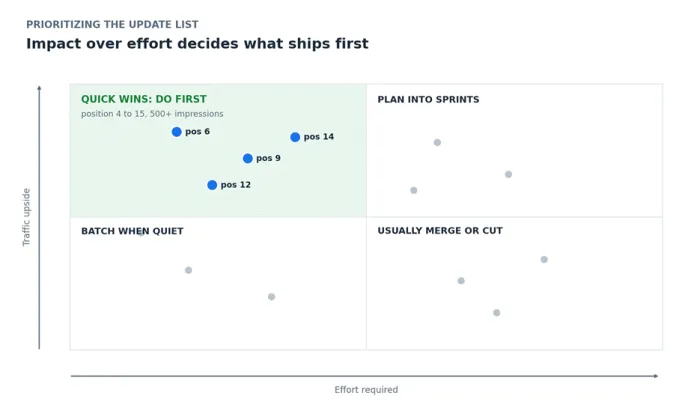
Sort the Update pages by impact over effort. The quick win filter is simple: average position between 4 and 15, plus at least 500 impressions over the last twelve months. Those pages already have proven demand and mostly need a push, not a rebuild.
Batch the rewrites. Ten page updates per month is a sustainable pace for a solo writer or a small team. Push past that and quality slips. Go smaller and momentum dies before the results arrive.
Handle Cuts and Merges in one sprint. Build a two column redirect map, old URL on the left and destination on the right, implement every 301 in a single session, then paste the old URL list back into Screaming Frog in List mode to confirm each one actually redirects.
Snapshot your baseline first. Before changing anything, save a dated copy of the sheet with current clicks and positions. Future you needs a before picture, and Search Console will not keep it forever.
Step 7: Ship, Measure, and Book the Next One
Log every change with its date, either in a change log tab or as annotations inside GA4. Then measure on a rhythm instead of refreshing rankings every morning.
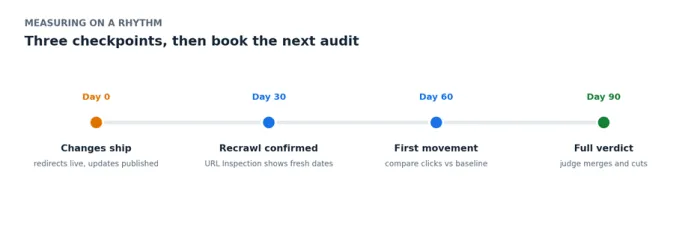
• Day 30: Confirm updated pages were recrawled. The URL Inspection tool in Search Console shows the last crawl date for any address.
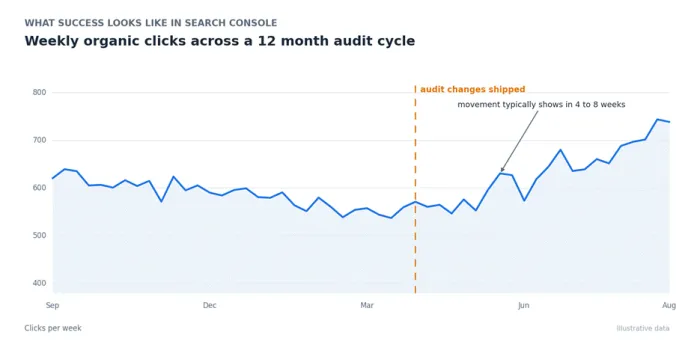
• Day 60: Compare clicks and average position against your baseline for each updated URL. Refreshed pages usually show movement somewhere between four and eight weeks.
• Day 90: Judge the merges and cuts. Consolidated pages can take longer while signals settle, but total organic clicks should be flat or climbing even though the site is smaller.
Then put the next audit on the calendar. A full pass every twelve months suits most sites, every six for sites publishing weekly. Between full audits, a one hour quarterly review of your top 20 money pages catches decay while it is still cheap to fix.
How Long a Website Content Audit Takes
Honest estimates from repeated real world audits:
| Site size | Realistic time investment |
|---|---|
| Under 100 URLs | 1 to 2 working days |
| 100 to 500 URLs | 3 to 5 working days |
| 500 to 2,000 URLs | 1 to 2 weeks |
| Over 2,000 URLs | Audit one section or template at a time |
The data pulls go fast. Scoring is what eats the hours. Budget roughly two minutes per URL once you settle into a rhythm, and more like five while you are still calibrating.
Mistakes That Derail Most First Audits
• Judging every page on traffic alone. Bottom of funnel pages convert on tiny visit counts. Kill them by traffic logic and your leads quietly dry up a month later.
• Deleting linked pages without redirects. Every referring domain pointing at a fresh 404 is authority thrown in the bin.
• Auditing during noise. Pulling data mid seasonal dip or during a confirmed Google core update rollout skews every trend line in the sheet. Wait for a normal window.
• Changing everything at once. Fifty simultaneous edits make results impossible to attribute. Batches of ten keep cause and effect readable.
• Treating the spreadsheet as the deliverable. The sheet is the map. Traffic only moves when the edits actually ship.
Final Verdict
| The verdict: A content audit is the highest return SEO project available to an established site. It costs a few days, runs almost entirely on free tools, and routinely beats months of new publishing. The only way it fails is when the spreadsheet gets finished and the fixes never ship. |
The audit itself is the easy part. Anyone can color a spreadsheet over a weekend. The gap between sites that grow from this and sites that do not comes down to boring follow through: ten updates a month, redirects done properly, results checked at day ninety instead of day three.
One warning no checklist mentions: the first audit stings. Nobody enjoys discovering that half their archive earns nothing. Cut anyway. On site after site, a pruned and refreshed library has outperformed a bigger untouched one, and it usually has not been close.
So block half a day this week. Pull the crawl, attach the Search Console export, and score your first fifty pages. You will learn more about your website by Friday than another month of publishing would ever teach you.