
Introduction
A content audit is a systematic review of every page on your website, where each piece is measured against criteria like traffic, engagement, conversions, and accuracy so you can decide what to keep, update, merge, or remove. In short, it separates the pages earning their place from the ones quietly costing you rankings and budget.
Most sites need one more than they realize. Millions of new blog posts go live every day, yet on most established websites the older pages are quietly bleeding traffic while all the attention goes to publishing new ones. Without an audit, that loss stays invisible until it shows up in your numbers.
This guide gives you the complete process: a six-step framework, a decision matrix for sorting every page, real case studies with published numbers, a look at how AI search is changing what "audit-worthy" means in 2026, and short answers to the questions teams ask most.
2x More likely to report content marketing success with regular audits Content Marketing Institute | 24% Average lift in marketing ROI from quarterly audits Gartner, | 21% Of marketers can accurately measure their content ROI today Industry research, 2026 | 2.5x More likely to successfully implement audit findings with an action plan McKinsey |
What Is a Content Audit?
A content audit is a structured process of cataloging, analyzing, and evaluating every piece of content on your website so you can decide what to keep, what to improve, what to merge, and what to remove. It is essentially a full inventory of your content assets, scored against a set of criteria you define up front.
The scope is broader than many teams assume. A proper audit covers blog posts, landing pages, product and service pages, pillar guides, case studies, ebooks, whitepapers, videos, infographics, podcast pages, and any other indexable asset on your domain. Each piece is reviewed against a consistent set of signals such as organic traffic, engagement, conversions, technical health, factual accuracy, and alignment with your current business goals.
“Think of a content audit like an MOT for your website.” Steve Robinson, Digital Marketing Executive, Bronco |
Every page gets checked for traffic, engagement, and freshness, and you walk away knowing exactly what needs tightening up. Without that visibility, content decisions become guesswork.
Why Content Audits Matter: The Data
If you are wondering whether an audit is worth the effort, recent industry data makes the answer clear. Marketing teams that set measurable goals and audit their content regularly outperform those that do not by a wide margin.
Goal-Setting Drives Revenue Outcomes Share of companies hitting their revenue targets, by measurement maturity | |
| Companies with measurable goals | 67% |
| Companies without measurable goals | 41% |
| Marketers who measure content ROI accurately | 21% |
| Sources: HubSpot State of Marketing Report; Digital Applied 2026 measurement framework research. | |
The numbers reveal three things. First, only one in five marketers can confidently measure their content ROI today, which means most teams are making decisions without a clear view of what is working. Second, goal-setting alone closes most of the gap. Companies with measurable targets hit revenue goals 67 percent of the time, versus just 41 percent without (HubSpot). Third, McKinsey research shows that teams which turn audit findings into detailed action plans are 2.5 times more likely to actually implement the changes they identify.
Real-World Case Studies
The case for content audits is not theoretical. Several well-documented teams have published the results they achieved by auditing and updating existing content rather than simply publishing more. Three examples stand out.
+106% Organic traffic lift | HubSpot: Historical Optimization HubSpot popularized a strategy called “historical optimization,” using a structured audit to find and refresh older blog posts that had lost traffic. The team reported that updating and republishing legacy content drove a 106 percent increase in monthly organic search traffic. Pages with existing backlinks and topical authority recovered fastest. Source: HubSpot blog (Optimizing the Past) |
+260% Traffic in 14 days | Backlinko: The Content Relaunch After reading HubSpot's case study, Brian Dean of Backlinko tested the same approach on his own site. He documented a 260.7 percent jump in organic traffic over 14 days using what he called “The Content Relaunch,” without publishing a single new article. The lift came from identifying decayed pages, rewriting them for current search intent, and re-promoting them. Source: Backlinko case study |
3.3M Organic sessions added | Portent: Content Hub Strategy Digital agency Portent worked with a reference industry client to audit and update underperforming content while filling topical gaps. The result was a 3.3 million increase in organic sessions, a 207 percent rise in traffic to the audited subfolder, and a 13,100 percent jump in organic sessions to rewritten content. Updating existing pages outperformed creating brand-new ones. Source: Portent case study |
The common thread across all three is striking. In each case, the team grew traffic significantly without writing more content. They simply audited what already existed and made it better.
Understanding Content Decay
Content decay is the slow, often invisible decline of a page's traffic and rankings over time. A piece that drove 5,000 monthly visits last year might quietly slip to 1,000 today without any obvious cause. Decay differs from a sudden algorithm penalty in two important ways: it happens gradually, and it usually affects pages one at a time rather than the whole site. That is exactly why running audits on a regular schedule matters so much.
What Triggers Content Decay
Five forces drive most decay, and they tend to compound on each other. A page suffering from outdated stats and a slow load time is far more vulnerable than one with only a single weakness.
| Trigger | What Happens | Early Warning Sign |
|---|---|---|
| Algorithm update | Google changes how pages are ranked or rewards different signals | Sudden drop across multiple pages on the same date |
| Competitor improvement | A rival publishes a more comprehensive, fresher version of your topic | Average position slowly slips while impressions stay flat |
| Outdated information | Statistics, examples, screenshots, or links become stale | Engagement metrics decline and bounce rate rises |
| Search intent shift | Users start expecting different content (video, lists, comparisons) for the same query | Impressions hold steady but click-through rate drops |
| Technical decay | Broken links, slow load times, weak internal linking, or missing schema | Crawl errors in Search Console and rising bounce rate |
How to Spot Decay Early
The earliest signal of decay is almost always a gradual decline in Google Search Console impressions. By the time clicks and overall traffic drop, the damage is already underway. A practical rule of thumb, widely used by SEO teams, is to flag any page whose organic traffic has dropped more than 20 percent year-over-year and prioritize it for review.
One important caveat. Simply updating the publication date without making real changes is not enough to recover lost rankings.
“Google can look back across multiple versions of a page.” Roxana Stingu, SEO expert |
Google can assess whether a change is meaningful or merely a cosmetic timestamp adjustment. That means a real refresh requires substantive edits: updated statistics, new sections that cover gaps in your competitors' coverage, refreshed examples, stronger internal links, and improved metadata. Anything less is window dressing.
Types of Content Audits
Not every audit looks the same. The right approach depends on the problem you are trying to solve. Most teams run one of three main types, and often combine them for a complete view.
| Audit Type | Primary Focus | Key Metrics | Best For |
|---|---|---|---|
| SEO Audit | Search engine performance and visibility | Rankings, organic traffic, CTR, backlinks, page speed | Growing organic traffic and recovering lost rankings |
| Editorial Audit | Content quality, brand voice, strategic fit | Accuracy, tone, audience alignment, topical relevance | Rebrands, repositioning, or new product focus |
| UX & Accessibility Audit | How easy content is to consume | Load time, mobile usability, alt text, contrast, readability | Lifting conversion rates and meeting compliance |
Most successful programs blend at least two of these. For example, a quarterly SEO audit paired with an annual editorial and UX review covers traffic performance, content quality, and user experience without overwhelming the team.
Key Benefits of a Content Audit
A well-run audit pays off across multiple parts of the business.
•Stronger organic visibility from fixing broken links, outdated information, weak meta data, and keyword cannibalization.
•Better user experience by surfacing slow pages, accessibility gaps, and design issues that quietly drive visitors away.
•Sharper content strategy through evidence about which topics, formats, and angles actually convert.
•Lower costs, because cutting or consolidating low-value content frees up budget for the work that drives results.
•Clearer reporting to leadership, since an audit produces hard data that links content effort to revenue outcomes.
Auditing Content for AI Search
Search behavior changed faster than most content strategies did. A growing share of your audience now gets answers from AI Overviews in Google, ChatGPT, Perplexity, and similar assistants, systems that read your pages and decide whether to cite them. A page can rank respectably in classic search and still be invisible in AI answers, simply because nothing on it is written as a clear, liftable answer.
That adds a new question to every row of your audit spreadsheet. It is no longer just "does this page rank and convert?" It is also "if an AI assistant read this page, could it pull an accurate, current answer from it and would we want it to?"
Outdated content carries a new kind of risk here. When an assistant repeats your 2022 statistic, your old pricing, or a discontinued feature name, the reader has no way to know the claim is stale. Your decayed page has just misinformed a potential customer, with your brand's name attached. In the AI search era, outdated pages are not just underperforming. They are actively working against you.
What to check on each page
- A direct answer up top: Does the page answer its core question in the first 100 words, in plain declarative language? AI systems favor passages that stand alone as complete answers.
- Fact freshness: Are all statistics, prices, screenshots, and product names current? Anything dated is now a liability, not just a weakness.
- Extractable structure: Question-style H2s and H3s, short paragraphs, definition-shaped sentences, and tables all make content easier for machines to quote accurately.
- Self-contained passages: Could any single paragraph be quoted out of context and still be true and clear? Rewrite the ones that only make sense mid-flow.
- Schema markup: Article, FAQ, and HowTo schema help engines understand what each block of content actually is.
The practical move is simple: add one column to your audit spreadsheet, "AI-quotable? (Y/N)", and score every page during Step 4. Pages that rank in classic search but fail this check go straight into the Update bucket.
How to Conduct a Content Audit: Step by Step
A content audit becomes far less intimidating when you break it into clear stages. The framework below works for sites of almost any size.
Step 1: Define Your Goals
Start with the why. Are you trying to grow organic traffic, lift conversion rates, improve user experience, or align content with a new brand strategy? Your goal shapes every decision that follows. Write it down in one or two sentences so the team can refer back to it whenever scope creeps.
Step 2: Build a Complete Content Inventory
Create a master list of every URL on your site. Tools like Screaming Frog, Sitebulb, or Semrush can crawl your domain and export a structured spreadsheet of every page. For each piece, capture URL, title, publish date, author, content type, primary keyword, and word count. Your finished inventory will look something like the sample below.
SAMPLE AUDIT SPREADSHEET
| URL | Type | Published | Traffic/mo | Status | Action |
|---|---|---|---|---|---|
| /blog/seo-tips-2020 | Blog | Mar 2020 | 12 | Decaying | Update |
| /blog/keyword-research-guide | Blog | Aug 2022 | 4,520 | Strong | Keep |
| /blog/social-media-2019 | Blog | Jun 2019 | 3 | Dead | Remove |
| /landing/old-product | Landing | Feb 2021 | 45 | Off-strategy | Redirect |
| /blog/content-strategy-101 | Blog | Jan 2024 | 2,890 | Solid | Keep |
| /blog/email-marketing-tips | Blog | Oct 2021 | 380 | Stable | Update |
Step 3: Collect Performance Data
Layer performance metrics onto your inventory. Pull from Google Analytics 4, Google Search Console, and your chosen SEO platform such as Ahrefs or Semrush. The metrics should map back to your goals. For most audits that means organic sessions, impressions, average position, click-through rate, bounce rate, engagement time, conversions, backlinks, and revenue where possible.
Step 4: Analyze and Categorize Each Page
This is where the real work happens. Review each page against your criteria and place it into one of four buckets:
| Keep As Is | Update / Optimize | Consolidate / Merge | Remove / Noindex |
|---|---|---|---|
| Strong traffic, accurate, ranks well, drives conversions. Leave it alone. | Good bones but dated stats, thin sections, weak meta, or shifted intent. | Several pages targeting the same keyword. Merge into one, redirect the rest. | Zero traffic, no links, outdated, off-strategy. Delete, noindex, or redirect. |
To make the call easier, plot each page on a simple 2x2 grid that compares performance against strategic value. The quadrant a page lands in tells you exactly which bucket it belongs in.
DECISION MATRIX
| LOW PERFORMANCE | HIGH PERFORMANCE | |
| HIGH STRATEGIC VALUE | UPDATE / OPTIMIZE Worth saving, fix it now | KEEP AS IS Your star content, leave it alone |
| LOW STRATEGIC VALUE | REMOVE / NOINDEX Deadweight, prune it | CONSOLIDATE / MERGE Roll into a better-aligned page |
Step 5: Build an Action Plan and Execute
Turn the sorted spreadsheet into a prioritized roadmap. Group tasks by impact and effort. Quick wins such as fixing broken links, updating meta titles, and adding internal links should come first. Larger projects such as rewriting cornerstone articles or consolidating entire content clusters can be scheduled across several weeks or months. Assign owners, deadlines, and clear success metrics to every task.
Step 6: Measure the Results
Track performance for at least 90 days after changes go live, since SEO impact rarely shows up immediately. Compare organic traffic, rankings, engagement, and conversions against the baseline you captured in Step 3. The patterns you spot here feed directly into the next audit cycle.
Essential Metrics to Track
Not every metric deserves equal attention. The strongest audits focus on a tight set of indicators that connect directly to business outcomes.
•Organic traffic and impressions reveal whether content is reaching real people.
•Click-through rate from search shows whether titles and meta descriptions are doing their job.
•Average position and ranking trends indicate whether SEO investment is paying off.
•Engagement signals such as scroll depth, time on page, and bounce rate suggest whether the content actually satisfies the visitor.
•Backlinks and referring domains measure authority and external trust.
•Conversion rate, leads generated, and revenue per page tie content to actual growth.
Recent CMO research shows that 56 percent of marketers identify attribution as their biggest measurement hurdle, and 47 percent struggle to measure content performance at all. Picking a small, clear group of metrics is one of the most effective ways to break through that fog.
Tools You Actually Need
You do not need every tool on the market. A practical audit toolkit usually contains four parts: a crawler, an analytics platform, an SEO data source, and a workspace where everything comes together.
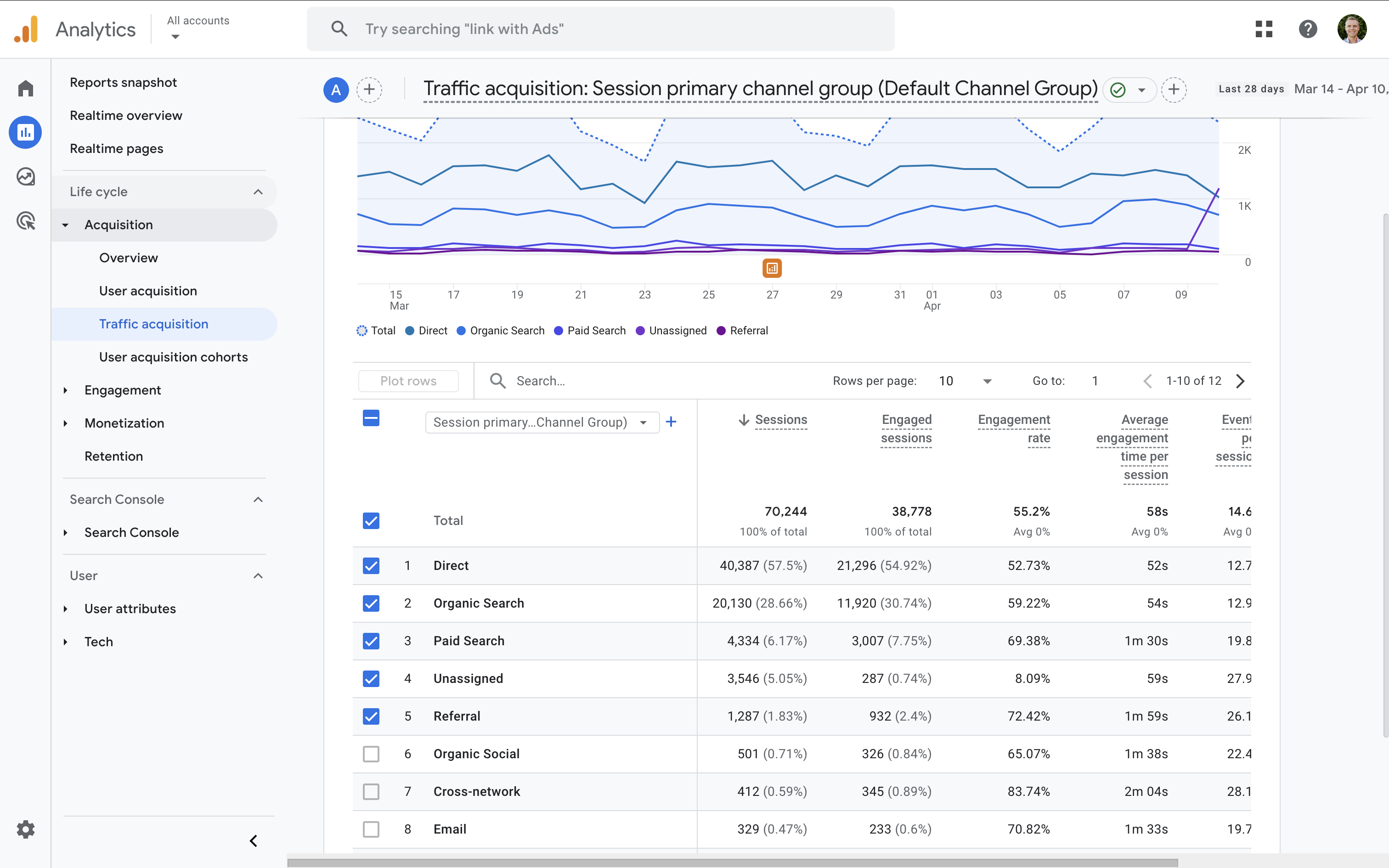
•Google Analytics 4 and Google Search Console offer free, first-party data on traffic, behavior, and search performance.
•Screaming Frog or Sitebulb crawl your site and export the structure into a spreadsheet you can analyze.
•Semrush, Ahrefs, or Ubersuggest provide deeper SEO data including rankings, backlinks, and competitor insights.
•Google Sheets or Airtable serve as the central workspace where inventory, metrics, and decisions all live.
For larger sites, dedicated content audit platforms can save time, but for most small and mid-sized businesses, the combination above is more than enough. Industry data suggests the average outsourced content audit costs between roughly 100 and 700 US dollars, which is a small investment relative to the long-term lift a strong audit can deliver.
Common Mistakes to Avoid
Even well-intentioned audits can fail. Watch out for these traps:
•Auditing without a clear goal, which produces a giant spreadsheet that no one knows how to act on.
•Focusing only on traffic and ignoring conversions, which leads to keeping high-traffic pages that never produce business value.
•Being afraid to delete content. Pruning weak pages often improves the performance of the rest of the site.
•Treating the audit as a one-time project. Content decays continuously, so a single audit is only a snapshot.
•Skipping post-audit measurement, which means you never learn which tactics actually worked.
•Changing the publication date without substantive edits, which can actually accelerate decay rather than reverse it.
How Often Should You Audit?
Frequency depends on the size of your site and how fast your industry moves. The table below offers a practical starting point based on site profile.
| Site Profile | Recommended Cadence | Audit Scope | Effort Level |
|---|---|---|---|
| Small site (under 100 pages) | Once per year | Full site | Low |
| Mid-size site (100 to 1,000 pages) | Quarterly mini plus annual deep dive | Top 20% quarterly, full annually | Medium |
| Enterprise (1,000+ pages) | Rolling monthly plus annual | Section-based rotation | High |
| Fast-moving industries (tech, finance, health) | Quarterly | Comprehensive | Medium to High |
A practical rhythm for most mid-sized businesses looks like this. Run a deep, full-site audit once per year. In between, run a focused quarterly review of the top 20 percent of pages that drive most of your traffic and revenue. This combination keeps your content portfolio healthy without overwhelming your team.
Final Thoughts
A content audit is not glamorous, but it is one of the highest-leverage activities a content team can run. It turns guesswork into evidence, surfaces hidden opportunities, removes dead weight, and ensures that every piece of content on your site is earning its place. The data and the case studies tell the same story. HubSpot grew organic traffic by 106 percent, Backlinko jumped 260 percent in two weeks, and Portent helped a client add 3.3 million sessions. None of them did it by writing more. They did it by auditing better.
If you have never run one before, start small. Choose a single content category, define one clear goal, and work through the six steps in this guide. The first audit will feel like the hardest part. Every audit after that will feel like the most natural part of your strategy.