Modern brands no longer live on a single website. Their content has to appear on mobile apps, smart displays, voice assistants, in-store kiosks, and channels that may not exist yet. Traditional content management systems were never built for this. A headless CMS solves the problem by separating content from presentation: content is created once and delivered everywhere through APIs. The global headless CMS market, valued at around $0.86 billion in 2024, is projected to exceed $3.8 billion by 2032 at roughly 20 to 22 percent annual growth. This guide covers what a headless CMS is, how it performs against traditional platforms, what it costs, what the code looks like, and how to decide whether it is right for your team.
What is a Headless CMS, Defined
A headless CMS is a content management system that stores and manages content in a backend repository and delivers it to any frontend website, mobile app, kiosk, or voice assistant through APIs. Unlike a traditional CMS, it has no built-in presentation layer (the "head"), which is why it's called headless.
Three working parts make the system function. A content repository stores articles, products, images, and structured data, organized by content models. A blog post model might have title, author, body, hero image, and tags. Content APIs (REST and GraphQL) expose that content to any frontend. An admin interface gives editors a clean place to create content without templates or layout tools.
How Does a Headless CMS Work
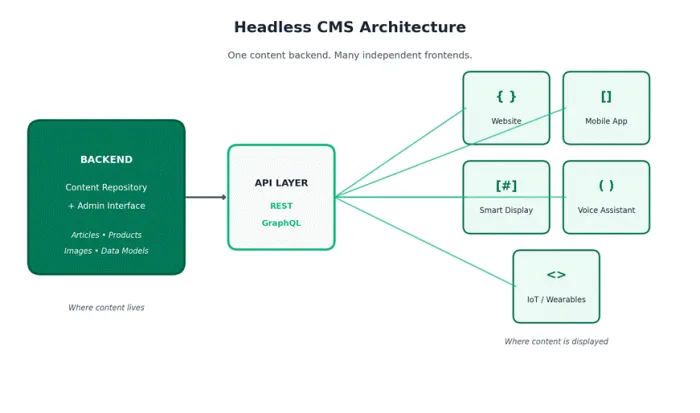
│ Figure 1. A headless CMS keeps content in a single backend and delivers it to any frontend through APIs.
Content lives in one backend. The API layer becomes the universal interface. Each frontend (website, mobile app, in-store display, future channel) asks the API for what it needs. Adding a new channel rarely requires touching the content itself: existing models flow to the new endpoint, and the work concentrates on the new frontend.
What Does Headless CMS Code Look Like?
At the implementation level, a headless CMS works by allowing the frontend to request structured content through an API and decide independently how that content should be displayed.
For example, a JavaScript application might retrieve an article from a CMS like this:
Example: Fetching content from a headless CMS
const response = await fetch(
  `${process.env.CMS_API_URL}/posts?slug=${slug}`,
  {
    headers: {
      Authorization: `Bearer ${process.env.CMS_DELIVERY_TOKEN}`
    }
  }
);

const data = await response.json();

return {
  title: data.title,
  body: data.body,
  heroImage: data.heroImage
};
In this example, the CMS stores and manages the article, while the frontend controls how the title, body, image, and other fields appear to the visitor.
The same structured content could also be delivered to a mobile application, digital display, ecommerce experience, voice interface, or another frontend without creating separate copies of the content.
The exact implementation varies by CMS. Platforms may expose content through REST APIs, GraphQL APIs, proprietary query languages, SDKs, or a combination of these methods.
Sensitive API credentials and management tokens should remain on trusted server infrastructure rather than being exposed directly in browser-side code.
Headless CMS vs. Traditional CMS: Key Differences
Traditional systems like WordPress and Drupal bundle content management and presentation into one platform. Headless splits them apart. The table below compares them across the dimensions that matter most.
| FEATURE | TRADITIONAL CMS | HEADLESS CMS |
|---|---|---|
| Architecture | Coupled: backend and frontend live together | Decoupled: backend only, APIs deliver content |
| Content Delivery | Primarily web pages | Any channel via APIs (web, app, IoT, voice) |
| Frontend Freedom | Limited to platform's themes and stack | Any framework (React, Vue, Next.js, Swift, etc.) |
| Editor Experience | Visual page editing with WYSIWYG | Structured content modeling |
| Setup Speed | Fast, out-of-the-box | Slower; custom frontend required |
| Security Surface | Larger (frontend + backend exposed) | Smaller (backend isolated from delivery) |
| Best For | Simple websites, blogs, small businesses | Omnichannel, complex digital products, enterprise |
| Examples | WordPress, Drupal, Joomla | Contentful, Sanity, Strapi |
│ Table 1. A side-by-side comparison of traditional and headless content management systems.
Neither approach wins universally. The right choice depends on the channels you serve and the team you have.
WordPress alone still powers roughly 43 percent of all websites (W3Techs, late 2025). A traditional CMS suits single web properties with small teams. Headless wins where flexibility, scale, and multi-channel reach matter, but introduces friction around live preview, in-context editing, and visual personalization.
Headless vs. Decoupled, Hybrid, and Composable CMS
Headless, decoupled, hybrid, and composable are closely related terms, but they describe different architectural ideas.
| Approach | What It Means | Frontend Flexibility | Editorial Experience | Best Fit |
|---|---|---|---|---|
| Traditional CMS | Content management and presentation are closely connected in one platform. | Lower | Usually strong out of the box | Standard websites and relatively simple publishing workflows |
| Headless CMS | Content is managed separately and delivered to independent frontends through APIs. | High | Depends on the platform and implementation | Omnichannel publishing, apps, modern web experiences |
| Decoupled CMS | Backend and frontend are separated, but the platform may still provide integrated presentation tools. | High | Often stronger than purely API-first systems | Teams wanting flexibility without fully separating editorial tooling |
| Hybrid Headless CMS | Combines API-based delivery with visual editing, previews, page building, or similar capabilities. | High | Strong | Marketing teams that need both developer flexibility and visual workflows |
| Composable Architecture | Multiple independent services are assembled to create the broader digital platform. | Very high | Depends on the selected components | Enterprises that need modularity across content, commerce, search, DAM, personalization, and other services |
A headless CMS separates content management from the presentation layer and exposes structured content for independent frontends.
A hybrid headless CMS keeps that architectural flexibility while adding tools such as visual page building, previews, reusable components, and in-context editing.
Composable architecture is broader than headless CMS. A composable stack can combine separate services for content, commerce, search, personalization, analytics, digital asset management, and other functions.
A headless CMS can therefore be one part of a composable architecture, but adopting a headless CMS does not automatically make an organization's entire technology stack composable.
Why Adoption Is Accelerating in 2026
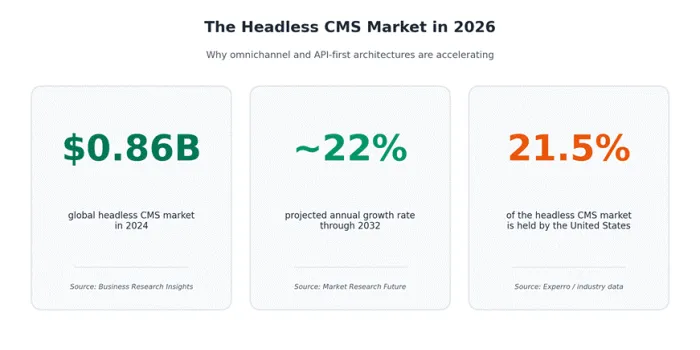
Five long-running shifts are driving adoption.
Omnichannel reach. 92 percent of organizations report headless improves cross-channel consistency, and 90 percent of non-headless organizations plan to evaluate within a year (Contentstack).
Performance and ROI. 70 percent of German companies saw performance gains post-migration; 61 percent of organizations report increased ROI after migrating (Storyblok, Contentstack).
AI-readiness and security. Structured content is far easier for generative search to consume, and the decoupled admin eliminates a major class of attack.
Performance Benchmarks
Performance is the most quantified benefit of going headless. The table below shows typical real-world ranges from HTTP Archive, vendor benchmarks, and case studies.
| METRIC | TYPICAL TRADITIONAL CMS | TYPICAL HEADLESS + MODERN FRONTEND |
|---|---|---|
| Largest Contentful Paint | 3.5 to 5.0+ seconds on mobile | Under 2.5 seconds with SSG and edge delivery |
| Time to First Byte | 300 to 800 ms | Often under 100 ms with edge caching |
| Core Web Vitals (pass rate) | ~45% mobile (WordPress, 2025) | Frequently above 90% with disciplined builds |
| JavaScript shipped per page | 1 to 2+ MB (plugin bloat) | Often under 300 KB with code splitting |
| Publisher API latency (P50) | Variable; coupled to web tier | 22 ms (Storyblok) to 54 ms (Payload Cloud) |
│ Table 2. Typical performance ranges for traditional CMS sites versus modern headless implementations.
HTTP Archive's 2025 Web Almanac puts WordPress at a 45 percent mobile Core Web Vitals pass rate, the lowest among major CMS platforms; well-built headless implementations frequently exceed 90 percent. Performance comes from implementation quality, not architecture alone.
Three Real-World Case Studies
Photobox: 50 percent reduction in page load time
Platform: Contentstack · Sector: E-commerce
Photobox, a large European photo-printing platform, migrated from a legacy CMS to Contentstack and reported page load time cut by roughly 50 percent, alongside a substantially faster path from product creation to live site.
Regional outdoor-gear retailer: 18 percent conversion lift in 8 weeks
Platform: headless CMS + Next.js · Source: LastRev case study, 2026
A regional outdoor-gear retailer with 800 SKUs migrated from WordPress and WooCommerce to a Next.js headless stack. Largest Contentful Paint fell from 4.9 seconds to under 2.5 seconds, conversion rate rose 18 percent, and merchandising product entry time dropped from 25 minutes to 8 minutes.
Nike and ASICS: enterprise-scale cost and velocity gains
Platforms: JAMstack / Contentstack · Sector: Apparel and footwear
Nike's JAMstack overhaul is widely reported to have cut server costs by 40 percent and improved page speed by roughly 60 percent. ASICS Digital, after migrating to Contentstack, reported reduced operational costs and accelerated content deployment. At enterprise scale the headline win is rarely a single conversion lift; it is the compounding effect of lower infrastructure cost, faster releases, and the ability to serve new channels without rebuilding the stack.
The Real-World Landscape
The clearest way to see where headless belongs is to look at which industries adopt it first and which platforms they end up on.
| INDUSTRY | COMMON USE CASE | WHY HEADLESS WINS |
|---|---|---|
| E-commerce | Storefronts across web, mobile, in-store kiosks | Single product catalog feeds every touchpoint |
| Media & Publishing | Articles across web, apps, newsletters, podcasts | One content source, many distribution channels |
| SaaS / Technology | Marketing site, product docs, in-app help | Reuse content blocks between marketing and product |
| Retail (omnichannel) | Web, mobile apps, smart displays, kiosks | Unified content across physical and digital spaces |
| Enterprise | Multi-brand, multi-region sites with shared content | Centralized governance with localized delivery |
| Mobile-first products | Content-driven mobile apps and PWAs | API-first design fits native app development naturally |
│ Table 3. Common headless CMS use cases by industry and why each benefits from the architecture.
Five platforms stand out for breadth of adoption and tooling maturity.
| PLATFORM | HOSTING MODEL | BEST FOR | NOTABLE STRENGTHS |
|---|---|---|---|
| Contentful | SaaS | Enterprise, omnichannel brands | Mature ecosystem, REST and GraphQL APIs |
| Sanity | SaaS | Teams needing custom editor experiences | Customizable Studio, real-time collaboration |
| Strapi | Open-source or cloud | Teams wanting full control | Self-hostable, flexible content modeling |
| Contentstack | SaaS | Large enterprises | MACH-certified, strong workflow tooling |
| Storyblok | SaaS | Content teams needing visual editing | Visual editor on a headless backend |
│ Table 4. The most widely adopted headless CMS platforms in 2026.
A Pricing Snapshot
Pricing in the headless category changes faster than feature sets. The table captures tier structure as of mid-2026.
| PLATFORM | FREE TIER | MID TIER (TYPICAL ENTRY) | ENTERPRISE |
|---|---|---|---|
| Contentful | Removed in Q2 2025 | Lite / Basic plans start around $300/month | Custom pricing |
| Sanity | Generous free tier still available | Growth: usage-based, scales gradually | Enterprise: custom |
| Strapi | Open-source: free if self-hosted | Strapi Cloud Essential ~$15/month | Cloud Team / Enterprise: custom |
| Storyblok | Free for single user, limited spaces | Entry plan ~$99/month | Premium / Enterprise: custom |
| Contentstack | No public free tier | Custom quote (enterprise-focused) | Enterprise: custom |
| Hygraph | Hobby tier (limited reads) | Growth plan ~$299/month | Enterprise: custom |
| Prismic | Free for small projects | Starter / Small ~$15 to $100/month | Platinum / Enterprise: custom |
│ Table 5. Typical pricing structure across leading headless CMS platforms. Verify current pricing with each vendor.
The most consequential shift of the past two years was Contentful removing its free community tier in Q2 2025, pushing many evaluations toward Sanity, Strapi, and Payload. Total cost rarely ends at platform fees; budget for the frontend build, CDN, image transformation, and ongoing developer time.
The Integration Ecosystem
A headless CMS is rarely the only system in the stack. It connects to marketing automation (HubSpot, Marketo, Salesforce Marketing Cloud) via API or webhook, and pairs naturally with commerce platforms like Shopify Hydrogen, BigCommerce, and Commerce Layer. Analytics (Segment, Mixpanel, GA4) and personalization tools (Ninetailed, Optimizely) sit between the CMS and the frontend. DAM systems like Cloudinary, Bynder, and Mux handle images and video at the edge, while Algolia and Typesense add search, and Smartling or Phrase handle localization. All consume content via the same APIs the frontends use, making them straightforward to layer on without rearchitecting.
A Five-Step Path to Adoption
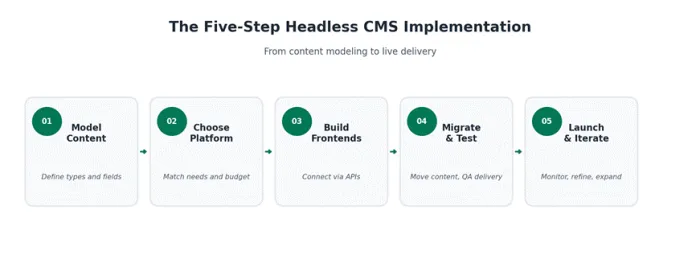
│ Figure 3. The five-step journey from content modeling to a live headless CMS deployment.
01 Model your content first. Audit existing content, then define the types and fields you need. Rushing this is the single most common reason headless projects underperform.
02 Choose the right platform. Evaluate hosting, pricing, API quality, editor experience, and integrations. Run a proof of concept with two or three finalists before committing.
03 Build the frontend layer. Pick a framework matching your team's skills. React with Next.js dominates the modern stack; Vue, Svelte, and Astro all integrate cleanly.
04 Migrate and test thoroughly. Preserve URLs, redirects, and metadata to protect SEO. Test every channel before launch.
05 Launch, then iterate. Monitor performance, rankings, and editor adoption. Iterate as new channels emerge.
Migration Deep-Dive: Timelines, SEO, and Rollback
Three operational details consistently determine whether the migration succeeds: realistic timelines, disciplined SEO preservation, and a safety net to roll back if needed.
Timelines and Resources
Small marketing sites (under 50 pages) typically take 4 to 8 weeks. Mid-sized sites take 3 to 6 months. Enterprise migrations with multiple integrations or localization often run 9 to 12 months. A realistic team includes a technical lead, one or two frontend developers, a backend or integration engineer, a content strategist, an editor representative, and a project manager. Cost ranges span from roughly $10,000 for a small marketing site to $30,000 to $80,000-plus for enterprise builds, before design refresh scope.
SEO Preservation Checklist
The largest risk in any CMS migration is losing organic traffic. A 2024 study of 892 domain migrations found organic traffic took an average of 523 days to return to pre-migration levels. The checklist below prevents that outcome.
☐ Crawl the existing site and export every URL with its current ranking and metadata.
☐ Map every old URL to a new URL with a permanent (301) redirect. Wildcard redirects to the homepage are the biggest cause of post-migration traffic loss.
☐ Preserve title tags, meta descriptions, canonical tags, and structured data.
☐ Regenerate XML sitemaps and submit them through Search Console after launch.
☐ Audit internal links so they point to new URLs directly.
☐ Monitor Core Web Vitals for at least 90 days post-launch.
Rollback Strategy
Keep the legacy CMS in read-only mode for at least 30 days after cutover, maintain DNS-level switching so traffic can be reverted within minutes, and snapshot the database before any irreversible step. The rollback path is rarely used, but its existence is what makes the cutover decision survivable.
Should You Go Headless? A Decision Framework
The flowchart below distills the decision into four questions. Most teams find their answer in two or three steps.
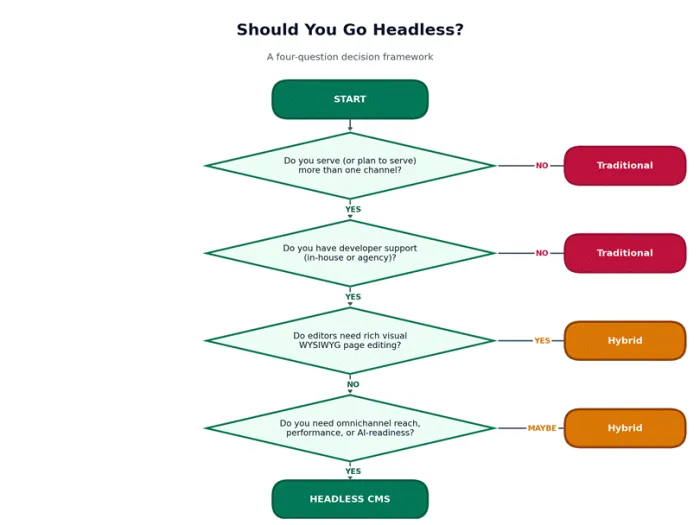
Teams that answer yes to channel diversity, have developer support, do not need rich WYSIWYG, and need omnichannel reach or performance gains are almost certainly right to go headless. If WYSIWYG is essential, a hybrid platform like Storyblok or a hybrid offering from Contentful is often the better compromise.
When Headless Is NOT the Right Fit
A traditional CMS is usually the better choice when the site is a single web property, when the team has no in-house developer support, when the existing site loads in under three seconds and the team is happy, or when the budget for a frontend rebuild does not exist. WordPress with strong hosting, good caching, and image optimization can deliver 80 percent of the performance benefit of a full migration at roughly 20 percent of the cost. The honest test is not 'is headless better in the abstract?' but 'is headless enough better, for our specific situation, to justify the investment?' For many small and mid-sized sites, the honest answer is no.
Voices from the Field
Three perspectives recur in post-migration retrospectives.
For developers, the appeal is the freedom to use modern frameworks, the predictability of structured content, and the elimination of plugin maintenance.
Our old CMS platforms were extremely frustrating. It took too much time to ship new products to the site. The in-house solution was unstable. We needed to have part of the site move to a framework that was far easier to manage from both a technical and content editing perspective.
— Darren Beukes, Software Architect, Photobox (Contentstack case study)
For content editors, the experience is mixed: real-time collaboration and structured fields are gains, but the WYSIWYG many grew up with is lost. Successful rollouts pair the platform with hands-on training.
For CTOs, headless is fundamentally a bet on long-term flexibility, with the strongest case being the compounding effect of faster channel launches, lower infrastructure cost, and a content layer ready for AI-driven discovery.
Common Myths and What's Actually True
The table below corrects the assumptions that come up most often in evaluation conversations.
| COMMON MYTH | REALITY |
|---|---|
| Headless CMS migrations are quick. | Mid-sized projects take three to six months; enterprise migrations often run nine to twelve. |
| You can't run WordPress as a headless CMS. | You can, via the REST API or WPGraphQL, but you lose the visual editing and plugin ecosystem that make WordPress easy. |
| Headless works for any team. | Only for teams with developer support. Without that, a traditional CMS or website builder will serve you better. |
| Headless hurts your SEO. | The opposite, with proper implementation. The catch is that you must handle sitemaps, redirects, structured data, and metadata yourself. |
| Headless and hybrid CMS are the same thing. | A headless CMS has no native frontend. A hybrid CMS combines API-first delivery with visual editing tools as a middle ground. |
| Headless can't handle e-commerce. | Modern stacks pair a headless CMS with a headless commerce platform like Shopify Hydrogen, BigCommerce, or Commerce Layer. |
│ Table 6. The most common headless CMS misconceptions and the realities behind them.
The Verdict
A headless CMS is a strategic choice, not a default upgrade. It rewards organizations that need omnichannel reach, modern performance, strong security, and the flexibility to adapt to new channels and AI-driven discovery. It penalizes organizations that simply want a quick website without a development team. Model content thoughtfully, choose a platform that fits the team rather than the feature list, plan migration redirects meticulously, and invest in the editor experience from day one. Done well, a headless CMS becomes the durable content backbone that keeps a brand visible, fast, and ready for whatever comes next.