

About SEOptimer's AI Scrambler, and when to reach for an alternative
This guide is about SEOptimer's AI Scrambler and the tools worth using when it is not enough. The Scrambler is a free tool on SEOptimer's site: paste in a paragraph or an essay, choose from about a dozen languages, and you get an instantly reworded version that looks meaningfully different while keeping your meaning. It sits alongside a wider set of free rewriting tools there, and for a fast, no-cost rewrite it does the job.
It is also deliberately simple. There is one box and one button, no dial for how far the rewrite goes, no built-in check for how an AI detector might score the result, and nothing that plugs into Word or Google Docs. Once you want more control, a proper humanizing pass, or a detector preview, a dedicated tool earns its place. The five below cover those needs, and one caveat holds for all of them: no tool reliably beats every AI detector, so always re-read the output before you use it.
How these picks were judged
Every tool here was weighed against the same short checklist. No affiliate relationships shaped the ranking, and nothing was cherry-picked to look good.
• Rewrite quality and meaning preservation. Does the output read naturally without quietly changing what you meant?
• Control. Can you steer tone, length, and how aggressively the text is changed, or is it one-size-fits-all?
• Breadth versus focus. Is it a sharp single-purpose tool or a broad suite, and which do you actually need?
• Where it works. Browser, extensions, Word, Google Docs, desktop, mobile.
• Price and value. What the free tier really gives you, and whether the paid plan is fair.
• Transparency. Does the tool make honest claims, or lean on promises it cannot keep?
The five tools at a glance
Skim this first, then drop into the sections that matter to you.
| Tool | Best at | Free tier | Starts at | Main watch-out |
| QuillBot | Precise paraphrasing with mode and slider control | Yes (125-word cap, 2 modes) | $8.33/mo annual ($19.95 monthly) | Meaning can drift on aggressive settings |
| Wordtune | Fast sentence rewrites and tone shifts inline | Yes (about 10 rewrites/day) | About $6.99/mo (varies) | Sentence-level only; daily caps |
| Undetectable AI | Humanizing tone with a detector preview built in | 250-word trial | $9.99/mo (10k words) | Detection-bypass results are inconsistent |
| Monica AI | An all-in-one, multi-model AI sidebar | Yes (daily credits) | About $9.90/mo (Pro) | Rewrite is one feature among many; credit system |
| SafeWrite AI | Personalized humanizing plus a detector dashboard | Free trial (limited credits) | Free trial, then tiered | Younger tool; default runs feel generic |
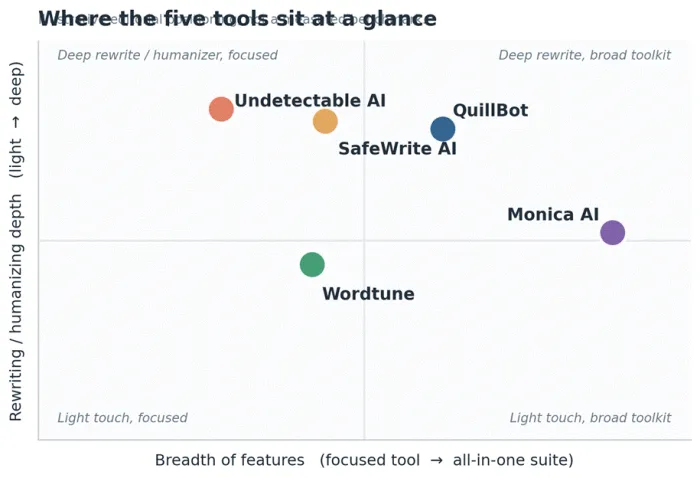
Figure 1. A rough map of how the five tools trade breadth for rewriting depth. Editorial view, not a measured score.
QuillBot: the paraphrasing workhorse
Quick verdict: The most controllable paraphraser in this price range, and a fair default for students, non-native speakers, and anyone repurposing text at volume.
QuillBot started life in 2017 as a single paraphrasing tool and grew into a full writing suite used by tens of millions of people. The core is still the paraphraser, and it remains the reason to show up. You get nine rewriting modes (Standard, Fluency, Formal, Academic, Simple, Creative, Shorten, Expand, and Custom), a Synonym Slider that dials how much the text changes, and a Freeze Words option that locks terms you do not want touched. That combination gives you more say over the output than almost anything else here.
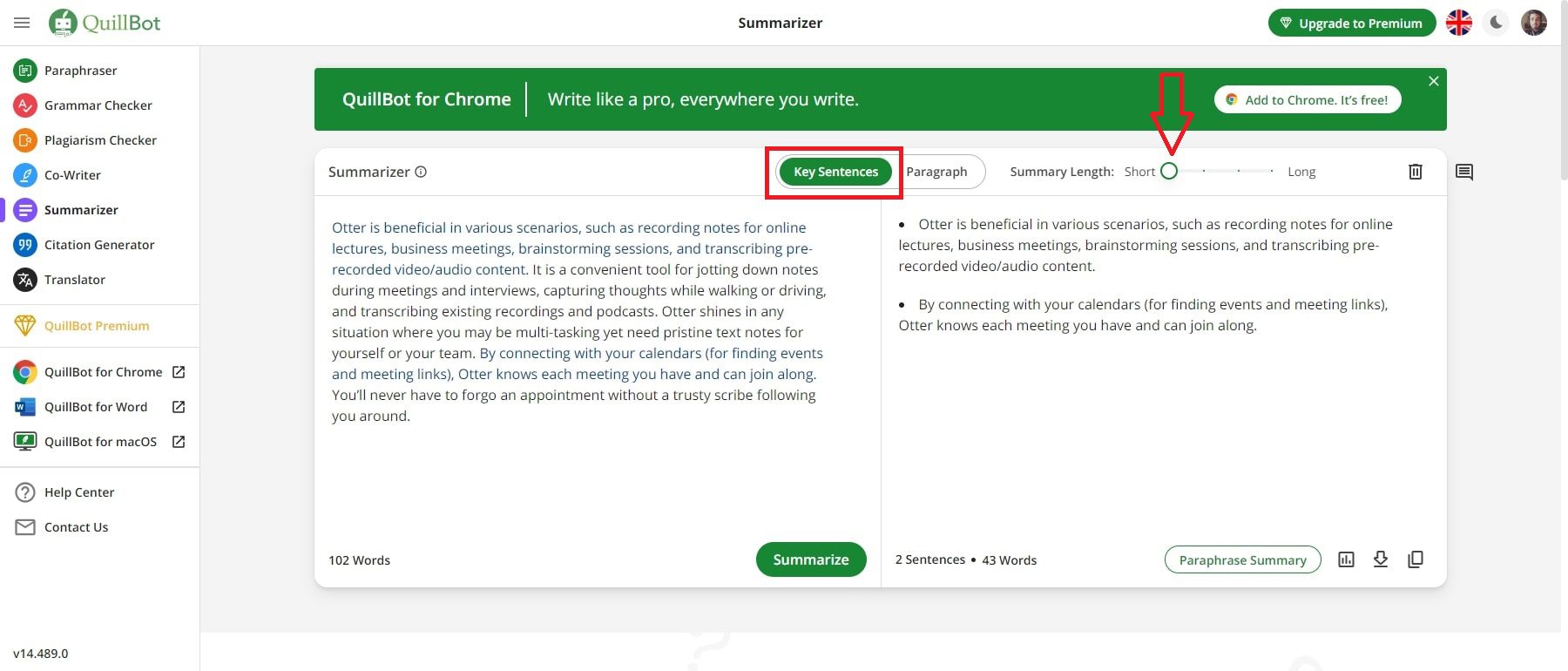
Around the paraphraser sit a grammar checker, summarizer, translator, citation generator, plagiarism checker, an AI detector, and a newer AI humanizer mode. The suite is broad, but be honest with yourself about which parts you trust. Independent reviewers consistently rate the paraphraser and grammar checker highly, while flagging the plagiarism and AI-detection add-ons as the weaker links.
Key features
• Nine paraphrasing modes plus a custom mode, so you can match academic, formal, simple, or creative registers.
• Synonym Slider and Freeze Words for controlling how far the rewrite strays and protecting names or jargon.
• Summarizer, translator, and citation tools that cover most of a student's writing workflow in one place.
• Works almost everywhere: web app, Chrome, Edge and Safari extensions, a Microsoft Word add-in, a Google Docs widget, macOS and Windows apps, and iOS and Android keyboards.
Strengths and limitations
| Strengths | Limitations |
| + Best paraphrasing control in its class, with modes plus a slider. | − Meaning can drift on the more aggressive synonym settings, so re-read every output. |
| + Generous free tier: no daily limit on paraphrases and two full modes. | − The free 125-word cap per pass is limiting for full documents. |
| + Broad suite at roughly $8.33 per month on the annual plan, cheaper than Grammarly. | − Plagiarism and AI-detection add-ons are inconsistent and should not be your only check. |
| + Excellent for non-native English writers and quick tone or length changes. | − The annual price roughly doubled in 2025, narrowing its value edge. |
| + Runs on more platforms than any other tool in this list. | − Everything runs server-side, so there is no offline mode. |
Pricing and who it suits
Free forever for short paraphrases and grammar checks. Premium runs about $8.33 per month billed annually ($99.95 per year) or $19.95 month to month, and unlocks unlimited length, all modes, and a larger summarizer. There is a 3-day money-back window and a 25 percent student discount. Best for students, researchers, non-native speakers, and content teams who rephrase a lot and want real control.
Pro tip
Keep the Synonym Slider low and use Freeze Words to lock names, citations, and technical terms before you paraphrase. You will keep the meaning intact and avoid the awkward synonym swaps that make rewritten text sound off. Then read it once, out loud if you can.
Wordtune: quick, clean sentence rewrites
Quick verdict: The friction-free choice for polishing emails, messages, and single sentences right where you are typing. Not a document rewriter.
Wordtune, from AI21 Labs, is built around one job done well: take a sentence you have already written and offer clearer, more natural versions of it. Highlight text and it suggests rewrites, shifts the tone between casual and formal, and shortens or expands on demand. There is a summarizer for long reads and a set of co-writer add-ins that can drop in analogies, facts, or counterpoints, but the heart of the tool is real-time sentence refinement.
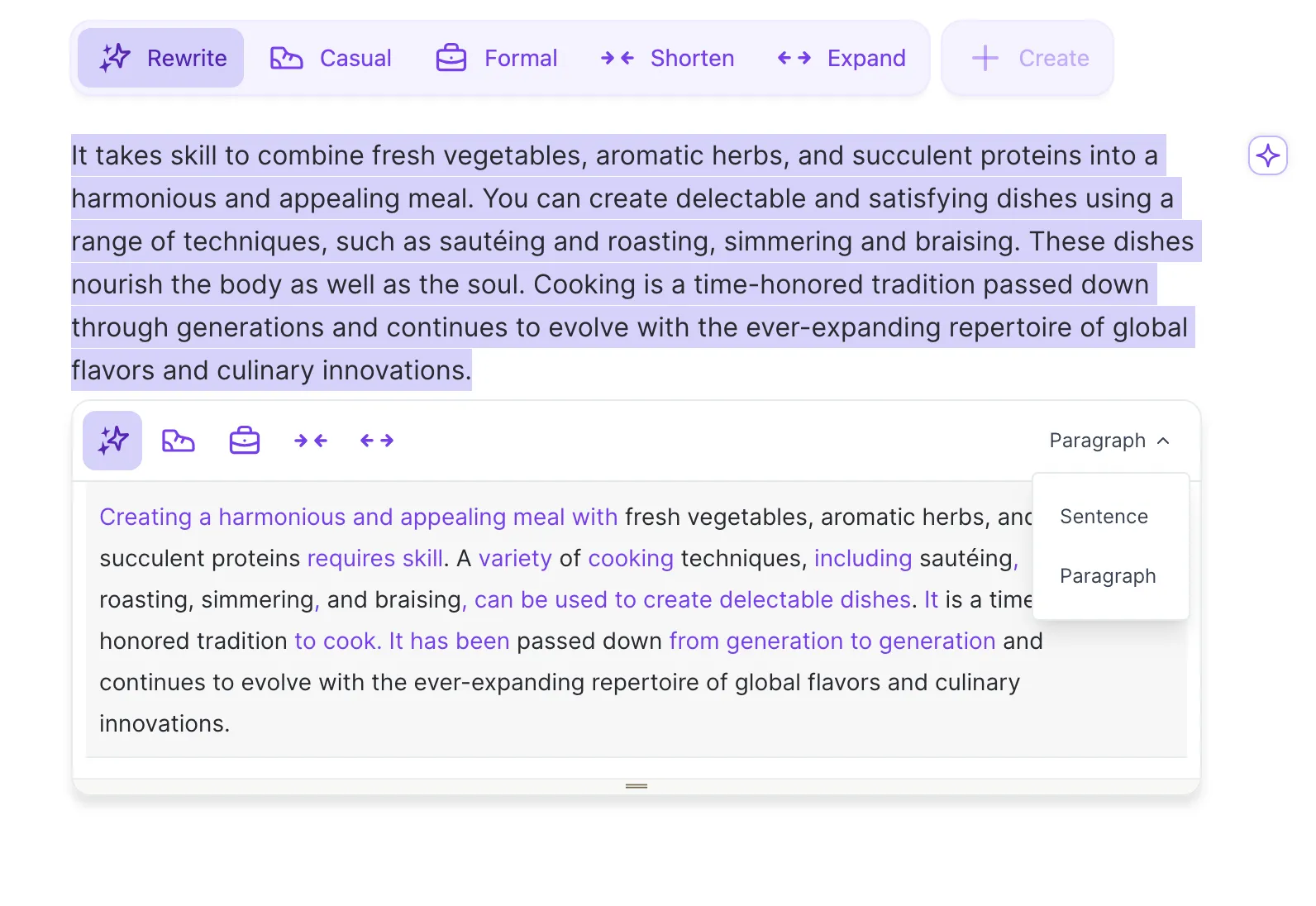
What Wordtune does not do is restructure whole paragraphs or generate content from scratch. Reviewers who push it toward document-level rewriting hit its ceiling quickly. Used for its actual purpose, cleaning up phrasing as you work, it is fast and pleasant, and it shines for professionals firing off emails and for non-native speakers who want their writing to read smoothly.
Key features
• Multiple rewrite suggestions for any highlighted sentence, so you can pick the phrasing that fits.
• Tone control that swings between casual and formal without a full rewrite.
• Shorten and expand to trim bloat or add supporting detail to thin drafts.
• Inline everywhere: a browser extension that works in Gmail, Google Docs, LinkedIn and more, plus a Microsoft Word add-in.
Strengths and limitations
| Strengths | Limitations |
| + Genuinely good, fast sentence rewrites and tone shifts. | − Sentence-level only; it cannot reorganize a full section or document. |
| + Lives inline in your browser and Word, so there is no copy-paste dance. | − Free plan caps at roughly 10 rewrites a day, which many users blow through fast. |
| + Great for email, customer replies, and non-native English polishing. | − Output can drift into safe, slightly generic phrasing that needs a manual tweak. |
| + Simple enough that there is almost no learning curve. | − No free trial of premium, and reviewers note billing and cancellation friction. |
Pricing and who it suits
A free plan gives you about 10 rewrites a day. Paid plans start around $6.99 per month for Advanced, with an unlimited tier near $9.99 and team pricing per seat. Note that figures vary by region and promotion, and some listings quote up to about $20 per month, so check the live pricing page. Best for professionals who write email and short documents all day and non-native speakers who want quick fluency help.
Pro tip
Highlight the sentence you want to fix plus the sentence just before it. Giving Wordtune that little bit of context produces rewrites that flow with the surrounding text instead of standing out. If the first set of suggestions feels flat, re-roll for a fresh batch.
Undetectable AI: humanizer with a built-in detector
Quick verdict: A capable, established humanizer that pairs rewriting with a detector preview. Useful for readability, but treat its 'undetectable' promise with healthy skepticism.
Undetectable AI launched in 2023 and effectively named the humanizer category. The workflow is simple: paste AI-generated text, pick a readability level and a purpose (general, essay, email, or marketing), choose how far to push toward 'more human' versus 'more readable', and get a rewrite. A built-in AI detector shows an estimated risk score before and after, which saves you from opening a separate tab to check.

Here is the honest part. The name sets an expectation the tool cannot fully meet. Independent tests show wildly mixed results: some outputs slip past ZeroGPT or Writer while the same text still gets flagged by Turnitin, GPTZero, or Originality.ai. Detectors update constantly, so any bypass claim is a moving target. Where Undetectable AI clearly helps is readability, taking stiff, over-even AI prose and loosening it up. On longer passages, watch for meaning drift where a rephrase quietly changes your point.
Key features
• Content-type modes (essay, email, marketing, general) that tune the rewrite for the job.
• Readability and 'more human' controls so you can balance a natural read against a lower detector score.
• Built-in detector preview that estimates AI-likelihood before and after in one place.
• Money-back guarantee if the output is flagged as AI, per the vendor's stated policy.
Strengths and limitations
| Strengths | Limitations |
| + Established, fast, and clean to use, with a sensible mode selector. | − 'Undetectable' is marketing, not a guarantee; results vary a lot by detector. |
| + The bundled detector preview removes a step from the workflow. | − Meaning can drift on longer texts of roughly 400 words or more. |
| + Good at making short AI text read more naturally. | − The pop-up output flow feels dated to some users. |
| + Refund policy if flagged gives some peace of mind. | − Meaningful use needs a paid plan; the free trial is only 250 words. |
Pricing and who it suits
A 250-word free trial, then a volume ladder starting near $9.99 per month for 10,000 words (annual billing can be cheaper), scaling up for heavier use. Best for creators and teams who want a humanizer plus a detector check in one place and who understand it will not reliably clear institutional checks.
Pro tip
Optimize for how the text reads, not for chasing a perfect detector score. Scores shift as detectors change, but clear, natural writing lasts. Run the result through a detector you trust separately, and never lean on any humanizer to pass work you are required to write yourself.
Monica AI: the all-in-one AI sidebar
Quick verdict: The pick when you want rewriting as one of many tools, inside a single multi-model assistant that follows you across the web.
Monica is less a scrambler and more a Swiss-army AI assistant that happens to include a strong rewrite tool. It lives as a browser sidebar and extension, with desktop and mobile apps too, and gives you access to several frontier models in one interface. Highlight text anywhere and a smart toolbar lets you rephrase, translate, summarize, shorten, or expand it on the spot, without leaving the page you are on.

Beyond rewriting, Monica summarizes web pages, PDFs, and YouTube videos, drafts and answers emails, generates images, and offers a large template library. That breadth is the appeal for knowledge workers who hate switching tabs. The trade-off is that paraphrasing is one feature among dozens rather than a specialist engine, and the credit-based pricing can feel opaque because different models burn credits at different rates.
Key features
• Contextual smart toolbar to rephrase, translate, or summarize highlighted text on any website.
• Multiple AI models in one place so you can match the model to the task.
• Web, PDF, and video summarizing plus email drafting and a big template library.
• Broad reach: Chrome and Edge extensions, Windows and macOS apps, and iOS and Android apps.
Strengths and limitations
| Strengths | Limitations |
| + Enormous breadth in one subscription, which cuts down tool sprawl. | − Rewriting is a generalist feature, not a dedicated paraphrasing engine. |
| + The sidebar works on any page, so rewriting is always a click away. | − Credit-based usage can feel opaque across different models. |
| + Access to several top models without juggling separate accounts. | − The free tier is limited by daily credits. |
| + Strong value: the Pro plan sits well below the category average. | − Marketing leans on 'bypass detection' claims that deserve caution. |
Pricing and who it suits
A free tier with daily credits, then paid plans starting around $9.90 per month for Pro, with higher credit tiers above that. Best for knowledge workers, researchers, and students who live in the browser and want one versatile assistant where rewriting is part of a much bigger toolkit.
Pro tip
Lean on the highlight-and-act toolbar rather than opening a separate window; it is where Monica saves the most time. Pick a capable model for nuanced rewrites and a lighter one for quick jobs, and keep an eye on credit use so you are not surprised at month's end.
SafeWrite AI: a personalized humanizer plus detector hub
Quick verdict: A newer, two-in-one tool that learns your writing style and bundles a multi-detector dashboard. Promising, but best treated as a refinement step rather than a magic button.
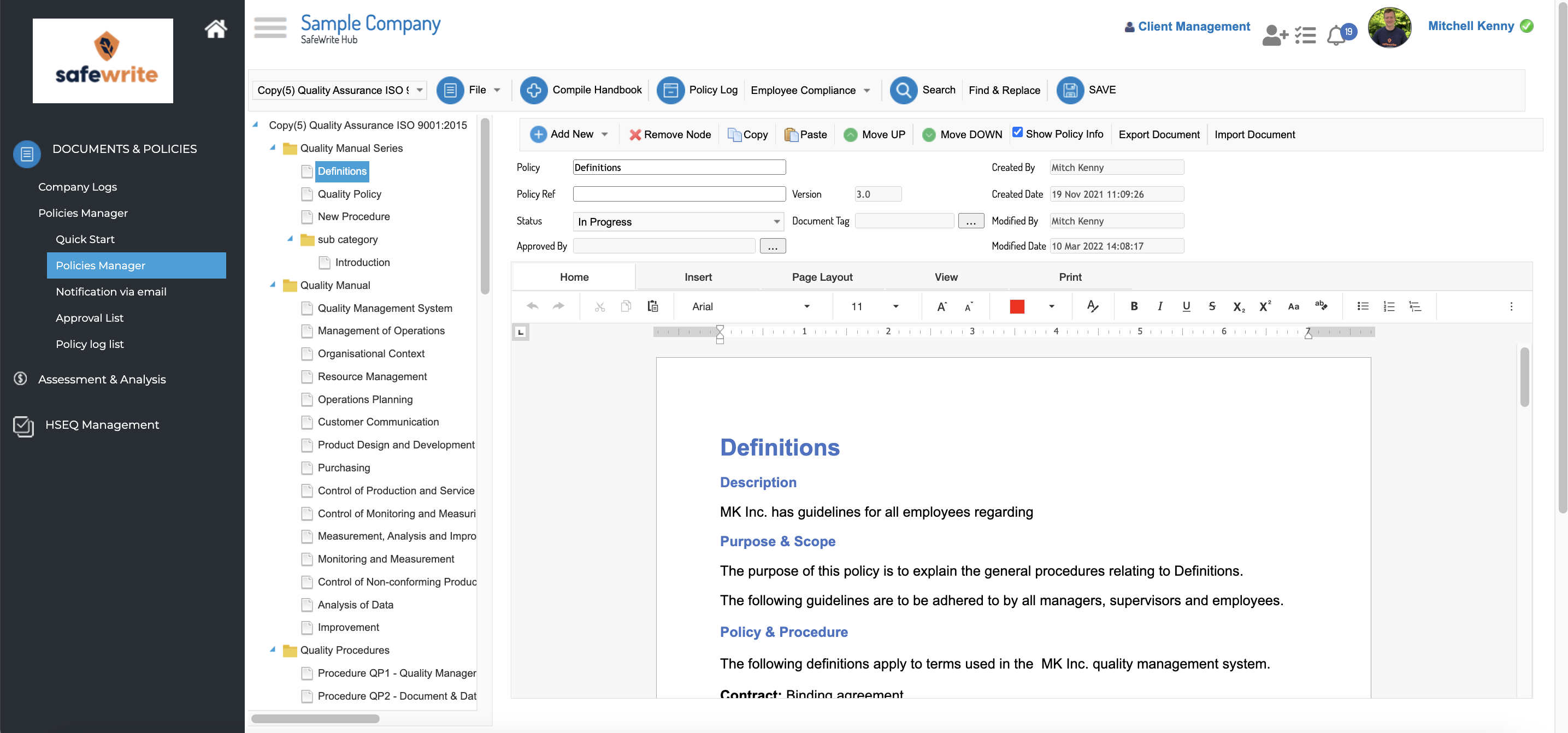
SafeWrite AI takes a different angle from the generic rewriters. Its headline feature is a personalized humanizer that builds a private model from your own writing, aiming to keep your voice instead of flattening everything into the same neutral tone. The second half is a detector aggregator: paste your text once and get results from Turnitin, GPTZero, Copyleaks, ZeroGPT, and others in a single dashboard, which spares you from paying for and tab-hopping between several checkers.
Independent reviews land on a measured take. When you invest in the personalization step, outputs preserve meaning reasonably well and read more like an edited human draft. Skip that setup and run the default model, and the results feel generic, like most spinners. And as with every tool in this category, no humanizer guarantees a clean pass across every detector, because the detectors keep changing. It is a young platform, so its pricing is less transparent and its track record is shorter than the others here.
Key features
• Personalized humanizer that learns your cadence and word choices to preserve your voice.
• All-in-one detector dashboard running several major detectors on one paste, with downloadable reports.
• Change highlighting so you can see exactly what was rewritten and review it line by line.
• Privacy posture including encryption and automatic deletion of content after processing, per the vendor.
Strengths and limitations
| Strengths | Limitations |
| + Personalization can keep your voice better than generic spinners. | − Default, non-personalized runs feel generic. |
| + One dashboard for many detectors saves real time and subscription cost. | − No humanizer can promise a clean pass across every detector. |
| + Highlights every change, which makes reviewing fast. | − Younger and less proven than the other four tools. |
| + Decent meaning preservation in independent tests when set up well. | − Pricing is less transparent and still requires human editing after. |
Pricing and who it suits
A free trial with limited credits, then subscription tiers that scale with volume; the entry price is not clearly published, so check current plans directly. Best for writers who already use AI heavily and want a voice-preserving humanizer plus a one-stop detector view, used as a careful editing pass rather than a one-click fix.
Pro tip
Do the personalization setup before you judge it; that is the whole point of the tool. Treat the humanized draft as a first pass, then edit it by hand to smooth any awkward spots, and verify with a detector you trust on its own. One tool's dashboard is convenient, but a second opinion never hurts.
Price, side by side
A quick visual on entry-level cost. Remember these are ballpark figures that move with billing cycle, region, and promotions.
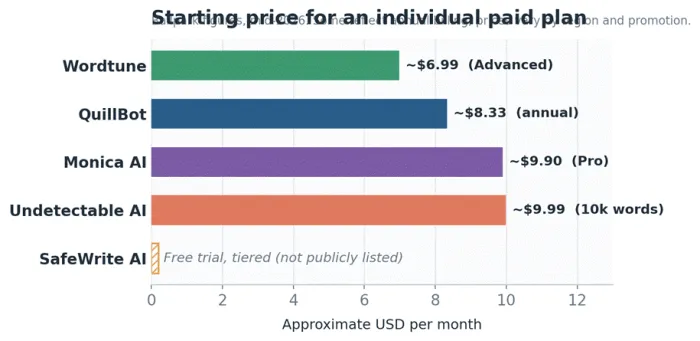
Figure 2. Approximate starting price for an individual paid plan. SafeWrite AI is trial-based with tiered pricing that is not publicly listed.
Match the tool to the job
Most people do not need every tool. This table maps a common goal to the pick that tends to fit best.
| If you want to... | Best pick | Why it fits |
| Paraphrase with fine control over tone and how much changes | QuillBot | Nine modes, a synonym slider, and word-freezing give you the most steering. |
| Polish emails and messages as you type | Wordtune | Fast sentence rewrites and tone shifts live right inside your browser and Word. |
| Loosen an AI tone and sanity-check it in one place | Undetectable AI | Humanizer plus a built-in detector preview and content-type modes. |
| Handle many tasks from one AI sidebar | Monica AI | Rewrite sits alongside summarizing, translation, and multi-model chat. |
| Humanize in your own voice with a detector dashboard | SafeWrite AI | A personalized model plus aggregated reports from several detectors. |
| Rewrite something quickly for free | QuillBot or Wordtune | Both have usable free tiers; just mind the word and daily caps. |
| Polish non-native English writing | QuillBot or Wordtune | Both are strong on fluency and natural phrasing at the sentence level. |
| Summarize long documents while you rewrite | QuillBot or Monica AI | Both bundle capable summarizers next to their rewriting tools. |
Cross-platform availability
Where each tool actually runs. In this table, 'Web' means you use it in a browser rather than a dedicated app for that platform.
| Tool | Web | Extension | MS Word | Google Docs | Desktop | Mobile |
| QuillBot | Yes | Chrome, Edge, Safari | Add-in | Via extension | Win and macOS | iOS and Android |
| Wordtune | Yes | Chrome, Edge | Add-in | Via extension | Web | iOS app / Web |
| Undetectable AI | Yes | Chrome | Web | Web | Web | Web |
| Monica AI | Yes | Chrome, Edge | Web | Via extension | Win and macOS | iOS and Android |
| SafeWrite AI | Yes | Listed | Web | Web | Web | Web |
Availability reflects each vendor's public listings in mid-2026 and can change. Confirm current platforms on the official site before you commit.
How to choose without overthinking it
• Pick QuillBot if paraphrasing is the main event and you want control plus wide device support.
• Pick Wordtune if you mostly rewrite sentences and emails and want it inline with zero friction.
• Pick Undetectable AI if you want humanizing plus a detector preview, and you accept its limits.
• Pick Monica AI if you want one assistant for many jobs and rewriting is just part of it.
• Pick SafeWrite AI if voice-preserving humanizing and a detector dashboard in one tool appeal to you.
Still unsure? Start on a free tier. All five let you test the core rewrite before paying, and an afternoon with your own text will tell you more than any review, including this one.
Using these tools responsibly
This category sits close to a line, so it is worth being direct. Rewriting and humanizing tools are helpful and legitimate for plenty of everyday work. They are also marketed, loudly, as a way to disguise AI writing and slip past detectors. Those are not the same thing, and conflating them is where people get into trouble.
Where these tools are a fair use
• Rewriting your own ideas for clarity, flow, or a different tone.
• Editing and tightening your own drafts, or refreshing content you already own.
• Helping non-native English writers produce smoother, more natural prose.
• Summarizing long material or turning rough notes into readable paragraphs.
• Learning how different phrasing and structure change meaning.
Where they are not
• Passing off AI-generated or someone else's work as your own original writing.
• Trying to defeat academic integrity checks on assessed work.
• Misrepresenting authorship to a client, publisher, or employer.
Two facts are worth internalizing. First, detection and humanizing are a cat-and-mouse game. No tool reliably clears every detector, results swing from one checker to the next, and detectors update on their own schedule, so today's clean pass can be tomorrow's flag. Second, AI detectors are themselves imperfect and produce false positives, which is exactly why human writers sometimes get flagged for work they wrote themselves.
The practical guidance is simple. Most schools and many employers now have explicit policies covering AI paraphrasing and humanizing tools, and the tool will not warn you when you cross a line. Check the rules that apply to you, disclose AI assistance where it is expected, and treat these products as aids to your own thinking rather than a substitute for it.
Final thoughts
There is no single best alternative to SEOptimer's AI Scrambler, only the right fit for what you are doing. For controllable paraphrasing across every device, QuillBot is the safe default. For fast inline polish, Wordtune. For humanizing with a detector check attached, Undetectable AI. For one assistant that does a bit of everything, Monica AI. And for a voice-aware humanizer with a detector dashboard, SafeWrite AI.
Whatever you choose, keep two habits. Read every rewrite before you use it, because the meaning is your responsibility, not the tool's. And stay honest about the difference between improving your own writing and disguising something as your own. Get those right and any of these tools becomes a genuine help rather than a shortcut that backfires.





