

If you've landed here, you've probably already tried GPT Scrambler. You pasted in a paragraph of ChatGPT output, watched it get reshuffled into something that reads a little more like a person wrote it, and thought: “Okay, but is there something better?”
That's a fair question, and it's the one I want to answer honestly.
Here's what I tell everyone who asks me for a GPT Scrambler alternative. The tools in this space quietly do three different jobs, and most people don't realize they're shopping across three categories at once.
Some tools polish your writing. Some paraphrase or rewrite it. A few are built to make AI text read as human, which is the “humanizer” category GPT Scrambler lives in. Pick the wrong category and you'll be disappointed no matter how good the tool is.
One more bit of straight talk. That promise of “bypass every AI detector, guaranteed” is shakier than it sounds. These tools do change your text. The problem is that AI detectors themselves are famously unreliable, so the smartest move is to focus on the writing outcome you actually want, not on winning a cat-and-mouse game that neither side is really winning.
So that's how I've organized this: best alternatives grouped by what they're genuinely good at, honest pros and cons, a table for each, and a 30-second decision guide at the end.
First, a quick reality check
Before we talk tools, one uncomfortable fact is worth sitting with: AI detectors are not the lie detectors they're marketed as.
• OpenAI shut down its own detector. The company behind ChatGPT launched an AI-text classifier in early 2023 and quietly retired it that July, citing a “low rate of accuracy.” At launch it correctly flagged only about a quarter of AI-written text, and it mislabeled roughly one in eleven human passages as AI. If the makers of the model can't reliably detect it, third-party detectors deserve real skepticism.
• Detectors are biased and error-prone. A widely cited 2023 Stanford study (Liang et al.) found popular detectors misclassified around 61% of essays by non-native English speakers as AI, while rating native-speaker essays as human almost perfectly. Several universities, including Pittsburgh and UCLA, turned off or declined Turnitin's AI detector over exactly these false-positive risks.
Why does this matter for choosing a scrambler? Because it reframes the whole exercise. Detectors throw false positives (flagging real human writing) and false negatives (missing AI writing) all the time.
Building your workflow around beating them is building on sand. A tool that makes your writing clearer and genuinely yours is a durable win. A tool sold purely on a “99% bypass rate” is selling you a number that changes every time a detector updates. So I'll judge each tool here on what it does to your writing, not on marketing claims.
The three jobs these tools actually do
Think of the whole category in three buckets. Knowing which one you need is most of the decision.
• Polish. Fix grammar, tone, and clarity while keeping your words mostly intact. (Grammarly, and Wordtune at the sentence level.)
• Paraphrase and rewrite. Restate your text in fresh wording, shorten or expand it, shift register. (QuillBot, Wordtune, Toolbaz.)
• Humanize. Aggressively restructure AI-generated text to read as human, usually with a built-in detector check. This is GPT Scrambler's home turf. (Undetectable AI.)
Plenty of tools straddle two buckets. QuillBot is mainly a paraphraser, but it now bundles a humanizer and a detector too. With that map in hand, here are the alternatives.
QuillBot
the versatile all-rounder
Quick take: One affordable tool that paraphrases, checks grammar, summarizes, and more, with the changes shown inline so you can actually see them.
QuillBot started life as a paraphraser in 2017 and grew into a full writing suite used by tens of millions of people. Students and non-native English writers especially lean on it. You paste text once, then paraphrase, check grammar, summarize, run a plagiarism scan, or push it through the built-in humanizer without switching tabs.It competes with Wordtune toe to toe
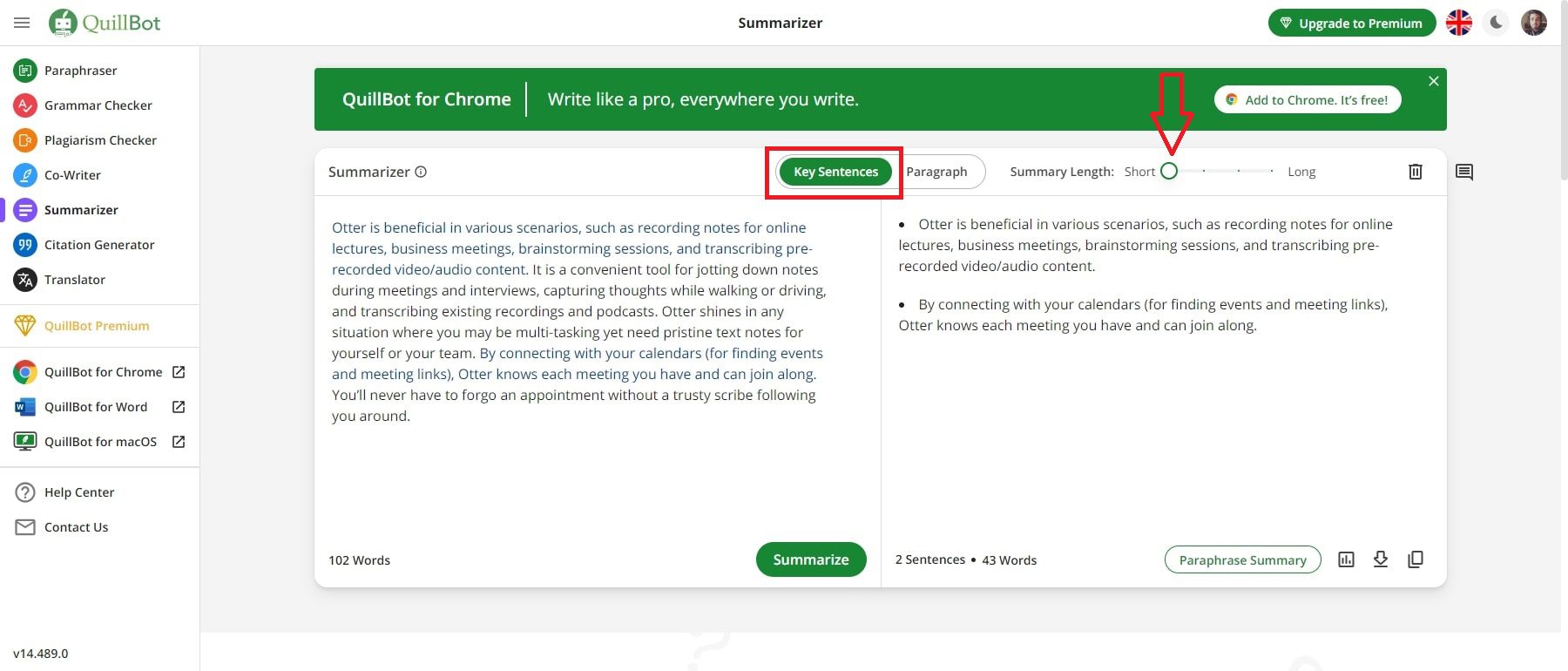
Its best feature is transparency. The paraphraser highlights exactly which words changed, so you never accept a rewrite you can't see. For putting a cited idea in your own words or tightening a clunky draft, it's hard to beat at the price.
The catch: as a paraphraser it mostly swaps words and lightly reshuffles sentences. Reviewers who tested it purely as a detector-bypass tool found it underwhelming, since synonym-swapping doesn't fool modern detectors. Treat the paraphraser as an editing aid, not a cloaking device.
Pros
• Real multi-tool suite: paraphrase, grammar, summarize, translate, plagiarism, humanizer, and detector in one place
• Transparent inline edits, so you see every change before accepting it
• Nine paraphrase modes on premium, including Formal, Academic, Simple, Creative, Shorten, and Expand
• Strong integrations with Chrome, Google Docs, and Microsoft Word
• A great fit for students and ESL writers doing legitimate rewriting
Cons
• The free plan caps the paraphraser at about 125 words per run, which is painful for long drafts
• Only 2 of 9 modes, and no plagiarism checker, on the free tier
• It's an editor, not a content generator, so it won't write a draft from a prompt
• As a pure paraphraser it's a weak bypass tool, and even its Humanizer is an arms race
Best for
Students, ESL writers, and content teams who want one affordable tool for everyday rewriting, summarizing, and grammar.
| Field | Detail |
|---|---|
| Category | Paraphraser plus writing suite (with humanizer and detector) |
| Free plan | Yes. Paraphraser about 125 words per run, 2 modes, plus a free AI detector |
| Paid (approx.) | Roughly $8 to $20 a month depending on plan and billing. Annual is much cheaper. Verify current pricing |
| Standout | Transparent, multi-mode paraphrasing inside an all-in-one suite |
| Watch out for | Tight free word cap, and not built for reliable detection bypass |
| Platforms | Web, Chrome, Google Docs, Microsoft Word |
Wordtune
the clarity and tone specialist
Quick take: Real-time sentence rewrites that make stiff writing flow, without steamrolling your voice. A poor fit if you need to disguise AI text.
Wordtune is what I reach for when someone says their writing is fine but sounds stiff. It lives in your browser and suggests cleaner phrasings sentence by sentence. Highlight an awkward line and it offers alternatives. You can nudge it more formal, more casual, shorter, or longer.

It's especially handy for non-native speakers and busy professionals firing off emails and reports. And it tends to improve a sentence without overwriting how you sound.
The catch: Wordtune works at the sentence level only. It won't restructure a whole document, it isn't a content generator, and it is not a humanizer or detection tool. Its own reviewers are blunt about that. Worth knowing too, users report occasional billing and cancellation headaches, so set a reminder before any renewal.
Pros
• Best-in-class sentence-level rewriting for clarity and flow
• Tone controls (formal or casual), shorten or expand, plus a summarizer
• Preserves your voice instead of rewriting your personality
• Works inside Gmail, Google Docs, Word, and most web editors
• Genuinely helpful for ESL writers and professional communication
Cons
• Sentence-level only, with no whole-document restructuring
• No plagiarism checker, citations, or content generation
• Not a humanizer, so it won't help with detection (by design)
• The free plan is tight at about 10 rewrites a day, and billing complaints are common
Best for
Professionals and non-native speakers who want quick, in-workflow clarity and tone fixes without changing their voice.
| Field | Detail |
|---|---|
| Category | Sentence-level rewriter and clarity assistant |
| Free plan | Yes. About 10 rewrites a day, 3 summaries a month, basic grammar |
| Paid (approx.) | Around $7 to $10 a month on annual billing (higher monthly). Teams custom. Verify current pricing |
| Standout | Natural rewrites that keep your voice intact |
| Watch out for | Sentence-only scope, billing complaints, and no humanizer |
| Platforms | Web, Chrome, Gmail, Google Docs, Word |
Undetectable AI
the closest match to GPT Scrambler
Quick take: A dedicated humanizer with a built-in detector check. Competent on lower-stakes content, but the real-world bypass rate is well below the marketing.
If you specifically want what GPT Scrambler does, take AI text and rework it to read as human, Undetectable AI is the most established name in that exact lane. Paste your text, pick a readability level and a purpose (essay, email, marketing), and hit humanize. It shows a before-and-after detector-risk score and lets you export. It supports 50+ languages, with a Chrome extension and API for teams.

For blog posts and marketing copy, it's a competent, polished workflow, and the multi-detector check saves you bouncing between sites.
The catch: independent testing tells a more modest story than the homepage. Controlled tests generally land around 85 to 92% bypass across major detectors, not the near-99% the marketing implies. Results are also unstable. The same text can pass one detector and fail another, or pass on one run and get flagged on a re-run. It's weaker on academic content against Turnitin than on marketing copy, and a few reviewers noticed it inserting deliberate quirks or errors that a human reader might catch. The free trial is a tiny one-time 250 words, so you can barely evaluate it before paying.
A word on “best humanizer” lists: this is the category where review sites are least trustworthy. A huge share of them are published by competing humanizer companies ranking their own product first. Read them, including glowing head-to-head “tests,” with heavy skepticism, and always test a tool yourself before paying for a year.
Pros
• Purpose-built humanizer with an integrated multi-detector check
• Readability and purpose modes, plus 50+ languages
• Chrome extension, API, and Zapier, which is reasonable for content teams
• Consistent, usable output on blog and marketing content
• Money-back guarantee if output is flagged (read the fine print)
Cons
• Independent bypass rates of about 85 to 92% fall well short of marketing claims
• Results are inconsistent across different detectors and re-runs
• Weaker on academic and Turnitin than on marketing copy
• Word-credit pricing adds up fast, and credits typically don't roll over
• A tiny one-time free trial makes it hard to evaluate before paying
Best for
Content marketers and bloggers who want a dedicated humanizer for lower-stakes copy, and who'll verify the output themselves rather than trust a score.
| Field | Detail |
|---|---|
| Category | Dedicated AI humanizer (detection-focused) |
| Free plan | About 250 words, one-time, email required. Not a recurring free tier |
| Paid (approx.) | Entry around $10 to $19 a month (word-limited), scaling up. Annual as low as about $5 a month. Verify current pricing |
| Standout | Built-in multi-detector check plus purpose and readability modes |
| Watch out for | Real-world bypass about 85 to 92% and unstable, with costs that stack at volume |
| Platforms | Web, Chrome, API |
Grammarly
the reputable polish, everywhere
Quick take: Not a humanizer, and that's the point. It's the low-risk, trusted way to make AI-assisted writing sound clean and professional.
Grammarly isn't a humanizer, and I'm including it on purpose. Plenty of people reaching for a scrambler don't actually need to disguise AI text. They just need their writing to stop sounding robotic. For that, the most trustworthy option is still Grammarly.
It corrects grammar, spelling, and punctuation, adjusts tone and clarity, offers full-sentence rewrites, checks for plagiarism on paid tiers, and now includes generative AI prompts and its own AI-text detection. It follows you everywhere: browser, desktop, mobile keyboard, Docs, Word, and Gmail, with a genuinely useful free tier.
If your writing is AI-assisted but the work is legitimate, this is the low-risk, high-reputation choice. It won't promise to fool a detector, which is exactly why you can use it out in the open.
The catch: it's a polisher, not a rewriter-from-scratch or a humanizer. It won't restructure a whole document or generate a draft from a prompt (the AI prompts help, but within monthly caps). And while the product is well loved (4.7 out of 5 on G2 across thousands of reviews), it has a poor reputation for billing and refunds, driven almost entirely by surprise renewals. Cancel deliberately and watch your renewal date.
Pros
• The most established, trusted writing assistant, with 40M+ users
• Real-time grammar, clarity, tone, and full-sentence rewrites everywhere you type
• Plagiarism detection and generative AI on paid tiers
• An excellent free plan for everyday correction
• No ethics asterisk, because it's for legitimate polish, not disguise
Cons
• Not a humanizer or detection-bypass tool (by design)
• A polisher, not a content generator or document restructurer
• AI-prompt caps can pinch heavy users
• Widely reported billing and refund frustrations despite a strong product
Best for
Anyone who wants clean, professional, low-risk writing help across every app, from students to professionals to teams.
| Field | Detail |
|---|---|
| Category | Writing assistant and polish (grammar, clarity, tone, rewrites) |
| Free plan | Yes. Solid grammar, spelling, and tone, plus limited AI prompts |
| Paid (approx.) | Pro around $12 a month on annual billing ($30 monthly). Enterprise custom. Verify current pricing |
| Standout | Trusted, everywhere-you-type polish, with plagiarism and AI features |
| Watch out for | Not a humanizer, and recurring billing complaints |
| Platforms | Web, desktop, mobile keyboard, Docs, Word, Gmail |
Toolbaz
the free all-in-one toolbox
Quick take: 75+ AI writing tools, much of it usable without an account. Great for experimenting, less so for serious daily work.
If budget is the main constraint, Toolbaz is worth a look. It's a sprawling free suite of 75+ AI writing tools, powered by a rotating cast of underlying models. That includes the rewriting bits you'd want (sentence, paragraph, and essay rewriters, a plagiarism remover, a summarizer) alongside generators for articles, stories, emails, even images and voice.

Best of all, you can use a lot of it without creating an account. For quick drafts and experiments, it's genuinely generous by free-tier standards.
The catch: breadth comes at the cost of focus and polish. The free experience is peppered with ads and countdown timers, and independent review scores are mixed at best, sitting around 2.5 stars on some platforms. It's a jack-of-all-trades, not a specialized humanizer. And if you're paying, you're competing with more focused tools, or with using ChatGPT or Claude directly, for similar money.
Pros
• A huge free toolset of 75+ tools, much of it usable without signup
• Includes rewriters, a summarizer, a plagiarism remover, and generators
• A choice of multiple underlying models
• Great for quick drafts and low-stakes experimentation
Cons
• Ads and countdown timers on the free tier add friction
• Mixed independent review scores and inconsistent quality
• Not a specialized humanizer, so breadth over depth
• The paid tier competes with stronger, more focused options
Best for
Budget-conscious users who want to experiment across many writing tasks for free.
| Field | Detail |
|---|---|
| Category | Free all-in-one AI writing suite (75+ tools) |
| Free plan | Yes. Generous, much usable without signup (with ads and timers) |
| Paid (approx.) | Standard around $9.99 a month. Verify current pricing |
| Standout | Breadth: rewriters, generators, and image or voice in one place |
| Watch out for | Ads and timers, mixed quality, and no dedicated humanizer |
| Platforms | Web, Android app |
A few more worth knowing
The humanizer space is crowded, and new tools appear constantly. A few names you'll bump into:
• HIX Bypass and BypassGPT. Two more dedicated humanizers, with similar promises and similar caveats.
• StealthGPT and Phrasly. Same lane, same trade-offs.
• Monica. A broad AI assistant with rewriting among many features.
• SafeWrite. A lighter-weight humanizer.
None of them escape the core reality. They all rewrite text, none can truly guarantee a detector pass, and the “independent reviews” ranking them are often published by competitors. Test on your own text, and trust your eyes over any score.
How the alternatives compare at a glance
Here's a simple way to see where each tool sits, by what it's built to do rather than any bypass number.
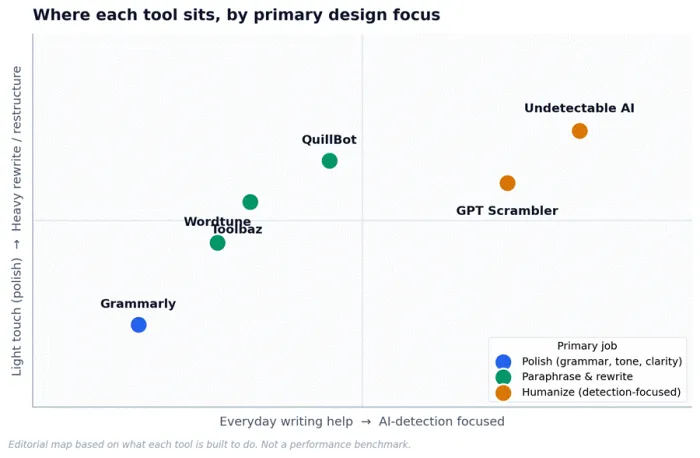
Figure 1. Editorial positioning by primary design focus. Not a performance benchmark.
And the side-by-side, with GPT Scrambler included for reference:
| Tool | Primary job | Best for | Honest caveat |
|---|---|---|---|
| GPT Scrambler | Humanize (bypass-focused) | Quick, free humanizing of short AI text | Self-reported bypass claims, small free cap |
| Undetectable AI | Humanize | Dedicated humanizing for marketing copy | About 85 to 92% and unstable in independent tests |
| QuillBot | Paraphrase plus suite | Everyday, legitimate rewriting and summarizing | Weak as a detection-bypass tool |
| Wordtune | Sentence rewrite and clarity | Clarity and tone, in-workflow | Sentence-only, not a humanizer |
| Grammarly | Polish | Trusted, everywhere polish, low risk | Not a humanizer, billing gripes |
| Toolbaz | All-in-one (free) | Free experimentation across many tasks | Mixed quality, breadth over depth |
The honest part: ethics, risk, and what actually works
I promised straight talk, so here it is. Every tool on this list has a legitimate use and a misuse.
Rewriting your own AI-assisted draft so it reads better, matching a brand voice, localizing content, helping a non-native speaker sound fluent: all fine, all just editing. The trouble starts when the goal shifts from “make this better” to “make this pass as something it isn't” in a context where that matters.
• Academic work. If your school prohibits AI, running an essay through a humanizer to dodge Turnitin isn't a clever hack. It's an integrity violation, and the risk sits entirely with you. It's also a bad bet, because detectors are unreliable in both directions, so you might get flagged anyway (even honest students do). Many instructors now weigh drafts, process, and oral checks over a single score. If AI is allowed but must be disclosed, disclose it.
• Sworn or regulated contexts. Legal declarations, certain journalism, professional certifications. Passing off AI text as fully human here can carry consequences far beyond a bad grade.
• The false-positive trap. Because detectors wrongly flag real human writing (especially from non-native speakers and some neurodivergent writers), the sensible defense isn't a scrambler. It's keeping your drafts, version history, and notes so you can show your work if you're ever wrongly accused.
Five tips for using these tools well (and honestly)
• Edit for you, not for the detector. If you're rewriting, read every line and make it something you'd stand behind.
• Keep your receipts. Save drafts and version history. It's the only real protection against a false accusation.
• Don't trust the score. A “0% AI” or “100% human” badge is one vendor's probability guess, not proof.
• Distrust the reviews. In this niche especially, assume “best tool” lists are marketing until proven otherwise.
• Match the tool to the job. Polish means Grammarly or Wordtune. Rewrite means QuillBot or Wordtune. A genuine humanizer means Undetectable AI or GPT Scrambler, with your own eyes on the output.
How to choose (a 30-second guide)
• “I just want my writing to sound cleaner and more professional.” Go with Grammarly (or Wordtune for tone and voice).
• “I need to rephrase source material or tighten a draft, legitimately.” Go with QuillBot.
• “English isn't my first language and I want to sound natural.” Go with Wordtune or Grammarly.
• “I want to try lots of writing tools without paying.” Go with Toolbaz.
• “I specifically need to humanize AI text for low-stakes content.” Try Undetectable AI or GPT Scrambler, and check the output with your own eyes.
• “I'm trying to sneak AI text past my professor.” Don't. Keep your drafts, use AI where it's allowed, and disclose it where required. Honestly, that's the safer bet.
The bottom line
If you take one thing from all this, let it be this. The best GPT Scrambler alternative isn't the tool with the boldest bypass claim. It's the tool that fits the writing you're actually trying to do.
Most of the time, that's a polisher or a paraphraser, not a humanizer at all. And on the rare occasion you do want a humanizer, go in clear-eyed. These tools genuinely rework your text, but no honest one can promise to fool a detector that can't even be trusted to be right in the first place.
My real advice? Use these tools to become a better writer, not a harder-to-catch one. Let QuillBot show you cleaner ways to phrase an idea until you start reaching for them yourself. Let Grammarly quietly teach you your own tics. Use AI to draft, then make the words yours.
That's the version of this that keeps paying off long after the current arms race moves on, because it always does. Pick the tool that matches your job, keep your drafts, trust your own ear over any score, and you'll be in good shape. Happy writing.





